


- Posts: 6
- Thank you received: 1
3 Post Moderation Rule for New Boarders (25 Jan 2021)
New boarders will have their posts moderated - Don't worry if you cannot see your post immediately.
Workflow Question - permanently deleting portions of large clips to save hd space
- crazyshannon
-
 Topic Author
- Offline
- New Member
-

Less
More
17 Oct 2014 16:39 - 17 Oct 2014 17:14 #54294
by crazyshannon
Workflow Question - permanently deleting portions of large clips to save hd space was created by crazyshannon
Hey all,
I am new to FCP and editing in general. I started in iMovie three weeks ago, had fun but quickly ran into software limitations. So I've been on the trial version of FCP for the last seven days, following the 8-hr FCP course on lynda.com. I find the interface to be extremely intuitive and the editing is becoming quite addictive!
One of the things that I've been struggling with is project file sizes quickly getting out of hand. I understand that FCP has no way to permanently trim large clips. I have many clips that are 1-10 minutes long and I only want to keep 10-30 seconds of the entire thing. A quick google shows I'm not the only one with this problem.
So far the solutions I've been able to come up with thus:
1. Initial Trim in iMovie - from what I've read, iMovie has the option to "move rejected files to Trash" which deletes the sections of the clips that have been rejected but unlike FCP, preserves the non-rejected portions, creating separate clips for each preserved portion. The problem with this solution is, I can't seem to get it to work: I don't see the "move rejected files to Trash" button in the top right of the browser where it's supposed to appear. File>Move Rejected Files To Trash does not exist in my menu options either. So I'm wondering if maybe this was only possible with an older version of iMovie (i'm on 2013 version) or if there's some setting I need to check.
2. Initial Trim in FCP, making copies of the trimmed clips - this fix doesn't work, since it turns out that when i make a copy of the trimmed clip, FCP copies and maintains the attachment with all of the rejected material as well, so it doesn't solve anything.
3. Compound clips?? - Initial Trim in FCP, make copies of the trimmed clips via New Compound Clip - when I make a copy of a clip this way, the rejected portions of the clip do not stay married to the clip, it appears to create an entirely new source media file?? However, the creation date settings for the clip get reset to my current time. This ends up being quite problematic, as I'm working on travel videos so being able to sort clips by date created is useful for organizational purposes. I can reset the clip's creation date in Modify>Adjust Content Created Date and Time, but as far as I can tell, it's going to have to be done for each individual clip, which is going to be very time consuming. When I select multiple clips and go to Modify>Adjust Content, FCP claims to be editing the time of all clips selected, however in practice only one gets changed. The other problem is that, after i made a compound clip, when I delete the original source file, it doesn't appear in Trash... even if I delete the compound AND the original, nothing shows up in trash. So what exactly is going on when I make a compound clip ??
So right now I'm thinking the iMovie fix might be the most efficient, but I can't seem to get it to work. What do you all use?
Thanks
I am new to FCP and editing in general. I started in iMovie three weeks ago, had fun but quickly ran into software limitations. So I've been on the trial version of FCP for the last seven days, following the 8-hr FCP course on lynda.com. I find the interface to be extremely intuitive and the editing is becoming quite addictive!
One of the things that I've been struggling with is project file sizes quickly getting out of hand. I understand that FCP has no way to permanently trim large clips. I have many clips that are 1-10 minutes long and I only want to keep 10-30 seconds of the entire thing. A quick google shows I'm not the only one with this problem.
So far the solutions I've been able to come up with thus:
1. Initial Trim in iMovie - from what I've read, iMovie has the option to "move rejected files to Trash" which deletes the sections of the clips that have been rejected but unlike FCP, preserves the non-rejected portions, creating separate clips for each preserved portion. The problem with this solution is, I can't seem to get it to work: I don't see the "move rejected files to Trash" button in the top right of the browser where it's supposed to appear. File>Move Rejected Files To Trash does not exist in my menu options either. So I'm wondering if maybe this was only possible with an older version of iMovie (i'm on 2013 version) or if there's some setting I need to check.
2. Initial Trim in FCP, making copies of the trimmed clips - this fix doesn't work, since it turns out that when i make a copy of the trimmed clip, FCP copies and maintains the attachment with all of the rejected material as well, so it doesn't solve anything.
3. Compound clips?? - Initial Trim in FCP, make copies of the trimmed clips via New Compound Clip - when I make a copy of a clip this way, the rejected portions of the clip do not stay married to the clip, it appears to create an entirely new source media file?? However, the creation date settings for the clip get reset to my current time. This ends up being quite problematic, as I'm working on travel videos so being able to sort clips by date created is useful for organizational purposes. I can reset the clip's creation date in Modify>Adjust Content Created Date and Time, but as far as I can tell, it's going to have to be done for each individual clip, which is going to be very time consuming. When I select multiple clips and go to Modify>Adjust Content, FCP claims to be editing the time of all clips selected, however in practice only one gets changed. The other problem is that, after i made a compound clip, when I delete the original source file, it doesn't appear in Trash... even if I delete the compound AND the original, nothing shows up in trash. So what exactly is going on when I make a compound clip ??
So right now I'm thinking the iMovie fix might be the most efficient, but I can't seem to get it to work. What do you all use?
Thanks
Last edit: 17 Oct 2014 17:14 by crazyshannon.
Please Log in to join the conversation.

17 Oct 2014 20:38 #54309
by BenB
Replied by BenB on topic Workflow Question - permanently deleting portions of large clips to save hd space
FCPX is non-destructive. It never alters the original clip at all. At this time there is no compacting feature in FCPX. Yet I'm confident we will see it soon. You'd need to select a Range in a clip, export it, then reimport it.
Please Log in to join the conversation.
- crazyshannon
-
Topic Author
- Offline
- New Member
-
Less
More
- Posts: 6
- Thank you received: 1
17 Oct 2014 20:44 #54311
by crazyshannon
Replied by crazyshannon on topic Workflow Question - permanently deleting portions of large clips to save hd space
Hey Ben, thanks for the response. Do you know if this is the case with iMovie as well? From what I've read it does seem like iMovie has the ability to permanently split clips, I just can't figure out how to do it.
Please Log in to join the conversation.
17 Oct 2014 20:59 #54314
by BenB
Replied by BenB on topic Workflow Question - permanently deleting portions of large clips to save hd space
I don't touch iMovie enough to know much about it.
Please Log in to join the conversation.
- crazyshannon
-
Topic Author
- Offline
- New Member
-
Less
More
- Posts: 6
- Thank you received: 1
18 Oct 2014 01:02 - 18 Oct 2014 01:07 #54335
by crazyshannon
Replied by crazyshannon on topic Workflow Question - permanently deleting portions of large clips to save hd space
Ok so, after more reading, more crying, and pulling out my hair, I have found a fourth (and hopefully final) solution to my problem.
I will be using GoProStudio, a free program which uses the cineform codec and allows for the BATCH creation of subclips and is able to export up to 4k .mov or .mp4 files. (Info on export options here ). Because GoPro footage typically involves tons of slop, this program is especially geared toward creation of subclips. It does have some limited editing capability like fisheye removal, reframing and 'zooming' of a shot (it can also do these via keyframing). This post processing can be baked-in or done non-destructively via the codec, editor's choice.
I can import multiple clips at a time, trim off all of the unusable footage, and then do a batch convert. It is possible to grab multiple sections of a single clip (like three twenty-second sections of a ten-minute clip).
This software is basically designed for doing exactly what I need: batch trimming of multiple large files. I'm unimpressed with having to add another step to the workflow, but all said and done, I do think this is a pretty good option for now.
Hopefully this info will help someone else out there struggling with a small hard drive and an overly optimistic videographer!
I will be using GoProStudio, a free program which uses the cineform codec and allows for the BATCH creation of subclips and is able to export up to 4k .mov or .mp4 files. (Info on export options here ). Because GoPro footage typically involves tons of slop, this program is especially geared toward creation of subclips. It does have some limited editing capability like fisheye removal, reframing and 'zooming' of a shot (it can also do these via keyframing). This post processing can be baked-in or done non-destructively via the codec, editor's choice.
I can import multiple clips at a time, trim off all of the unusable footage, and then do a batch convert. It is possible to grab multiple sections of a single clip (like three twenty-second sections of a ten-minute clip).
This software is basically designed for doing exactly what I need: batch trimming of multiple large files. I'm unimpressed with having to add another step to the workflow, but all said and done, I do think this is a pretty good option for now.
Hopefully this info will help someone else out there struggling with a small hard drive and an overly optimistic videographer!
Last edit: 18 Oct 2014 01:07 by crazyshannon.
Please Log in to join the conversation.
18 Oct 2014 01:44 #54338
by BenB
Replied by BenB on topic Workflow Question - permanently deleting portions of large clips to save hd space
Thank you camera manufacturers for making more proprietary codecs than we can shake a stick at! It just makes life so freakin' easy! Gotta love it!
So this is GoPro stuff, eh? Should have mentioned that in the first place. A small few camera manufacturers make their own pre-post-production apps.
So this is GoPro stuff, eh? Should have mentioned that in the first place. A small few camera manufacturers make their own pre-post-production apps.
Please Log in to join the conversation.
- crazyshannon
-
Topic Author
- Offline
- New Member
-
Less
More
- Posts: 6
- Thank you received: 1
18 Oct 2014 02:10 - 18 Oct 2014 03:21 #54339
by crazyshannon
Replied by crazyshannon on topic Workflow Question - permanently deleting portions of large clips to save hd space
Most of my usable footage is coming off my GH3, but indeed the really big files, and the ones that are causing me problems, are the twenty-minute GoPro files (which aren't anything special, they start life as a regular mp4).
I knew GoPro had their own post-production app, but I assumed it wouldn't be terribly useful and I was trying to keep everything streamlined by staying within FCP. At the core I just don't understand the fundamental nature of the problem - FCP wants to maintain its non-destructiveness, but I -can- delete entire clips from my library, so why not sections of clips? If it's so obsessed with preventing the accidental deletion, I don't know, make it a five-step process or something. hah.
And despite my encountering multiple forum threads on people running into this issues, I believe this GoPro fix may be the least convoluted I have yet heard of. So what are the other editors doing to trim their fat? What's the average library file size to support a 4-minute 1080p web video? If I make a four-minute video for a client, what happens to the library containing the original media afterward - should I be saving it myself, and/or does it ship out to the client, should I keep a small library that uses pointer files but delete the original media expecting to get it back from them if they for some reason need a change in the future?
I have so many questions, chief amongst them, are y'all buying stock in G-Tech or what?
I knew GoPro had their own post-production app, but I assumed it wouldn't be terribly useful and I was trying to keep everything streamlined by staying within FCP. At the core I just don't understand the fundamental nature of the problem - FCP wants to maintain its non-destructiveness, but I -can- delete entire clips from my library, so why not sections of clips? If it's so obsessed with preventing the accidental deletion, I don't know, make it a five-step process or something. hah.
And despite my encountering multiple forum threads on people running into this issues, I believe this GoPro fix may be the least convoluted I have yet heard of. So what are the other editors doing to trim their fat? What's the average library file size to support a 4-minute 1080p web video? If I make a four-minute video for a client, what happens to the library containing the original media afterward - should I be saving it myself, and/or does it ship out to the client, should I keep a small library that uses pointer files but delete the original media expecting to get it back from them if they for some reason need a change in the future?
I have so many questions, chief amongst them, are y'all buying stock in G-Tech or what?
Last edit: 18 Oct 2014 03:21 by crazyshannon.
Please Log in to join the conversation.
- Nervebroke
-
- Offline
- Elite Member
-

Less
More
- Posts: 177
- Thank you received: 12
18 Oct 2014 02:38 #54340
by Nervebroke
Replied by Nervebroke on topic Workflow Question - permanently deleting portions of large clips to save hd space
Hello crazyshannon. Welcome to the forums. In your case to keep library sizes to a minimum your GoPro fix is probably your best bet. I can't answer the client footage question. I just did a 4:22 long video using my GoPro Hero3+ and Cannon T5i footage. The Library file size is 17.8 GB. However I ingested all the footage and stills from both cameras. I don't envy your situation with limited HD space.
I don't own stock in G-Tech, But I have given OWC a lot of my money
I really enjoyed your blog and your Video. Please keep us posted on how your GoPro fix works. I love my GoPro's but I hate the codec. I have lots of HD space so I run all my GoPro media through compressor to ProRes then i Ingest it into FCPX.
It is nice to see some one else say "y'all"
Dave
I don't own stock in G-Tech, But I have given OWC a lot of my money
I really enjoyed your blog and your Video. Please keep us posted on how your GoPro fix works. I love my GoPro's but I hate the codec. I have lots of HD space so I run all my GoPro media through compressor to ProRes then i Ingest it into FCPX.
It is nice to see some one else say "y'all"
Dave
Please Log in to join the conversation.
- crazyshannon
-
Topic Author
- Offline
- New Member
-
Less
More
- Posts: 6
- Thank you received: 1
18 Oct 2014 03:30 #54343
by crazyshannon
Replied by crazyshannon on topic Workflow Question - permanently deleting portions of large clips to save hd space
Awwwww you liked my video? Thanks, I am flattered. It was the first video I'd made, and it was done in iMovie. I was shocked at the power that iMovie was able to provide, as well as the ease of use from someone who'd never really messed in editors before. I am so excited about my new FCP video and really just learning FCP in general. It is such a beautiful, intuitive piece of software.
I'm pretty keen to get some constructive criticism on my work, maybe get some insight into how to improve my transitions and my timing -- do you know of a good place to get that (this forum seems more geared toward answering strictly technical FCP stuff but correct me if I'm mistaken)?
I'm pretty keen to get some constructive criticism on my work, maybe get some insight into how to improve my transitions and my timing -- do you know of a good place to get that (this forum seems more geared toward answering strictly technical FCP stuff but correct me if I'm mistaken)?
Please Log in to join the conversation.
- Nervebroke
-
- Offline
- Elite Member
-
Less
More
- Posts: 177
- Thank you received: 12
18 Oct 2014 03:36 #54344
by Nervebroke
Replied by Nervebroke on topic Workflow Question - permanently deleting portions of large clips to save hd space
Everyone here will help with the creative side as well as the technical / hardware / software. That is what makes FCP.co such a special place.
Dave
Dave
Please Log in to join the conversation.
18 Oct 2014 03:54 #54345
by BenB
Replied by BenB on topic Workflow Question - permanently deleting portions of large clips to save hd space
Southeast Louisiana here, New Orleans, "y'all"...
Please Log in to join the conversation.
- crazyshannon
-
Topic Author
- Offline
- New Member
-
Less
More
- Posts: 6
- Thank you received: 1
18 Oct 2014 04:10 #54347
by crazyshannon
Replied by crazyshannon on topic Workflow Question - permanently deleting portions of large clips to save hd space
You don't say Ben! Funny story - the video Dave was just commenting on documents a solo motorcycle trip from Vancouver BC to North Carolina. The next video (in development) picks up in Tennessee where I ride down to New Orleans and have a close encounter with a cottonmouth. (And for everyone else not from the deep south: that's a pretty badass venomous pit viper). I spent the following two days in ICU and the next week recovering and learning FCPX!
New Orleans, snake encounters aside, was a pretty amazing city with fantastic people.
New Orleans, snake encounters aside, was a pretty amazing city with fantastic people.
Please Log in to join the conversation.
- Karsten Schlüter
-

- Offline
- Moderator
-

Less
More
- Posts: 3790
- Thank you received: 718
18 Oct 2014 08:05 #54363
by Karsten Schlüter
Replied by Karsten Schlüter on topic Workflow Question - permanently deleting portions of large clips to save hd space
in case, FCPX doesn't recognize the file-structure of your cam, therefor doesn't support selectable import, there's a free and handy tool called VirtualCameraCard
DL link:
www.spherico.com/filmtools/X-Files/VirtualCameraCard.dmg
Manual:
www.spherico.com/filmtools/X-Files/VCC.pdf
The usage is drop-dead easy: launch VCC, drag your video file into it, and VCC will create a sparesebundle; FCPX will recognize that as a 'camera', and you can select just the 30sec needed from your 2h recording
Only 'issue': the format of your recordings have to be somehow compatible with FCPX, VCC is no converter, just some sot of re-wrapper ...
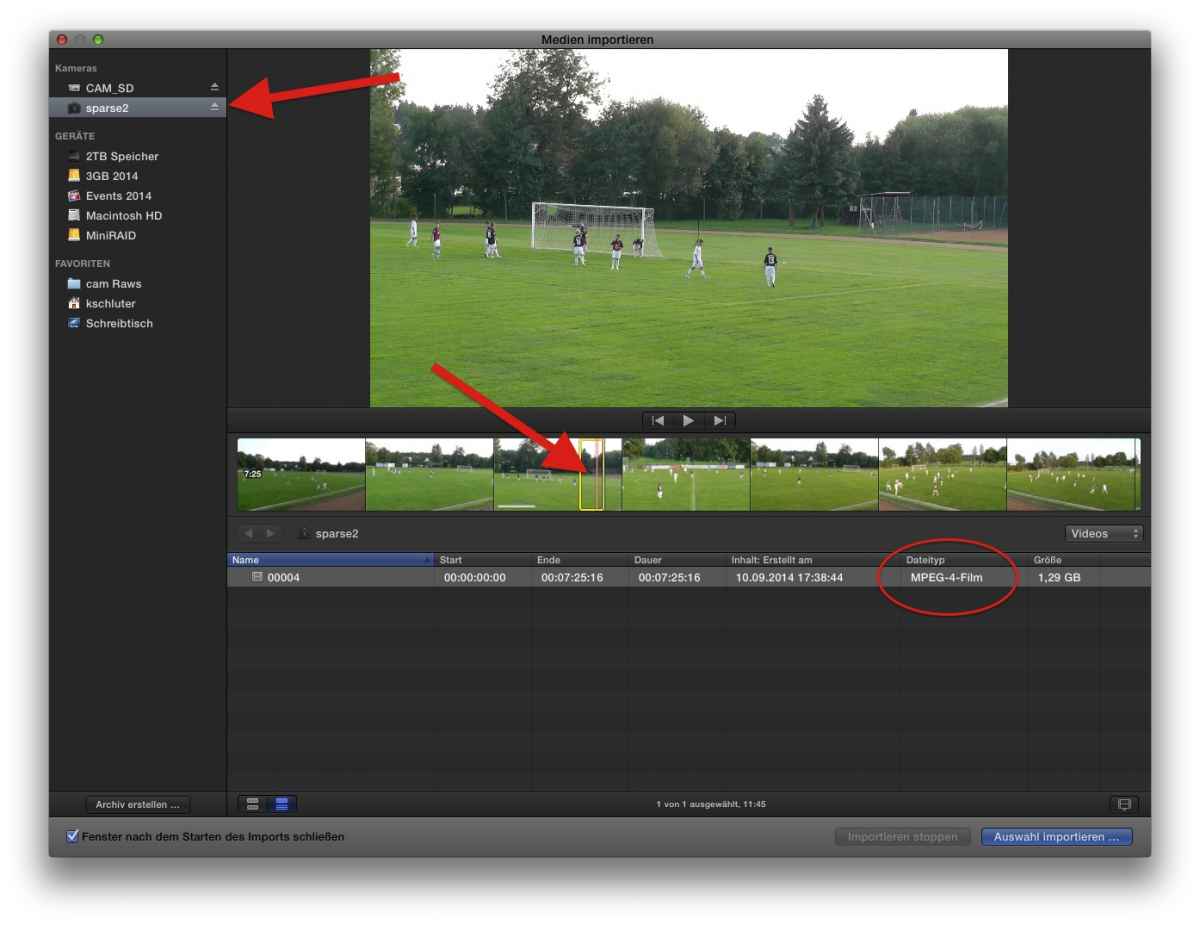
In use here weekly to re-package my recordings from some cheap sacrifice-cams, 70min recordings, needing max a a minute for my soccer-reports.-
just to mention: choose 'managed media'/import to Lib, you can erase the sparse image after use... safes tons of disk-space....
DL link:
www.spherico.com/filmtools/X-Files/VirtualCameraCard.dmg
Manual:
www.spherico.com/filmtools/X-Files/VCC.pdf
The usage is drop-dead easy: launch VCC, drag your video file into it, and VCC will create a sparesebundle; FCPX will recognize that as a 'camera', and you can select just the 30sec needed from your 2h recording
Only 'issue': the format of your recordings have to be somehow compatible with FCPX, VCC is no converter, just some sot of re-wrapper ...
In use here weekly to re-package my recordings from some cheap sacrifice-cams, 70min recordings, needing max a a minute for my soccer-reports.-
just to mention: choose 'managed media'/import to Lib, you can erase the sparse image after use... safes tons of disk-space....
Please Log in to join the conversation.
- mobiletaylor
-
- Offline
- Elite Member
-
Less
More
- Posts: 181
- Thank you received: 6
19 Oct 2014 04:59 #54397
by mobiletaylor
Replied by mobiletaylor on topic Workflow Question - permanently deleting portions of large clips to save hd space
Yes, use FCPX to trim your GoPro footage. No need to do that extra step in the GoPro software. There is a great Ripple Training video on how to do this.
JT
JT
Please Log in to join the conversation.
- Andreas Kiel
-
- Offline
- Platinum Member
-

Less
More
- Posts: 1077
- Thank you received: 189
19 Oct 2014 15:20 #54419
by Andreas Kiel
Thanks Karsten to mention the app.
It's quite popular in Germany only (for whatever reason)
VirtualCamCard though doesn't wrap anything, it's kind of "con-man app" .
This kind of sparse bundles make FCP X think that there is a camera – even if FCP X, the computer and/or the user never have seen a camera or camera card.
It should be mentioned that working with camera cards of any kind (this way, means selecting parts of the source) always will create managed files.
In FCP X there is the option to create Camera Archives. This is a good and helpful feature – often enough 'life saving'.
Camera Archives are nothing else than FCP X tailored sparse bundles with all the real data copied from your camera card.
VirtualCamCard could do the same (except the tailoring for FCP X) but also allows to create sym-links. Therefore no data must be stored on the "card" – just the links to the data.
As Karsten said: "you can erase the sparse image after use... safes tons of disk-space..." – But be CAREFUL with what you do.
- Andreas
Replied by Andreas Kiel on topic Workflow Question - permanently deleting portions of large clips to save hd space
Karsten Schlüter wrote: in case, FCPX doesn't recognize the file-structure of your cam, therefor doesn't support selectable import, there's a free and handy tool called VirtualCameraCard
DL link:
www.spherico.com/filmtools/X-Files/VirtualCameraCard.dmg
Manual:
www.spherico.com/filmtools/X-Files/VCC.pdf
The usage is drop-dead easy: launch VCC, drag your video file into it, and VCC will create a sparesebundle; FCPX will recognize that as a 'camera', and you can select just the 30sec needed from your 2h recording
Only 'issue': the format of your recordings have to be somehow compatible with FCPX, VCC is no converter, just some sot of re-wrapper ...
In use here weekly to re-package my recordings from some cheap sacrifice-cams, 70min recordings, needing max a a minute for my soccer-reports.-
just to mention: choose 'managed media'/import to Lib, you can erase the sparse image after use... safes tons of disk-space....
Thanks Karsten to mention the app.
It's quite popular in Germany only (for whatever reason)
VirtualCamCard though doesn't wrap anything, it's kind of "con-man app"
.This kind of sparse bundles make FCP X think that there is a camera – even if FCP X, the computer and/or the user never have seen a camera or camera card.
It should be mentioned that working with camera cards of any kind (this way, means selecting parts of the source) always will create managed files.
In FCP X there is the option to create Camera Archives. This is a good and helpful feature – often enough 'life saving'.
Camera Archives are nothing else than FCP X tailored sparse bundles with all the real data copied from your camera card.
VirtualCamCard could do the same (except the tailoring for FCP X) but also allows to create sym-links. Therefore no data must be stored on the "card" – just the links to the data.
As Karsten said: "you can erase the sparse image after use... safes tons of disk-space..." – But be CAREFUL with what you do.
- Andreas
Please Log in to join the conversation.
- Karsten Schlüter
-
- Offline
- Moderator
-
Less
More
- Posts: 3790
- Thank you received: 718
19 Oct 2014 15:47 #54420
by Karsten Schlüter
well, at last , FCP-Master Mind Tom Wolsky mentions it on his website ..
.... same story with Remux - when everybody asked for mts-transcoders, nobody recommended that super fast, free tool ...
... hmm, no more 'software excellence' since Kai Krause (what happened to Kai Krause anyhow???)... :woohoo:
Replied by Karsten Schlüter on topic Workflow Question - permanently deleting portions of large clips to save hd space
Andreas Kiel wrote: ... It's quite popular in Germany only (for whatever reason)
…
well, at last , FCP-Master Mind Tom Wolsky mentions it on his website ..
.... same story with Remux - when everybody asked for mts-transcoders, nobody recommended that super fast, free tool ...
... hmm, no more 'software excellence' since Kai Krause (what happened to Kai Krause anyhow???)... :woohoo:
Please Log in to join the conversation.
- Andreas Kiel
-
- Offline
- Platinum Member
-
Less
More
- Posts: 1077
- Thank you received: 189
19 Oct 2014 16:05 #54421
by Andreas Kiel
His "mini-expo-refrigerator-4-champagne" (which might be older than Kai himself) still has a place in my office - any offers are welcome
- Andreas
Replied by Andreas Kiel on topic Workflow Question - permanently deleting portions of large clips to save hd space
I haven't seen him for more than a decade.Karsten Schlüter wrote: ... hmm, no more 'software excellence' since Kai Krause (what happened to Kai Krause anyhow???)... :woohoo:
His "mini-expo-refrigerator-4-champagne" (which might be older than Kai himself) still has a place in my office - any offers are welcome
- Andreas
Please Log in to join the conversation.
- Karsten Schlüter
-
- Offline
- Moderator
-
Less
More
- Posts: 3790
- Thank you received: 718
19 Oct 2014 16:18 #54422
by Karsten Schlüter
have read for a while his really, really weird blog at byteburg.org ... gave up ... maybe a candle burning on both ends ... :silly:
...
Replied by Karsten Schlüter on topic Workflow Question - permanently deleting portions of large clips to save hd space
Andreas Kiel wrote: ... I haven't seen him for more than a decade....
have read for a while his really, really weird blog at byteburg.org ... gave up ... maybe a candle burning on both ends ... :silly:
...
Please Log in to join the conversation.
