


- Posts: 11
- Thank you received: 1
3 Post Moderation Rule for New Boarders (25 Jan 2021)
New boarders will have their posts moderated - Don't worry if you cannot see your post immediately.
Timeline not rendering properly
- LintelFilms
-
 Topic Author
- Offline
- New Member
-

Less
More
12 Oct 2014 10:49 - 12 Oct 2014 11:07 #54034
by LintelFilms
Timeline not rendering properly was created by LintelFilms
Hi, my timeline never renders fully if I try to render more than one clip. It doesn't matter if I use 'render all' or 'render clip', select all clips or just the clips that need rendering. Any combination of the above leads to the same issue - the inspector will begin as I would expect, showing a small percentage completed (say 10%; blue circle) for the first clip or two (if I have a lot of clips that need rendering) and then at the end of that first clip or two, jump to 100% (green circle), even though there are still a lot of clips that need rendering. It does this whether I render using keystrokes or do it via the menu. The same issue occurs if I have no clips selected and use 'render all'. I have background render turned off.
Is this a known issue? Am I doing something wrong?
iMac (27-inch, Late 2013), OS X Mavericks (10.9.5)
Is this a known issue? Am I doing something wrong?
iMac (27-inch, Late 2013), OS X Mavericks (10.9.5)
Last edit: 12 Oct 2014 11:07 by LintelFilms.
Please Log in to join the conversation.
- ronny courtens
-

- Offline
- Moderator
-

Less
More
- Posts: 4455
- Thank you received: 962
12 Oct 2014 14:32 #54035
by ronny courtens
Replied by ronny courtens on topic Timeline not rendering properly
Hi Matt, welcome to the forum.
This is not a known issue.
First thing you can do is delete all your render files and re-render your timeline. To delete all your render files for a specific Project (FCP X 10.1.3) select the project in the Browser and got to File > Delete Generated project Files. A window will pop up asking which files you want to delete, select "Render Files".
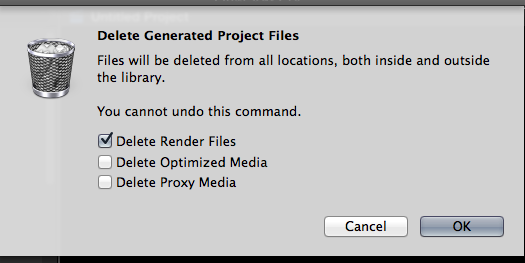
When the render files have been deleted, press SHIFT+CTRL+R to render your timeline.
If this doesn't help:
Unexpected behavior like this is often solved by deleting the FCP X preferences: quit FCP X and launch it again holding the ALT+CMD keys pressed down. You will get a message asking if if you want to delete your preferences. Confirm and let FCP X open. Then try rendering again.
If this doesn't help: post back with a screenshot of the clips on your timeline.
- Ronny
This is not a known issue.
First thing you can do is delete all your render files and re-render your timeline. To delete all your render files for a specific Project (FCP X 10.1.3) select the project in the Browser and got to File > Delete Generated project Files. A window will pop up asking which files you want to delete, select "Render Files".
When the render files have been deleted, press SHIFT+CTRL+R to render your timeline.
If this doesn't help:
Unexpected behavior like this is often solved by deleting the FCP X preferences: quit FCP X and launch it again holding the ALT+CMD keys pressed down. You will get a message asking if if you want to delete your preferences. Confirm and let FCP X open. Then try rendering again.
If this doesn't help: post back with a screenshot of the clips on your timeline.
- Ronny
Please Log in to join the conversation.
- LintelFilms
-
Topic Author
- Offline
- New Member
-
Less
More
- Posts: 11
- Thank you received: 1
24 Oct 2014 20:19 #54762
by LintelFilms
Replied by LintelFilms on topic Timeline not rendering properly
Thanks Ronny.
This seems to have helped a bit but my issue is still occurring sometimes. I'm going to do some more tests when I get the time. For mow I'm just turning background render on when I want to render the whole timeline and turning it off when it's done. Not ideal but it works ok for now.
I'll return here when and if I get anywhere (or don't!).
This seems to have helped a bit but my issue is still occurring sometimes. I'm going to do some more tests when I get the time. For mow I'm just turning background render on when I want to render the whole timeline and turning it off when it's done. Not ideal but it works ok for now.
I'll return here when and if I get anywhere (or don't!).
Please Log in to join the conversation.

25 Oct 2014 03:29 #54776
by Julian
Replied by Julian on topic Timeline not rendering properly
Do you have any plugins on the clips? I've had issues with SliceX or TrackX sometimes, but not other times. Once I remove the plugin things go back to normal. I've also had success creating a new library and copying the project and events to that library.
Please Log in to join the conversation.
- LintelFilms
-
Topic Author
- Offline
- New Member
-
Less
More
- Posts: 11
- Thank you received: 1
25 Oct 2014 08:39 #54781
by LintelFilms
Replied by LintelFilms on topic Timeline not rendering properly
Yes I use a number of plugins (e.g. Neat Video, Lock and Load). But I think this is an issue that is a problem with or without plugins. I'll bear this in mind as I test though. Thanks.
It's my major bugbear about FCPX actually - that plugins can be unstable.
It's my major bugbear about FCPX actually - that plugins can be unstable.
Please Log in to join the conversation.
