


- Posts: 11
- Thank you received: 1
3 Post Moderation Rule for New Boarders (25 Jan 2021)
New boarders will have their posts moderated - Don't worry if you cannot see your post immediately.
Clip Preview Issues ?
12 Oct 2014 00:58 #54028
by itsparks
Clip Preview Issues ? was created by itsparks
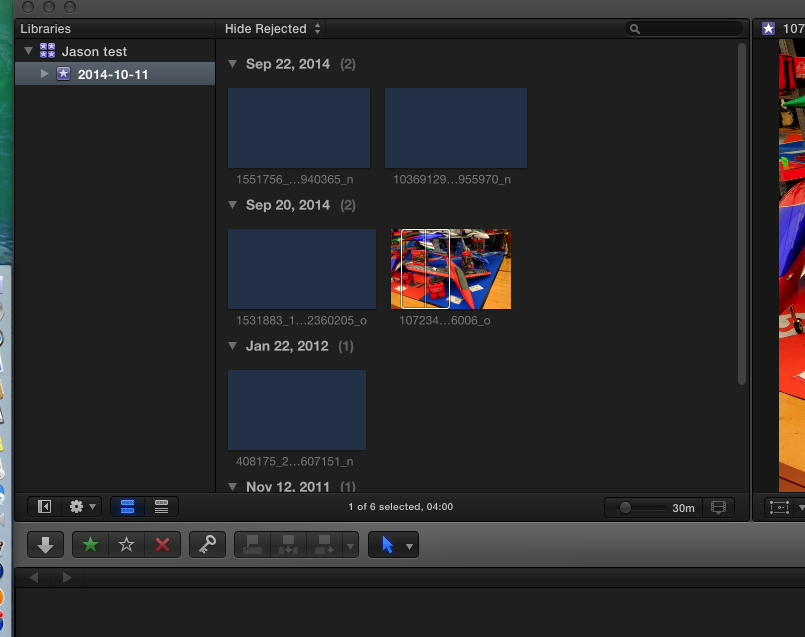
How do i fix this ? I am not able to see any preview of any media pictures / video files unless I click on them ?
Please Log in to join the conversation.
12 Oct 2014 04:17 #54031
by itsparks
Replied by itsparks on topic Clip Preview Issues ?
Any one ?
Please Log in to join the conversation.
- ronny courtens
-

- Offline
- Moderator
-

Less
More
- Posts: 4455
- Thank you received: 962
12 Oct 2014 07:54 - 12 Oct 2014 07:55 #54033
by ronny courtens
Replied by ronny courtens on topic Clip Preview Issues ?
This is a thumbnail cache issue. It can be caused by conflicting preferences, or because you have interrupted the thumbnail cache creation process after importing the files.
First thing you can try is delete your FCP X preferences:
close FCP X and re-open it while holding the ALT+CMD keys pressed down. You will get a message asking if you want to delete your preferences, confirm and let FCP X open.
If this does not restore your thumbnails:
Close FCP X again.
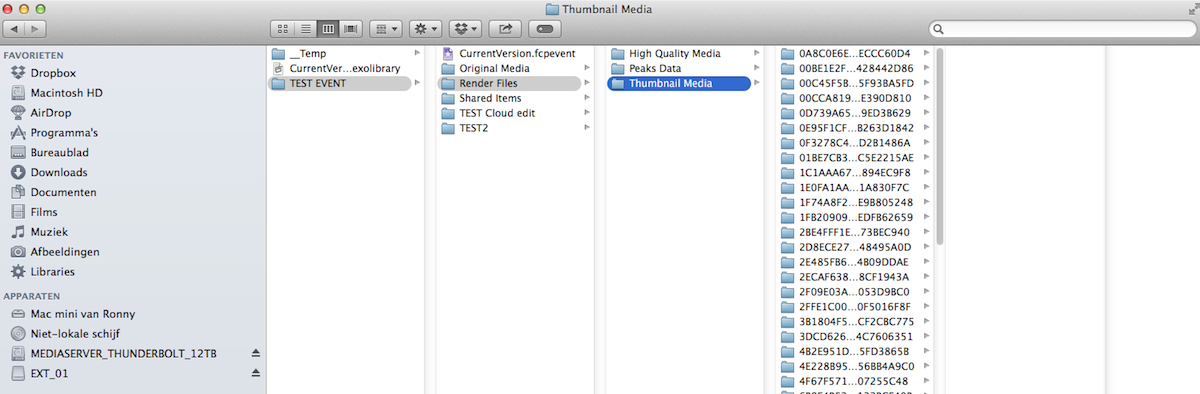
In Finder go to the "Jason Test" Library, R-click the Library icon and choose "Show Packages Contents".
Inside the Library open the "2014-10-11" Event folder and go to Render Files > Thumbnail Media. Open the Thumbnail Media folder, select all the files inside that folder (CMD+A) and put them in the trash.
Launch FCP X. Let the application open and wait until FCP X recreates your thumbnail cache. This should restore the thumbnail previews.
- Ronny
First thing you can try is delete your FCP X preferences:
close FCP X and re-open it while holding the ALT+CMD keys pressed down. You will get a message asking if you want to delete your preferences, confirm and let FCP X open.
If this does not restore your thumbnails:
Close FCP X again.
In Finder go to the "Jason Test" Library, R-click the Library icon and choose "Show Packages Contents".
Inside the Library open the "2014-10-11" Event folder and go to Render Files > Thumbnail Media. Open the Thumbnail Media folder, select all the files inside that folder (CMD+A) and put them in the trash.
Launch FCP X. Let the application open and wait until FCP X recreates your thumbnail cache. This should restore the thumbnail previews.
- Ronny
Last edit: 12 Oct 2014 07:55 by ronny courtens.
Please Log in to join the conversation.
12 Oct 2014 17:17 #54048
by itsparks
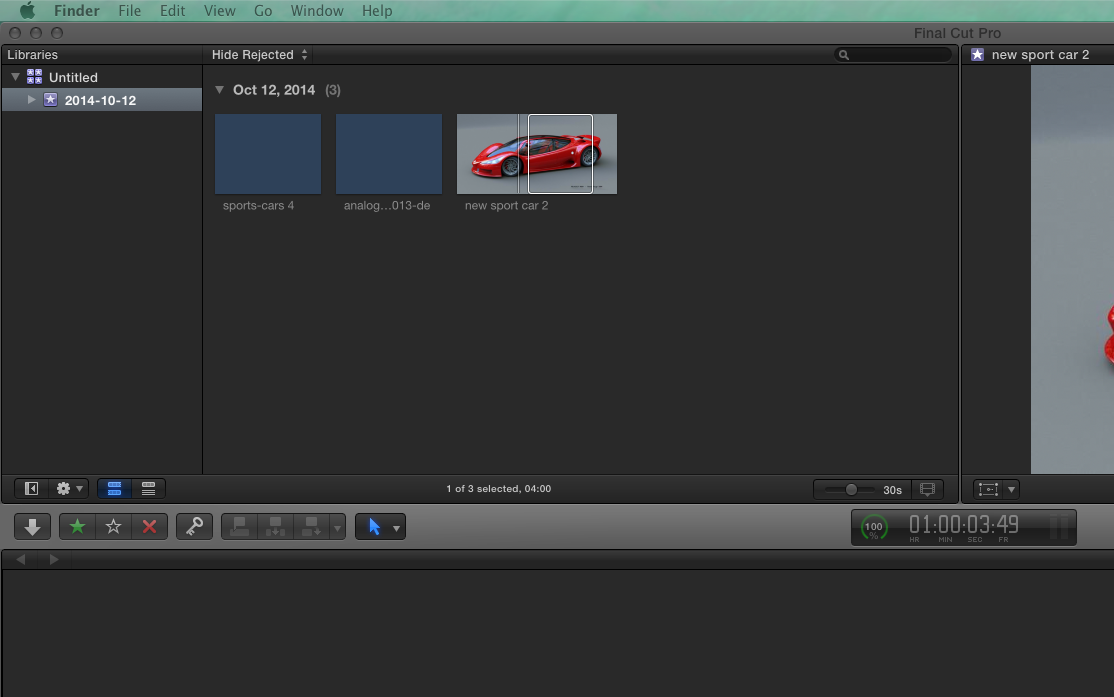
Well i tried everything and no go, i even reinstalled the whole os last night and re-installed FCP x and still same issue.
If i create a new event i still get no thumbnail previews on anything. I even tried new images new events new project etc etc..
No clue
Screen shot attached
Replied by itsparks on topic Clip Preview Issues ?
ronny courtens wrote: This is a thumbnail cache issue. It can be caused by conflicting preferences, or because you have interrupted the thumbnail cache creation process after importing the files.
First thing you can try is delete your FCP X preferences:
close FCP X and re-open it while holding the ALT+CMD keys pressed down. You will get a message asking if you want to delete your preferences, confirm and let FCP X open.
If this does not restore your thumbnails:
Close FCP X again.
In Finder go to the "Jason Test" Library, R-click the Library icon and choose "Show Packages Contents".
Inside the Library open the "2014-10-11" Event folder and go to Render Files > Thumbnail Media. Open the Thumbnail Media folder, select all the files inside that folder (CMD+A) and put them in the trash.
Launch FCP X. Let the application open and wait until FCP X recreates your thumbnail cache. This should restore the thumbnail previews.
- Ronny
Well i tried everything and no go, i even reinstalled the whole os last night and re-installed FCP x and still same issue.
If i create a new event i still get no thumbnail previews on anything. I even tried new images new events new project etc etc..
No clue
Screen shot attached
Please Log in to join the conversation.
- ronny courtens
-
- Offline
- Moderator
-
Less
More
- Posts: 4455
- Thank you received: 962
12 Oct 2014 17:34 #54050
by ronny courtens
Replied by ronny courtens on topic Clip Preview Issues ?
Very strange indeed. Can you give us some more information about your system:
- Computer model
- Amount of RAM
- Available space on your system drive
- OS version and FCP X version
- When you quit FCP X do you get the message "cancelling background tasks"?
- Ronny
- Computer model
- Amount of RAM
- Available space on your system drive
- OS version and FCP X version
- When you quit FCP X do you get the message "cancelling background tasks"?
- Ronny
Please Log in to join the conversation.
12 Oct 2014 17:38 - 14 Oct 2014 02:58 #54052
by itsparks
Replied by itsparks on topic Clip Preview Issues ?
I figured it out, when building a hackintosh, if you have npci=0x3000 cpus=1 -f in your config it turns of certain features in the cpu & disables some other ones that FCP-x needs. After tinkering and messing around i figured it all out. My machine is running FAST
Infact i played with a video edit tonight and well, this machine i built is DAMN fast Excited. Now to go portable so i can edit all over
Infact i played with a video edit tonight and well, this machine i built is DAMN fast
Excited. Now to go portable so i can edit all over
Last edit: 14 Oct 2014 02:58 by itsparks.
Please Log in to join the conversation.
- ronny courtens
-
- Offline
- Moderator
-
Less
More
- Posts: 4455
- Thank you received: 962
14 Oct 2014 05:40 #54080
by ronny courtens
Replied by ronny courtens on topic Clip Preview Issues ?
Good to know the problem was your hackintosh and it had nothing to do with FCP X.
- Ronny
- Ronny
Please Log in to join the conversation.
