


- Posts: 107
- Thank you received: 0
3 Post Moderation Rule for New Boarders (25 Jan 2021)
New boarders will have their posts moderated - Don't worry if you cannot see your post immediately.
nudging audio
11 Oct 2014 07:10 #54009
by mitchino
nudging audio was created by mitchino
I am editing a music video where we shot with two cameras, the artist mimed to a backing track.
I now have a multicam clip on the timeline that has audio which was recorded on onboard camera mics. I also have the original audio track that the artist mimed to connected to the multi cam clip on the timeline.
I want to precisely align the two audio waveforms, they are very slightly out by around half a frame.
I can only nudge the multi cam clip one frame at a time, but I thought I could nudge the audio in sub frames?
How do I do this? I've tried various key combos that I found on google, but nothing seems to work
I now have a multicam clip on the timeline that has audio which was recorded on onboard camera mics. I also have the original audio track that the artist mimed to connected to the multi cam clip on the timeline.
I want to precisely align the two audio waveforms, they are very slightly out by around half a frame.
I can only nudge the multi cam clip one frame at a time, but I thought I could nudge the audio in sub frames?
How do I do this? I've tried various key combos that I found on google, but nothing seems to work
Please Log in to join the conversation.
- ronny courtens
-

- Offline
- Moderator
-

Less
More
- Posts: 4455
- Thank you received: 962
11 Oct 2014 07:24 #54010
by ronny courtens
Replied by ronny courtens on topic nudging audio
Hold the ALT key and tap either the Period or Comma key to move audio by subframes. Also make sure you are zoomed in on the waveforms so you can actually see what you are doing when moving audio by subframes.
- Ronny
- Ronny
Please Log in to join the conversation.
11 Oct 2014 07:47 #54011
by mitchino
Replied by mitchino on topic nudging audio
Thanks for the very quick reply! I've tried that already and it doesn't work, I select the audio clip tap the keys and nothing moves.
Using 10.08 btw.
What I've had to do is bring another copy of the master audio onto the timeline. For some reason I can nudge that one.
It all seems to be to do with connected clips, I only have to do two big edits per year, and every time I come back to FCPX after a few months away, I get driven insane by those connected clips.
Using 10.08 btw.
What I've had to do is bring another copy of the master audio onto the timeline. For some reason I can nudge that one.
It all seems to be to do with connected clips, I only have to do two big edits per year, and every time I come back to FCPX after a few months away, I get driven insane by those connected clips.
Please Log in to join the conversation.
- ronny courtens
-
- Offline
- Moderator
-
Less
More
- Posts: 4455
- Thank you received: 962
11 Oct 2014 08:21 #54012
by ronny courtens
Replied by ronny courtens on topic nudging audio
Subframe nudging only works with audio, not with any clips that have video frames. Which is quite logical, as video is always frame-based.
If the audio is connected to the first frame of the multicam clip you won't be able to nudge the audio to the left, which again is quite logical.
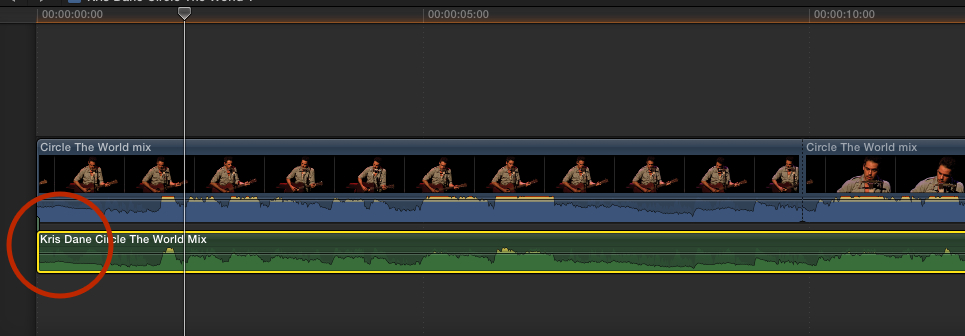
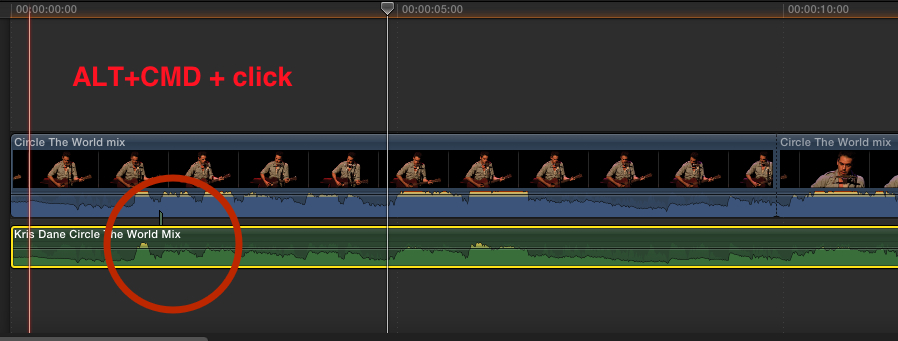
But you can move the connection point to any place you wish by holding ALT+CMD and clicking anywhere in the audio clip. The connection point will be moved to the place where you click, and now you will be able to nudge the audio in both directions.
From what you say I think you are pretty good at editing, you only need to spend more time with FCP X to get more familiar with how it works. Once you get there you will be amazed by the power and speed of this application. And you really should update to the latest version of FCP X if you can, it has evolved quite a lot in the past year.
- Ronny
If the audio is connected to the first frame of the multicam clip you won't be able to nudge the audio to the left, which again is quite logical.
But you can move the connection point to any place you wish by holding ALT+CMD and clicking anywhere in the audio clip. The connection point will be moved to the place where you click, and now you will be able to nudge the audio in both directions.
From what you say I think you are pretty good at editing, you only need to spend more time with FCP X to get more familiar with how it works. Once you get there you will be amazed by the power and speed of this application. And you really should update to the latest version of FCP X if you can, it has evolved quite a lot in the past year.
- Ronny
Please Log in to join the conversation.
11 Oct 2014 08:29 #54013
by mitchino
Replied by mitchino on topic nudging audio
I'll say one thing - this forum is one of the best I've ever come across. Will check out your suggestions Ronny - thanks again.
Please Log in to join the conversation.
11 Oct 2014 13:08 #54020
by mitchino
Replied by mitchino on topic nudging audio
Moving the connection did the trick. Onwards and upwards!
Please Log in to join the conversation.
- ronny courtens
-
- Offline
- Moderator
-
Less
More
- Posts: 4455
- Thank you received: 962
11 Oct 2014 13:09 #54021
by ronny courtens
Replied by ronny courtens on topic nudging audio
Great! Happy editing.
- Ronny
- Ronny
Please Log in to join the conversation.

12 Oct 2014 00:19 #54026
by marchyman
So what keyboard are you using, Ronny (Yeah, my option key is also labeled alt)
Replied by marchyman on topic nudging audio
ronny courtens wrote: Hold the ALT key and ...
So what keyboard are you using, Ronny
(Yeah, my option key is also labeled alt) Please Log in to join the conversation.
- ronny courtens
-
- Offline
- Moderator
-
Less
More
- Posts: 4455
- Thank you received: 962
12 Oct 2014 07:18 #54032
by ronny courtens
Replied by ronny courtens on topic nudging audio
Using regular Apple keyboards with Dutch language and French layout (yeah, Belgians are really weird ).
On forums I tend to say ALT instead of OPTION to make it easier for people who are also using Windows or who have switched from Windows.
- Ronny
).On forums I tend to say ALT instead of OPTION to make it easier for people who are also using Windows or who have switched from Windows.
- Ronny
Please Log in to join the conversation.
