


3 Post Moderation Rule for New Boarders (25 Jan 2021)
New boarders will have their posts moderated - Don't worry if you cannot see your post immediately.
Channel Configuration Problem
How can I get X to set the config correctly? I mean, it *was* correct when I imported them so uh... wtf?

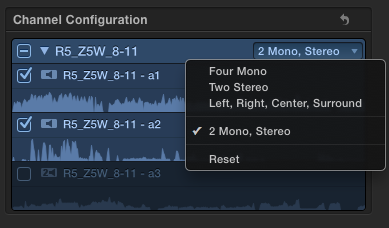
This is what they should be (what they *are*)
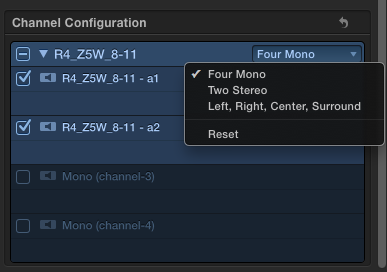
This is what they changed to
Can't sleep? Try this: fcpxpert.net ;-)
Please Log in to join the conversation.

Please Log in to join the conversation.
- Disproportionate Pictures
-

- Offline
- Platinum Member
-

- Posts: 1433
- Thank you received: 64
Please Log in to join the conversation.
Please Log in to join the conversation.
- Disproportionate Pictures
-
- Offline
- Platinum Member
-
- Posts: 1433
- Thank you received: 64
Please Log in to join the conversation.
Please Log in to join the conversation.
- Disproportionate Pictures
-
- Offline
- Platinum Member
-
- Posts: 1433
- Thank you received: 64
The whole point is to do as much Role tagging in the Event browser with Master clips, so that you aren't having to tag all instances of each clip once you edit them into a Project.
Please Log in to join the conversation.
But no, you do have to open a clip into its own timeline to configure channels. Yes, it would be nice to be able to do that without that step.
Please Log in to join the conversation.
BenB wrote: Try setting them to Dual Stereo. Then I think you can break one of those stereo pairs out into two monos.
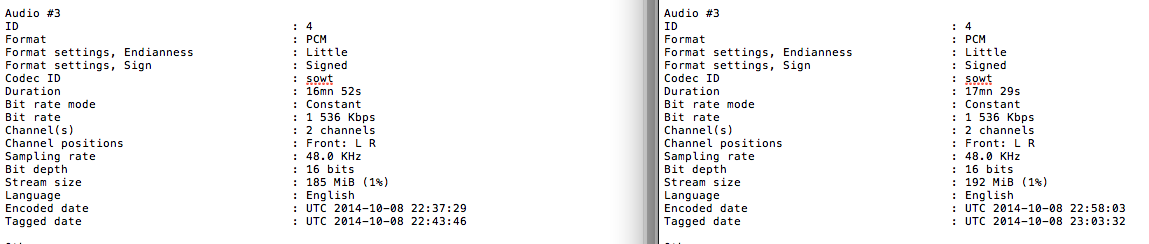
Not gonna work, I need the channels to be what they are in the file. The files channel configurations are exactly the same. Is the analyses data for the clips stored somewhere? Or is it baked into the Event XML? Anyone know? In any case, the channels are the stereo music stem, which i don't need, but this would be a problem if I did need the stem. FWIW, here's a look at the metadata for Audio 3 (the stereo pair) from 2 reels. File on left is fine in X, file on right is wrong in X and there's no way to right it (that I'm aware of). I can see no difference... And when played in FCP 7 or something, Audio 3 is definitely stereo. I thought maybe someone accidentally put a mono pair in there by mistake. Nope.
Can't sleep? Try this: fcpxpert.net ;-)
Please Log in to join the conversation.
- Ponponpostprod
-

- Offline
- Premium Member
-

- Posts: 134
- Thank you received: 9
BenB wrote: I was answering "multiple clips at once where the channel configurations are the same".
But no, you do have to open a clip into its own timeline to configure channels. Yes, it would be nice to be able to do that without that step.
It'll be very nice because when you export the AAF to the mix., if you have one time the HF Mic. in ch1 and Cam Mic. ch2, and another time the reverse, you cannot change the way it'll appear in pro tools, Pyramix ..., the only way to do this is to have role or sub-role for each channel, and the speed way is to do it for multiple clips in the event.
Please Log in to join the conversation.
 No ideas how to get the channel config to reset properly?!?
:sad face:
Can't sleep? Try this: fcpxpert.net ;-)
Please Log in to join the conversation.
Please Log in to join the conversation.
BenB wrote: "Reset" always works for me.
Me too. Not this time. The correct config isn't an option.
 Might be nice to be able to manually set a custom config.
Can't sleep? Try this: fcpxpert.net ;-)
Please Log in to join the conversation.
Please Log in to join the conversation.
BenB wrote: OK, I'm lost, no clue what you are "not" able to do. I tested, and not finding same results. What camera are these files coming from? Having one of them personally would help.
I share your confusion.
These are not camera files. They are multichannel split feature reels exported in a batch from... FCP 7 I think. As I said, when I imported them, the config auto detected correctly. At some point, for no discernible reason, 2 of the 6 reels changed to 4 mono, which is wrong. Reset parameter does nothing. I can change it to 2 stereo (wrong) or surround (wrong) but it will not reset to 2 mono 1 stereo. The 4 other reels are fine.
It's really odd. If I re-mport the 2 bad files, they keep the incorrect config. I'm sure something is messed up somewhere, but I can't figure out what. The masters that X is confused by import fine (2 mono 1 stereo) into FCP 7. Pr sees it as 4 mono, but that's because Pr CC is kind of stupid when it comes to multichannel sources. It see all the reels as 4 mono. All the file metadata is the same in all 6 files. I'm not a casual user FWIW, and I'm hoping I just made a rookie mistake, but I have no idea what that would be. So here i am...
Can't sleep? Try this: fcpxpert.net ;-)
Please Log in to join the conversation.
- ronny courtens
-

- Offline
- Moderator
-

- Posts: 4455
- Thank you received: 962
When you open the problematic audio files in QT7 and you press CMD+J, do you see 3 audio tracks or 4?
- Ronny
Please Log in to join the conversation.
ronny courtens wrote: Hey Charlie,
When you open the problematic audio files in QT7 and you press CMD+J, do you see 3 audio tracks or 4?
- Ronny
Hi Ronny,
That's the only thing I haven't done, but I'm gonna say it'll show 3. Did CMD-I in QT 7 and 10 and it shows the correct config. Also inspected in DR's QT Edit and the Media Info app, which display the same metadata as CMD-J in QT 7. Both show 3 as expected. FCP 7 interprets them correctly, as did FCP X before the waveforms finished drawing. I suspected maybe those 2 clips for some reason had 2 channels of the same audio grouped as stereo or something, but inspecting the waveform indicates that they are indeed a stereo pair. It's really perplexing.
Only thing I haven't done is Make a new Library, import the files, and see what happens. As I said, I don't need those channels anyway, but I need to figure out what's going on just... because.
Can't sleep? Try this: fcpxpert.net ;-)
Please Log in to join the conversation.
- ronny courtens
-
- Offline
- Moderator
-
- Posts: 4455
- Thank you received: 962
Exactly my thoughts, but this doesn't seem to be the case. Been breaking my head on this. I have tried every trick I know to mess up the channel configuration in FCP X but I cannot reproduce this issue. In the worst case i always can use "Reset" to get everything back on track.
What seems strange is that you have 6 files and it only happens with 2 of them. Which makes me suspect it's not something you did, nor is it related to FCP X. Do you have any way of getting the "clean" audio tracks back from a backup or so and try importing them again to see if X interprets them correctly?
- Ronny
Please Log in to join the conversation.
ronny courtens wrote: I suspected maybe those 2 clips for some reason had 2 channels of the same audio grouped as stereo or something,
Exactly my thoughts, but this doesn't seem to be the case. Been breaking my head on this. I have tried every trick I know to mess up the channel configuration in FCP X but I cannot reproduce this issue. In the worst case i always can use "Reset" to get everything back on track.
What seems strange is that you have 6 files and it only happens with 2 of them. Which makes me suspect it's not something you did, nor is it related to FCP X. Do you have any way of getting the "clean" audio tracks back from a backup or so and try importing them again to see if X interprets them correctly?
- Ronny
I agree. I'm sure it's something to do with the files. I do have access to the originals, so that is the next step. I think we share the same obsession with figuring out why things are happening, so you can imagine how this is driving me crazy.
The fact that FCP 7 and other apps interpret the files correctly only adds to my madness. lol I suppose the only thing X could maybe offer that it doesn't is the ability to force a "custom" audio config, as you can with project settings etc.It's not the end of the world, as I said, But I'll of course post here if I figure it out. Thanks!
Can't sleep? Try this: fcpxpert.net ;-)
Please Log in to join the conversation.
