


- Posts: 6
- Thank you received: 0
3 Post Moderation Rule for New Boarders (25 Jan 2021)
New boarders will have their posts moderated - Don't worry if you cannot see your post immediately.
Finally upgraded to 10.1.3 now some internal compound clips I had rotated are distorted
- allofthepeople
-
 Topic Author
- Offline
- New Member
-

Less
More
09 Oct 2014 15:27 #53866
by allofthepeople
Finally upgraded to 10.1.3 now some internal compound clips I had rotated are distorted was created by allofthepeople
I finally upgraded to 10.1.3 from an older FCPX and imported everything. I then go to open up the template for our Church's announcement videos to update them and now some internal compound clips I had rotated are distorted. I tried to reimport, delete render files, and adjust all the effects, nothing fixes it. Please help I really do not want to have to rebuild these custom animations, I had them perfect. I just have some basic compound clips rotated then animated to swipe across the frame. Nothing had changed besides FCPX so I am confused.
Here was a still before:
https://www.dropbox.com/s/1vljxq6m9muvj3b/before.png?dl=0
After upgrade:
https://www.dropbox.com/s/o7d61st0hrvnyv8/after.png?dl=0
If you try to fix the simple rotation:
https://www.dropbox.com/s/06ocp5m36uhslcf/whilefixing.png?dl=0
Thanks!
Here was a still before:
https://www.dropbox.com/s/1vljxq6m9muvj3b/before.png?dl=0
After upgrade:
https://www.dropbox.com/s/o7d61st0hrvnyv8/after.png?dl=0
If you try to fix the simple rotation:
https://www.dropbox.com/s/06ocp5m36uhslcf/whilefixing.png?dl=0
Thanks!
Please Log in to join the conversation.


09 Oct 2014 15:51 #53871
by anickt
Replied by anickt on topic Finally upgraded to 10.1.3 now some internal compound clips I had rotated are distorted
It's a bug. Surprised they still haven't fixed it. You may be stuck until or if they fix it.
If you want to crop and rotate, use the Alex4D Trim plug-in. It should be on this site or on his site.
If you want to crop and rotate, use the Alex4D Trim plug-in. It should be on this site or on his site.
Please Log in to join the conversation.
- allofthepeople
-
Topic Author
- Offline
- New Member
-
Less
More
- Posts: 6
- Thank you received: 0
09 Oct 2014 15:55 #53872
by allofthepeople
Replied by allofthepeople on topic Finally upgraded to 10.1.3 now some internal compound clips I had rotated are distorted
do you know the first version without this? I rather just downgrade to that. I only upgraded because the version I had didn't work with some motion templates I downloaded no matter what I tried.
Please Log in to join the conversation.
09 Oct 2014 16:01 #53873
by anickt
Replied by anickt on topic Finally upgraded to 10.1.3 now some internal compound clips I had rotated are distorted
Sorry, I'm not sure. I'd try 10.0.9. Hopefully you have a backup that you haven't opened in 10.1.3 because once you've opened a project in a new version you can't open it in a previous version.
Please Log in to join the conversation.
- allofthepeople
-
Topic Author
- Offline
- New Member
-
Less
More
- Posts: 6
- Thank you received: 0
09 Oct 2014 16:06 #53874
by allofthepeople
Replied by allofthepeople on topic Finally upgraded to 10.1.3 now some internal compound clips I had rotated are distorted
I do... I may just try to rebuild the rotation part with that plugin but I have to get it exact  We also have the still of it before the animation on all sorts of stuff.
This blends in seamlessly with our other graphics that we use during service so I do not have much room to change something without having to redo everything.
Here is the original finished product:
www.dropbox.com/s/a1gksz1v4fs6rv1/Annouc...20Sept%2014.mp4?dl=0
Before this we have our static animated logo loop up, pretty much what you see before the animated swipes take place in the above video so this blends perfectly. Then the end of the announcements fade into our current sermon series intro.
We also have the still of it before the animation on all sorts of stuff.This blends in seamlessly with our other graphics that we use during service so I do not have much room to change something without having to redo everything.
Here is the original finished product:
www.dropbox.com/s/a1gksz1v4fs6rv1/Annouc...20Sept%2014.mp4?dl=0
Before this we have our static animated logo loop up, pretty much what you see before the animated swipes take place in the above video so this blends perfectly. Then the end of the announcements fade into our current sermon series intro.
Please Log in to join the conversation.
- ronny courtens
-

- Offline
- Moderator
-

Less
More
- Posts: 4455
- Thank you received: 962
09 Oct 2014 17:34 #53879
by ronny courtens
Replied by ronny courtens on topic Finally upgraded to 10.1.3 now some internal compound clips I had rotated are distorted
@anickt
I just did the exact same thing as in the video (crop, rotate, animate position) and it's working perfectly. So what is this bug you are talking about?
- Ronny
I just did the exact same thing as in the video (crop, rotate, animate position) and it's working perfectly. So what is this bug you are talking about?
- Ronny
Please Log in to join the conversation.
- ronny courtens
-
- Offline
- Moderator
-
Less
More
- Posts: 4455
- Thank you received: 962
09 Oct 2014 18:03 - 09 Oct 2014 18:03 #53880
by ronny courtens
Replied by ronny courtens on topic Finally upgraded to 10.1.3 now some internal compound clips I had rotated are distorted
Shaun,
I had a look at your stills and the video. Can you open the problematic compound clip in its timeline and post a screenshot of the timeline so we can see exactly what's inside that compound clip? I have no trouble at all doing exactly the same thing as you show in your video.
- Ronny
I had a look at your stills and the video. Can you open the problematic compound clip in its timeline and post a screenshot of the timeline so we can see exactly what's inside that compound clip? I have no trouble at all doing exactly the same thing as you show in your video.
- Ronny
Last edit: 09 Oct 2014 18:03 by ronny courtens.
Please Log in to join the conversation.
09 Oct 2014 18:57 #53890
by anickt
Replied by anickt on topic Finally upgraded to 10.1.3 now some internal compound clips I had rotated are distorted
Ronny
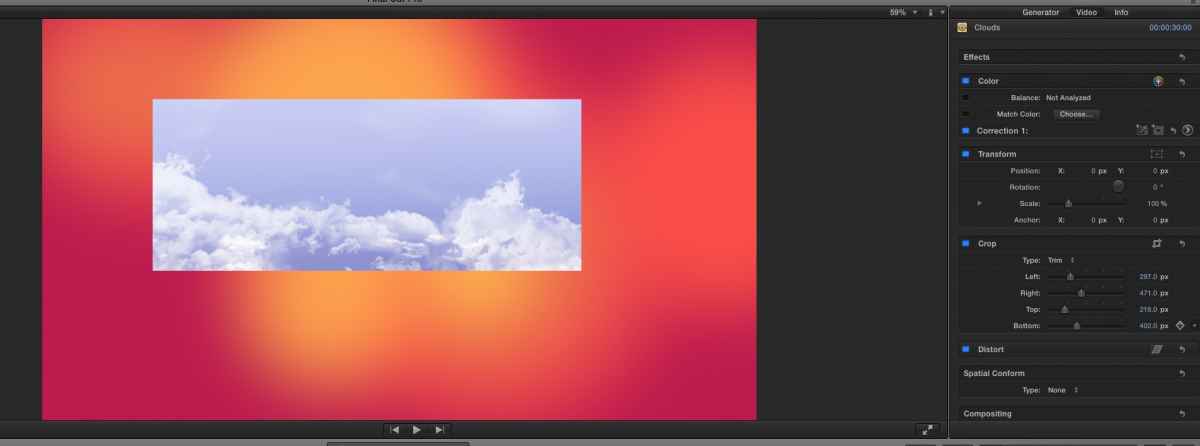
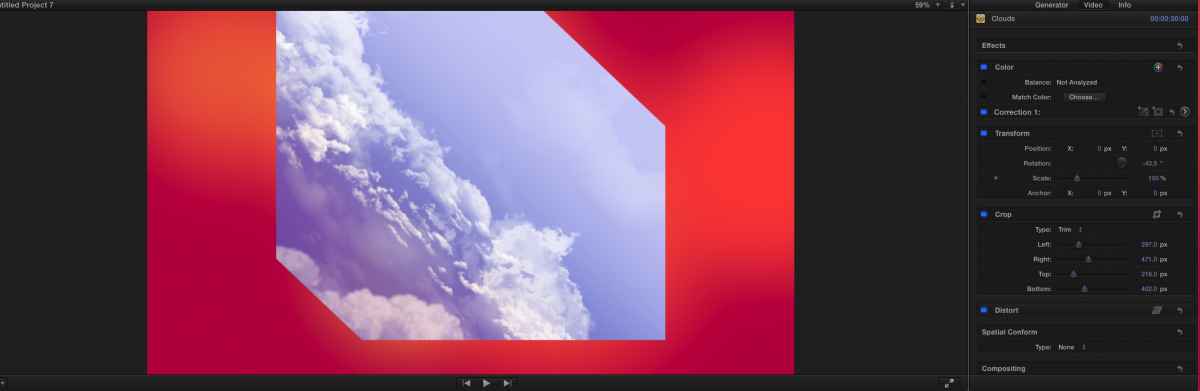
I have seen this happening for a while. Others have told me of the same issue. See attached.
I cropped the top layer in the "cropped" jpg. The only difference in the second jpg is the added rotation.
I have seen this happening for a while. Others have told me of the same issue. See attached.
I cropped the top layer in the "cropped" jpg. The only difference in the second jpg is the added rotation.
Please Log in to join the conversation.
- ronny courtens
-
- Offline
- Moderator
-
Less
More
- Posts: 4455
- Thank you received: 962
09 Oct 2014 19:02 - 09 Oct 2014 19:19 #53892
by ronny courtens
Replied by ronny courtens on topic Finally upgraded to 10.1.3 now some internal compound clips I had rotated are distorted
Are you using 10.1.3? Because I don't see this happening at all. Here's a little test I did, cropping and rotating two stills and animating them over a background image. Just like the video Saun linked to:
- Ronny
- Ronny
Last edit: 09 Oct 2014 19:19 by ronny courtens.
Please Log in to join the conversation.
09 Oct 2014 19:05 #53894
by anickt
Replied by anickt on topic Finally upgraded to 10.1.3 now some internal compound clips I had rotated are distorted
Ronny - your video is marked "private". Yes I am on 10.1.3. I'm actually on a different computer entirely since the first time I saw this. It's strange that you're not seeing it. I'll have to investigate further. From what discussion I've had with other people it seemed that it was a bug. Maybe one of those that don't show up for everyone. You know, the exasperating ones!

Please Log in to join the conversation.
- allofthepeople
-
Topic Author
- Offline
- New Member
-
Less
More
- Posts: 6
- Thank you received: 0
09 Oct 2014 19:10 #53895
by allofthepeople
Replied by allofthepeople on topic Finally upgraded to 10.1.3 now some internal compound clips I had rotated are distorted
I just experimented around and now I'm thinking it has something to do with the layers of compound clips I have in there to build each part. I just tried to save certain parts as a finished movie and then back in and it fixes it. Now I have to go through each thing and replace them. So weird it does this... maybe the new version is bugging out when it is overloaded with compound clip within compound clip, one after another. Still would like to know a better solution because I do videos this way a lot and each time I don't want something similar to happen.
Please Log in to join the conversation.
- ronny courtens
-
- Offline
- Moderator
-
Less
More
- Posts: 4455
- Thank you received: 962
09 Oct 2014 19:18 #53898
by ronny courtens
Replied by ronny courtens on topic Finally upgraded to 10.1.3 now some internal compound clips I had rotated are distorted
I have changed the settings of the video so anyone can see it.
Can anyone else confirm that there is an issue with cropping and rotating an image in FCP X 10.1.3? If so we should report this immediately. I cannot see any issues, I have tested this on three systems now.
@ Saun:
There are no known issues with compound clips in the new version. If you have updated from a pre-10.1 version this may explain why certain crop settings did not transfer well, as the Transform tool has been completely revised since 10.1.1.
I suggest you do a test with a completely new animation when you have the time, you should not have any issues with this. If you do have issues with a newly created animation, report back so we can see where it goes wrong.
- Ronny
Can anyone else confirm that there is an issue with cropping and rotating an image in FCP X 10.1.3? If so we should report this immediately. I cannot see any issues, I have tested this on three systems now.
@ Saun:
There are no known issues with compound clips in the new version. If you have updated from a pre-10.1 version this may explain why certain crop settings did not transfer well, as the Transform tool has been completely revised since 10.1.1.
I suggest you do a test with a completely new animation when you have the time, you should not have any issues with this. If you do have issues with a newly created animation, report back so we can see where it goes wrong.
- Ronny
Please Log in to join the conversation.
09 Oct 2014 19:24 #53899
by anickt
Replied by anickt on topic Finally upgraded to 10.1.3 now some internal compound clips I had rotated are distorted
I see this whether it's a compound clip or as in my example jpg's just a layer of video that is cropped and rotated. I have reported it.
Please Log in to join the conversation.
- allofthepeople
-
Topic Author
- Offline
- New Member
-
Less
More
- Posts: 6
- Thank you received: 0
09 Oct 2014 19:26 #53900
by allofthepeople
Replied by allofthepeople on topic Finally upgraded to 10.1.3 now some internal compound clips I had rotated are distorted
What's weird is only rotating is affected, when I turn that change off it is fine. Very weird. Thanks for the help.
Please Log in to join the conversation.
- ronny courtens
-
- Offline
- Moderator
-
Less
More
- Posts: 4455
- Thank you received: 962
09 Oct 2014 19:33 - 09 Oct 2014 19:34 #53902
by ronny courtens
Replied by ronny courtens on topic Finally upgraded to 10.1.3 now some internal compound clips I had rotated are distorted
Anickt, good to know that you have sent feedback. Strange that I cannot reproduce this on any system here.
Saun, are you saying that when you export the animation you don't see the problem?
- Ronny
Saun, are you saying that when you export the animation you don't see the problem?
- Ronny
Last edit: 09 Oct 2014 19:34 by ronny courtens.
Please Log in to join the conversation.
09 Oct 2014 19:34 #53903
by anickt
Replied by anickt on topic Finally upgraded to 10.1.3 now some internal compound clips I had rotated are distorted
I just remembered. The issue is not with a straight piece of video or graphic. It is a problem with a compound clip or a generator. I just tried it again. My original source was a generator. That doesn't crop properly when rotated. A graphic or video file does. A compound clip doesn't.
Please Log in to join the conversation.
- ronny courtens
-
- Offline
- Moderator
-
Less
More
- Posts: 4455
- Thank you received: 962
09 Oct 2014 19:37 #53904
by ronny courtens
Replied by ronny courtens on topic Finally upgraded to 10.1.3 now some internal compound clips I had rotated are distorted
Ah, that's correct and I'm aware of this behavior.
But for what Saun is doing he does not need to crop a compound clip or a generator, so this should work without any problems.
- Ronny
But for what Saun is doing he does not need to crop a compound clip or a generator, so this should work without any problems.
- Ronny
Please Log in to join the conversation.
09 Oct 2014 19:43 #53907
by anickt
Replied by anickt on topic Finally upgraded to 10.1.3 now some internal compound clips I had rotated are distorted
One more of the world's problems settled (sort of) 
Please Log in to join the conversation.
- ronny courtens
-
- Offline
- Moderator
-
Less
More
- Posts: 4455
- Thank you received: 962
09 Oct 2014 19:46 #53909
by ronny courtens
Replied by ronny courtens on topic Finally upgraded to 10.1.3 now some internal compound clips I had rotated are distorted
LOL!
- Ronny
- Ronny
Please Log in to join the conversation.
- allofthepeople
-
Topic Author
- Offline
- New Member
-
Less
More
- Posts: 6
- Thank you received: 0
09 Oct 2014 19:52 #53910
by allofthepeople
When I make a new project with the clip I need rotated and export that then drop it back in. Taking some of the layers away so to speak it works. Which makes sense now if the bug is with compound clips as mentioned below. I wish they would fix this! Thanks everyone for the help though.
Replied by allofthepeople on topic Finally upgraded to 10.1.3 now some internal compound clips I had rotated are distorted
ronny courtens wrote: Anickt, good to know that you have sent feedback. Strange that I cannot reproduce this on any system here.
Saun, are you saying that when you export the animation you don't see the problem?
- Ronny
When I make a new project with the clip I need rotated and export that then drop it back in. Taking some of the layers away so to speak it works. Which makes sense now if the bug is with compound clips as mentioned below. I wish they would fix this! Thanks everyone for the help though.
Please Log in to join the conversation.
