


- Posts: 4
- Thank you received: 0
3 Post Moderation Rule for New Boarders (25 Jan 2021)
New boarders will have their posts moderated - Don't worry if you cannot see your post immediately.
Conform from original AVCHD files
- Nondsccript
-
 Topic Author
- Offline
- New Member
-

Less
More
08 Oct 2014 12:51 #53798
by Nondsccript
Conform from original AVCHD files was created by Nondsccript
I have just finished a feature doc on FCP 10.1.3 and am in need of outputting a conform to send to the post house. What I want/need to do is to use the orginal camera files instead of the proxies I have been using in the edit.
My work flow so far has been to shoot, digitise via ShotPut Pro onto hard drives and to then import proxies into FCP from the hard drives. This has had me backing up to a degree and making sure that the camera files are all in the one place.
Is there an easier way to use these original camera files in a conform than having to re-import the necessary files?
Any thoughts, suggestions, links, advice would be very much appreciated.
Cheers.
My work flow so far has been to shoot, digitise via ShotPut Pro onto hard drives and to then import proxies into FCP from the hard drives. This has had me backing up to a degree and making sure that the camera files are all in the one place.
Is there an easier way to use these original camera files in a conform than having to re-import the necessary files?
Any thoughts, suggestions, links, advice would be very much appreciated.
Cheers.
Please Log in to join the conversation.

08 Oct 2014 13:58 - 08 Oct 2014 14:03 #53802
by BenB
Replied by BenB on topic Conform from original AVCHD files
When using FCPX, you should have FCPX create the proxy files for you, while leaving the original files in place.
Then in the Viewer Settings menu (top right of Viewer, light switch icon), you can switch between original and proxy with a mouse click.
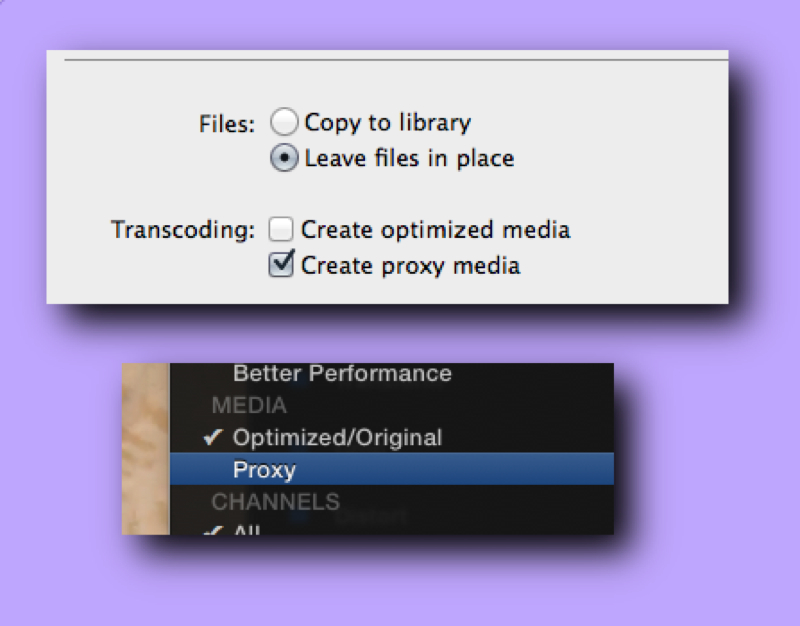
Otherwise, if you created proxies outside of FCPX, and imported only those files, you'd have to Reconnect Media (File menu) back to the original files, which may or may not work, as FCPX is overly picky about what files you can relink to.
So the two questions at this time are, when you imported the files into FCPX-
A; Did you "Copy To Event" or "Leave In Place"?
B; Did you check either "Create Optimized" or "Create Proxy" media?
Then in the Viewer Settings menu (top right of Viewer, light switch icon), you can switch between original and proxy with a mouse click.
Otherwise, if you created proxies outside of FCPX, and imported only those files, you'd have to Reconnect Media (File menu) back to the original files, which may or may not work, as FCPX is overly picky about what files you can relink to.
So the two questions at this time are, when you imported the files into FCPX-
A; Did you "Copy To Event" or "Leave In Place"?
B; Did you check either "Create Optimized" or "Create Proxy" media?
Last edit: 08 Oct 2014 14:03 by BenB.
Please Log in to join the conversation.
- Nondsccript
-
Topic Author
- Offline
- New Member
-
Less
More
- Posts: 4
- Thank you received: 0
08 Oct 2014 14:37 #53803
by Nondsccript
Replied by Nondsccript on topic Conform from original AVCHD files
Thanks BenB.
I Copied to Event and Created Proxie. Which as I made my way through the project I realised was probably the wrong decision however decided to stick with it for consistency.
I Copied to Event and Created Proxie. Which as I made my way through the project I realised was probably the wrong decision however decided to stick with it for consistency.
Please Log in to join the conversation.
