


- Posts: 4
- Thank you received: 0
3 Post Moderation Rule for New Boarders (25 Jan 2021)
New boarders will have their posts moderated - Don't worry if you cannot see your post immediately.
Mini VD tape clip to convert to digital
06 Oct 2014 11:09 #53702
by bsfez
Mini VD tape clip to convert to digital was created by bsfez
Hello,
I have 3 dozens of mini DV (and another dozens of VHS) with thousands of small clip I want to save on my computer. I recall the batch feature on FCP6 but can’t find it now on FPCX.
I read it was not a FCPX feature.
Is it still true ? (that was a great feature, how did they remove that ?)
Does someone think of a way I can complete my task without loosing hours to view, rewind, rewind again, rewind, play, capture and restart on and on ?
I have 3 dozens of mini DV (and another dozens of VHS) with thousands of small clip I want to save on my computer. I recall the batch feature on FCP6 but can’t find it now on FPCX.
I read it was not a FCPX feature.
Is it still true ? (that was a great feature, how did they remove that ?)
Does someone think of a way I can complete my task without loosing hours to view, rewind, rewind again, rewind, play, capture and restart on and on ?
Please Log in to join the conversation.

06 Oct 2014 12:06 #53704
by BenB
Replied by BenB on topic Mini VD tape clip to convert to digital
FCPX was very clear from day one, it is a digital workflow, leaving tape behind. The tape capture support is a very minimal, necessary evil.
For things like this, you may want to look in to things like the Roxio solution.
www.roxio.com/enu/products/easy-vhs-to-d...?rTrack=b_easyvhsmac
For things like this, you may want to look in to things like the Roxio solution.
www.roxio.com/enu/products/easy-vhs-to-d...?rTrack=b_easyvhsmac
Please Log in to join the conversation.
- ronny courtens
-

- Offline
- Moderator
-

Less
More
- Posts: 4455
- Thank you received: 962
06 Oct 2014 12:48 #53706
by ronny courtens
Replied by ronny courtens on topic Mini VD tape clip to convert to digital
FCP X does not allow for tape batch capture but it has a batch-import feature, which IMO works better and faster.
Tape batch capture was useful when everyone ingested from tape. But tape is not really a popular acquisition medium anymore. Not to mention that for DV tapes it is much better to capture an entire tape and make your selects on the digitized media. Constantly searching and rewinding a DV tape wears down the heads of your player and it can permanently damage the fragile tapes. For VHS a batch capture utility is useless anyway, as you cannot batch capture from a VHS tape (it has not TC track).
So how do you do this in FCP X?
Connect your DV player to your system over FireWire and in FCP X create a Camera Archive from each tape. This is how you create a Camera Archive from tapes (second paragraph): support.apple.com/kb/PH12710?viewlocale=en_US
Save the Camera Archives on an external drive. They will be an excellent safety backup of your tape media and you can batch-import selected parts of the archives in FCP X without having to handle the tape anymore.
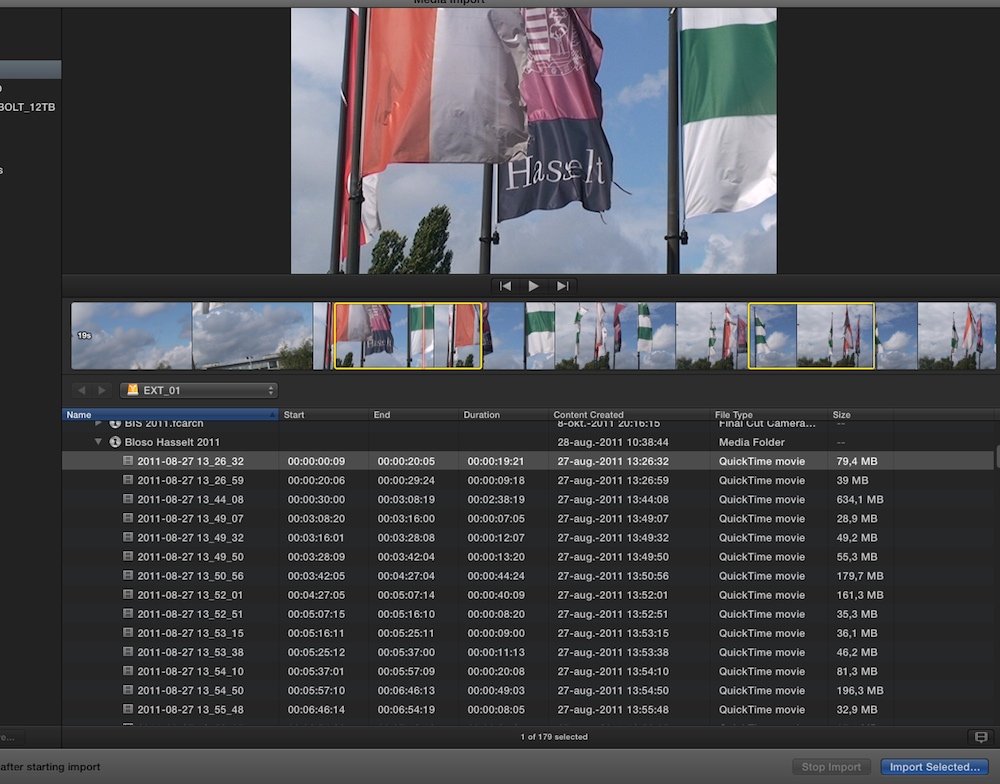
Once you have created the Camera Archives you can open them in the FCP X Import window. FCP X shows every clip that's on the tape, you can select which clips you want to import and for every clip you can set multiple ranges if you only want to import parts of a clip. When you have made all your selections, just press Import Selected and FCP X will import all your selections at once. Much faster than scrolling through a tape, rewinding, viewing, pressing in and out for every portion, etc...
Here you see a Camera Archive from a DV tape, where I have set two selections on one clip. Only the parts I have selected will be imported. The selections are persistent, you can set selection for any clip and batch-import the selections.
As VHS tapes have no time code you cannot just capture them in FCP X. You can use QT player or any other video capture utility, then import the captured media in FCP X.
- Ronny
Tape batch capture was useful when everyone ingested from tape. But tape is not really a popular acquisition medium anymore. Not to mention that for DV tapes it is much better to capture an entire tape and make your selects on the digitized media. Constantly searching and rewinding a DV tape wears down the heads of your player and it can permanently damage the fragile tapes. For VHS a batch capture utility is useless anyway, as you cannot batch capture from a VHS tape (it has not TC track).
So how do you do this in FCP X?
Connect your DV player to your system over FireWire and in FCP X create a Camera Archive from each tape. This is how you create a Camera Archive from tapes (second paragraph): support.apple.com/kb/PH12710?viewlocale=en_US
Save the Camera Archives on an external drive. They will be an excellent safety backup of your tape media and you can batch-import selected parts of the archives in FCP X without having to handle the tape anymore.
Once you have created the Camera Archives you can open them in the FCP X Import window. FCP X shows every clip that's on the tape, you can select which clips you want to import and for every clip you can set multiple ranges if you only want to import parts of a clip. When you have made all your selections, just press Import Selected and FCP X will import all your selections at once. Much faster than scrolling through a tape, rewinding, viewing, pressing in and out for every portion, etc...
Here you see a Camera Archive from a DV tape, where I have set two selections on one clip. Only the parts I have selected will be imported. The selections are persistent, you can set selection for any clip and batch-import the selections.
As VHS tapes have no time code you cannot just capture them in FCP X. You can use QT player or any other video capture utility, then import the captured media in FCP X.
- Ronny
Please Log in to join the conversation.
09 Nov 2014 12:39 #55716
by bsfez
Replied by bsfez on topic Mini DV and VHS tape clip to convert to digital
It took me sometime but I get it all working.
MiniDV capture worked well thanks to all your recommendations.
A few disappointment however.. when working on VHS, but I will open a new thread for this.
Thanks again for your help.
MiniDV capture worked well thanks to all your recommendations.
A few disappointment however.. when working on VHS, but I will open a new thread for this.
Thanks again for your help.
Please Log in to join the conversation.
