


- Posts: 13
- Thank you received: 0
3 Post Moderation Rule for New Boarders (25 Jan 2021)
New boarders will have their posts moderated - Don't worry if you cannot see your post immediately.
Any way to HIDE rejected AND VIEW unused?
04 Oct 2014 19:04 #53641
by Adamesq
Any way to HIDE rejected AND VIEW unused? was created by Adamesq
I'm trying to view unused clips while also hiding rejected (just wanted to see clips I haven't used and still want). It seems like an obvious feature, but is there any way to do it?
Please Log in to join the conversation.
- cinemaloha
-

- Offline
- Elite Member
-

Less
More
- Posts: 163
- Thank you received: 36
04 Oct 2014 20:25 - 04 Oct 2014 20:35 #53642
by cinemaloha
Replied by cinemaloha on topic Any way to HIDE rejected AND VIEW unused?
Highlight Event.
Show 'Rejected' in the 'Browser'
Select All (cntrl+A) rejected clips.
Add keyword (cmd+K) 'Rejected' to all clips.
Right click on Event.
Create a New Smart Collection.
Double click on the Smart Collection.
Click + for 'Used Media' & 'Keywords' (Does Not Include Any/Check box of the Keyword) in the 'Filter' popup box.
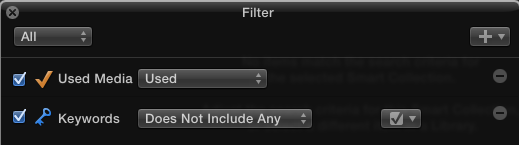
Show 'Rejected' in the 'Browser'
Select All (cntrl+A) rejected clips.
Add keyword (cmd+K) 'Rejected' to all clips.
Right click on Event.
Create a New Smart Collection.
Double click on the Smart Collection.
Click + for 'Used Media' & 'Keywords' (Does Not Include Any/Check box of the Keyword) in the 'Filter' popup box.
Last edit: 04 Oct 2014 20:35 by cinemaloha.
Please Log in to join the conversation.

04 Oct 2014 23:04 - 04 Oct 2014 23:06 #53647
by BenB
Replied by BenB on topic Any way to HIDE rejected AND VIEW unused?
Well, the keyword thing, you want to hide anything that has the "rejected" keyword in it, not all keywords.
Last edit: 04 Oct 2014 23:06 by BenB.
Please Log in to join the conversation.
04 Oct 2014 23:13 #53648
by Adamesq
Replied by Adamesq on topic Any way to HIDE rejected AND VIEW unused?
Thank you for the work-around, @cinemaloha, but I'm looking for something that wouldn't require me to constantly add the "rejected" keyword to clips as I reject them. Your suggestion may be the only way for now. "View unused, non-rejected" should be in the selection box...that's pretty easy with all of the other functionality already built in.
Please Log in to join the conversation.
- Tom Wolsky
-

- Offline
- Moderator
-

04 Oct 2014 23:45 #53649
by Tom Wolsky
Replied by Tom Wolsky on topic Any way to HIDE rejected AND VIEW unused?
You have a smart collection set to show unused. In the smart collect you set it to hide rejected. Is that not working for you?
Please Log in to join the conversation.
05 Oct 2014 04:22 #53657
by BenB
Replied by BenB on topic Any way to HIDE rejected AND VIEW unused?
There is no "hide" rejected tags in smart collections. There is only to show Favs, or show Rejected, but not hide one or the other. Unless it is a keyword, then you can select one of the "do not include" choices.
Please Log in to join the conversation.
- Karsten Schlüter
-

- Offline
- Moderator
-
Less
More
- Posts: 3790
- Thank you received: 718
05 Oct 2014 04:57 #53658
by Karsten Schlüter
... but it would be a nice enhancement...
esp. on the property 'rejected' - even in a smart-collection, a rejected clip should be rejected=hide.
Replied by Karsten Schlüter on topic Any way to HIDE rejected AND VIEW unused?
BenB wrote: There is no "hide" rejected tags in smart collections. ...
... but it would be a nice enhancement...
esp. on the property 'rejected' - even in a smart-collection, a rejected clip should be rejected=hide.
Please Log in to join the conversation.
- Tom Wolsky
-
- Offline
- Moderator
-
05 Oct 2014 05:50 #53660
by Tom Wolsky
Replied by Tom Wolsky on topic Any way to HIDE rejected AND VIEW unused?
The function is already there just not built into the smart collection. The default browser state is hide rejected. That is still the default browser state in the smart collection. The smart collection shows unused, the browser state hides rejected.
Please Log in to join the conversation.
- ronny courtens
-

- Offline
- Moderator
-
Less
More
- Posts: 4455
- Thank you received: 962
05 Oct 2014 16:43 - 05 Oct 2014 16:45 #53673
by ronny courtens
Replied by ronny courtens on topic Any way to HIDE rejected AND VIEW unused?
I agree with Tom, it's quite easy.
Set Browser filter to "Hide Rejected"
Create a Smart Collection for "Unused".
When you select the "Unused" Smart Collection you will see all clips that are unused and not rejected.

- Ronny
Set Browser filter to "Hide Rejected"
Create a Smart Collection for "Unused".
When you select the "Unused" Smart Collection you will see all clips that are unused and not rejected.
- Ronny
Last edit: 05 Oct 2014 16:45 by ronny courtens.
Please Log in to join the conversation.
05 Oct 2014 19:04 #53677
by BenB
Replied by BenB on topic Any way to HIDE rejected AND VIEW unused?
Filling out feedback form. A "hide" for favorites and rejected would be nice to have access to in smart collections. One collection, not two unrelated settings.
Please Log in to join the conversation.
- Skippermark
-

- Offline
- New Member
-

Less
More
- Posts: 15
- Thank you received: 4
20 Nov 2022 16:16 #122969
by Skippermark
Replied by Skippermark on topic Any way to HIDE rejected AND VIEW unused?
Hi - I know this post is from 2014, so I wasn't sure if I should start a new thread or reply. I chose to reply.
Has the way FCP works changed? I created a smart collection and followed the directions in the detailed post below, but my rejected clips still show and wondering if there's a new method for more current versions.
I'm using FCP 10.6.5 - November 2022
Thanks!
Has the way FCP works changed? I created a smart collection and followed the directions in the detailed post below, but my rejected clips still show and wondering if there's a new method for more current versions.
I'm using FCP 10.6.5 - November 2022
Thanks!
I agree with Tom, it's quite easy.
Set Browser filter to "Hide Rejected"
Create a Smart Collection for "Unused".
When you select the "Unused" Smart Collection you will see all clips that are unused and not rejected.
Please Log in to join the conversation.
