


- Posts: 7
- Thank you received: 0
3 Post Moderation Rule for New Boarders (25 Jan 2021)
New boarders will have their posts moderated - Don't worry if you cannot see your post immediately.
Kernel Task Out of Control using FCPX
- imblakeandiskate
-
 Topic Author
- Offline
- New Member
-

Less
More
03 Oct 2014 07:09 - 03 Oct 2014 07:11 #53582
by imblakeandiskate
Kernel Task Out of Control using FCPX was created by imblakeandiskate
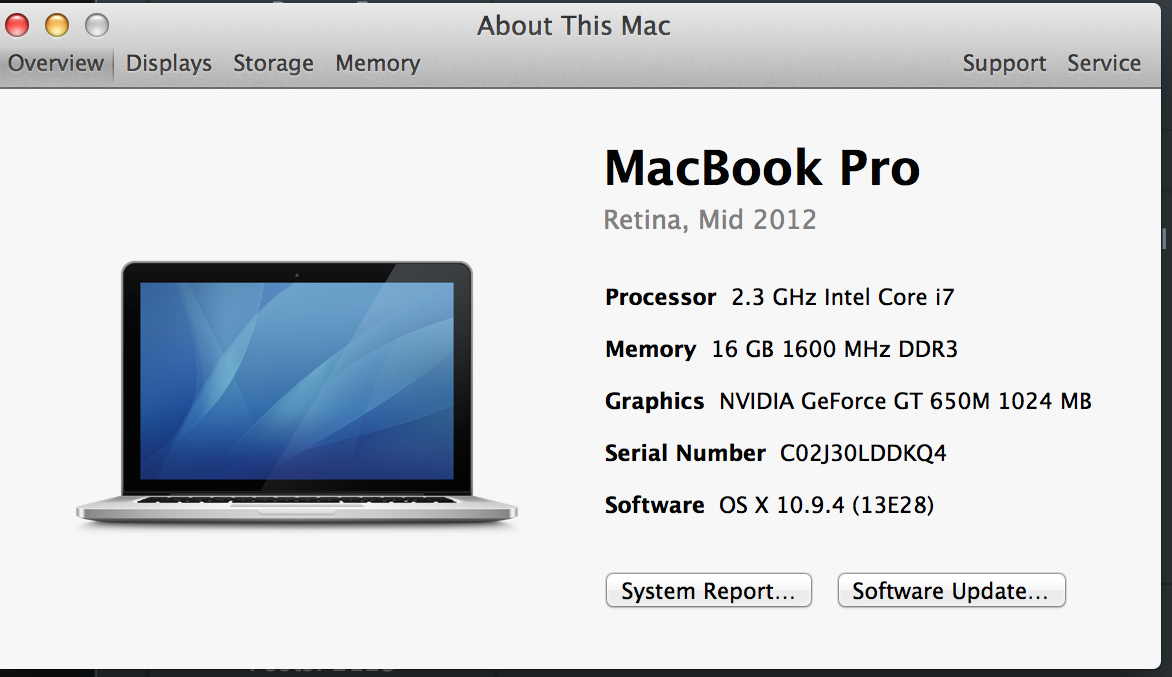
As of recently, my FCPX has been freezing up resulting to force quit due to lack of application memory. I check my activity monitor and notice that Kernel Task reaches 9 gb when I'm editing footage. I have 16 gb RAM. When I am not using FCPX, Kernel Task stays around 1 gb. My background rendering is off and even when I edit with proxies, Kernel Task still reaches around 9 gb causing FCPX to crash. I am in them middle of a few projects, so I do not want to risk by updating mid project. Any suggestions as to why it is crashing? Perhaps a memory leak? Trash the Preferences? Attached is two screen shots that may help. Please let me know if there is anything else I can show to help diagnose my Kernel Task problem.
Last edit: 03 Oct 2014 07:11 by imblakeandiskate.
Please Log in to join the conversation.
03 Oct 2014 07:30 #53583
by Ploki
Replied by Ploki on topic Kernel Task Out of Control using FCPX
I have the same machine except I have 2.7GHz.
I haven't noticed that (yet), but when I work with Logic Pro X on an external monitor with the lid of my laptop closed, kernel task takes ~650% of the CPU. If I open the lid everything is fine again.
Trashing rebuilding everything with ONYX didn't help, reseting PRAM and SMC didn't help, fixing permissions didn't help.
I'm going to reinstall everything from scratch when Yosemite comes out to see if it helps.
I haven't noticed that (yet), but when I work with Logic Pro X on an external monitor with the lid of my laptop closed, kernel task takes ~650% of the CPU. If I open the lid everything is fine again.
Trashing rebuilding everything with ONYX didn't help, reseting PRAM and SMC didn't help, fixing permissions didn't help.
I'm going to reinstall everything from scratch when Yosemite comes out to see if it helps.
Please Log in to join the conversation.
- ronny courtens
-

- Offline
- Moderator
-

Less
More
- Posts: 4455
- Thank you received: 962
03 Oct 2014 08:25 #53586
by ronny courtens
Replied by ronny courtens on topic Kernel Task Out of Control using FCPX
Are you both working with a second display attached to the MBP?
- Ronny
- Ronny
Please Log in to join the conversation.
- imblakeandiskate
-
Topic Author
- Offline
- New Member
-
Less
More
- Posts: 7
- Thank you received: 0
03 Oct 2014 14:46 #53594
by imblakeandiskate
Replied by imblakeandiskate on topic Kernel Task Out of Control using FCPX
Hi Ronny, Yes I am using a second display as my main viewer.
Please Log in to join the conversation.
03 Oct 2014 16:07 #53596
by Ploki
Yeah, only external (2nd) display via HDMI and the problem only arises if the lid of the laptop is closed (meaning if internal display doesn't work).
Replied by Ploki on topic Kernel Task Out of Control using FCPX
ronny courtens wrote: Are you both working with a second display attached to the MBP?
- Ronny
Yeah, only external (2nd) display via HDMI and the problem only arises if the lid of the laptop is closed (meaning if internal display doesn't work).
Do you have the laptop lid closed or open?imblakeandiskate wrote: Hi Ronny, Yes I am using a second display as my main viewer.
Please Log in to join the conversation.
- imblakeandiskate
-
Topic Author
- Offline
- New Member
-
Less
More
- Posts: 7
- Thank you received: 0
03 Oct 2014 18:40 #53605
by imblakeandiskate
Replied by imblakeandiskate on topic Kernel Task Out of Control using FCPX
I have the laptop open. I use viewer as second display.
Please Log in to join the conversation.
