


- Posts: 37
- Thank you received: 3
3 Post Moderation Rule for New Boarders (25 Jan 2021)
New boarders will have their posts moderated - Don't worry if you cannot see your post immediately.
issue with interview picture dissolves and straight audio cuts
02 Oct 2014 20:40 - 03 Oct 2014 00:52 #53568
by jvasey
I edit a lot of oral history interviews where contain either 1 second or 18 frame picture dissolves between sound bites of the talent. The sound bites at the edit point are not audio dissolves, but rather straight cuts with a quick 1 frame audio fade (or less) to hide any pop at the cut.
I feel that in my workflow something must be wrong because FCPX 10.1.3 seems to be creating extra cleanup work for me. So rather than bang my head against the wall, I took some screen snapshots and hopefully others can chime in on how I can alter my workflow so things would be less work steps and more FCPX user friendly.
Photo 1: shows an edit that I've made with a dissolve on the picture track and a straight audio cut underneath it. By doing this edit in the expanded view, and not collapsed clip view…the straight cut will not become an audio dissolve. Also, but not shown in the photo, I would add one frame (or less) audio fades on either side of the cut to hide any "pop."
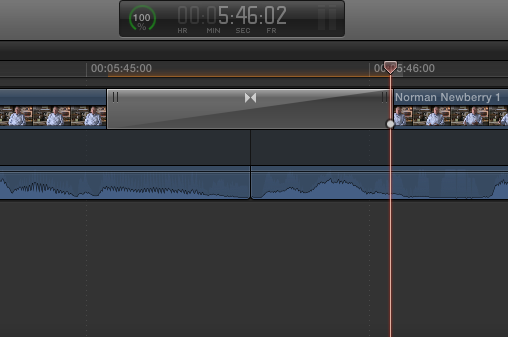
Photo 2: moving down to the end of the soundbite, I've used the razor blade tool to make a cut at the tail end…and soon as I did that the audio track to the clip I've been working moved further south by 1 lane…why? The answer is in the next photo.
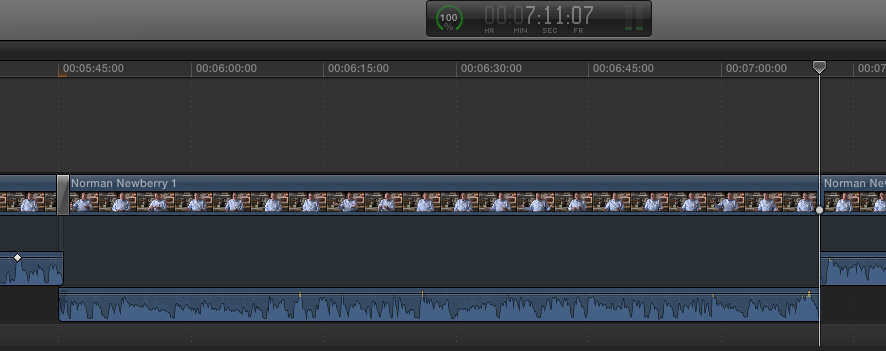
Photo 3: as you an see, we are now back at the head of the clip and FCPX has automatically extended the audio handle here. It's seeing the picture dissolve above…and is trying to create an audio overlap (which I don't want…and the overlap is why the clip moved down one lane). The audio transition is now not workable for the cut.
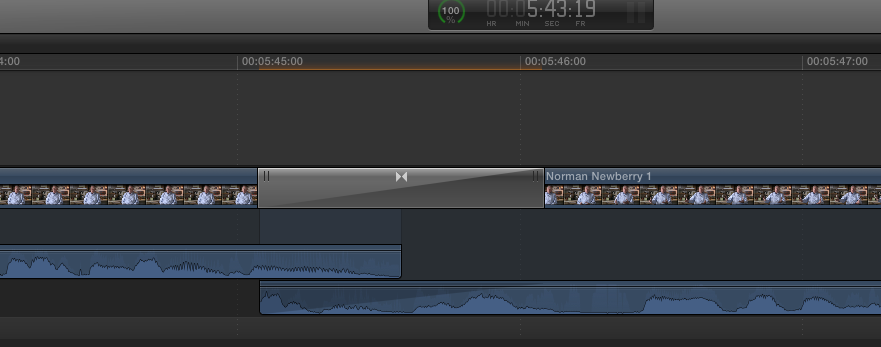
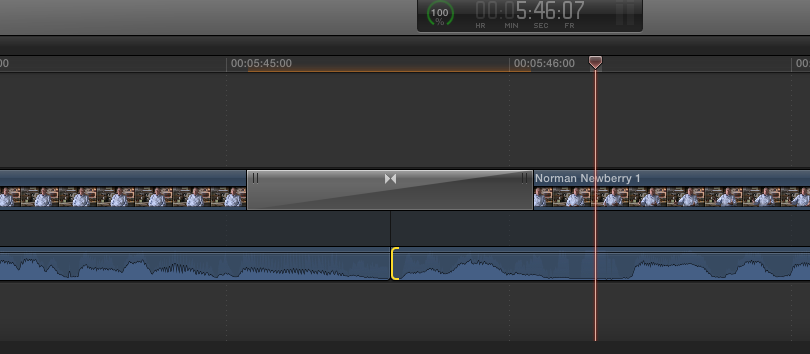
Photo 4: I have used the trim tool to correct the audio overlap and make it a straight audio cut once again. And this is the EXTRA step that is working against me.
So to sum up:
I like to put in picture dissolves "as I edit" so I can get a sense of what the visual transition looks like, but I would also like to retain the straight audio cut without FCPX changing it on me when I go to make adjustments to the other end of the clip (which the act of razor blading seems to do).
Any suggestions on how I can work in a more friendlier way with FCPX?
Thanks, John
I feel that in my workflow something must be wrong because FCPX 10.1.3 seems to be creating extra cleanup work for me. So rather than bang my head against the wall, I took some screen snapshots and hopefully others can chime in on how I can alter my workflow so things would be less work steps and more FCPX user friendly.
Photo 1: shows an edit that I've made with a dissolve on the picture track and a straight audio cut underneath it. By doing this edit in the expanded view, and not collapsed clip view…the straight cut will not become an audio dissolve. Also, but not shown in the photo, I would add one frame (or less) audio fades on either side of the cut to hide any "pop."
Photo 2: moving down to the end of the soundbite, I've used the razor blade tool to make a cut at the tail end…and soon as I did that the audio track to the clip I've been working moved further south by 1 lane…why? The answer is in the next photo.
Photo 3: as you an see, we are now back at the head of the clip and FCPX has automatically extended the audio handle here. It's seeing the picture dissolve above…and is trying to create an audio overlap (which I don't want…and the overlap is why the clip moved down one lane). The audio transition is now not workable for the cut.
Photo 4: I have used the trim tool to correct the audio overlap and make it a straight audio cut once again. And this is the EXTRA step that is working against me.
So to sum up:
I like to put in picture dissolves "as I edit" so I can get a sense of what the visual transition looks like, but I would also like to retain the straight audio cut without FCPX changing it on me when I go to make adjustments to the other end of the clip (which the act of razor blading seems to do).
Any suggestions on how I can work in a more friendlier way with FCPX?
Thanks, John
Last edit: 03 Oct 2014 00:52 by jvasey. Reason: wrong FCPX version number
Please Log in to join the conversation.
- ronny courtens
-

- Offline
- Moderator
-

Less
More
- Posts: 4455
- Thank you received: 962
05 Oct 2014 17:02 #53674
by ronny courtens
Replied by ronny courtens on topic issue with interview picture dissolves and straight audio cuts
Hey John,
Your workflow is correct, this should not happen. Good catch, and do report this to Apple using the Feedback page. Give a small description of the problem and paste a link to this thread so they can see the screenshots.
- Ronny
Your workflow is correct, this should not happen. Good catch, and do report this to Apple using the Feedback page. Give a small description of the problem and paste a link to this thread so they can see the screenshots.
- Ronny
Please Log in to join the conversation.
05 Oct 2014 22:29 #53682
by jvasey
Replied by jvasey on topic issue with interview picture dissolves and straight audio cuts
Thanks, Ronny…I will be reporting this bug to Apple today. And I appreciate hearing back that you agree FCPX is not functioning correctly regarding this issue. Hopefully Apple can correct it in the next update or two…John
Please Log in to join the conversation.
