


- Posts: 4
- Thank you received: 0
3 Post Moderation Rule for New Boarders (25 Jan 2021)
New boarders will have their posts moderated - Don't worry if you cannot see your post immediately.
Problems importing video from GoPro Camera to FCPX
- fb_1375492789
-
 Topic Author
- Offline
- New Member
-

Less
More
26 Sep 2014 14:29 - 26 Sep 2014 14:36 #53252
by fb_1375492789
Problems importing video from GoPro Camera to FCPX was created by fb_1375492789
Lately, I have developed a problem when I try to import files to a FCPX library directly from my GoPro 3 Black camera. I have sporadic problems whether I try to import parts of a clip or the entire clip. Everything seem to perform normally until I see the clip in the library. See the first attached photo.
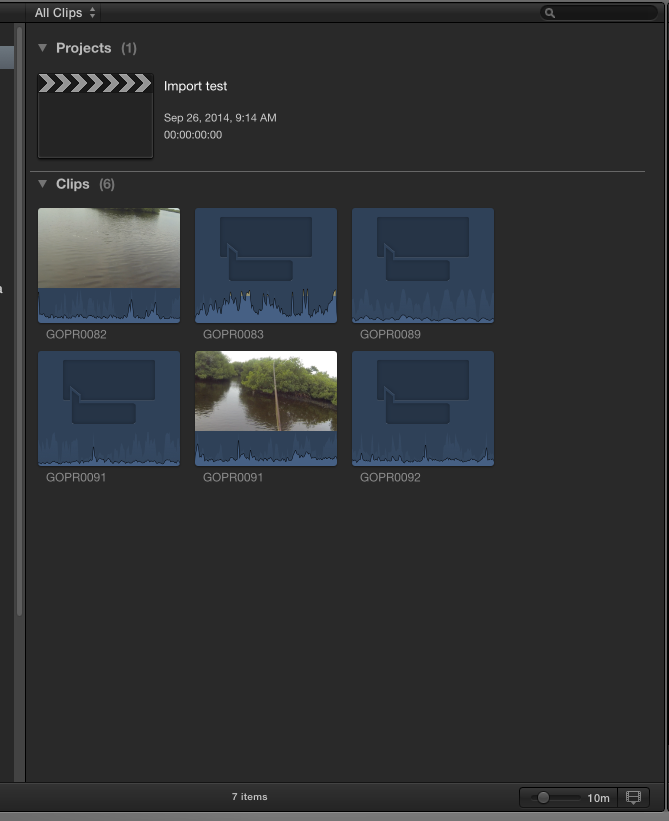
Some appear normally and others have this blue box and what looks like a waveform. When I try to skim or play the clip nothing shows and there is no sound.
I can append it to the story line, but again nothing shows and there is a red bar above the clip. See second attachment.
I can play the clip that doesn't have the red bar, but I can't skim it unless I park the cursor over the clip and click it. See next two attachments.

I went to the library in finder and the clips do not appear to be corrupted. I can play them if I "show contents" in the library. I copied them, moved them to another folder and then imported them again and they show up normally in FCPX and act normally. See Last attachment.
Any ideas?
Some appear normally and others have this blue box and what looks like a waveform. When I try to skim or play the clip nothing shows and there is no sound.
I can append it to the story line, but again nothing shows and there is a red bar above the clip. See second attachment.
I can play the clip that doesn't have the red bar, but I can't skim it unless I park the cursor over the clip and click it. See next two attachments.
I went to the library in finder and the clips do not appear to be corrupted. I can play them if I "show contents" in the library. I copied them, moved them to another folder and then imported them again and they show up normally in FCPX and act normally. See Last attachment.
Any ideas?
Last edit: 26 Sep 2014 14:36 by fb_1375492789. Reason: attachment didn't show
Please Log in to join the conversation.
- ronny courtens
-

- Offline
- Moderator
-

Less
More
- Posts: 4455
- Thank you received: 962
26 Sep 2014 16:12 - 26 Sep 2014 16:13 #53268
by ronny courtens
Replied by ronny courtens on topic Problems importing video from GoPro Camera to FCPX
Hi Dan, welcome to the forum.
It's always better to import GoPro footage from the card reader instead of straight from the camera. This is from an earlier thread on the forum:
If you import from the camera and you have these issues, this is what GoPro support has to say about this:
"In some cases you may be able to work around that by quitting Final Cut Pro X and reconnecting the camera before re-opening FCPX."
Steve D
GoPro Support
- Ronny
It's always better to import GoPro footage from the card reader instead of straight from the camera. This is from an earlier thread on the forum:
If you import from the camera and you have these issues, this is what GoPro support has to say about this:
"In some cases you may be able to work around that by quitting Final Cut Pro X and reconnecting the camera before re-opening FCPX."
Steve D
GoPro Support
- Ronny
Last edit: 26 Sep 2014 16:13 by ronny courtens.
Please Log in to join the conversation.
- fb_1375492789
-
Topic Author
- Offline
- New Member
-
Less
More
- Posts: 4
- Thank you received: 0
27 Sep 2014 14:42 #53306
by fb_1375492789
Replied by fb_1375492789 on topic Problems importing video from GoPro Camera to FCPX
I shot some new video and tried to import from a card reader and had exactly the same problem. Same blue boxes and no video is viewable. When I go to finder to look at the file in the library, I can open it and it plays just like the segment I tried to import.
I can drag the video file into FCPX and everything imports. However, the problem is I have to import the entire clip.
Another interesting thing, to me anyway, is that once I have tried to import a segment, it won't show up in the import window anymore, even if I eject the card, turn off FCPX and then reinsert the card, start final cut and go to import. FCPX seems to know that it imported it (even though it really didn't.)
The only work around I can find is to cut the video in the GoPro app and then import it, but that is REALLY a hassle.
I can drag the video file into FCPX and everything imports. However, the problem is I have to import the entire clip.
Another interesting thing, to me anyway, is that once I have tried to import a segment, it won't show up in the import window anymore, even if I eject the card, turn off FCPX and then reinsert the card, start final cut and go to import. FCPX seems to know that it imported it (even though it really didn't.)
The only work around I can find is to cut the video in the GoPro app and then import it, but that is REALLY a hassle.
Please Log in to join the conversation.
- mobiletaylor
-
- Offline
- Elite Member
-

Less
More
- Posts: 181
- Thank you received: 6
27 Sep 2014 14:50 #53307
by mobiletaylor
Replied by mobiletaylor on topic Problems importing video from GoPro Camera to FCPX
Did you try the workaround from this thread? Just curious if it works for you.
www.fcp.co/forum/4-final-cut-pro-x-fcpx/...x-and-gopro-problems
www.fcp.co/forum/4-final-cut-pro-x-fcpx/...x-and-gopro-problems
Please Log in to join the conversation.
- fb_1375492789
-
Topic Author
- Offline
- New Member
-
Less
More
- Posts: 4
- Thank you received: 0
27 Sep 2014 16:43 #53311
by fb_1375492789
Replied by fb_1375492789 on topic Problems importing video from GoPro Camera to FCPX
That does work. I had tried it previously, opening the library in finder, copying the files to another folder and importing them. Still a stupid  way to run a railroad.
BTW I am importing 120fps and using a GoPro Hero 3 Black not the 3+
Never had the problem until the last week. The only thing different is there was an operating system update
way to run a railroad.BTW I am importing 120fps and using a GoPro Hero 3 Black not the 3+
Never had the problem until the last week. The only thing different is there was an operating system update
Please Log in to join the conversation.
