


- Posts: 233
- Thank you received: 6
3 Post Moderation Rule for New Boarders (25 Jan 2021)
New boarders will have their posts moderated - Don't worry if you cannot see your post immediately.
SD Widescreen Export Settings
- damiangrady
-
 Topic Author
- Offline
- Elite Member
-

Less
More
26 Sep 2014 13:02 #53240
by damiangrady
SD Widescreen Export Settings was created by damiangrady
Hi there,
Hope someone can help me.
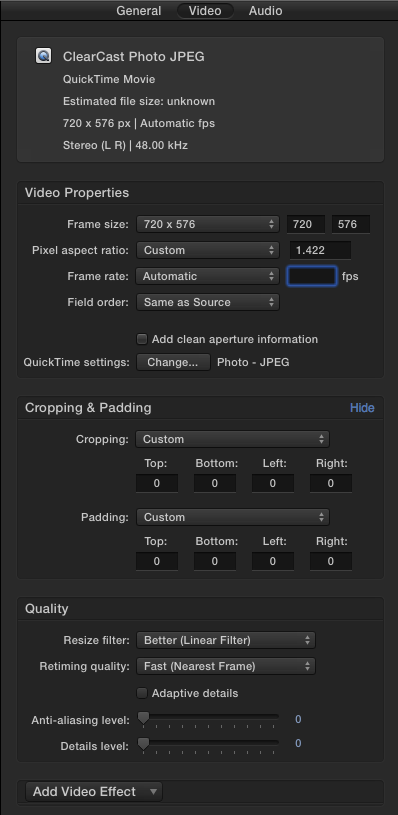
I need to export from a 1920 x 1080 FCPX to a 720 x 576 PAL Widescreen format in PhotoJPEG.
I have been into Compressor and set up a new preset putting the frame size as 720 x 576 with a pixel aspect ration of 1.422 but it keeps coming out at 4:3 when played in Quicktime Player.
Am I doing something wrong here?
Hope someone can help me.
I need to export from a 1920 x 1080 FCPX to a 720 x 576 PAL Widescreen format in PhotoJPEG.
I have been into Compressor and set up a new preset putting the frame size as 720 x 576 with a pixel aspect ration of 1.422 but it keeps coming out at 4:3 when played in Quicktime Player.
Am I doing something wrong here?
Please Log in to join the conversation.
- ronny courtens
-

- Offline
- Moderator
-

Less
More
- Posts: 4455
- Thank you received: 962
26 Sep 2014 16:03 #53265
by ronny courtens
Replied by ronny courtens on topic SD Widescreen Export Settings
Hi Damian,
QT player 7 has the nasty habit of displaying anamorphic widescreen video as squished 4:3.
You can correct this in QT7 by opening the Movie Properties of the file (CMD+J), changing the "Scaled Size" value to read 1024 x 576, and saving the file. This change only affects how the file will display in "old technology" apps like QT 7 since this field value is ignored by "new technology" apps like QT X when playing the file.
BUT: you can also avoid this entirely by changing the export settings in Compressor.
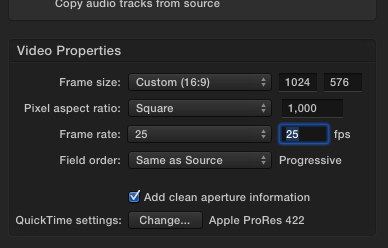
Set Pixel Aspect Ratio to "Square" and Frame Size to 1024 x 576. This will create a true square pixel widescreen SD format that will display correctly in any player:
- Ronny
QT player 7 has the nasty habit of displaying anamorphic widescreen video as squished 4:3.
You can correct this in QT7 by opening the Movie Properties of the file (CMD+J), changing the "Scaled Size" value to read 1024 x 576, and saving the file. This change only affects how the file will display in "old technology" apps like QT 7 since this field value is ignored by "new technology" apps like QT X when playing the file.
BUT: you can also avoid this entirely by changing the export settings in Compressor.
Set Pixel Aspect Ratio to "Square" and Frame Size to 1024 x 576. This will create a true square pixel widescreen SD format that will display correctly in any player:
- Ronny
Please Log in to join the conversation.
