


- Posts: 6
- Thank you received: 0
3 Post Moderation Rule for New Boarders (25 Jan 2021)
New boarders will have their posts moderated - Don't worry if you cannot see your post immediately.
Have the XML reference optimized media files
25 Sep 2014 23:45 #53206
by mrchikita
Have the XML reference optimized media files was created by mrchikita
Hello everybody,
i'm having an issue with xml export. For some reason the xml is only referencing the original media files rather than the optimized ones. Is there a way to change this?
cheers
Michael
i'm having an issue with xml export. For some reason the xml is only referencing the original media files rather than the optimized ones. Is there a way to change this?
cheers
Michael
Please Log in to join the conversation.
- ronny courtens
-

- Offline
- Moderator
-

Less
More
- Posts: 4455
- Thank you received: 962
26 Sep 2014 06:55 #53225
by ronny courtens
Replied by ronny courtens on topic Have the XML reference optimized media files
Hello Michael.
XML is used for sending your FCP X projects to other applications (for compositing, audio sweetening, grading,...) and back. So you always want an exported XML to reference the original media. Optimized and Proxy media are only created to improve playback while you are editing inside FCP X.
Just an example: you work with original raw R3D files and you optimize them to ProRes to get better playback in FCP X while editing. When you export an XML of your project for final grading in Resolve you will want your colorist to work with the raw files, right?
So why would you want an XML that references files that are only created to improve playback while editing?
- Ronny
XML is used for sending your FCP X projects to other applications (for compositing, audio sweetening, grading,...) and back. So you always want an exported XML to reference the original media. Optimized and Proxy media are only created to improve playback while you are editing inside FCP X.
Just an example: you work with original raw R3D files and you optimize them to ProRes to get better playback in FCP X while editing. When you export an XML of your project for final grading in Resolve you will want your colorist to work with the raw files, right?
So why would you want an XML that references files that are only created to improve playback while editing?
- Ronny
Please Log in to join the conversation.
26 Sep 2014 07:07 #53226
by mrchikita
Replied by mrchikita on topic Have the XML reference optimized media files
Thanks Ronny,
makes sense but i have a project from lower quality original files that i didn't copy over assuming that encoding them into prores will for sure not reduce the quality compared to the original media. now i don't have the original media available anymore so the only files that there are to reference to would be the optimized ones.
cheers
Michael
makes sense but i have a project from lower quality original files that i didn't copy over assuming that encoding them into prores will for sure not reduce the quality compared to the original media. now i don't have the original media available anymore so the only files that there are to reference to would be the optimized ones.
cheers
Michael
Please Log in to join the conversation.
- ronny courtens
-
- Offline
- Moderator
-
Less
More
- Posts: 4455
- Thank you received: 962
26 Sep 2014 07:14 #53227
by ronny courtens
Replied by ronny courtens on topic Have the XML reference optimized media files
Ah, I see. I'm sure this can be done. Let me do a little test and I will come back to you in a few minutes.
- Ronny
- Ronny
Please Log in to join the conversation.
26 Sep 2014 07:30 #53228
by mrchikita
Replied by mrchikita on topic Have the XML reference optimized media files
Thank you Ronny. It would be amazing if this would be possible. I already tried to edit the xml by hand but than it comes down to filenames as the original media is not always a .mov file but something else. So if there would be an automated way for this it would be great.
cheers
Michael
cheers
Michael
Please Log in to join the conversation.
- ronny courtens
-
- Offline
- Moderator
-
Less
More
- Posts: 4455
- Thank you received: 962
26 Sep 2014 07:46 #53229
by ronny courtens
Replied by ronny courtens on topic Have the XML reference optimized media files
I think I have found a way, but just to be sure that my test project is exactly the same as your project:
- You are working with FCP X 10.1.3.
- You have imported the low-res media using "leave files in place", you have created optimized media, then you have deleted the low-res media.
- Your project opens in FCP X with only the optimized media and you see all the clips in your browser window, there are no offline clips.
Is that correct?
- Ronny
- You are working with FCP X 10.1.3.
- You have imported the low-res media using "leave files in place", you have created optimized media, then you have deleted the low-res media.
- Your project opens in FCP X with only the optimized media and you see all the clips in your browser window, there are no offline clips.
Is that correct?
- Ronny
Please Log in to join the conversation.
26 Sep 2014 08:20 #53230
by mrchikita
Replied by mrchikita on topic Have the XML reference optimized media files
Yes. Exactly this setup.
Cheers
Michael
Cheers
Michael
Please Log in to join the conversation.
- ronny courtens
-
- Offline
- Moderator
-
Less
More
- Posts: 4455
- Thank you received: 962
26 Sep 2014 09:24 #53233
by ronny courtens
Replied by ronny courtens on topic Have the XML reference optimized media files
Great. Here we go:
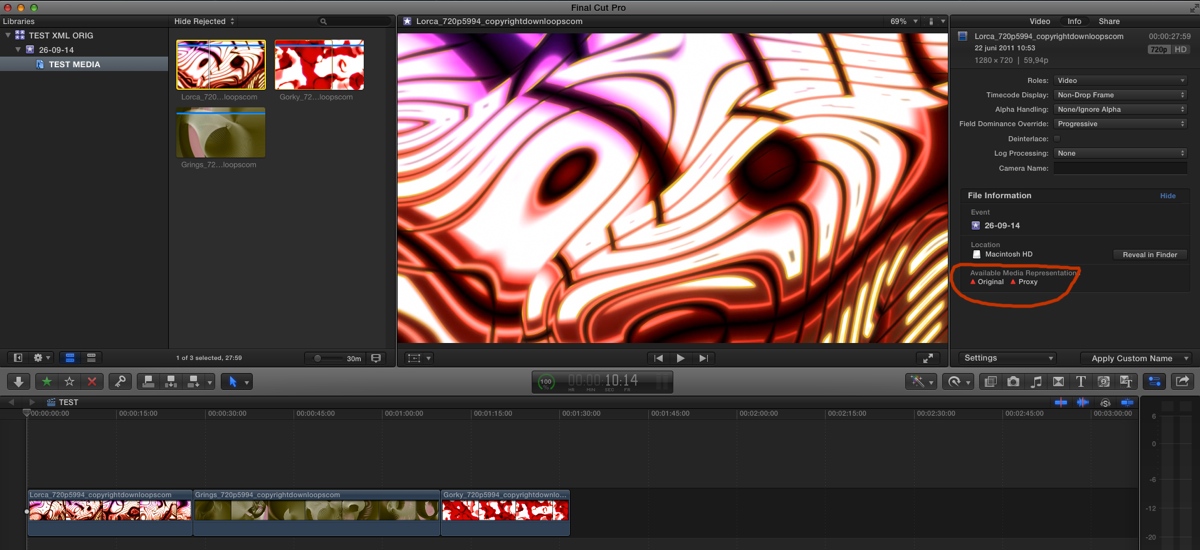
Here you see an FCP X project where I have imported 3 clips using "leave files in place". I have optimized the media and then I have deleted the folder from which I have imported the original media. My project works perfectly with only the optimized media. As you can see in the Inspector I don't have any original media available:
Now we are going to replace the missing original media with the optimized media.
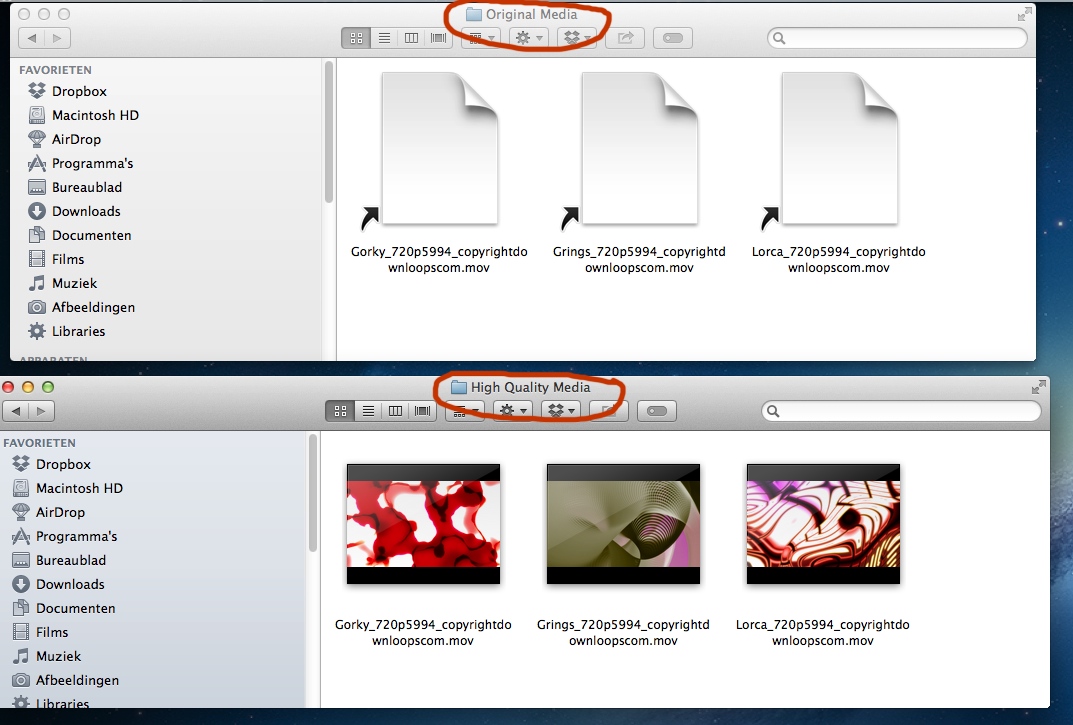
A. Close FCP X. Locate the Library in Finder, R-click the Library and choose "Show Package Contents". Open the Event folder, then open the Original Media folder and the Transcoded Media > High Quality Media folder in separate Finder windows:
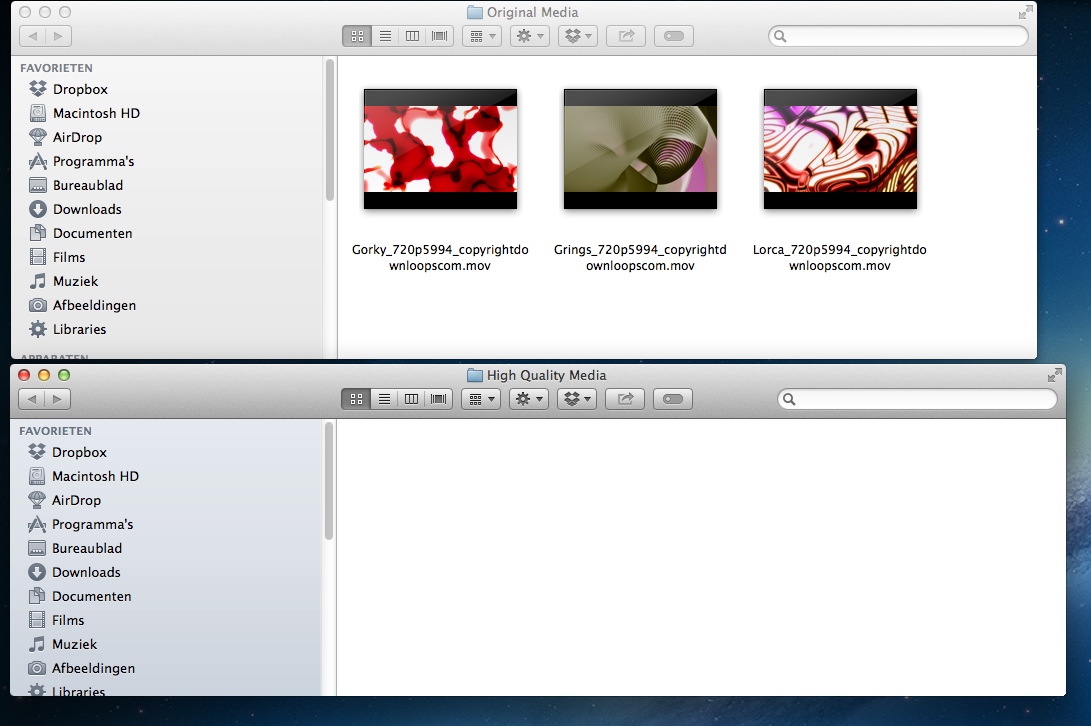
B. Delete the symbolic links from the Original Media folder (they are useless anyway as the media they are referencing is gone). Then drag the clips from the High Quality Media folder over to the Original Media folder:
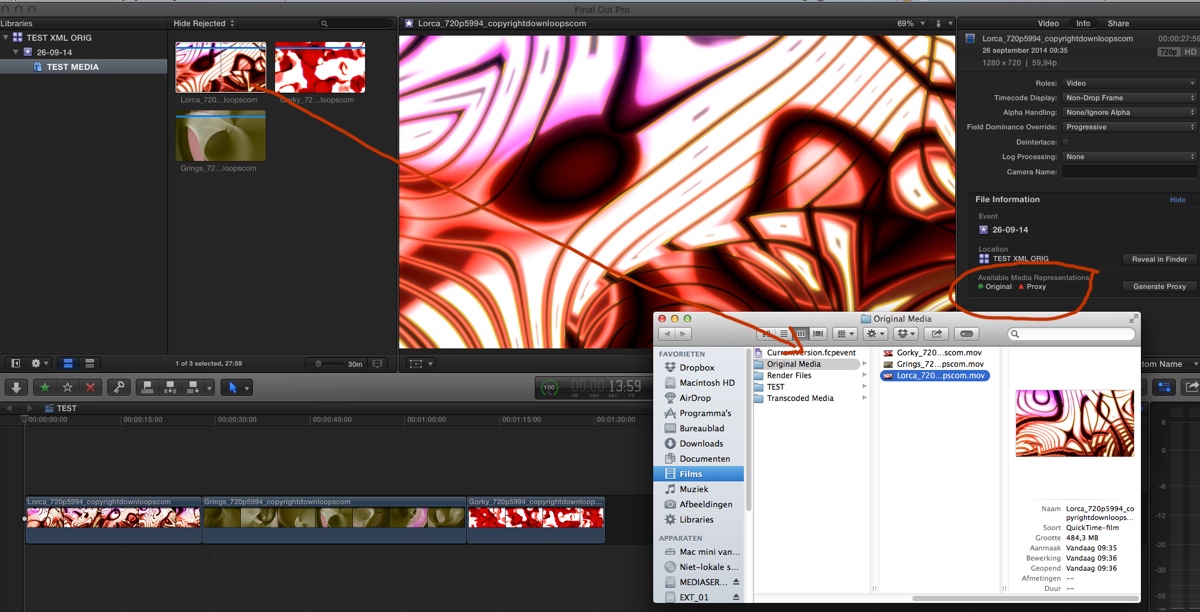
C. Close the Finder windows and open FCP X. As you can see the project works fine and in the Inspector I now have a green dot next to Original Media, indicating that my formerly optimized ProRes files are now the Original Media for this project. When I select a clip in the Browser and I click Reveal in Finder you can see the clip references the ProRes file in the Original Media folder:
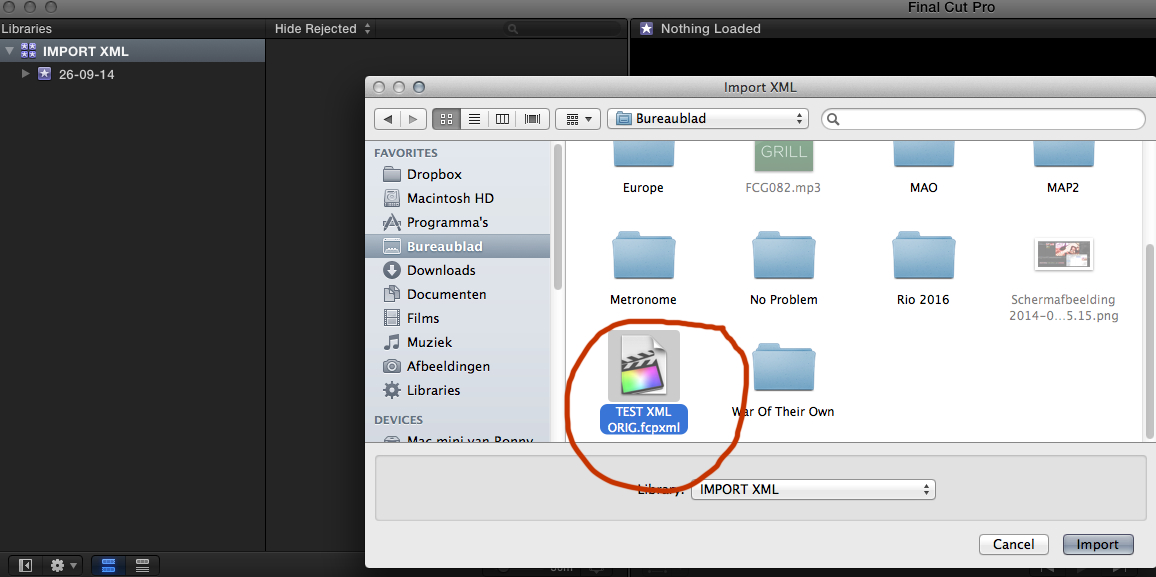
Now we do a final test to see if the XML export works. I export a Library XML, I create a new Library and I import the XML into the new Library:
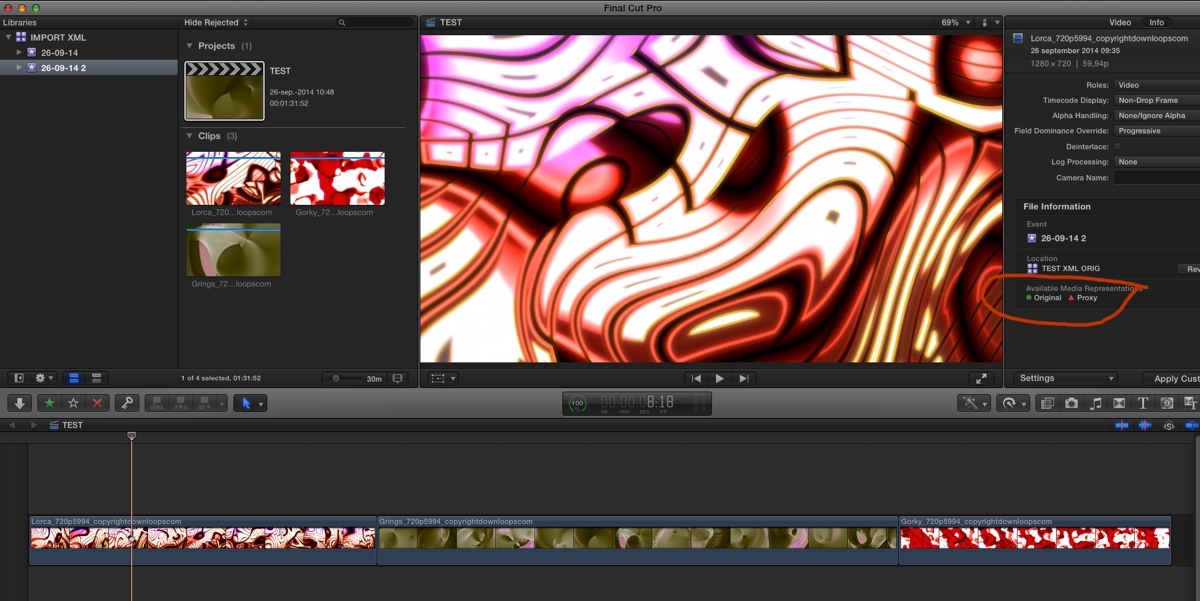
The project opens with all media available as original media:
- Ronny
Here you see an FCP X project where I have imported 3 clips using "leave files in place". I have optimized the media and then I have deleted the folder from which I have imported the original media. My project works perfectly with only the optimized media. As you can see in the Inspector I don't have any original media available:
Now we are going to replace the missing original media with the optimized media.
A. Close FCP X. Locate the Library in Finder, R-click the Library and choose "Show Package Contents". Open the Event folder, then open the Original Media folder and the Transcoded Media > High Quality Media folder in separate Finder windows:
B. Delete the symbolic links from the Original Media folder (they are useless anyway as the media they are referencing is gone). Then drag the clips from the High Quality Media folder over to the Original Media folder:
C. Close the Finder windows and open FCP X. As you can see the project works fine and in the Inspector I now have a green dot next to Original Media, indicating that my formerly optimized ProRes files are now the Original Media for this project. When I select a clip in the Browser and I click Reveal in Finder you can see the clip references the ProRes file in the Original Media folder:
Now we do a final test to see if the XML export works. I export a Library XML, I create a new Library and I import the XML into the new Library:
The project opens with all media available as original media:
- Ronny
Please Log in to join the conversation.
26 Sep 2014 09:43 #53235
by mrchikita
Replied by mrchikita on topic Have the XML reference optimized media files
Hey Ronny,
amazing. Thank you so much. Will try this out frist thing when i come home.
cheers
Michael
amazing. Thank you so much. Will try this out frist thing when i come home.
cheers
Michael
Please Log in to join the conversation.
