


- Posts: 238
- Thank you received: 20
3 Post Moderation Rule for New Boarders (25 Jan 2021)
New boarders will have their posts moderated - Don't worry if you cannot see your post immediately.
Change in orientation
- Squamish ed
-
 Topic Author
- Offline
- Elite Member
-

Less
More
24 Sep 2014 03:27 #53127
by Squamish ed
Ed
Change in orientation was created by Squamish ed
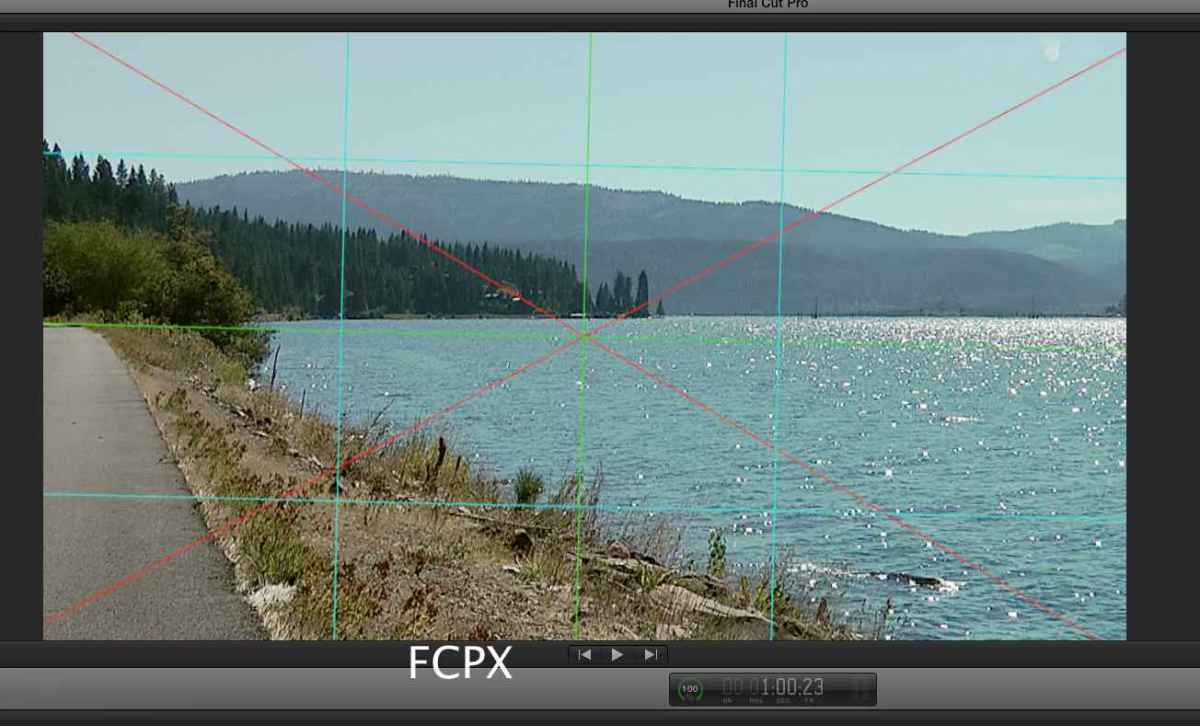
I made a grid in Motion as an effect and then used it in FCPX.
When I made it I used Motion's grid and the guides were active too. When I apply it in FCPX the grid has rotated clockwise a couple of degrees. I've attached screenshots. Anyone have any thoughts about what I did that induced the rotation?
When I made it I used Motion's grid and the guides were active too. When I apply it in FCPX the grid has rotated clockwise a couple of degrees. I've attached screenshots. Anyone have any thoughts about what I did that induced the rotation?
Ed
Please Log in to join the conversation.
- Squamish ed
-
Topic Author
- Offline
- Elite Member
-
Less
More
- Posts: 238
- Thank you received: 20
24 Sep 2014 10:38 #53135
by lichinho
Replied by lichinho on topic Change in orientation
Both your screenshots are the same and show what you see in FCP X.
You should describe in some detail how you created this in Motion.
You should describe in some detail how you created this in Motion.
Please Log in to join the conversation.

24 Sep 2014 12:30 #53136
by BenB
Replied by BenB on topic Change in orientation
Need a screen shot of the same grid in Motion (on the same clip).
Please Log in to join the conversation.
- Squamish ed
-
Topic Author
- Offline
- Elite Member
-
Less
More
- Posts: 238
- Thank you received: 20
24 Sep 2014 22:24 #53150
by Squamish ed
Ed
Replied by Squamish ed on topic Change in orientation
Ben & lichinho - sorry for the mixup & delay. My router died during my attempts at posting. After endless troubleshooting and 2 routers I'm finally online again.
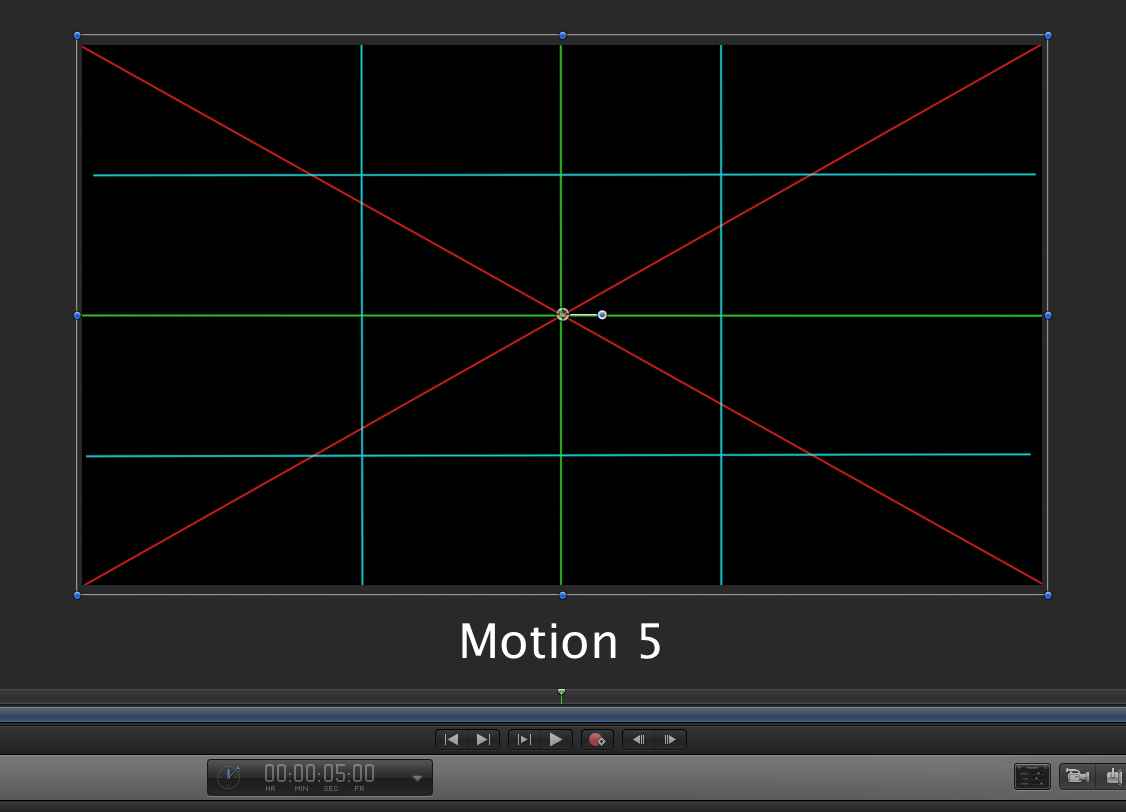
Here (I hope) are the 2 images.
Here (I hope) are the 2 images.
Ed
Please Log in to join the conversation.
25 Sep 2014 00:15 #53151
by BenB
Replied by BenB on topic Change in orientation
Did you publish the rotation parameter?
Please Log in to join the conversation.
- Andreas Kiel
-
- Offline
- Platinum Member
-

Less
More
- Posts: 1077
- Thank you received: 189
25 Sep 2014 00:37 #53154
by Andreas Kiel
Replied by Andreas Kiel on topic Change in orientation
I think Ben gave the right hint,
The screenshot is taken from the middle of the timeline.
Go to the start and look how the rotation is setup there.
- Andreas
The screenshot is taken from the middle of the timeline.
Go to the start and look how the rotation is setup there.
- Andreas
Please Log in to join the conversation.
- Squamish ed
-
Topic Author
- Offline
- Elite Member
-
Less
More
- Posts: 238
- Thank you received: 20
25 Sep 2014 03:12 - 25 Sep 2014 03:13 #53157
by Squamish ed
Ed
Replied by Squamish ed on topic Change in orientation
I did publish the rotation in Motion but it rotates the BG image under the effect too. Seeing that I did it again as a generator. What I found was that the grid was still off axis and there was a fair bit of latitude between 0º and 1º or -1º. The grid could be a noticeable amount off in either direction and still read 0º in Motion. I didn't see any away to correct in fractions of a degree. In this case that would have allowed me to get by.
In the attached examples you can see that in Motion the end points are ~5 pixels off at either end. The last image shows detail of this overlaid on the background in FCPX with 2 variations that both show as 0º when I use transform to rotate. In both cases the apps showed the line as being horizontal.
In the attached examples you can see that in Motion the end points are ~5 pixels off at either end. The last image shows detail of this overlaid on the background in FCPX with 2 variations that both show as 0º when I use transform to rotate. In both cases the apps showed the line as being horizontal.
Ed



Last edit: 25 Sep 2014 03:13 by Squamish ed. Reason: edited to remove duplicate image
Please Log in to join the conversation.
- Squamish ed
-
Topic Author
- Offline
- Elite Member
-
Less
More
- Posts: 238
- Thank you received: 20
25 Sep 2014 03:31 #53158
by Squamish ed
Ed
Replied by Squamish ed on topic Change in orientation
I think this image will explain the problem more clearly than I've managed.
The top half shows the line aligned to the grid and the lower half. On the control points Y is +11.9 and -17.7. The lower half shows the line with control points Y at 0º. It appears the grid in Motion is significantly off in my copy. Could someone check if this happens in theirs too?
Thanks.
The top half shows the line aligned to the grid and the lower half. On the control points Y is +11.9 and -17.7. The lower half shows the line with control points Y at 0º. It appears the grid in Motion is significantly off in my copy. Could someone check if this happens in theirs too?
Thanks.
Ed

Please Log in to join the conversation.
25 Sep 2014 09:50 #53166
by lichinho
Replied by lichinho on topic Change in orientation
If you want horizontal lines, why do the control points not have the same Y coordinate?
Either change them in the inspector, or simply draw a line holding the Shift key to make it horizontal.
Either change them in the inspector, or simply draw a line holding the Shift key to make it horizontal.
Please Log in to join the conversation.
