


- Posts: 7
- Thank you received: 0
3 Post Moderation Rule for New Boarders (25 Jan 2021)
New boarders will have their posts moderated - Don't worry if you cannot see your post immediately.
MULTICAM!!!!
- zachbeckett
-
 Topic Author
- Offline
- New Member
-

Less
More
23 Sep 2014 06:22 #53067
by zachbeckett
MULTICAM!!!! was created by zachbeckett
Hi folks...
I've got a confounding problem I've never before encountered with multicam. I'm hoping someone can help!!
I've imported a significant amount of footage into the Angle Editor, synched everything and it is all viewable in the Angle Viewer. Everything seems fine. However, when I drop the multicam clip into the timeline, there is neither video nor audio. The track is completely black!!
I can't figure out what is causing this. (BTW, I have created both proxy and optimized media.)
Here are a few clues:
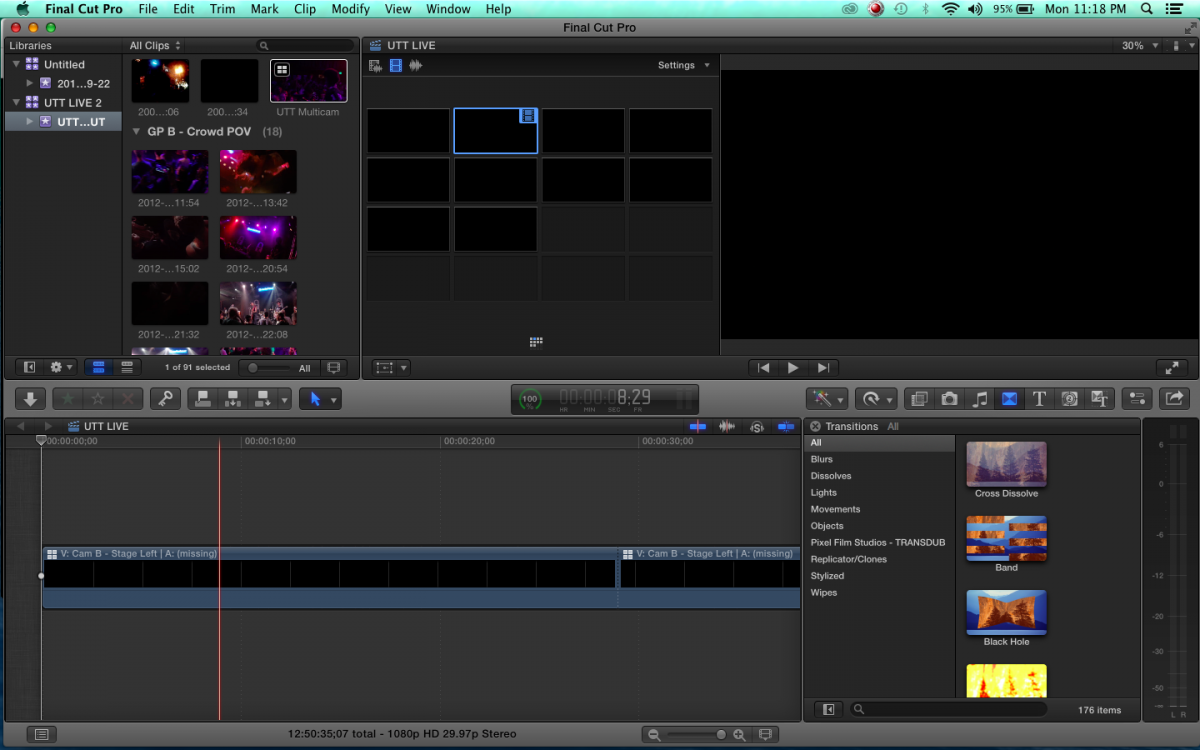
1) in the Angle Viewer, even though I can see the actual clip, there is this word after the name of the clip: (missing) . But I can see the clip when I'm in the Angle Viewer, just not when I drop the multicam clip into the timeline. (See the first screen capture.) And note that when I mouse over teh multicam clip, all the footage appears normally in the Angle Viewer. (Screen Cap #2)
2) I've thought it may have something to do with the fact that when I first created the Library, Event and Project, I set it up on my External Passport drive, instead of locally, due to its huge file size. Thoughts?
3) In the Angle Editor, I clicked on the name of the track and renamed it to make more sense. Does this renaming affect the way fcpx references the original ftg? I wouldn't think so, but I'm trying to think of anything that could be causing the issue.
4) There are eleven individual camera angles, each with five or so clips on its individual timeline. (The cameras were restarted, causing each clip to need to be re-synched.) Any chance this could be causing issues?
When I brought in the footage, fcpx automatically grouped the clips according to the folders they were in that corresponded to each camera name. (I didn't change the original clip names.)
I really need help with this one folks. If I have to start over, it will be insanely awful! Help. Please!
I've got a confounding problem I've never before encountered with multicam. I'm hoping someone can help!!
I've imported a significant amount of footage into the Angle Editor, synched everything and it is all viewable in the Angle Viewer. Everything seems fine. However, when I drop the multicam clip into the timeline, there is neither video nor audio. The track is completely black!!
I can't figure out what is causing this. (BTW, I have created both proxy and optimized media.)
Here are a few clues:
1) in the Angle Viewer, even though I can see the actual clip, there is this word after the name of the clip: (missing) . But I can see the clip when I'm in the Angle Viewer, just not when I drop the multicam clip into the timeline. (See the first screen capture.) And note that when I mouse over teh multicam clip, all the footage appears normally in the Angle Viewer. (Screen Cap #2)
2) I've thought it may have something to do with the fact that when I first created the Library, Event and Project, I set it up on my External Passport drive, instead of locally, due to its huge file size. Thoughts?
3) In the Angle Editor, I clicked on the name of the track and renamed it to make more sense. Does this renaming affect the way fcpx references the original ftg? I wouldn't think so, but I'm trying to think of anything that could be causing the issue.
4) There are eleven individual camera angles, each with five or so clips on its individual timeline. (The cameras were restarted, causing each clip to need to be re-synched.) Any chance this could be causing issues?
When I brought in the footage, fcpx automatically grouped the clips according to the folders they were in that corresponded to each camera name. (I didn't change the original clip names.)
I really need help with this one folks. If I have to start over, it will be insanely awful! Help. Please!
Please Log in to join the conversation.
- ronny courtens
-

- Offline
- Moderator
-

Less
More
- Posts: 4455
- Thank you received: 962
23 Sep 2014 12:10 #53071
by ronny courtens
Replied by ronny courtens on topic MULTICAM!!!!
Hey Zack, welcome to the forum.
Sorry to hear about this problem. Could you try to re-attach the screenshots so we can see what's actually happening? Screenshots are best added as jpegs and they should not exceed 300 kB.
- Ronny
Sorry to hear about this problem. Could you try to re-attach the screenshots so we can see what's actually happening? Screenshots are best added as jpegs and they should not exceed 300 kB.
- Ronny
Please Log in to join the conversation.
- zachbeckett
-
Topic Author
- Offline
- New Member
-
Less
More
- Posts: 7
- Thank you received: 0
23 Sep 2014 16:29 #53091
by zachbeckett
Hi Ronny...
Thanks for responding. Here are the screen caps. Any help would be greatly appreciated.
Replied by zachbeckett on topic MULTICAM!!!!
Hi Ronny...
Thanks for responding. Here are the screen caps. Any help would be greatly appreciated.
Please Log in to join the conversation.

23 Sep 2014 17:19 #53094
by BenB
Replied by BenB on topic MULTICAM!!!!
How about one of this multiclip in the Angel Editor?
Please Log in to join the conversation.
- ronny courtens
-
- Offline
- Moderator
-
Less
More
- Posts: 4455
- Thank you received: 962
23 Sep 2014 17:21 #53097
by ronny courtens
Replied by ronny courtens on topic MULTICAM!!!!
I have seen this in earlier versions of FCP X but never again since 10.1.
It looks like your multi cam clip is referencing a different Event than the clips that are inside it. Have you been copying this multi cam clip over from an Event on a different drive?
- Ronny
It looks like your multi cam clip is referencing a different Event than the clips that are inside it. Have you been copying this multi cam clip over from an Event on a different drive?
- Ronny
Please Log in to join the conversation.
- zachbeckett
-
Topic Author
- Offline
- New Member
-
Less
More
- Posts: 7
- Thank you received: 0
23 Sep 2014 19:45 #53108
by zachbeckett
Replied by zachbeckett on topic MULTICAM!!!!
I built this in version 10.1. Thinking an upgrade may fix the problem, I installed 10.1.3. No change. It is exactly the same.
When I created the project, I created the Library, the Event and the Project all on an external drive. I then imported footage, let x create both proxies and optimized media overnight, which it did without issue.
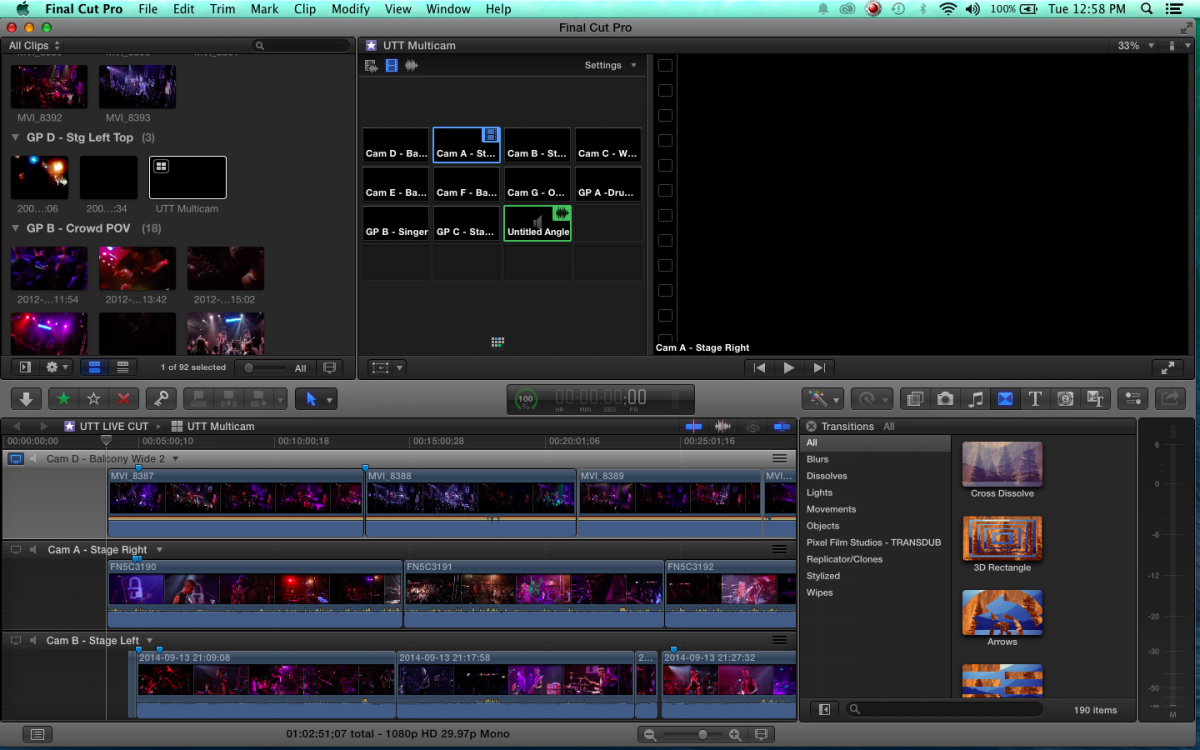
Here is a screenshot of the Angle editor. Note that each track consists of multiple synched clips:
and here is a screenshot that shows the way in which the footage in the Angle Viewers only appears when I mouse over the multicam thumbnail int eh clips window.
I have also tried uninstalling/reinstalling the program, and trashing the preferences, both to no avail.
I'm at a loss.
When I created the project, I created the Library, the Event and the Project all on an external drive. I then imported footage, let x create both proxies and optimized media overnight, which it did without issue.
Here is a screenshot of the Angle editor. Note that each track consists of multiple synched clips:
and here is a screenshot that shows the way in which the footage in the Angle Viewers only appears when I mouse over the multicam thumbnail int eh clips window.
I have also tried uninstalling/reinstalling the program, and trashing the preferences, both to no avail.
I'm at a loss.
Please Log in to join the conversation.
- zachbeckett
-
Topic Author
- Offline
- New Member
-
Less
More
- Posts: 7
- Thank you received: 0
23 Sep 2014 19:47 #53109
by zachbeckett
Replied by zachbeckett on topic MULTICAM!!!!
Here are the screencaps again:
Please Log in to join the conversation.
- ronny courtens
-
- Offline
- Moderator
-
Less
More
- Posts: 4455
- Thank you received: 962
23 Sep 2014 19:48 #53110
by ronny courtens
Replied by ronny courtens on topic MULTICAM!!!!
So you created the project on an external drive, you created the multi cam clip in that project and then you have moved everything to another drive?
Your screenshots are no appearing.
- Ronny
Your screenshots are no appearing.
- Ronny
Please Log in to join the conversation.
- zachbeckett
-
Topic Author
- Offline
- New Member
-
Less
More
- Posts: 7
- Thank you received: 0
23 Sep 2014 19:49 #53111
by zachbeckett
Replied by zachbeckett on topic MULTICAM!!!!
No, I created this in the original event I created when I created the library. In an attempt to troubleshoot, I created a new event later and moved the multicam into that event, but it was the same. I then moved the multicam back into its original event.
Please Log in to join the conversation.
- zachbeckett
-
Topic Author
- Offline
- New Member
-
Less
More
- Posts: 7
- Thank you received: 0
23 Sep 2014 19:59 #53112
by zachbeckett
Replied by zachbeckett on topic MULTICAM!!!!
Sorry, to clarify: I created everything (Library, Event and Project) on an external drive that also contains all the original media.
And I have no clue why the screencaps are not attaching. Here's another try:
And I have no clue why the screencaps are not attaching. Here's another try:
Please Log in to join the conversation.
- ronny courtens
-
- Offline
- Moderator
-
Less
More
- Posts: 4455
- Thank you received: 962
23 Sep 2014 20:03 #53113
by ronny courtens
Replied by ronny courtens on topic MULTICAM!!!!
Why do you have a blank space before every clip in the Angle Editor? Do you have any angle that does not have a blank space before it?
- Ronny
- Ronny
Please Log in to join the conversation.
- zachbeckett
-
Topic Author
- Offline
- New Member
-
Less
More
- Posts: 7
- Thank you received: 0
23 Sep 2014 21:45 #53116
by zachbeckett

THANK YOU!!! That fixed it. I had extra head on my bottom audio track and it kicked everything down. Thanks God it was something (realtively) simple. You're a genius. I'm an idiot!
May many blessings come your way sir!
Replied by zachbeckett on topic MULTICAM!!!!
THANK YOU!!! That fixed it. I had extra head on my bottom audio track and it kicked everything down. Thanks God it was something (realtively) simple. You're a genius. I'm an idiot!
May many blessings come your way sir!
Please Log in to join the conversation.
- ronny courtens
-
- Offline
- Moderator
-
Less
More
- Posts: 4455
- Thank you received: 962
24 Sep 2014 01:27 #53123
by ronny courtens
Replied by ronny courtens on topic MULTICAM!!!!
Glad you found what was causing the black. Before the Library system was introduced there have been some occasional problems where mc clips would indeed turn completely blank on the timeline, so you had me worried for a moment. Fortunately there was an easier explanation for this, and you are certainly no an idiot. This can happen to any of us.
- Ronny
- Ronny
Please Log in to join the conversation.
