


- Posts: 7
- Thank you received: 0
3 Post Moderation Rule for New Boarders (25 Jan 2021)
New boarders will have their posts moderated - Don't worry if you cannot see your post immediately.
Duplicated Project is Flat!
22 Sep 2014 21:56 #53040
by petemay
Duplicated Project is Flat! was created by petemay
I've been teaching myself FCPX so I'm hoping this is just a setting I missed or something.
I've duplicated scores of projects and whenever I open them they look just like the project I duplicated. Today when I tried to duplicate a project and open it, the project looked flat. There was a single representation of video and audio and the many hundreds of clips seem to have been subsumed into the primary story line. I need to make several changes to audio levels on a clip by clip basic but I can't figure out how to expand my project timeline so I can see all the individual components again. This happens whether I duplicate the project or duplicate as a snapshot. I thought maybe I'd created a compound clip of something but that doesn't seem to be the case.
Incidentally, when I went back and tried to double click on an earlier version it opened flat as well! I was able to get back to the expanded version by clicking the "back" arrow on the far left of the edit window.
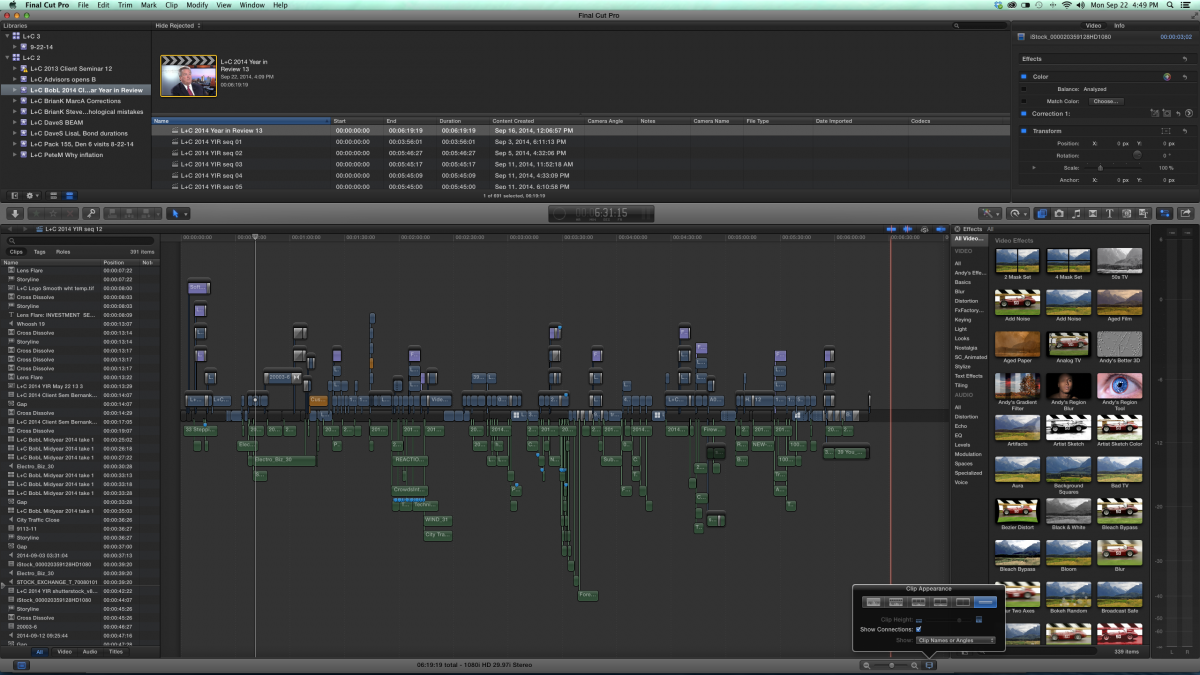
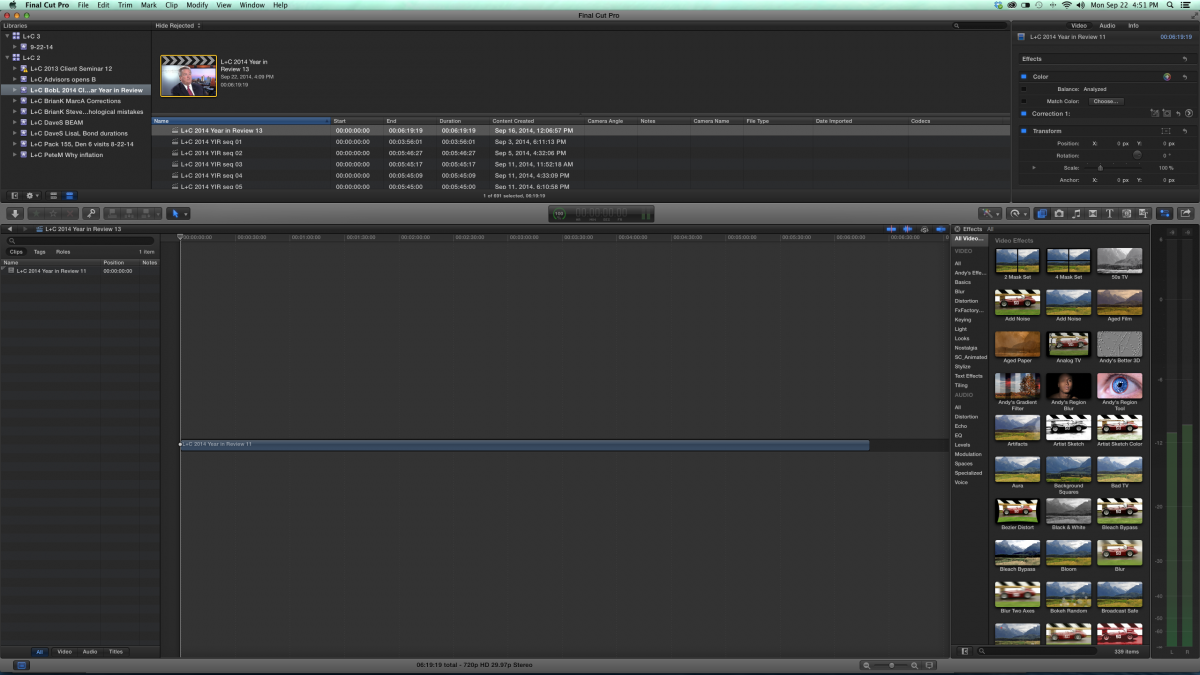
I've attached two screen grabs. In the first one you can see how complex the edit was. In the second one you can see the single video timeline!
TIA,
petemay
I've duplicated scores of projects and whenever I open them they look just like the project I duplicated. Today when I tried to duplicate a project and open it, the project looked flat. There was a single representation of video and audio and the many hundreds of clips seem to have been subsumed into the primary story line. I need to make several changes to audio levels on a clip by clip basic but I can't figure out how to expand my project timeline so I can see all the individual components again. This happens whether I duplicate the project or duplicate as a snapshot. I thought maybe I'd created a compound clip of something but that doesn't seem to be the case.
Incidentally, when I went back and tried to double click on an earlier version it opened flat as well! I was able to get back to the expanded version by clicking the "back" arrow on the far left of the edit window.
I've attached two screen grabs. In the first one you can see how complex the edit was. In the second one you can see the single video timeline!
TIA,
petemay
Please Log in to join the conversation.

22 Sep 2014 22:06 - 22 Sep 2014 22:07 #53043
by BenB
Replied by BenB on topic Duplicated Project is Flat!
OK, one is 1080i and one is 720p. One is 5-ish minutes, one is 6-ish minutes. I don't think you did a simple duplication. Or you duplicated a Project besides the one you "think" you duplicated. Look at the names, they're not the same, either. In one screen shot you have one Project opened in the timeline, a different one highlighted in the Browser. In the other screen shot you have the same timeline open and selected in the Browser. Something isn't right.
Odd...
Odd...
Last edit: 22 Sep 2014 22:07 by BenB.
Please Log in to join the conversation.
22 Sep 2014 22:16 #53044
by petemay
Replied by petemay on topic Duplicated Project is Flat!
They should both be 1080i. Are you looking at an individual clip? I showed you version 12 because it shows all the many clips broken out. The latest version was 13. I duplicated 13 to make a 14 but It only opened in that single timeline. I decided to close FCP and restart the computer just because sometimes that's the answer. When I opened it again 13 no longer opens into individual clips. I had to open an earlier version, version 12, to show you what the timeline should look like. In this case, 13 should look like 12 does. All I did is highlight 13, right click on duplicate, try to open 14 and all I got was the collapsed timeline.
I did not open the wrong event or duplicate the wrong project.
I did not open the wrong event or duplicate the wrong project.
Please Log in to join the conversation.
22 Sep 2014 22:18 #53045
by petemay
Replied by petemay on topic Duplicated Project is Flat!
The difference in length is because 12 is not a finished version. 13 is the finished version but it won't open into individual clips. Is there some reason the project would display this way?
Please Log in to join the conversation.
22 Sep 2014 22:22 #53046
by petemay
Replied by petemay on topic Duplicated Project is Flat!
Just to be clear, this version 13 opened with all the clips and individual edits showing two hours ago. Now it just opens flat. That's why I'm wondering if I'm displaying something improperly.
Please Log in to join the conversation.
- ronny courtens
-

- Offline
- Moderator
-

Less
More
- Posts: 4455
- Thank you received: 962
22 Sep 2014 22:32 #53047
by ronny courtens
Replied by ronny courtens on topic Duplicated Project is Flat!
Select the flat clip and press SHIFT+CMD+G. Does that restore your clips?
- Ronny
- Ronny
Please Log in to join the conversation.
22 Sep 2014 22:43 #53048
by petemay
Replied by petemay on topic Duplicated Project is Flat!
@Ronny, @BenB,
OK, I'm feeling pretty stupid right now. 13 was a version I exported from my 1080i timeline so I could reimport and change the timeline to 720p and compress to match the format of our projector. So, bottom line, BenB you called it. My apologies. Now, can we erase this thread (my first thread ever on this forum) or do I have to look like an idiot until the end of the internet?
Sorry.
Pete
OK, I'm feeling pretty stupid right now. 13 was a version I exported from my 1080i timeline so I could reimport and change the timeline to 720p and compress to match the format of our projector. So, bottom line, BenB you called it. My apologies. Now, can we erase this thread (my first thread ever on this forum) or do I have to look like an idiot until the end of the internet?
Sorry.
Pete
Please Log in to join the conversation.
22 Sep 2014 22:56 #53051
by BenB
Replied by BenB on topic Duplicated Project is Flat!
Sometimes I hate being right...
Please Log in to join the conversation.
23 Sep 2014 13:54 #53079
by petemay
Replied by petemay on topic Duplicated Project is Flat!
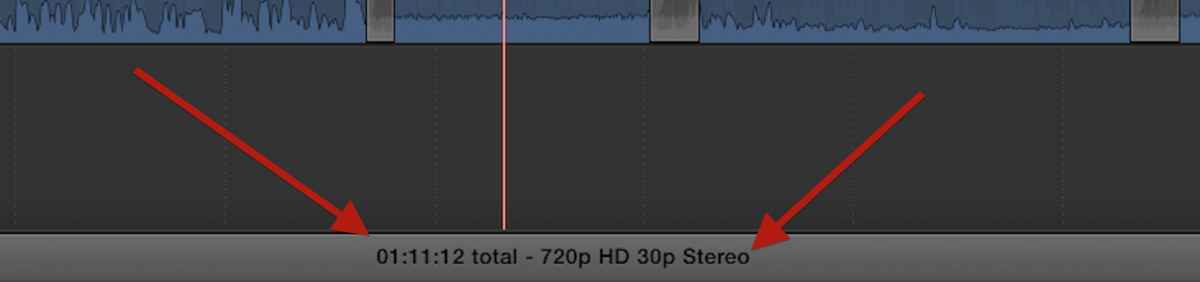
Probably not half as much as I hate being wrong. Unfortunately, right and wrong don't figure much into the self-righteous earnestness of my arguments. One thing is still bothering me. How did you know one event was 720p and the other 1080i? I've looked all over the screen grabs and con't find that information. Can you just feel the difference?
Please Log in to join the conversation.
23 Sep 2014 14:27 #53082
by BenB
Replied by BenB on topic Duplicated Project is Flat!
Very bottom center of the FCPX screen. Always shows the format of the currently active timeline, duration of that timeline, and duration of any selected items.
Please Log in to join the conversation.
23 Sep 2014 14:29 #53083
by petemay
Replied by petemay on topic Duplicated Project is Flat!
I've got to get a better FCP teacher.
Thanks,
Peter
Thanks,
Peter
Please Log in to join the conversation.
23 Sep 2014 14:33 #53085
by BenB
Replied by BenB on topic Duplicated Project is Flat!
I teach all over the country! LOL! This is one thing I pull on my students in every class. "OK, here's my screen, what is the duration of my active timeline and what format is it in? You have 5 seconds! 5-4-3-2-1! No clue?" Yeah, folks get a kick out of finding that. Usually the ones who claim to have worked with FCPX don't see it, the newbies see it more often, go figure. Don't feel bad, it isn't glaringly obvious. Very handy info to have there.
Please Log in to join the conversation.
- haysoos123
-

- Offline
- Platinum Member
-

Less
More
- Posts: 402
- Thank you received: 72
23 Sep 2014 18:22 #53106
by haysoos123
Replied by haysoos123 on topic Duplicated Project is Flat!
It's pretty funny actually, I didn't see that bar until last week some time when someone pointed it out! I've worked on many different NLEs for many years, and have been using FCPX for about two. I think the reason why is that I've just been used to digging deeper for that kind of info for so long, hidden in the project settings. In FCPX my eye would go automatically to the inspector. I consider this a mini-lesson on the design philosophy of FCPX, where they try to surface the info and controls you might need while in general hiding its complexities.
Please Log in to join the conversation.
