


- Posts: 6
- Thank you received: 0
3 Post Moderation Rule for New Boarders (25 Jan 2021)
New boarders will have their posts moderated - Don't worry if you cannot see your post immediately.
Scopes - Using them accurately
21 Sep 2014 20:45 - 21 Sep 2014 20:52 #53007
by Dorlingus
I'm relatively new to using FCPX and I have a question regarding Scopes.
I like to think that I understand scopes being a mathematically minded person.
One particular scope that appears to be the most valuable is the Waveform RGB Parade. I've followed Larry Jordan's tutorials on colour correction and he of course mentions the importance of eliminating both white and black beyond 100%, for which I understand.
However, taking the above in to consideration. All of my footage is coming from a GoPro 3+ Black and there always seems to be room for improvement using colour correction, without over doing it.
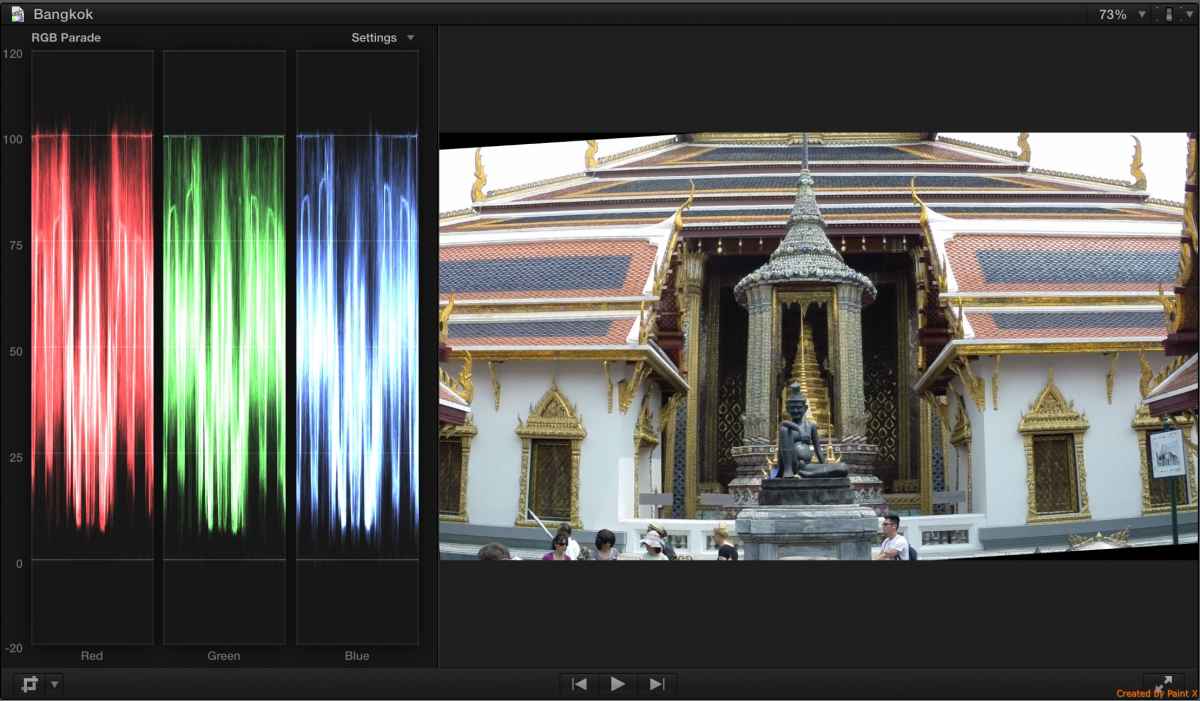
I'm correcting Exposure first, then Colour and Saturation last. Just by using scopes alone, the results show improvement. However, when using the RGB Parade scope to check colour levels, I'm always finding very thin spikes going beyond 100%. In mathematical terms, probably less than 1%. I've that I can often remove these spikes by reducing highlights in the saturation and thus allowing me to raise my highlight exposure. But this feels wrong in doing so and has a negative impact on colour saturation.
My question is, should i worry about these spikes? Should i just raise my other 99% levels up to 100% and ignore the spikes.
The attached picture showing a clip straight from the GoPro, unedited. As you can see there are many spike beyond 100%. Is this acceptable? Surely not if going beyond 100%?
What are the implications of levels going beyond 100%? Is it light that just isn't displayed anymore, or are the there adverse effects as a result?
Looking forward to some feedback.
(PS appologies if this has already been covered elsewhere)
Scopes - Using them accurately was created by Dorlingus
I'm relatively new to using FCPX and I have a question regarding Scopes.
I like to think that I understand scopes being a mathematically minded person.
One particular scope that appears to be the most valuable is the Waveform RGB Parade. I've followed Larry Jordan's tutorials on colour correction and he of course mentions the importance of eliminating both white and black beyond 100%, for which I understand.
However, taking the above in to consideration. All of my footage is coming from a GoPro 3+ Black and there always seems to be room for improvement using colour correction, without over doing it.
I'm correcting Exposure first, then Colour and Saturation last. Just by using scopes alone, the results show improvement. However, when using the RGB Parade scope to check colour levels, I'm always finding very thin spikes going beyond 100%. In mathematical terms, probably less than 1%. I've that I can often remove these spikes by reducing highlights in the saturation and thus allowing me to raise my highlight exposure. But this feels wrong in doing so and has a negative impact on colour saturation.
My question is, should i worry about these spikes? Should i just raise my other 99% levels up to 100% and ignore the spikes.
The attached picture showing a clip straight from the GoPro, unedited. As you can see there are many spike beyond 100%. Is this acceptable? Surely not if going beyond 100%?
What are the implications of levels going beyond 100%? Is it light that just isn't displayed anymore, or are the there adverse effects as a result?
Looking forward to some feedback.
(PS appologies if this has already been covered elsewhere)
Last edit: 21 Sep 2014 20:52 by Dorlingus.
Please Log in to join the conversation.
- Paul Anderegg
-

- Offline
- Senior Member
-

Less
More
- Posts: 47
- Thank you received: 3
21 Sep 2014 21:11 #53009
by Paul Anderegg
Replied by Paul Anderegg on topic Scopes - Using them accurately
I am new to this forum as well, and came here with a very similar set of questions regarding vectorscopes and waveform monitors.
By thin spikes, and you referring to those wispy hair thread things you see a little here and there? Can you determine exactly what they corresponds with? It is entirely possible that those spikes are simply blown out and clipped on the source material/footage.
Paul
By thin spikes, and you referring to those wispy hair thread things you see a little here and there? Can you determine exactly what they corresponds with? It is entirely possible that those spikes are simply blown out and clipped on the source material/footage.
Paul
Please Log in to join the conversation.
21 Sep 2014 22:12 #53015
by Dorlingus
Replied by Dorlingus on topic Scopes - Using them accurately
Hi Paul,
Yes, the spikes are the very thin spikes that you can see, particularly red and green in this instance. A result of of the over exposed sky that the GoPro shot i'm guessing.
I'm of the thinking that anything beyond 100% is unacceptable no matter how big or small. But being such a small percentage of the output, do I need to worry at all. The GoPro appears to have clipped most of the footage pretty much bang on the 100% mark, but not all as you can see.
Thanks,
Chris
Yes, the spikes are the very thin spikes that you can see, particularly red and green in this instance. A result of of the over exposed sky that the GoPro shot i'm guessing.
I'm of the thinking that anything beyond 100% is unacceptable no matter how big or small. But being such a small percentage of the output, do I need to worry at all. The GoPro appears to have clipped most of the footage pretty much bang on the 100% mark, but not all as you can see.
Thanks,
Chris
Please Log in to join the conversation.
- Paul Anderegg
-
- Offline
- Senior Member
-
Less
More
- Posts: 47
- Thank you received: 3
21 Sep 2014 23:12 #53017
by Paul Anderegg
Replied by Paul Anderegg on topic Scopes - Using them accurately
See my post below.
www.fcp.co/forum/4-final-cut-pro-x-fcpx/...ure-and-scopes#53016
You can see similar spikes on my chart, and nothing on the chart was exposed to over 90IRE. I was assuming it is just a scope artifact, but would be interested to know what causes that as well. You can see the odd edges where it appears on my charts, there is nothing highlighting there at all.
Paul
www.fcp.co/forum/4-final-cut-pro-x-fcpx/...ure-and-scopes#53016
You can see similar spikes on my chart, and nothing on the chart was exposed to over 90IRE. I was assuming it is just a scope artifact, but would be interested to know what causes that as well. You can see the odd edges where it appears on my charts, there is nothing highlighting there at all.
Paul
Please Log in to join the conversation.
22 Sep 2014 00:41 #53018
by Dorlingus
Replied by Dorlingus on topic Scopes - Using them accurately
If it is actually Scope artifact, then it's a bit worrying that there's a fault with the software. If the data is indeed correct then what is actually going on?
The spikes on your charts are alarming to me but would suggest something is a miss in the software! If using a test card, then in an ideal world, you would expect an ideal graph.
I come from Research & Development lab background where graphical representation through software is key to my work, so fully understanding the graphical representations here in FCPX are important to me.
Is there anyone else out there experiencing the same problems as us two and can shine a light?
The spikes on your charts are alarming to me but would suggest something is a miss in the software! If using a test card, then in an ideal world, you would expect an ideal graph.
I come from Research & Development lab background where graphical representation through software is key to my work, so fully understanding the graphical representations here in FCPX are important to me.
Is there anyone else out there experiencing the same problems as us two and can shine a light?
Please Log in to join the conversation.

22 Sep 2014 01:15 - 22 Sep 2014 02:02 #53021
by Seanus
Sean Lander - Editing since 1982 - AVID 1991 - FCP 1999 - FCPX 2011
Replied by Seanus on topic Scopes - Using them accurately
RGP Parade is very handy for matching and balancing colours.
It would be better to judge your luminance values from the waveform switched to luma and monochrome and use the vectorscope for judging colour levels.
It would be better to judge your luminance values from the waveform switched to luma and monochrome and use the vectorscope for judging colour levels.
Sean Lander - Editing since 1982 - AVID 1991 - FCP 1999 - FCPX 2011
Last edit: 22 Sep 2014 02:02 by Seanus.
Please Log in to join the conversation.
22 Sep 2014 01:49 #53023
by Dorlingus
Replied by Dorlingus on topic Scopes - Using them accurately
Hi Seanus,
Each graphical representation is essentially the same data but displayed in a different way. Normally i would use the waveform in Luma or Monochrome if you wish to set levels, but using that method alone cloaks the spikes which you see in the RGB Parade. The RGB Parade highlights the issue here more clearly.
Each graphical representation is essentially the same data but displayed in a different way. Normally i would use the waveform in Luma or Monochrome if you wish to set levels, but using that method alone cloaks the spikes which you see in the RGB Parade. The RGB Parade highlights the issue here more clearly.
Please Log in to join the conversation.

22 Sep 2014 12:36 #53032
by BenB
Replied by BenB on topic Scopes - Using them accurately
In RGB parade, you're balancing your colors, that's all. If you have spikes after that you can't pull down (the scopes are accurate), switch to the Luma waveform and pull some down. Scopes are like the three color boards, you'll jump back and forth between them during the grading process.
When it comes to individual RGB channel legal levels, you should be relying on the Vector scope which will show you broadcast legal much more clearly than the RGB parade.
When it comes to individual RGB channel legal levels, you should be relying on the Vector scope which will show you broadcast legal much more clearly than the RGB parade.
Please Log in to join the conversation.
22 Sep 2014 21:50 #53039
by Dorlingus
Replied by Dorlingus on topic Scopes - Using them accurately
Hi Ben,
Are you saying that the peaks that you're seeing in RGB Parade are not same peeks you are seeing in other waveforms? I understand that the purpose of RGB parade is to help balance colour and more so using the vectorscope. However, my raw footage from the GoPro would suggest levels above 100%. I still can't get answer as to whether the spikes you see, which are even more apparent and highlighted in RGB parade are acceptable or not. If they are acceptable, can somebody please give me a technical explanation as to why?
Thanks again for everybodys feedback so far.
Are you saying that the peaks that you're seeing in RGB Parade are not same peeks you are seeing in other waveforms? I understand that the purpose of RGB parade is to help balance colour and more so using the vectorscope. However, my raw footage from the GoPro would suggest levels above 100%. I still can't get answer as to whether the spikes you see, which are even more apparent and highlighted in RGB parade are acceptable or not. If they are acceptable, can somebody please give me a technical explanation as to why?
Thanks again for everybodys feedback so far.
Please Log in to join the conversation.
22 Sep 2014 22:00 - 22 Sep 2014 22:01 #53041
by BenB
Replied by BenB on topic Scopes - Using them accurately
Peaks are the same, as the scope measures them, but I don't use the RGB parade for broadcast safe chroma limits, I find the Vector scope much easier and more clear.
Last edit: 22 Sep 2014 22:01 by BenB.
Please Log in to join the conversation.
23 Sep 2014 01:43 - 23 Sep 2014 01:51 #53057
by Seanus
Sean Lander - Editing since 1982 - AVID 1991 - FCP 1999 - FCPX 2011
Replied by Seanus on topic Scopes - Using them accurately
In RGB you are looking at the amplitude of the colour channels. Find yourself a graphic that is 100% colour bars and you will see that the colours exceed 100% and go below 0.
Sean Lander - Editing since 1982 - AVID 1991 - FCP 1999 - FCPX 2011
Last edit: 23 Sep 2014 01:51 by Seanus.
Please Log in to join the conversation.

23 Sep 2014 12:17 #53072
by cseeman
Replied by cseeman on topic Scopes - Using them accurately
RGB to balance Color and see if individual channel is clipping.
Waveform luminance for luminance levels.
Vector Scope for chrominance levels (target boxes) and hue
Waveform chroma only shows chroma levels separate from combined luminance.
When looking at Waveform with luma and chroma combined, levels can appear to go over 100% but you need to look at luma and chroma independently (although I remember some broadcasters having a "combined" spec as well).
Computer monitors can handle a bit more than broadcast and you can often get away with levels up to about 109% which is clipping. Gamut is wider on computers monitors generally. Some will do separate grades for computer and broadcast. People tend to teach "broadcast" specs even if our work is only going to be shown on computer.
Waveform luminance for luminance levels.
Vector Scope for chrominance levels (target boxes) and hue
Waveform chroma only shows chroma levels separate from combined luminance.
When looking at Waveform with luma and chroma combined, levels can appear to go over 100% but you need to look at luma and chroma independently (although I remember some broadcasters having a "combined" spec as well).
Computer monitors can handle a bit more than broadcast and you can often get away with levels up to about 109% which is clipping. Gamut is wider on computers monitors generally. Some will do separate grades for computer and broadcast. People tend to teach "broadcast" specs even if our work is only going to be shown on computer.
Please Log in to join the conversation.
23 Sep 2014 20:05 #53114
by Dorlingus
Replied by Dorlingus on topic Scopes - Using them accurately
Thanks for all the feedback.Very much appreciated.
Thanks cseeman for your detailed explanation. Everything is starting to click and make more sense.
Chris
Thanks cseeman for your detailed explanation. Everything is starting to click and make more sense.
Chris
Please Log in to join the conversation.
