


- Posts: 3
- Thank you received: 0
3 Post Moderation Rule for New Boarders (25 Jan 2021)
New boarders will have their posts moderated - Don't worry if you cannot see your post immediately.
Video image problem after sharing/export
- fb_693118255
-
 Topic Author
- Offline
- New Member
-

Less
More
21 Sep 2014 15:52 - 21 Sep 2014 16:07 #52996
by fb_693118255
Video image problem after sharing/export was created by fb_693118255
Hey guys,
I just upgrade my FCPX to 10.1.2 and for the first time I'm having a problem that I don't know how to explain very well, that happens only when I export.
When I watch in the playback, video looks perfect, but when I export/share the video becomes weird. I don;t know how to explain with words, but it looks like the image is shaking/breaking, I really don't know how to explain. I'll put 2 pictures to try to explain that.
The first one show the problem when I export/share.
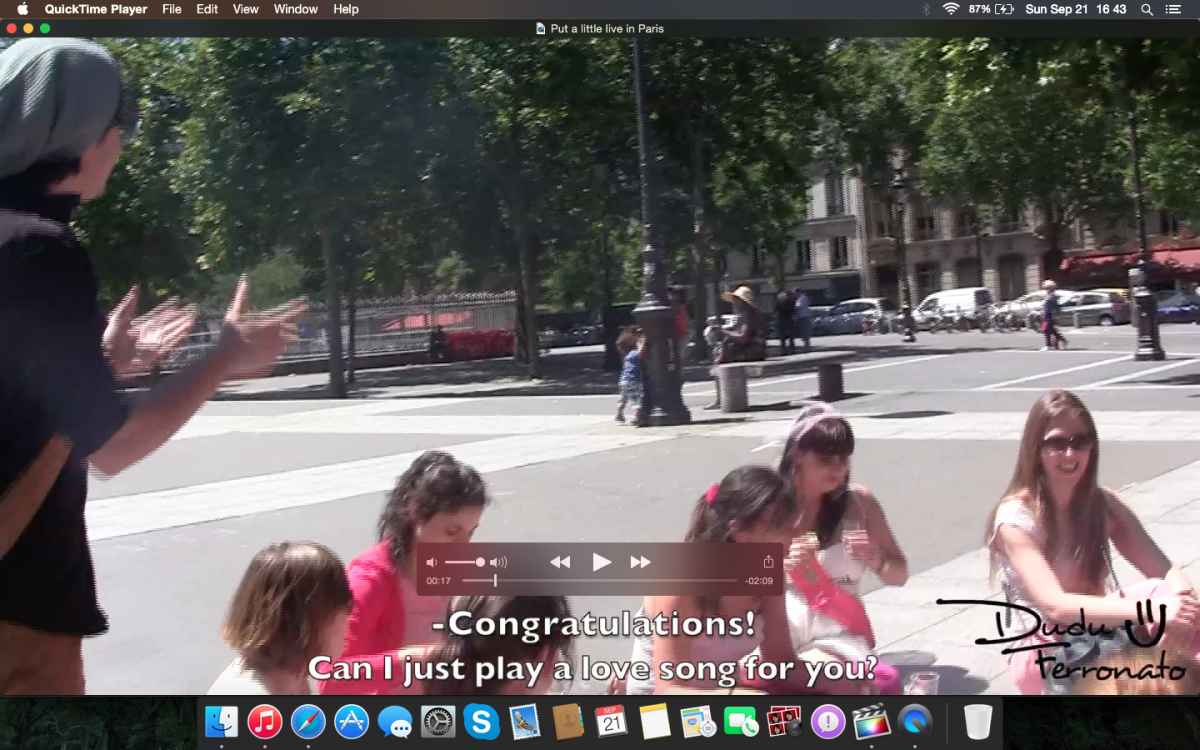
The second one show the playback on FCPX, that is how it should be

I know It's confused, but if anyone can help me, I will appreciate a lot!
Thanks
Eduardo
I just upgrade my FCPX to 10.1.2 and for the first time I'm having a problem that I don't know how to explain very well, that happens only when I export.
When I watch in the playback, video looks perfect, but when I export/share the video becomes weird. I don;t know how to explain with words, but it looks like the image is shaking/breaking, I really don't know how to explain. I'll put 2 pictures to try to explain that.
The first one show the problem when I export/share.
The second one show the playback on FCPX, that is how it should be
I know It's confused, but if anyone can help me, I will appreciate a lot!
Thanks
Eduardo
Last edit: 21 Sep 2014 16:07 by fb_693118255. Reason: inserting the image
Please Log in to join the conversation.
- ronny courtens
-

- Offline
- Moderator
-

Less
More
- Posts: 4455
- Thank you received: 962
21 Sep 2014 17:11 #52998
by ronny courtens
Replied by ronny courtens on topic Video image problem after sharing/export
Hi Eduardo, welcome to the forum.
This looks like an interlacing problem. It would be very helpful if you could tell us the format of your original video, the exact settings of your FCP X project and the format that you are exporting to.
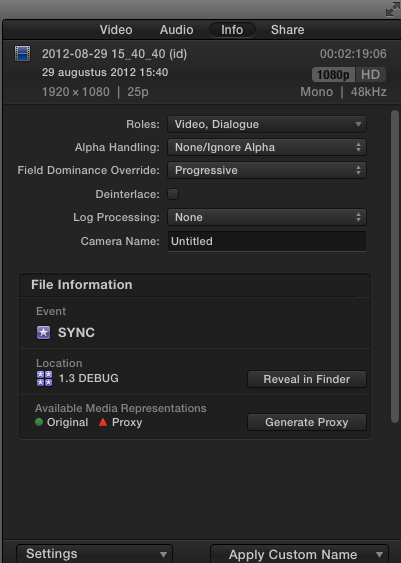
To know the format of your original video, select a clip in the browser, go to the Inspector > Info tab and make a screenshot of the Settings window:
To know the format of your project, select the project in the browser and make a screenshot of the Inspector > Info window.
To know the format of your exported video open the video in QT player and press CMD+I to open the info window of the video. Make a screenshot of that window.
- Ronny
This looks like an interlacing problem. It would be very helpful if you could tell us the format of your original video, the exact settings of your FCP X project and the format that you are exporting to.
To know the format of your original video, select a clip in the browser, go to the Inspector > Info tab and make a screenshot of the Settings window:
To know the format of your project, select the project in the browser and make a screenshot of the Inspector > Info window.
To know the format of your exported video open the video in QT player and press CMD+I to open the info window of the video. Make a screenshot of that window.
- Ronny
Please Log in to join the conversation.
- fb_693118255
-
Topic Author
- Offline
- New Member
-
Less
More
- Posts: 3
- Thank you received: 0
21 Sep 2014 18:13 #53000
by fb_693118255
Replied by fb_693118255 on topic Video image problem after sharing/export
Hi Ronny, thanks a lot for replying me! I took those screen shots: here it is:
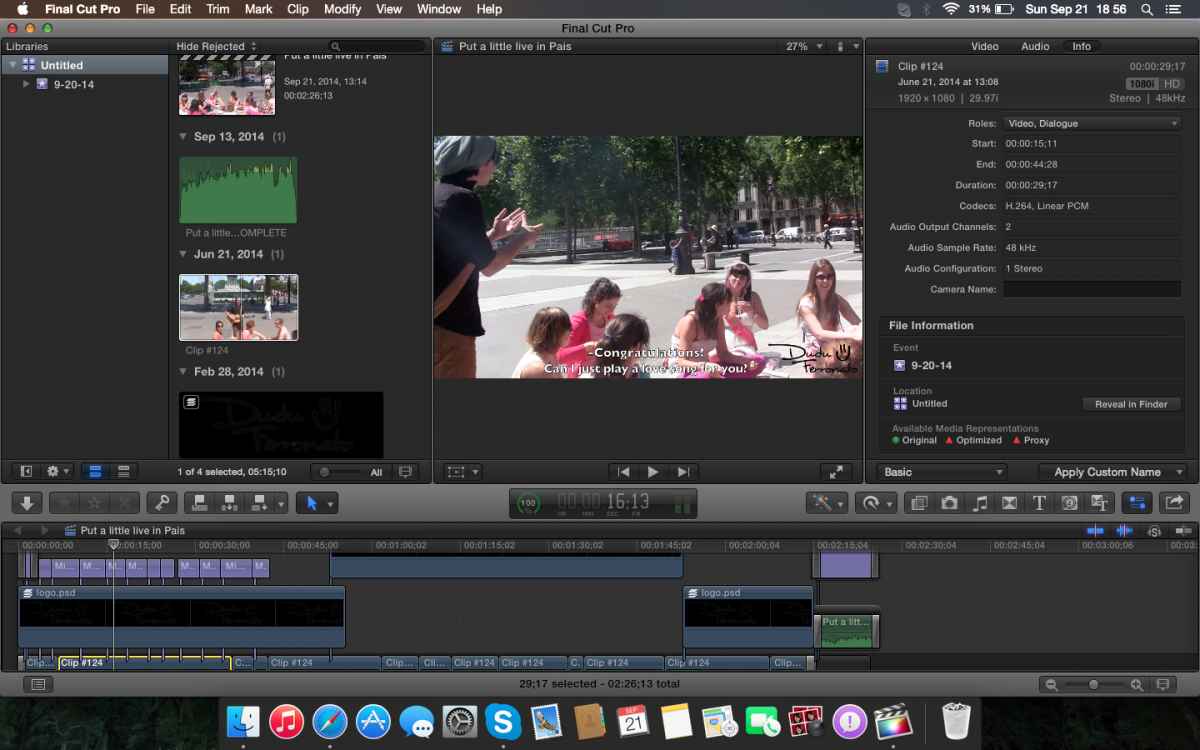
1- Original file info:
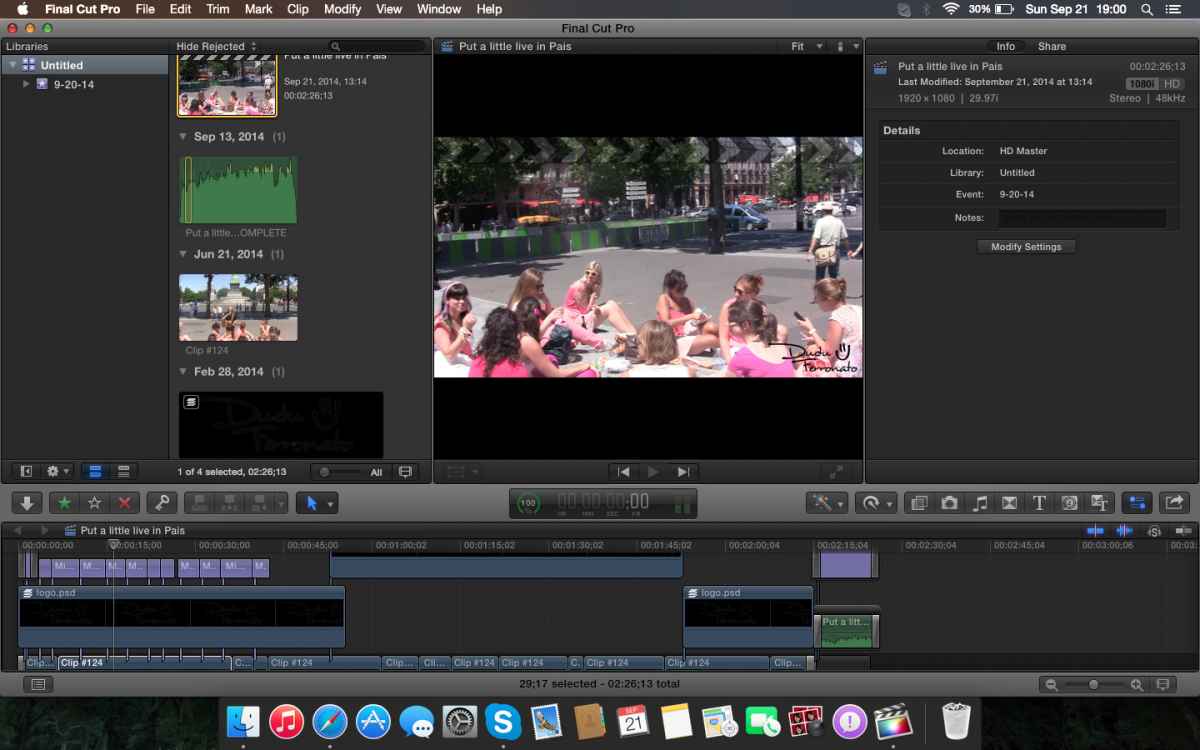
2- Project Info:
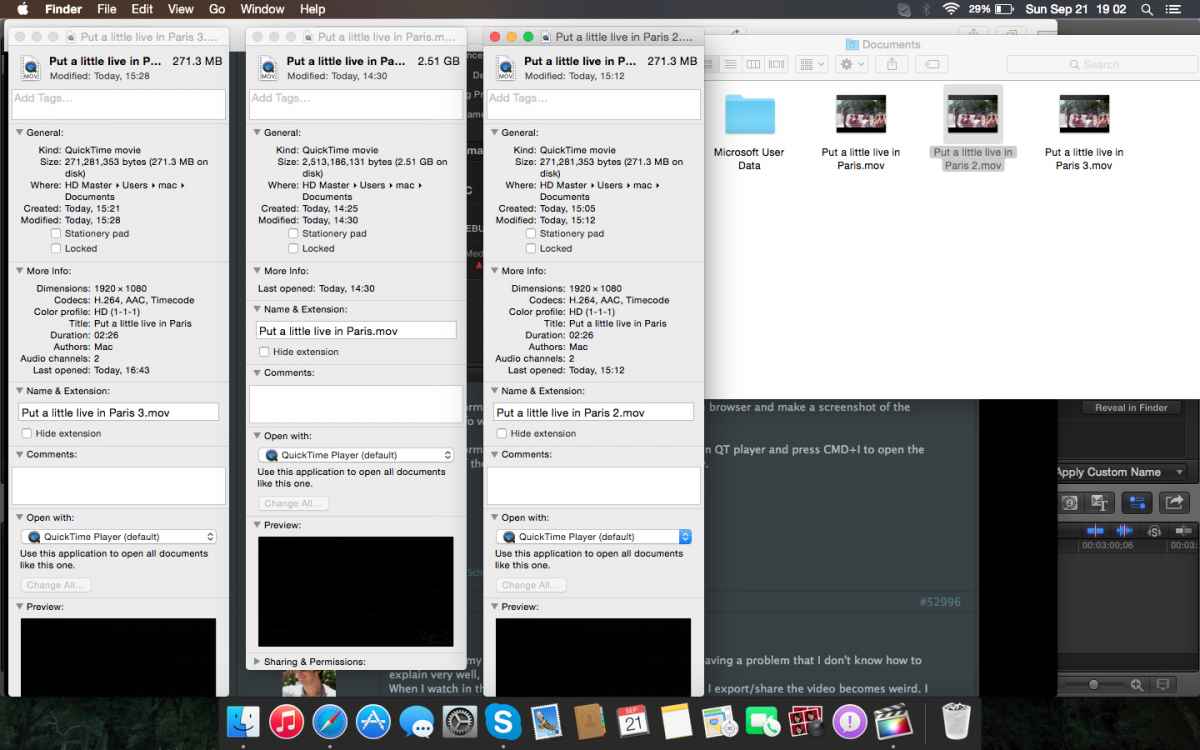
3- Exported files Info: I tried 3 different ways. the with the biggest size was with video codec apple ProRes 422, then with H.264 and the last one was H.264 with the "include chapter mark" disabled
4- My last exportation settings:
Thanks again for helping me!
Eduardo
1- Original file info:
2- Project Info:
3- Exported files Info: I tried 3 different ways. the with the biggest size was with video codec apple ProRes 422, then with H.264 and the last one was H.264 with the "include chapter mark" disabled
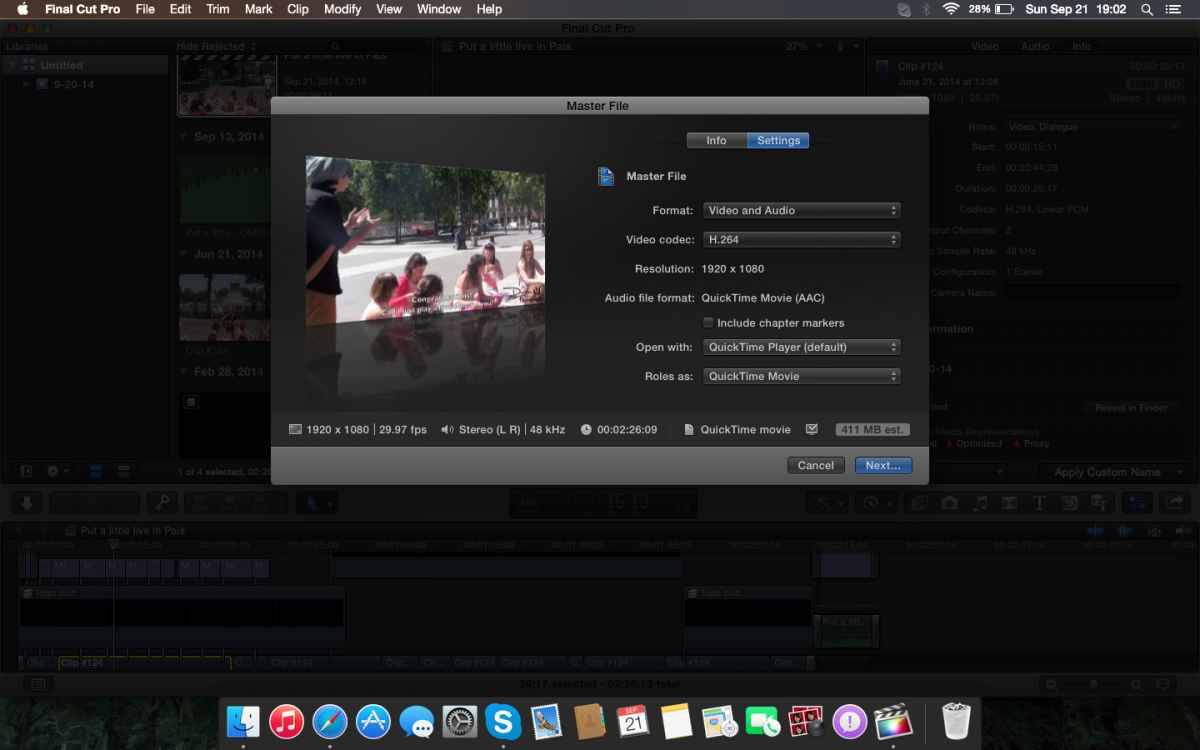
4- My last exportation settings:
Thanks again for helping me!
Eduardo
Please Log in to join the conversation.
- ronny courtens
-
- Offline
- Moderator
-
Less
More
- Posts: 4455
- Thank you received: 962
21 Sep 2014 18:43 #53001
by ronny courtens
Replied by ronny courtens on topic Video image problem after sharing/export
Thank you for the information, this is what I expected. You have interleaving artifacts in the parts with motion of your H.264 files. These are related to your original footage being interlaced.
As your videos are already edited the easiest way to solve this problem is to set the video properties of your Projects to 1080p instead of 1080i, then export again.
Select a Project in the Browser and in the Inspector click the Modify Settings button. This will open the Project properties window.
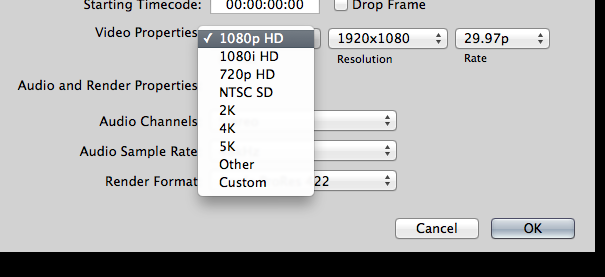
In the Project properties window click the drop-down bar next to Video Properties and select 1080p from the list. Then press OK.
Finally share your Projects again using the same export options. The artifacts should be gone.
- Ronny
As your videos are already edited the easiest way to solve this problem is to set the video properties of your Projects to 1080p instead of 1080i, then export again.
Select a Project in the Browser and in the Inspector click the Modify Settings button. This will open the Project properties window.
In the Project properties window click the drop-down bar next to Video Properties and select 1080p from the list. Then press OK.
Finally share your Projects again using the same export options. The artifacts should be gone.
- Ronny
Please Log in to join the conversation.
- fb_693118255
-
Topic Author
- Offline
- New Member
-
Less
More
- Posts: 3
- Thank you received: 0
21 Sep 2014 19:27 #53002
by fb_693118255
Replied by fb_693118255 on topic Video image problem after sharing/export
It worked!! 
Thanks a lot Ronny! you really saved me! lol
Thanks again for your help!
Thanks a lot Ronny! you really saved me! lol
Thanks again for your help!
Please Log in to join the conversation.
