


- Posts: 377
- Thank you received: 9
3 Post Moderation Rule for New Boarders (25 Jan 2021)
New boarders will have their posts moderated - Don't worry if you cannot see your post immediately.
Arrange by meta data? (sync clips not multicam clips)
20 Sep 2014 13:17 #52961
by dkag7
Arrange by meta data? (sync clips not multicam clips) was created by dkag7
Hi,
I wrote a post a few days ago about having 100's of video and audio files that i am trying to sync up.
These are separate clips, not multicam.
For a test, I took 2 folders, one video and one audio, where I know some of the files sync up, and put them in one folder. Then with pathfinder (kind of like finder but with many more options), I did a sort by 'info'.
Not too sure what info means, but it arranged the clips in such a way that synced clips are next to each other..
very happy with that.
I believe that it is sorting by metadata - date modified
Question:
Can I set fcpx to somehow arrange clips (in the browser) in this manor?
maybe by some metadata search or keyword collection?
with this, syncing would be easy as the clips would be near or next to each other in the browser
not having much luck trying to figure it out...
thanks
Kurt
I wrote a post a few days ago about having 100's of video and audio files that i am trying to sync up.
These are separate clips, not multicam.
For a test, I took 2 folders, one video and one audio, where I know some of the files sync up, and put them in one folder. Then with pathfinder (kind of like finder but with many more options), I did a sort by 'info'.
Not too sure what info means, but it arranged the clips in such a way that synced clips are next to each other..
very happy with that.
I believe that it is sorting by metadata - date modified
Question:
Can I set fcpx to somehow arrange clips (in the browser) in this manor?
maybe by some metadata search or keyword collection?
with this, syncing would be easy as the clips would be near or next to each other in the browser
not having much luck trying to figure it out...
thanks
Kurt
Please Log in to join the conversation.

20 Sep 2014 13:30 #52962
by mousefarm
Replied by mousefarm on topic Arrange by meta data? (sync clips not multicam clips)
After importing the clips in FCPX you could try to apply a Custom Name preset. That gives you the option to add "date modified".
See screenshot
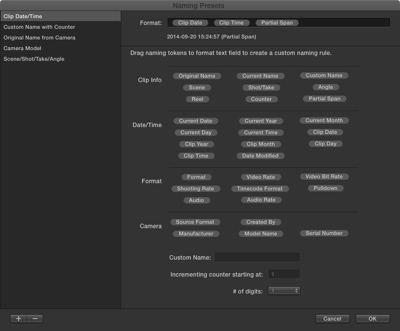
See screenshot
Please Log in to join the conversation.
20 Sep 2014 15:31 #52964
by dkag7
Replied by dkag7 on topic Arrange by meta data? (sync clips not multicam clips)
Thanks, but I cant find a way to view or 'arrange by' the date modified in the browser.
actually this didn't separate out the clips anyway.. must be some other area that pathfinder is using to arrange clips.
actually this didn't separate out the clips anyway.. must be some other area that pathfinder is using to arrange clips.
Please Log in to join the conversation.

20 Sep 2014 17:25 #52965
by Soundwise
Replied by Soundwise on topic Arrange by meta data? (sync clips not multicam clips)
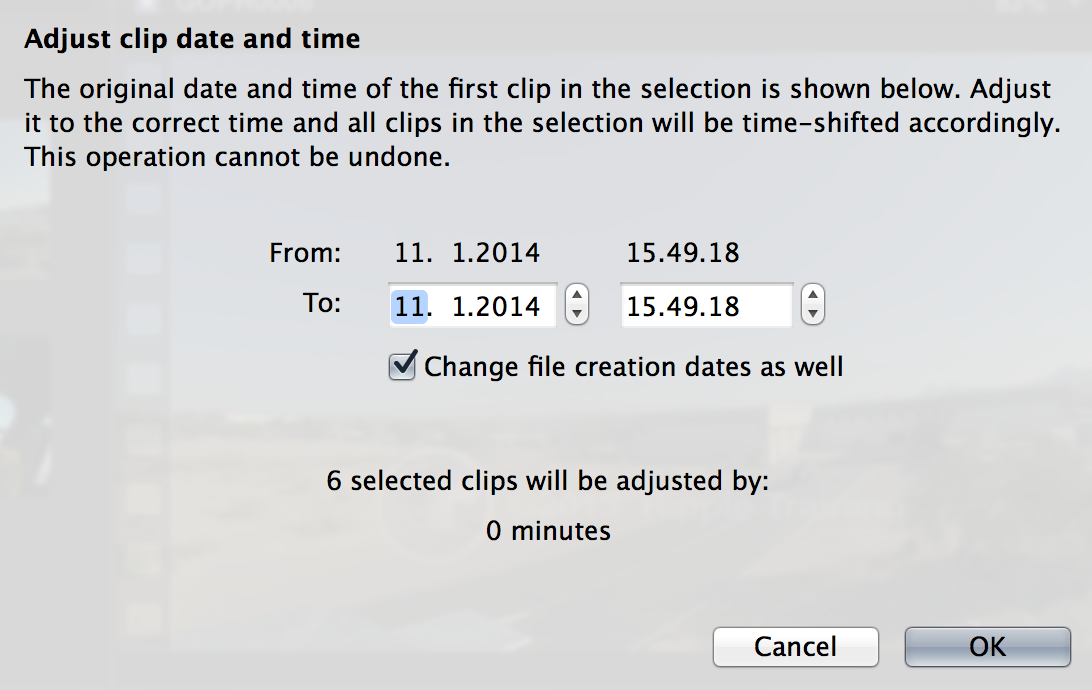
Try the "Adjust Content Created Date and Time"- command in the Modify Menu.
Please Log in to join the conversation.
