


3 Post Moderation Rule for New Boarders (25 Jan 2021)
New boarders will have their posts moderated - Don't worry if you cannot see your post immediately.
Changing clip orignal resolution
- gr8pics
-
 Topic Author
- Offline
- Senior Member
-

- www.christerdahl.com You gotta take the good with the bad, smile with the sad, love what you got and remember what you had. Learn to forgive, but never forget. Learn from your mistakes ...but never regret. People change, things go wrong. Just remember ..
Less
More
20 Sep 2014 12:20 #52960
by gr8pics
Changing clip orignal resolution was created by gr8pics
Does it affect the end quality if i downscale from 1440 to 1080 when exporting, vs choosing it on import of the files into the project, or will the end result still be the same?
Are there any compressor presets for YT and 1440 in fcpx, or just 4k?
Thx
Are there any compressor presets for YT and 1440 in fcpx, or just 4k?
Thx
Please Log in to join the conversation.
- Tom Wolsky
-

- Offline
- Moderator
-

20 Sep 2014 13:52 #52963
by Tom Wolsky
Replied by Tom Wolsky on topic Changing clip orignal resolution
Some confusion here I thnk. 1440 is an anamorphic horizontal dimension and 1080 is a vertical dimension.
Please Log in to join the conversation.
22 Sep 2014 06:30 #53025
by gr8pics
Replied by gr8pics on topic Changing clip orignal resolution
You may be right Tom, its the Gopro 2704x1440 format, and i think FC suggest a 2k format when importing, maybe i should choose custom and input the correct res instead?
Please Log in to join the conversation.

22 Sep 2014 12:29 - 22 Sep 2014 12:32 #53031
by BenB
Replied by BenB on topic Changing clip orignal resolution
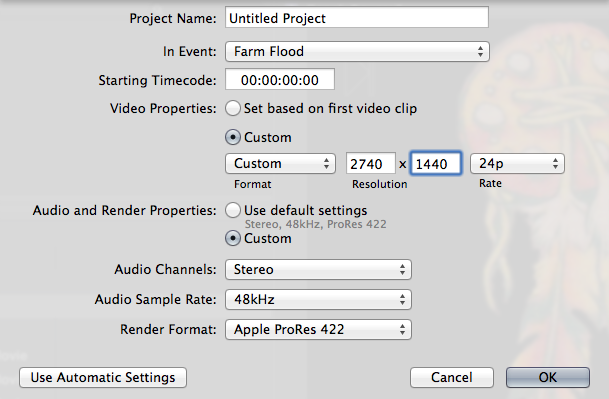
1920x1440 is the resolution of what GoPro calls 1440p.
2740x1440 is their 2.7K 17:9 frame size, a GoPro proprietary setting.
You can create a Project with custom settings for this frame size, which is what I do. Or just use a standard 2K 2048x1080 Project setting, and let some of the edges bleed off the frame, or resize as desired. Either way, no quality loss.
2740x1440 is their 2.7K 17:9 frame size, a GoPro proprietary setting.
You can create a Project with custom settings for this frame size, which is what I do. Or just use a standard 2K 2048x1080 Project setting, and let some of the edges bleed off the frame, or resize as desired. Either way, no quality loss.
Last edit: 22 Sep 2014 12:32 by BenB.
Please Log in to join the conversation.
