


3 Post Moderation Rule for New Boarders (25 Jan 2021)
New boarders will have their posts moderated - Don't worry if you cannot see your post immediately.
Remove black bars for Vimeo on 2:35
- gr8pics
-
 Topic Author
- Offline
- Senior Member
-

- www.christerdahl.com You gotta take the good with the bad, smile with the sad, love what you got and remember what you had. Learn to forgive, but never forget. Learn from your mistakes ...but never regret. People change, things go wrong. Just remember ..
Less
More
20 Sep 2014 10:35 - 20 Sep 2014 10:36 #52957
by gr8pics
Remove black bars for Vimeo on 2:35 was created by gr8pics
Anyone got an updated workflow on fcpx for this? 
urosbaric.com/how-to-widescreen-2-35-vid...px-remove-black-bars
urosbaric.com/how-to-widescreen-2-35-vid...px-remove-black-bars
Last edit: 20 Sep 2014 10:36 by gr8pics.
Please Log in to join the conversation.
- ronny courtens
-

- Offline
- Moderator
-

Less
More
- Posts: 4455
- Thank you received: 962
21 Sep 2014 12:03 #52986
by ronny courtens
Replied by ronny courtens on topic Remove black bars for Vimeo on 2:35
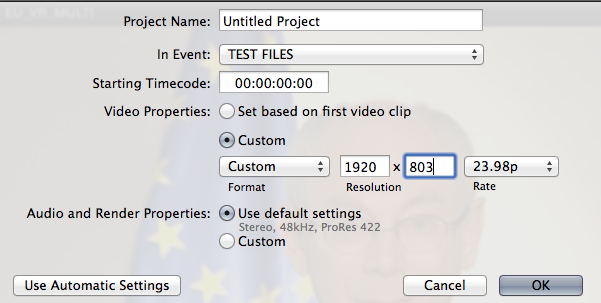
That's a very old article. Now you can create and export custom project sizes in FCP X, so you don't have to remove any bars anymore. As an example, to export a video with the 2:39:1 cinema format for Vimeo you just set your FCP X project frame size to 1920x803:
- Ronny
- Ronny
Please Log in to join the conversation.


21 Sep 2014 21:41 #53014
by Shane M
Replied by Shane M on topic Remove black bars for Vimeo on 2:35
I usually just "Send to Compressor" and then use the crop tools in that to export it with the black bars chopped.
Please Log in to join the conversation.
22 Sep 2014 06:39 #53026
by gr8pics
Replied by gr8pics on topic Remove black bars for Vimeo on 2:35
Aha, thanks guys!
I didnt know i could crop in the compressor as well...
Speaking of export, isnt it possible to adjust bitrates, sound quality etc like in Premiere? only codecs itself?
I didnt know i could crop in the compressor as well...
Speaking of export, isnt it possible to adjust bitrates, sound quality etc like in Premiere? only codecs itself?
Please Log in to join the conversation.
22 Sep 2014 12:17 #53030
by ddixon
Replied by ddixon on topic Remove black bars for Vimeo on 2:35
Not in FCPX. You can use the built-in presets but if you want more control you will need Compressor. Just export a master file from FCPX and use Compressor to make all the adjustments you wish. You can tweak the presets, or create your own. customized one, add it to the Destinations in the Share Project tool and it will be directly available from within FCPX.
Please Log in to join the conversation.
