


- Posts: 730
- Thank you received: 26
3 Post Moderation Rule for New Boarders (25 Jan 2021)
New boarders will have their posts moderated - Don't worry if you cannot see your post immediately.
F*%$ed up Multicam thumbnails
- DmitriZigany
-
 Topic Author
- Offline
- Platinum Member
-

Less
More
17 Sep 2014 17:08 - 17 Sep 2014 17:12 #52839
by DmitriZigany
F*%$ed up Multicam thumbnails was created by DmitriZigany
Pardon my french in the title.
Quite often the "thumbnails" in the angle viewer for multicams gets out of whack.
Looking like this:
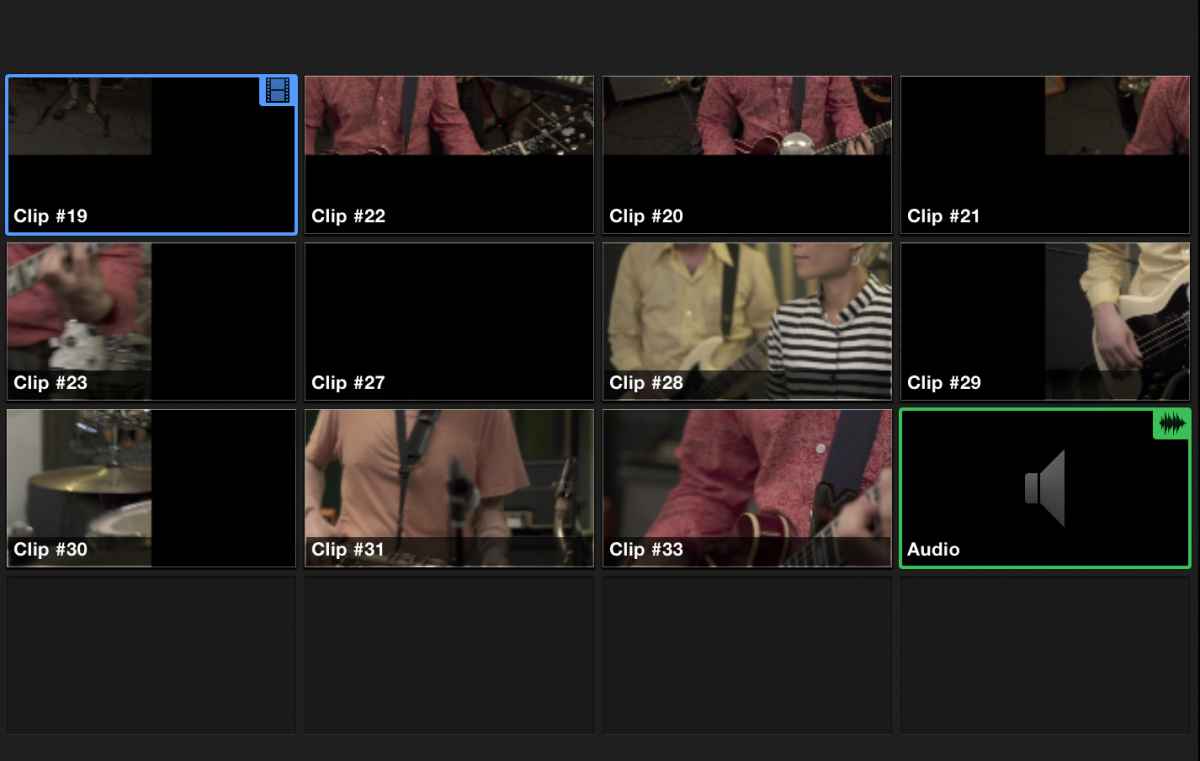
Anyone else seeing this? Been going on for a couple of versions at least...
Quite often the "thumbnails" in the angle viewer for multicams gets out of whack.
Looking like this:
Anyone else seeing this? Been going on for a couple of versions at least...
Last edit: 17 Sep 2014 17:12 by DmitriZigany. Reason: Trying to attach photo. Typos.
Please Log in to join the conversation.
18 Sep 2014 03:56 #52844
by tpayton
Replied by tpayton on topic F*%$ed up Multicam thumbnails
Bummer. Sorry you are having trouble. I do quite a bit of multicam on various computers and have never seen this issue. I assume you did the normal troubleshooting steps? Especially trying a fresh user account.
support.apple.com/kb/TS3893
fcpx.tv/troubleshooting.html
support.apple.com/kb/TS3893
fcpx.tv/troubleshooting.html
Please Log in to join the conversation.
- DmitriZigany
-
Topic Author
- Offline
- Platinum Member
-
Less
More
- Posts: 730
- Thank you received: 26
18 Sep 2014 04:39 #52845
by DmitriZigany
Replied by DmitriZigany on topic F*%$ed up Multicam thumbnails
It goes away after restarting FCPX, mostly an annoyance.
Worse is that the crashes when changing fonts in titles seem to be back with 10.1.3
Worse is that the crashes when changing fonts in titles seem to be back with 10.1.3
Please Log in to join the conversation.
- Karsten Schlüter
-

- Offline
- Moderator
-

Less
More
- Posts: 3790
- Thank you received: 718
18 Sep 2014 06:08 #52846
by Karsten Schlüter
Replied by Karsten Schlüter on topic F*%$ed up Multicam thumbnails
you're looking at eleven (!!) video streams simultaneously .... you're using a TB-connected, 6-platter Raid5 or sort-of ...?
... or, in other words: there's a LOT of data shoveling - I'm not surprised, when here&then it doesn't update fast enough ...

use optimized media, or with that amount of streams, better proxies ......
... or, in other words: there's a LOT of data shoveling - I'm not surprised, when here&then it doesn't update fast enough ...
use optimized media, or with that amount of streams, better proxies ......
Please Log in to join the conversation.
- ronny courtens
-

- Offline
- Moderator
-
Less
More
- Posts: 4455
- Thank you received: 962
18 Sep 2014 07:25 #52848
by ronny courtens
Replied by ronny courtens on topic F*%$ed up Multicam thumbnails
Hey Dmitri,
I have never heard about this thumbnail issue in multicam either, nor have I seen any other reports about FCP X 10.1.3 crashing when changing fonts. Annoyances like this that only seem to affect you and no other users can indicate that your system drive or your user setup may be slowly running into trouble.
That's why I think it would be a good idea to start checking your system when you have the time between projects. You can start with the usual troubleshooting steps T. has mentioned, and also run a maintenance utility like Onyx on your hard drive. Creating a fresh user account and running FCP X from this fresh account is the best way to check if the issues are user related or not.
- Ronny
I have never heard about this thumbnail issue in multicam either, nor have I seen any other reports about FCP X 10.1.3 crashing when changing fonts. Annoyances like this that only seem to affect you and no other users can indicate that your system drive or your user setup may be slowly running into trouble.
That's why I think it would be a good idea to start checking your system when you have the time between projects. You can start with the usual troubleshooting steps T. has mentioned, and also run a maintenance utility like Onyx on your hard drive. Creating a fresh user account and running FCP X from this fresh account is the best way to check if the issues are user related or not.
- Ronny
Please Log in to join the conversation.
18 Sep 2014 14:41 #52868
by tpayton
Replied by tpayton on topic F*%$ed up Multicam thumbnails
Font errors are typically font related. They go corrupt VERY easily.
Please Log in to join the conversation.
- DmitriZigany
-
Topic Author
- Offline
- Platinum Member
-
Less
More
- Posts: 730
- Thank you received: 26
18 Sep 2014 21:08 #52882
by DmitriZigany
I've had no issues using 16 angles at once before this started to appear. Can't remember at what version that was though.
Using a 7200rpm drive connected via USB3. But proxies obviously.
Replied by DmitriZigany on topic F*%$ed up Multicam thumbnails
Karsten Schlüter wrote: you're looking at eleven (!!) video streams simultaneously .... you're using a TB-connected, 6-platter Raid5 or sort-of ...?
... or, in other words: there's a LOT of data shoveling - I'm not surprised, when here&then it doesn't update fast enough ...
use optimized media, or with that amount of streams, better proxies ......
I've had no issues using 16 angles at once before this started to appear. Can't remember at what version that was though.
Using a 7200rpm drive connected via USB3. But proxies obviously.
Please Log in to join the conversation.
- DmitriZigany
-
Topic Author
- Offline
- Platinum Member
-
Less
More
- Posts: 730
- Thank you received: 26
18 Sep 2014 21:13 #52883
by DmitriZigany
Replied by DmitriZigany on topic F*%$ed up Multicam thumbnails
It only happens occasionally. Not often enough and it's not serious enough for me to be bothered with creating new accounts and stuff. Maybe when I have the time.
The fonts I should have a look at though. Just need to learn how the hell to do that. Used to be an expert at fonts back in the pre OSX days when I was working daily with Quark XPress. But haven't had to bother since OSX, never really had any font related issues until these in FCPX. So my font-keeping chops are not up to speed
The fonts I should have a look at though. Just need to learn how the hell to do that. Used to be an expert at fonts back in the pre OSX days when I was working daily with Quark XPress. But haven't had to bother since OSX, never really had any font related issues until these in FCPX. So my font-keeping chops are not up to speed
Please Log in to join the conversation.
18 Sep 2014 23:36 #52889
by tpayton
Replied by tpayton on topic F*%$ed up Multicam thumbnails
Create a new fresh user account. If font problems go away it was a font issue with your previous user account. Frankly user accounts just go bad. I think that is why you are seeing problems with multicam and your fonts.
Please Log in to join the conversation.
- Karsten Schlüter
-
- Offline
- Moderator
-
Less
More
- Posts: 3790
- Thank you received: 718
19 Sep 2014 06:38 #52902
by Karsten Schlüter
for a start, launch your Font Book.app ...
if something's wrong with a font (doubled, corrupted, etc) it shows a yellow warning sign and offer repair options ...
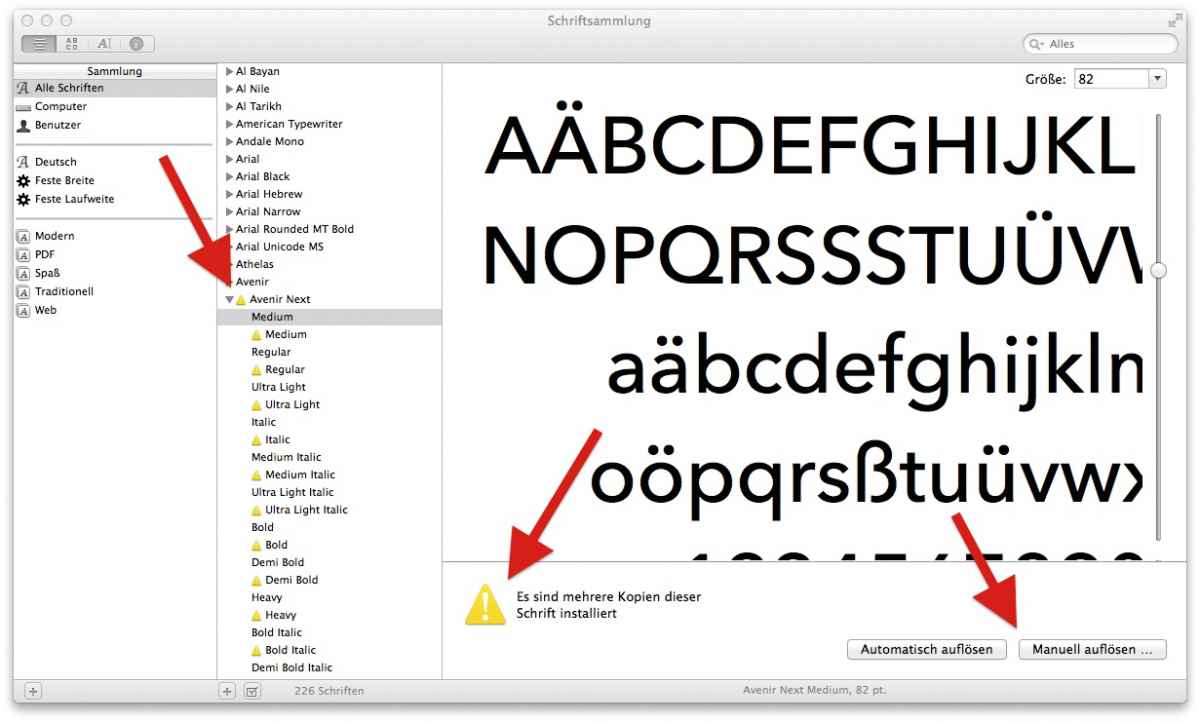
esp. fonts with same ID# (='doubled') can confuse the system ...
Replied by Karsten Schlüter on topic F*%$ed up Multicam thumbnails
DmitriZigany wrote: .... Just need to learn how the hell to do that. ...
for a start, launch your Font Book.app ...
if something's wrong with a font (doubled, corrupted, etc) it shows a yellow warning sign and offer repair options ...
esp. fonts with same ID# (='doubled') can confuse the system ...
Please Log in to join the conversation.
