


- Posts: 134
- Thank you received: 9
3 Post Moderation Rule for New Boarders (25 Jan 2021)
New boarders will have their posts moderated - Don't worry if you cannot see your post immediately.
Bug in Multicam in 10.1.3
- Ponponpostprod
-
 Topic Author
- Offline
- Premium Member
-

Less
More
16 Sep 2014 16:01 #52765
by Ponponpostprod
Bug in Multicam in 10.1.3 was created by Ponponpostprod
I encounter a problem in multicam 10.1.3 :
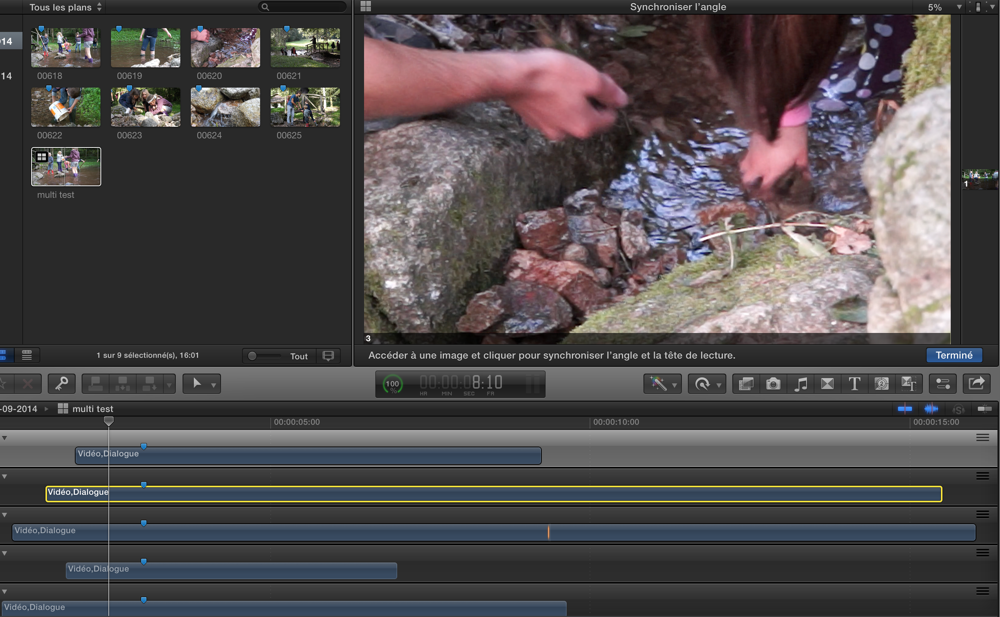
I've 8 cam to synchronise (without timecode), i make the multi cam and when i choose "synchronise with the control angle" the window (the right one) with the reference angle, become very little 5% only !
Another editor with the same MacBook Pro retina has the same problem.
see attach png
I've 8 cam to synchronise (without timecode), i make the multi cam and when i choose "synchronise with the control angle" the window (the right one) with the reference angle, become very little 5% only !
Another editor with the same MacBook Pro retina has the same problem.
see attach png
Please Log in to join the conversation.
- Tom Wolsky
-

- Offline
- Moderator
-

16 Sep 2014 16:12 #52768
by Tom Wolsky
Replied by Tom Wolsky on topic Bug in Multicam in 10.1.3
No image attached.
Please Log in to join the conversation.
- Ponponpostprod
-
Topic Author
- Offline
- Premium Member
-
Less
More
- Posts: 134
- Thank you received: 9
16 Sep 2014 17:27 #52771
by Ponponpostprod
Replied by Ponponpostprod on topic Bug in Multicam in 10.1.3
Please Log in to join the conversation.
- Tom Wolsky
-
- Offline
- Moderator
-
16 Sep 2014 17:47 #52772
by Tom Wolsky
Replied by Tom Wolsky on topic Bug in Multicam in 10.1.3
Can you resize the panes? It looks like event viewer. The viewer is normally on the other side of the angle viewer. Is this a laptop?
Please Log in to join the conversation.
- Ponponpostprod
-
Topic Author
- Offline
- Premium Member
-
Less
More
- Posts: 134
- Thank you received: 9
16 Sep 2014 17:52 #52773
by Ponponpostprod
Replied by Ponponpostprod on topic Bug in Multicam in 10.1.3
I can resize the pane but as soon as i move the pointer, the picture go back to this size.
It's not the event viewer but it's the view in multi cam edit when you ask to synchronise the clip with the reference angle, the reference angle appear to the right and the clip to synchronize with, to the left.
It's a macbook pro retina 16Go. Same thing with one or two screen.
It's not the event viewer but it's the view in multi cam edit when you ask to synchronise the clip with the reference angle, the reference angle appear to the right and the clip to synchronize with, to the left.
It's a macbook pro retina 16Go. Same thing with one or two screen.
Please Log in to join the conversation.
- ronny courtens
-

- Offline
- Moderator
-
Less
More
- Posts: 4455
- Thank you received: 962
16 Sep 2014 18:55 - 16 Sep 2014 18:57 #52779
by ronny courtens
Replied by ronny courtens on topic Bug in Multicam in 10.1.3
Must have something to do with the retina MBP. I cannot see this on any monitor, either with an iMac or a new MP. Use the feedback form to report this to Apple.
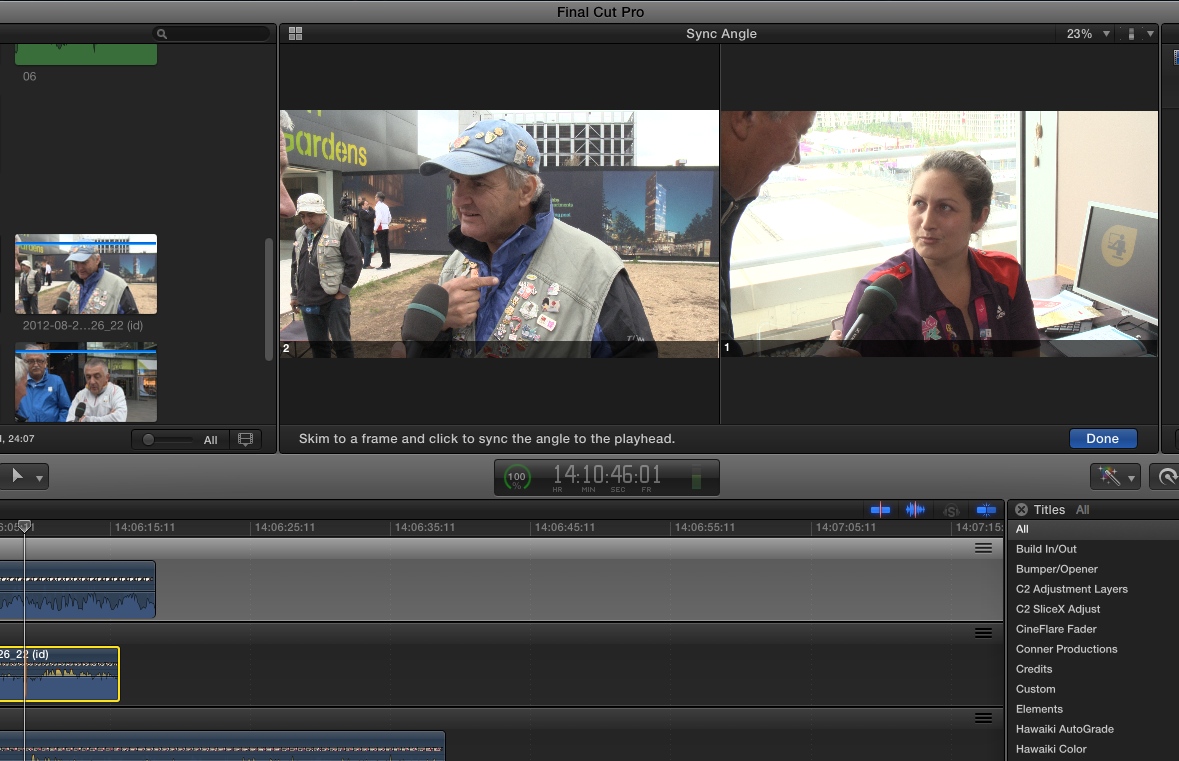
- Ronny
- Ronny
Last edit: 16 Sep 2014 18:57 by ronny courtens. Reason: attached screenshot
Please Log in to join the conversation.
- Ponponpostprod
-
Topic Author
- Offline
- Premium Member
-
Less
More
- Posts: 134
- Thank you received: 9
16 Sep 2014 19:25 #52780
by Ponponpostprod
Replied by Ponponpostprod on topic Bug in Multicam in 10.1.3
that's done. Thank you for the test.
Please Log in to join the conversation.
- Tom Wolsky
-
- Offline
- Moderator
-
16 Sep 2014 23:15 #52785
by Tom Wolsky
Replied by Tom Wolsky on topic Bug in Multicam in 10.1.3
I'm on a rMBP and couldn't reproduce it. Eight angles, added another and synced selection to monitoring angle. Didn't produce the result you're seeing. Wonder if it's format specific.
Please Log in to join the conversation.
- Ponponpostprod
-
Topic Author
- Offline
- Premium Member
-
Less
More
- Posts: 134
- Thank you received: 9
17 Sep 2014 06:03 #52804
by Ponponpostprod
Replied by Ponponpostprod on topic Bug in Multicam in 10.1.3
usually i didn't use the method of sync selection to monitoring angle, so when my friend told me about this problem i've tried. The first time, everything was OK and i send him a good screen capture. But after that, i've trying to use again this method and plouch ! the problem appear !?!
I don't think it's a format problem, i've not the same as him.
If I've time today, i'll make some test on an old macPro.
I don't think it's a format problem, i've not the same as him.
If I've time today, i'll make some test on an old macPro.
Please Log in to join the conversation.
- Ponponpostprod
-
Topic Author
- Offline
- Premium Member
-
Less
More
- Posts: 134
- Thank you received: 9
17 Sep 2014 07:34 #52811
by Ponponpostprod
Replied by Ponponpostprod on topic Bug in Multicam in 10.1.3
Tests on mac pro 2012 are done.
Same thing appear and it was FCPX 1.1 !
I've used P2 AVCintra 100 medias, at the beginning everything was ok and after 5 mn of test same problem : the right viewer was at 5% !
Should it be a french version bug, isit possible to ask an other language install ?
Same thing appear and it was FCPX 1.1 !
I've used P2 AVCintra 100 medias, at the beginning everything was ok and after 5 mn of test same problem : the right viewer was at 5% !
Should it be a french version bug, isit possible to ask an other language install ?
Please Log in to join the conversation.
- ronny courtens
-
- Offline
- Moderator
-
Less
More
- Posts: 4455
- Thank you received: 962
17 Sep 2014 09:05 #52812
by ronny courtens
Replied by ronny courtens on topic Bug in Multicam in 10.1.3
Hi Poncelin,
We have tested this on the French (France) version of FCP X and I see no issues:
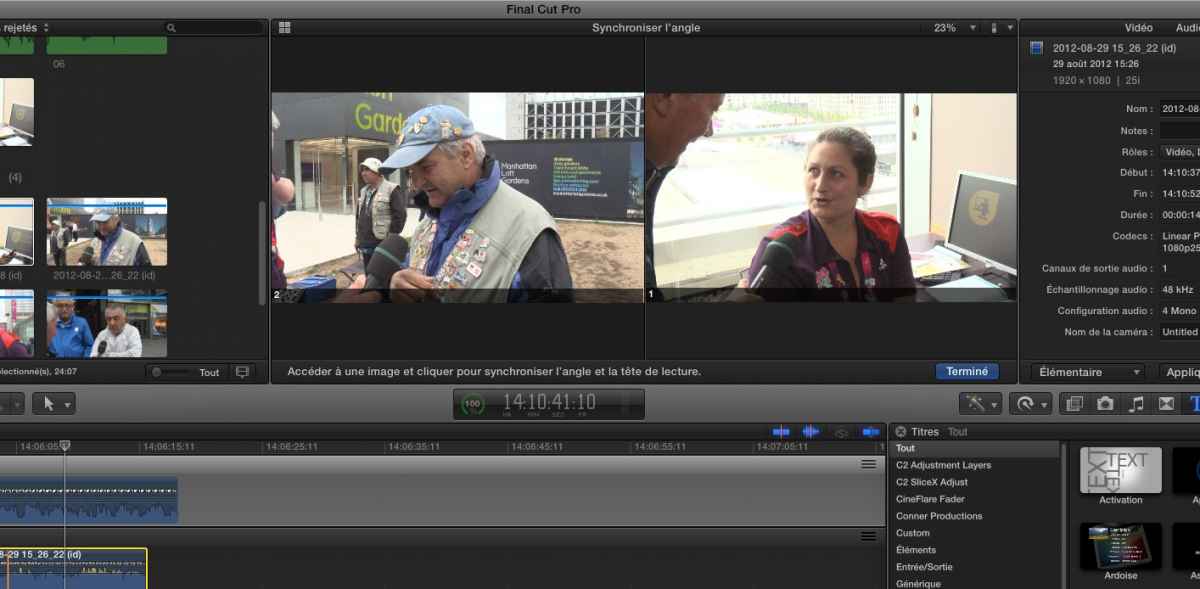
So it does not seem to be related to the language version either. As the problem sometimes doesn't show at all, and then suddenly it appears, this could either be an inconsistent bug or it could be related to the specific media.
One thing I would like to check: what is the frame size of the original media, and what is the frame size of the multi cam clip?
- Ronny
We have tested this on the French (France) version of FCP X and I see no issues:
So it does not seem to be related to the language version either. As the problem sometimes doesn't show at all, and then suddenly it appears, this could either be an inconsistent bug or it could be related to the specific media.
One thing I would like to check: what is the frame size of the original media, and what is the frame size of the multi cam clip?
- Ronny
Please Log in to join the conversation.
- Ponponpostprod
-
Topic Author
- Offline
- Premium Member
-
Less
More
- Posts: 134
- Thank you received: 9
17 Sep 2014 09:19 #52814
by Ponponpostprod
Replied by Ponponpostprod on topic Bug in Multicam in 10.1.3
I Ronny,
the media and the multi cam and timeline was 1920x1080 50i.
I've tested, the language version too, and i had the same issue. BUT ,
i discover something : If my monitoring angle is the first one, i ask "sync with monitoring angle", resize the pane, if i just go to the second angle, the pane stay at the good size, if i go to the third, it goes back 5%.
So i run to see my friend and explain, i've found a temporary solution for you, you've just to put the angle you want to synchronize on the second angle, change like this for the other and it's done.
But when the story begin to be fun, that's when he come and i show him, everything work like a charm with all the angle and always ok with french language !!!
No more problem.
:huh:
the media and the multi cam and timeline was 1920x1080 50i.
I've tested, the language version too, and i had the same issue. BUT ,
i discover something : If my monitoring angle is the first one, i ask "sync with monitoring angle", resize the pane, if i just go to the second angle, the pane stay at the good size, if i go to the third, it goes back 5%.
So i run to see my friend and explain, i've found a temporary solution for you, you've just to put the angle you want to synchronize on the second angle, change like this for the other and it's done.
But when the story begin to be fun, that's when he come and i show him, everything work like a charm with all the angle and always ok with french language !!!
No more problem.
:huh:
Please Log in to join the conversation.
- ronny courtens
-
- Offline
- Moderator
-
Less
More
- Posts: 4455
- Thank you received: 962
17 Sep 2014 09:24 #52815
by ronny courtens
Replied by ronny courtens on topic Bug in Multicam in 10.1.3
These kind of issues are the hardest to detect. It's like when you hear a strange sound when you start your car, you take it to the garage and when you start it there the strange sound is gone :S
But if you have seen the problem this means it can happen. So keep an eye on this and if the issue reoccurs please keep us updated.
- Ronny
But if you have seen the problem this means it can happen. So keep an eye on this and if the issue reoccurs please keep us updated.
- Ronny
Please Log in to join the conversation.
- Ponponpostprod
-
Topic Author
- Offline
- Premium Member
-
Less
More
- Posts: 134
- Thank you received: 9
17 Sep 2014 09:30 #52816
by Ponponpostprod
Replied by Ponponpostprod on topic Bug in Multicam in 10.1.3
the fear of mechanic !
Now it's ok on my MBP I'm going to correct the others, and if i find a way to repair without fail, i'll tell you.
Thanks for the time you've taken.
Now it's ok on my MBP I'm going to correct the others, and if i find a way to repair without fail, i'll tell you.
Thanks for the time you've taken.
Please Log in to join the conversation.
- Ponponpostprod
-
Topic Author
- Offline
- Premium Member
-
Less
More
- Posts: 134
- Thank you received: 9
30 Sep 2014 07:04 - 30 Sep 2014 07:11 #53421
by Ponponpostprod
Replied by Ponponpostprod on topic Bug in Multicam in 10.1.3
I've tested the bug of the "sync clip to reference angle" on a new and fresh installed MacPro 2013, on Imac an Macbook pro and it's always the same thing. I've to resize the right window and as soon as I pass thru the second angle my window become small again.
Test made with, Pro res 422 from evs, dvcpro HD, or H264, always the same problem...see the video
Test made with, Pro res 422 from evs, dvcpro HD, or H264, always the same problem...see the video
Last edit: 30 Sep 2014 07:11 by Ponponpostprod.
Please Log in to join the conversation.
