


- Posts: 85
- Thank you received: 2
3 Post Moderation Rule for New Boarders (25 Jan 2021)
New boarders will have their posts moderated - Don't worry if you cannot see your post immediately.
Editing between Libraries
15 Sep 2014 08:43 #52700
by BJansch
Editing between Libraries was created by BJansch
I'm making a film using a number of separate libraries and my question is: Why does FCPX need to copy the clips that I use into the Library containing the Project that I'm working on, effectively duplicating them and wasting disc space? Why does it not just link/reference the external media so that I don't have duplicated media on the drive?
Please Log in to join the conversation.
- Tom Wolsky
-

- Offline
- Moderator
-

15 Sep 2014 08:51 #52701
by Tom Wolsky
Replied by Tom Wolsky on topic Editing between Libraries
If the media's on the same drive for both libraries it's not duplicated though it might look as if it is. Perhaps you're not using the library structure correctly.
Please Log in to join the conversation.
- peteramwiggins
-

- Offline
- Administrator
-

- The Administrator :)
Less
More
- Posts: 1049
- Thank you received: 404
15 Sep 2014 08:51 #52702
by peteramwiggins
Administrator
Replied by peteramwiggins on topic Editing between Libraries
If you copy media between Libraries with external media, it won't make a copy.
Administrator
Please Log in to join the conversation.
- Tom Wolsky
-
- Offline
- Moderator
-
15 Sep 2014 09:04 #52703
by Tom Wolsky
Replied by Tom Wolsky on topic Editing between Libraries
Even if it's managed it won't duplicate if they're in the same drive. It uses hard links just to confuse people.
Please Log in to join the conversation.

15 Sep 2014 12:02 - 15 Sep 2014 12:07 #52706
by BenB
Replied by BenB on topic Editing between Libraries
I just tested, and mine are physically copying the full media file between Libraries, not using aliases.
Between Events will use aliases, but between Libraries, it does in fact copy. I'm watching it happen in front of me right now.
And all on the same drive, all Libraries in the same location.
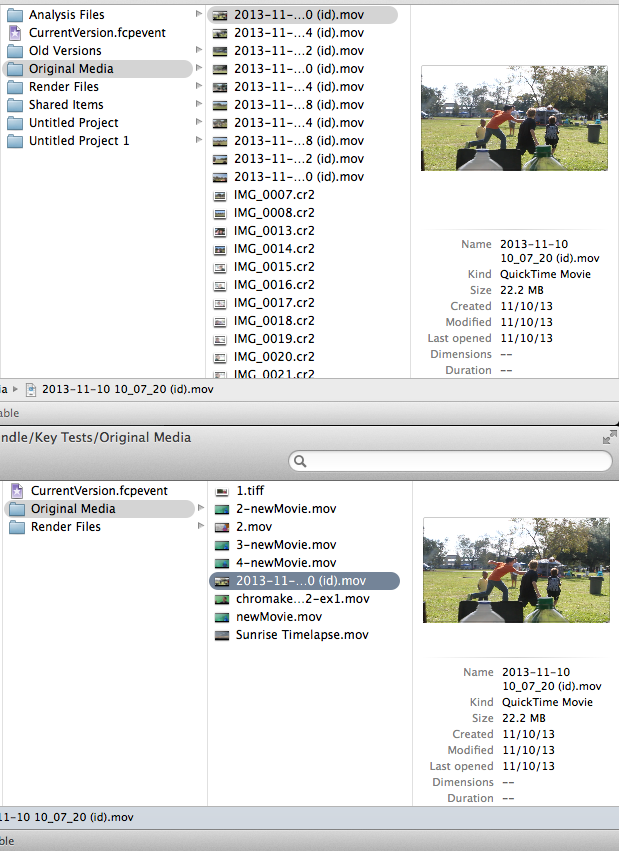
Between Events will use aliases, but between Libraries, it does in fact copy. I'm watching it happen in front of me right now.
And all on the same drive, all Libraries in the same location.
Last edit: 15 Sep 2014 12:07 by BenB.
Please Log in to join the conversation.

15 Sep 2014 12:03 #52707
by merc
Replied by merc on topic Editing between Libraries
Whoa Tom...so what happens when you move the library to another drive...missing clips?
Please Log in to join the conversation.
- Tom Wolsky
-
- Offline
- Moderator
-
15 Sep 2014 13:09 #52708
by Tom Wolsky
Replied by Tom Wolsky on topic Editing between Libraries
Repeat the exercise and check the volume sizes. Both libraries will show real clips. Both libraries will appear to take the same amount of space, but the available drive space will not decrease. That's the way hard links work.
Please Log in to join the conversation.
- Tom Wolsky
-
- Offline
- Moderator
-
15 Sep 2014 13:09 #52709
by Tom Wolsky
Replied by Tom Wolsky on topic Editing between Libraries
The media gets copied so it's in two locations.
Please Log in to join the conversation.
15 Sep 2014 13:28 #52710
by BenB
Replied by BenB on topic Editing between Libraries
If I delete the original, the copy still works.
Please Log in to join the conversation.
- Tom Wolsky
-
- Offline
- Moderator
-
15 Sep 2014 13:34 #52711
by Tom Wolsky
Replied by Tom Wolsky on topic Editing between Libraries
That's right. Clever isn't it. That's the way hard links work. A single sector of your drive holds the media. Until both libraries that reference it are trashed the media stays there. When both or all give if the libraries are trashed the media's there. When they're all gone the drive space is released.
Please Log in to join the conversation.
- ronny courtens
-

- Offline
- Moderator
-
Less
More
- Posts: 4455
- Thank you received: 962
15 Sep 2014 13:50 - 15 Sep 2014 13:52 #52712
by ronny courtens
Replied by ronny courtens on topic Editing between Libraries
Confirming what everyone says, with some screenshots to show it.
When you work with external media and you copy clips between Libraries, only the symlinks are copied and no actual media is ever copied from one Library into the other. So you never get physical duplicates of media. That's quite obvious.
When you work with managed media and you copy clips between Libraries, FCP X copies the media from one Library into the other but no physical duplicates of the media are created. This is called hard-linking, and it's indeed very clever.
Here I have 3 managed Libraries. LIB3 has a 20 GB clip imported into the Library, LIB 2 has a 10 GB clip imported into the Library and LIB1 has no media, only an empty Project. All Libraries are on the system drive and the drive has 186 GB free space left:
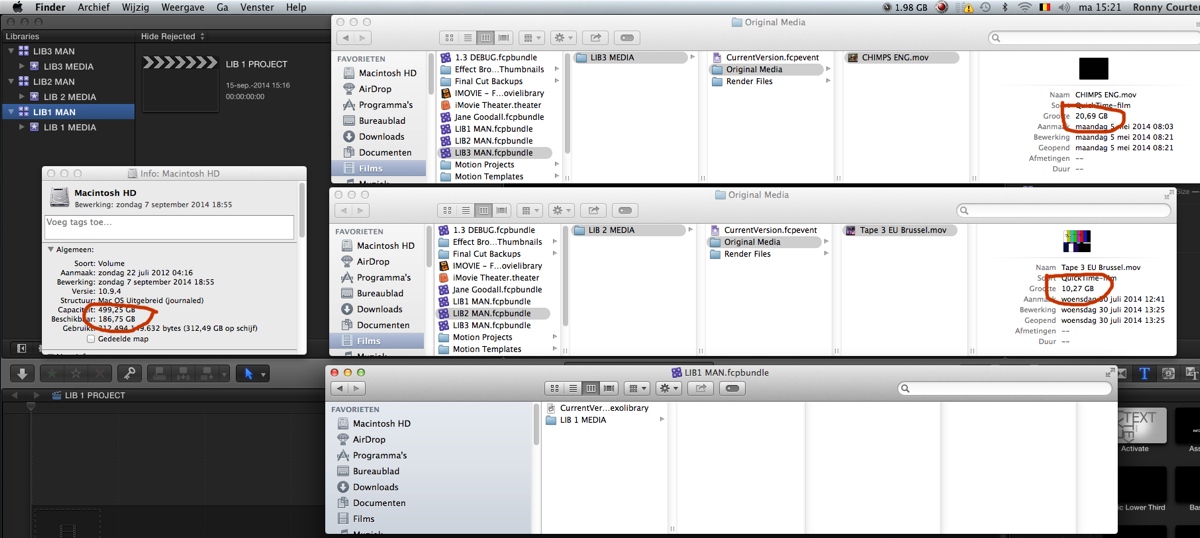
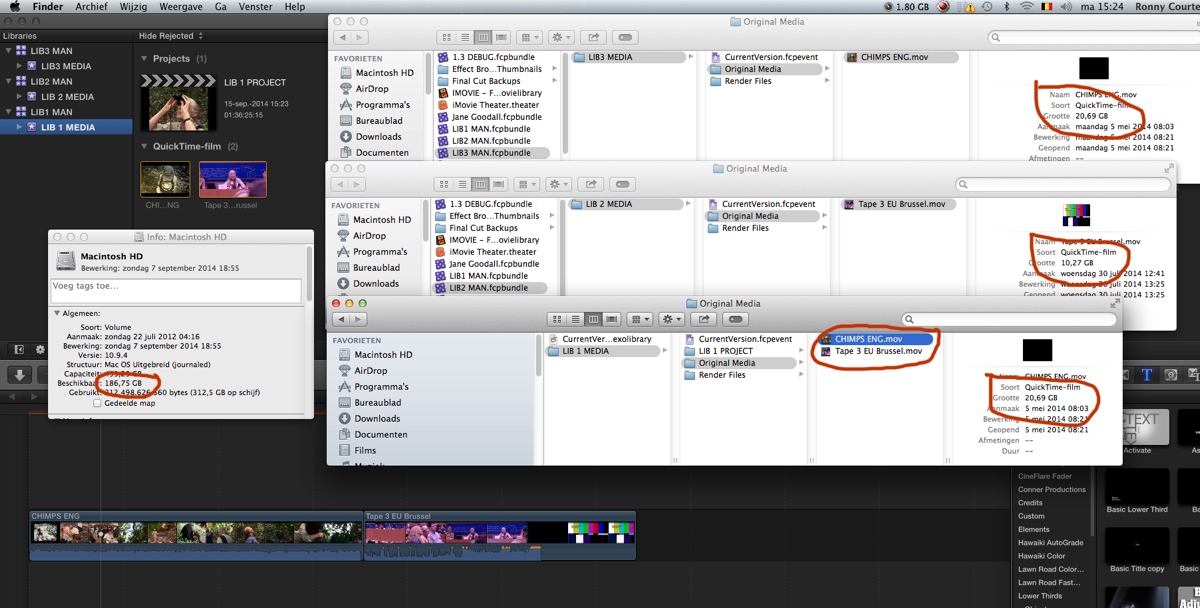
Now I use the clips from LIB 3 and LIB2 in the LIB1 Project. Although the 2 clips from LIB3 and LIB2 are copied to the Original Media folder of LIB1, the free space on the drive remains 186 GB:
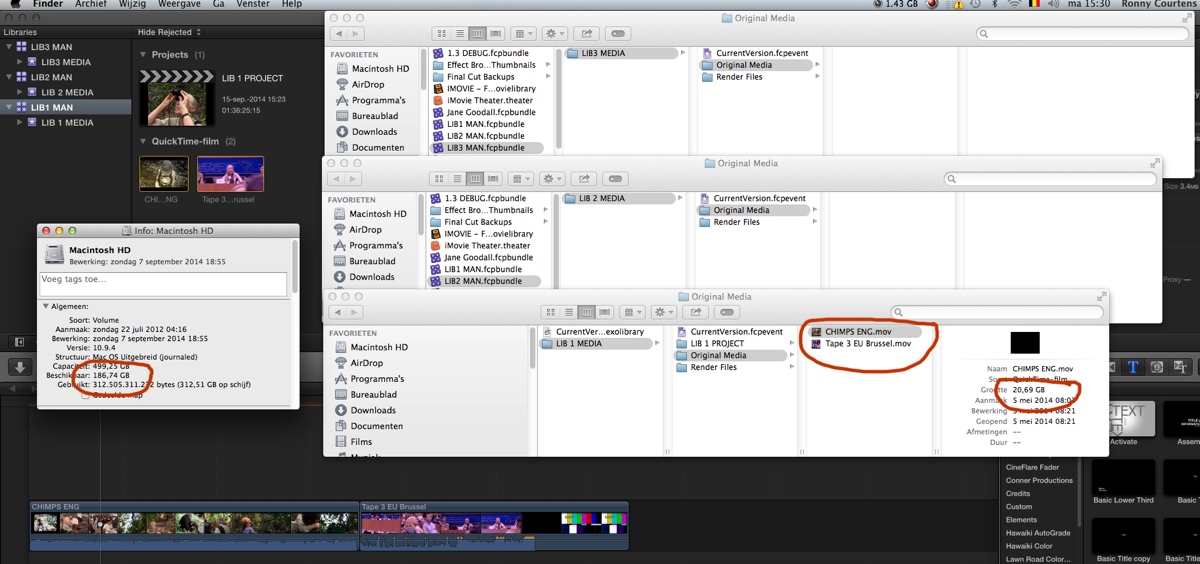
Now I have deleted the clips from LIB3 and LIB2 and I have only left the clips inside LIB1. Again the free space on the drive remains 186 GB:
So to answer the original question: when you use clips from one managed Library in another managed Library FCP X does NOT create physical duplicate media and it does NOT waste any drive space.
And for merc: if you should move the managed Library to another drive FCP X will physically copy all the media that's inside this Library onto the other drive, and you will get no missing media.
- Ronny
When you work with external media and you copy clips between Libraries, only the symlinks are copied and no actual media is ever copied from one Library into the other. So you never get physical duplicates of media. That's quite obvious.
When you work with managed media and you copy clips between Libraries, FCP X copies the media from one Library into the other but no physical duplicates of the media are created. This is called hard-linking, and it's indeed very clever.
Here I have 3 managed Libraries. LIB3 has a 20 GB clip imported into the Library, LIB 2 has a 10 GB clip imported into the Library and LIB1 has no media, only an empty Project. All Libraries are on the system drive and the drive has 186 GB free space left:
Now I use the clips from LIB 3 and LIB2 in the LIB1 Project. Although the 2 clips from LIB3 and LIB2 are copied to the Original Media folder of LIB1, the free space on the drive remains 186 GB:
Now I have deleted the clips from LIB3 and LIB2 and I have only left the clips inside LIB1. Again the free space on the drive remains 186 GB:
So to answer the original question: when you use clips from one managed Library in another managed Library FCP X does NOT create physical duplicate media and it does NOT waste any drive space.
And for merc: if you should move the managed Library to another drive FCP X will physically copy all the media that's inside this Library onto the other drive, and you will get no missing media.
- Ronny
Last edit: 15 Sep 2014 13:52 by ronny courtens.
Please Log in to join the conversation.

15 Sep 2014 14:00 #52714
by bobmax48
Replied by bobmax48 on topic Editing between Libraries
Ronny to make it more clear you are talking about copying the Library and using FCPX's consolidate command?
Please Log in to join the conversation.
15 Sep 2014 14:18 #52715
by bobmax48
Replied by bobmax48 on topic Editing between Libraries
Larry Jordon has a new article about "Move Libraries, Events, Clips and Projects:
goo.gl/Kal3qI
Please Log in to join the conversation.
- ronny courtens
-
- Offline
- Moderator
-
Less
More
- Posts: 4455
- Thank you received: 962
15 Sep 2014 14:23 #52716
by ronny courtens
Replied by ronny courtens on topic Editing between Libraries
The screenshots are about using clips across different managed Libraries that are on the same drive.
The last part of the reply was about moving a managed Library from one drive to another.
- Ronny
The last part of the reply was about moving a managed Library from one drive to another.
- Ronny
Please Log in to join the conversation.
15 Sep 2014 15:32 #52722
by merc
Replied by merc on topic Editing between Libraries
So does it follow that we should never move libraries using Finder... Or is it also able to resolve the hard links independent of FCPX?
Please Log in to join the conversation.
- ronny courtens
-
- Offline
- Moderator
-
Less
More
- Posts: 4455
- Thank you received: 962
15 Sep 2014 15:44 #52723
by ronny courtens
Replied by ronny courtens on topic Editing between Libraries
When you move a managed Library to a different location on the same drive, wether you do this on the Finder level or within FCP X, this will not involve any duplicating of media.
- Ronny
- Ronny
Please Log in to join the conversation.
15 Sep 2014 15:51 #52724
by merc
Replied by merc on topic Editing between Libraries
But if a managed library were to be moved to an external drive using Finder we could expect data loss right? If some of the media had been originally copied from another managed library.
Please Log in to join the conversation.
- ronny courtens
-
- Offline
- Moderator
-
Less
More
- Posts: 4455
- Thank you received: 962
15 Sep 2014 15:56 - 15 Sep 2014 16:00 #52725
by ronny courtens
Replied by ronny courtens on topic Editing between Libraries
Nope. In a managed Library all the media resides in the Original Media folder of the Events in that Library. If you move the Library to an external drive the Library will be duplicated and all the media inside the Library will be duplicated as well. No files will be missing.
The only thing you need to do before moving a Library to another drive is to make sure that all the media is actually contained inside the Library and you don't have any clips pointing to media outside of the Library. You do this with the Consolidate command.
- Ronny
The only thing you need to do before moving a Library to another drive is to make sure that all the media is actually contained inside the Library and you don't have any clips pointing to media outside of the Library. You do this with the Consolidate command.
- Ronny
Last edit: 15 Sep 2014 16:00 by ronny courtens.
Please Log in to join the conversation.
