


- Posts: 48
- Thank you received: 2
3 Post Moderation Rule for New Boarders (25 Jan 2021)
New boarders will have their posts moderated - Don't worry if you cannot see your post immediately.
all titles are gone in 10.1.3
14 Sep 2014 08:10 - 14 Sep 2014 09:14 #52682
by schloerg
all titles are gone in 10.1.3 was created by schloerg
I'm working on a long documentary and I have a lot of interviews. They are translated using annotation edit. I exported the files as XML and imported the XMLs into FCPX. In the project they exist as titles, (lower third, information bar). Updating all versions of FCPX until 10.1 there was no problem, everything was in place and also all titles. Now, that I updated to version 10.1.3, the following happened. All the titles (lower third information bar), are there. But they are empty, there's no text inside. I have several backups, so I went back to 10.1 and all is ok. Than I upgraded to 10.1.2 and there I found the same behavior. All titles are empty! So since 10.1.2 there is this bug. Does anyone have an explanation?
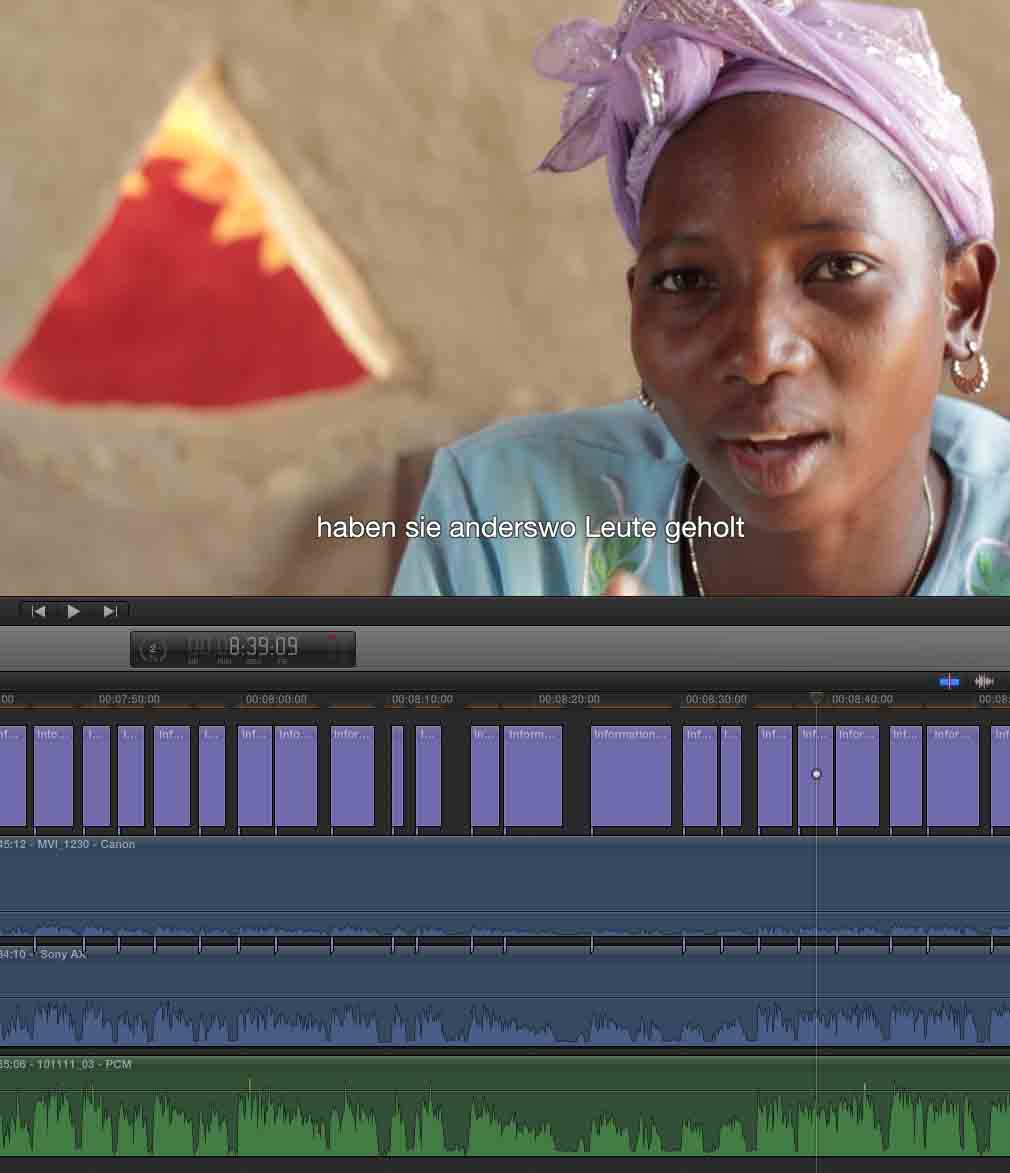
Last edit: 14 Sep 2014 09:14 by schloerg. Reason: picture added
Please Log in to join the conversation.
- ronny courtens
-

- Offline
- Moderator
-

Less
More
- Posts: 4455
- Thank you received: 962
14 Sep 2014 17:59 #52688
by ronny courtens
Replied by ronny courtens on topic all titles are gone in 10.1.3
Fortunately you have been wise keeping backups from the original version. That's always a good thing to do when you update mid-project. So are you saying that the title clips are on the timeline but there is no actual text in any of the titles? I'm asking this because in the screenshot I can see text in the Viewer.
- Ronny
- Ronny
Please Log in to join the conversation.
14 Sep 2014 19:00 - 14 Sep 2014 19:46 #52691
by schloerg
Replied by schloerg on topic all titles are gone in 10.1.3
Hi Ronny
What you see in the picture is my backup, working with 10.1. In 10.1.3 it looks the same, except there is no text, and when you activate the title and click in the textfield in the viewer, there ist nothing, also nothing in the inspector. just empty. thank you for taking care here.
What you see in the picture is my backup, working with 10.1. In 10.1.3 it looks the same, except there is no text, and when you activate the title and click in the textfield in the viewer, there ist nothing, also nothing in the inspector. just empty. thank you for taking care here.
Last edit: 14 Sep 2014 19:46 by schloerg.
Please Log in to join the conversation.
- ronny courtens
-
- Offline
- Moderator
-
Less
More
- Posts: 4455
- Thank you received: 962
15 Sep 2014 07:06 #52699
by ronny courtens
Replied by ronny courtens on topic all titles are gone in 10.1.3
Let's start with the obvious: launch FCP X 10.1.3 while holding the ALT+CMD keys pressed down to delete your FCP X preferences. Then open your project. Does this restore the text?
If it doesn't:
1. Open your project in FCP X 10.1. Then select the Library and choose File > Export XML. Store the XML file on your Desktop.
2. Launch FCP X 10.1.3. Close all Libraries and create a new Library. Then choose File > Import > XML and import the XML that is stored on your desktop. This will open your documentary in the new Library. Check the text, does it show now?
- Ronny
If it doesn't:
1. Open your project in FCP X 10.1. Then select the Library and choose File > Export XML. Store the XML file on your Desktop.
2. Launch FCP X 10.1.3. Close all Libraries and create a new Library. Then choose File > Import > XML and import the XML that is stored on your desktop. This will open your documentary in the new Library. Check the text, does it show now?
- Ronny
Please Log in to join the conversation.
- Andreas Kiel
-

- Offline
- Platinum Member
-

Less
More
- Posts: 1077
- Thank you received: 189
15 Sep 2014 10:31 #52705
by Andreas Kiel
Replied by Andreas Kiel on topic all titles are gone in 10.1.3
Lutz,
Unfortunately I do have a REAL slow internet connection. I tried to answer earlier but my iPad always gave up after 10 minutes. ut today seems a good day.
I would try the same XML approach Ronny suggested.
One thing Ronny didn't mention is that after exporting the XML you easily could open the file in a text editor and search for <text> in case it's not found you do have a real problem with your project.
Or you can try to import your Annotation Edit XML again. If the titles won't show up you do have a XML version problem. Since 10.1.2 the XML changed dramatically and "resources" like "effects" are stored at a different place. You may look at the XML in a text editor for the version - it's right up on the begining of the file.
Another thing which could happen (happened to me) is that some parameters of a title can't be interpreted and anything was lost at the first glimpse. I replaced the titles with another title and magically my text appeared again.
Mid of the week (German Telekom promised that to thousands of users) I should be back to normal communication state. You can send me the cleaned library and the Annotation Edit XML to kiel at spherico dot com.
- Andreas
Unfortunately I do have a REAL slow internet connection. I tried to answer earlier but my iPad always gave up after 10 minutes. ut today seems a good day.
I would try the same XML approach Ronny suggested.
One thing Ronny didn't mention is that after exporting the XML you easily could open the file in a text editor and search for <text> in case it's not found you do have a real problem with your project.
Or you can try to import your Annotation Edit XML again. If the titles won't show up you do have a XML version problem. Since 10.1.2 the XML changed dramatically and "resources" like "effects" are stored at a different place. You may look at the XML in a text editor for the version - it's right up on the begining of the file.
Another thing which could happen (happened to me) is that some parameters of a title can't be interpreted and anything was lost at the first glimpse. I replaced the titles with another title and magically my text appeared again.
Mid of the week (German Telekom promised that to thousands of users) I should be back to normal communication state. You can send me the cleaned library and the Annotation Edit XML to kiel at spherico dot com.
- Andreas
Please Log in to join the conversation.
15 Sep 2014 14:27 #52717
by schloerg
Replied by schloerg on topic all titles are gone in 10.1.3
Hi Ronny
thank you so much, the xml-trick regenerated the titles. Now I can update the whole project to 10.1.3. One tricky thing is still there: I cannot export the whole library in one piece. As far as I can see, 10.1 allows only projects and events. But my interviews sit in 8 events only, so I can export and import them one by one. All other events and files do not cause problems in the update process. Thank you, you are my hero!!!
thank you so much, the xml-trick regenerated the titles. Now I can update the whole project to 10.1.3. One tricky thing is still there: I cannot export the whole library in one piece. As far as I can see, 10.1 allows only projects and events. But my interviews sit in 8 events only, so I can export and import them one by one. All other events and files do not cause problems in the update process. Thank you, you are my hero!!!
Please Log in to join the conversation.
15 Sep 2014 14:30 #52718
by schloerg
Replied by schloerg on topic all titles are gone in 10.1.3
Hi Andreas
We could write german, but anyway. Thank you for your help, but Ronny already had the proper solution. By the way, I have about 5000 titles, so to import them again would cost me 3 or 4 days of work.
We could write german, but anyway. Thank you for your help, but Ronny already had the proper solution. By the way, I have about 5000 titles, so to import them again would cost me 3 or 4 days of work.
Please Log in to join the conversation.
- ronny courtens
-
- Offline
- Moderator
-
Less
More
- Posts: 4455
- Thank you received: 962
15 Sep 2014 14:33 #52719
by ronny courtens
Replied by ronny courtens on topic all titles are gone in 10.1.3
You are right, I had already forgotten that you cannot export a Library XML in 10.1 
You can indeed export separate Event XMLs and they should open without any issues in 10.1.3. Glad it's working, it's indeed very scary to see such a bunch of work disappearing after an update :S
- Ronny
You can indeed export separate Event XMLs and they should open without any issues in 10.1.3. Glad it's working, it's indeed very scary to see such a bunch of work disappearing after an update :S
- Ronny
Please Log in to join the conversation.
- Andreas Kiel
-
- Offline
- Platinum Member
-
Less
More
- Posts: 1077
- Thank you received: 189
16 Sep 2014 06:54 - 16 Sep 2014 07:00 #52734
by Andreas Kiel
Replied by Andreas Kiel on topic all titles are gone in 10.1.3
I'm back on track - regarding internet and phone 
Even though it is not working - it is good that it is not working.
Even Apple recommends not to use XML for more complicated projects.
I just tried a 1700+ subtitle conversion and import – all in all it took about 3 minutes.
The following is based on experience with millions of subtitles
I personally would never use the "information Bar" title for subtitles. It doesn't make any sense especially for last minute changes - you just limit yourself.
Use some title which has a "1-Text Entry Only", these all are easier to handle for FCP X and you.
You can use one of Simon Ubsdell's ones, use the gradient one from BenB (and modify) or one of my TextUp ones. All are free and way better for subtitles.
- Andreas
P.S.
Couldn't resist to add a customer quote from the beloved Netherlands:
Even in the unstable landscape which FCPX is, XTI and XTE are the only safe havens.
Actually, the subtitle templates Andreas developed are more stable than Apple’s!!!!
ronny courtens wrote: You are right, I had already forgotten that you cannot export a Library XML in 10.1
You can indeed export separate Event XMLs and they should open without any issues in 10.1.3. Glad it's working, it's indeed very scary to see such a bunch of work disappearing after an update :S
- Ronny
Even though it is not working - it is good that it is not working.
Even Apple recommends not to use XML for more complicated projects.
Hmmm, if these subs are not distributed thru 500 or whatever amount of projects this should take an hour or two.schloerg wrote: By the way, I have about 5000 titles, so to import them again would cost me 3 or 4 days of work.
I just tried a 1700+ subtitle conversion and import – all in all it took about 3 minutes.
The following is based on experience with millions of subtitles
I personally would never use the "information Bar" title for subtitles. It doesn't make any sense especially for last minute changes - you just limit yourself.
Use some title which has a "1-Text Entry Only", these all are easier to handle for FCP X and you.
You can use one of Simon Ubsdell's ones, use the gradient one from BenB (and modify) or one of my TextUp ones. All are free and way better for subtitles.
- Andreas
P.S.
Couldn't resist to add a customer quote from the beloved Netherlands:
Even in the unstable landscape which FCPX is, XTI and XTE are the only safe havens.
Actually, the subtitle templates Andreas developed are more stable than Apple’s!!!!
Last edit: 16 Sep 2014 07:00 by Andreas Kiel. Reason: Couldn't resist
Please Log in to join the conversation.
16 Sep 2014 08:50 #52737
by schloerg
Replied by schloerg on topic all titles are gone in 10.1.3
Hi Andreas
How can I tell annotation edit to use the titles you mentioned, and where can I get them? A link would be kind. best regards - Lutz
How can I tell annotation edit to use the titles you mentioned, and where can I get them? A link would be kind. best regards - Lutz
Please Log in to join the conversation.
- ronny courtens
-
- Offline
- Moderator
-
Less
More
- Posts: 4455
- Thank you received: 962
16 Sep 2014 09:07 #52738
by ronny courtens
Replied by ronny courtens on topic all titles are gone in 10.1.3
Hi Andreas,
Happy to hear you are "connected" again
I agree XML should not be used for complex projects. Actually I recently had a pleasant discussion about this with Phillip Hodgetts on a private forum. We had a laugh about the fact that you should use XML to transfer projects to completely different applications, but not within the application that created the XML :S
Anyway, in this case nothing could go wrong. The OP's project is a documentary, which implies it is a a fairly un-complex timeline in the vertical sense. Plus schloerg has been intelligent to make a safety backup before updating. This is something that everyone always should do before even thinking about updating at all. So I was quite confident that the XML roundtrip could fix this problem without any risks.
I also agree I would never use the "Information Bar" template for subtitles because it has a separate text entry field for each line of text, which is not very handy at all.
And I concur with my esteemed Dutch colleague that your tools are truly a safe haven, they even have a permanent place in my Dock.

Although I would never say FCP X is an "unstable landscape". It's constantly evolving, but not unstable at all
- Ronny
Happy to hear you are "connected" again
I agree XML should not be used for complex projects. Actually I recently had a pleasant discussion about this with Phillip Hodgetts on a private forum. We had a laugh about the fact that you should use XML to transfer projects to completely different applications, but not within the application that created the XML :S
Anyway, in this case nothing could go wrong. The OP's project is a documentary, which implies it is a a fairly un-complex timeline in the vertical sense. Plus schloerg has been intelligent to make a safety backup before updating. This is something that everyone always should do before even thinking about updating at all. So I was quite confident that the XML roundtrip could fix this problem without any risks.
I also agree I would never use the "Information Bar" template for subtitles because it has a separate text entry field for each line of text, which is not very handy at all.
And I concur with my esteemed Dutch colleague that your tools are truly a safe haven, they even have a permanent place in my Dock.
Although I would never say FCP X is an "unstable landscape". It's constantly evolving, but not unstable at all
- Ronny
Please Log in to join the conversation.
16 Sep 2014 09:17 #52739
by schloerg
Replied by schloerg on topic all titles are gone in 10.1.3
Hi Ronny
I modified information bar, now it has one text entry line only. (modified it in motion) I could never tell annotation edit to use another template than information bar, which is the default for the program. In trh export window It says it can import fcpxml effects, but how do I prepare an FCPX effect as XML?
Lutz
I modified information bar, now it has one text entry line only. (modified it in motion) I could never tell annotation edit to use another template than information bar, which is the default for the program. In trh export window It says it can import fcpxml effects, but how do I prepare an FCPX effect as XML?
Lutz
Please Log in to join the conversation.
- Andreas Kiel
-
- Offline
- Platinum Member
-
Less
More
- Posts: 1077
- Thank you received: 189
16 Sep 2014 10:14 #52740
by Andreas Kiel
Replied by Andreas Kiel on topic all titles are gone in 10.1.3
Ronny,
You do have more of my apps in the dock than I do. was does that tell me :blink:
The "unstable landscape" might some Dutch special cause many of them live on some land borrowed from the sea.
@Lutz,
The templates from Simon and Ben you'll find in the Template section here.
Ben published a new template (not really for subtitles) a day ago.
www.fcp.co/forum/4-final-cut-pro-x-fcpx/...itle-like-this#52654
Sounds like fun for some news cutting stuff.
And yes I can try it now, since I can download things again.
Regarding my templates just download X-Title Importer: www.spherico.com/filmtools/TitleExchange/XTI/XTI.dmg
Open the application once and the Motion titles will be installed. You can trash the app then or try to get your subtitles into FCP X with it.
For Annotation Edit create an empty timeline add a "subtitle safe" title of you choice to it and export as XML. This XML can be used with Annotation Edit.
Also the current version of Annotation Edit comes along with a Motion Title named AE Subtitle X which does more or less exactly the same than my TextUp.
I am doing this XML template stuff for more than a decade now, my TitleExchange was the first app which used this approach. I can highly recommend to get used to them even if you don't want burned in subtitles.
These user template presets can be a big help to simulate how subtitles will look at final delivery.
- Andreas
You do have more of my apps in the dock than I do. was does that tell me :blink:
The "unstable landscape" might some Dutch special cause many of them live on some land borrowed from the sea.
@Lutz,
The templates from Simon and Ben you'll find in the Template section here.
Ben published a new template (not really for subtitles) a day ago.
www.fcp.co/forum/4-final-cut-pro-x-fcpx/...itle-like-this#52654
Sounds like fun for some news cutting stuff.
And yes I can try it now, since I can download things again.
Regarding my templates just download X-Title Importer: www.spherico.com/filmtools/TitleExchange/XTI/XTI.dmg
Open the application once and the Motion titles will be installed. You can trash the app then or try to get your subtitles into FCP X with it.
For Annotation Edit create an empty timeline add a "subtitle safe" title of you choice to it and export as XML. This XML can be used with Annotation Edit.
Also the current version of Annotation Edit comes along with a Motion Title named AE Subtitle X which does more or less exactly the same than my TextUp.
I am doing this XML template stuff for more than a decade now, my TitleExchange was the first app which used this approach. I can highly recommend to get used to them even if you don't want burned in subtitles.
These user template presets can be a big help to simulate how subtitles will look at final delivery.
- Andreas
Please Log in to join the conversation.
16 Sep 2014 16:03 #52767
by schloerg
Replied by schloerg on topic all titles are gone in 10.1.3
Hi Andreas
thank you so far. But when I go the annotation-xml-way as you described, I end up with empty titles. So I went back to my modified information bar, which is fine for me, and this one works.
Lutz
thank you so far. But when I go the annotation-xml-way as you described, I end up with empty titles. So I went back to my modified information bar, which is fine for me, and this one works.
Lutz
Please Log in to join the conversation.
- Andreas Kiel
-
- Offline
- Platinum Member
-
Less
More
- Posts: 1077
- Thank you received: 189
17 Sep 2014 07:10 - 17 Sep 2014 07:24 #52808
by Andreas Kiel
Replied by Andreas Kiel on topic all titles are gone in 10.1.3
Hi Lutz,
I can't be of real help here since I don't have a full version of Annotation Edit at my office machines - no need for me here.
The way I described above should work though. I have no idea why it doesn't.
Anyway you got the problem solved.
Below an example "package" of the result I got using a standard .vtt file, the zeitAnker FCP X template and my app – should be more or less the same with Annotation Edit
First setup the template.
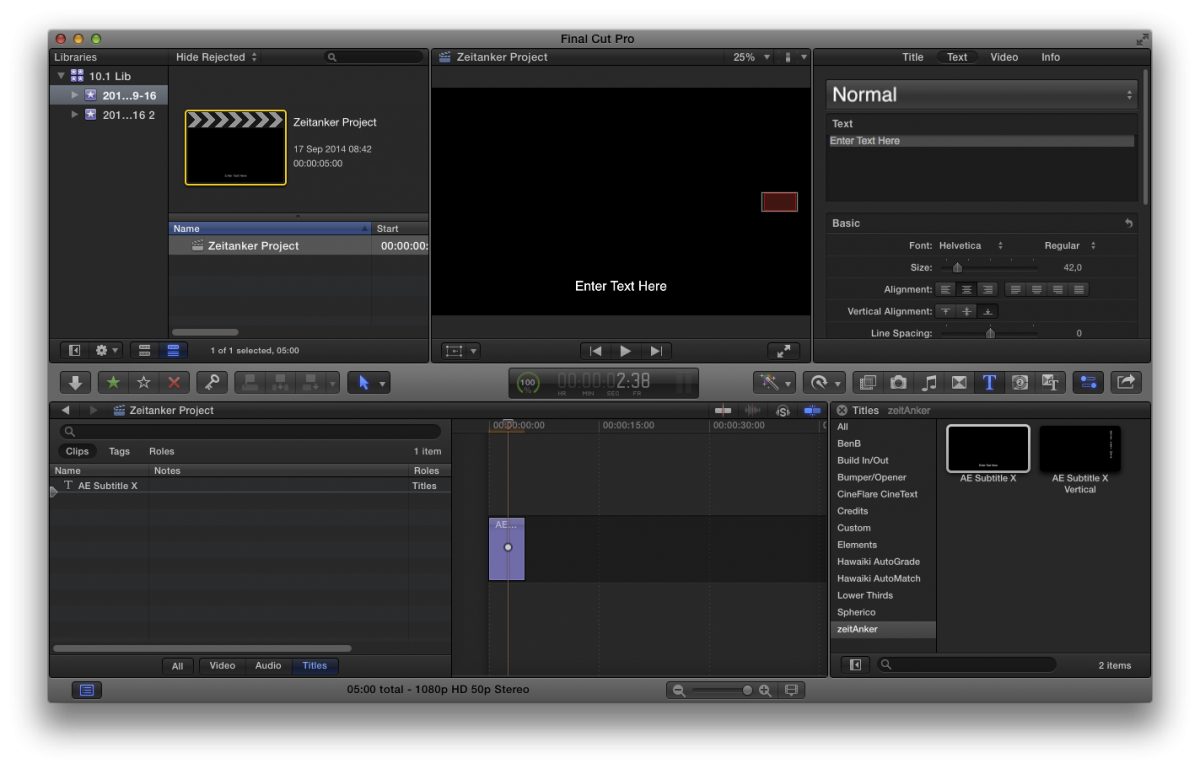
Save as XML.
Then use that template for the conversion.
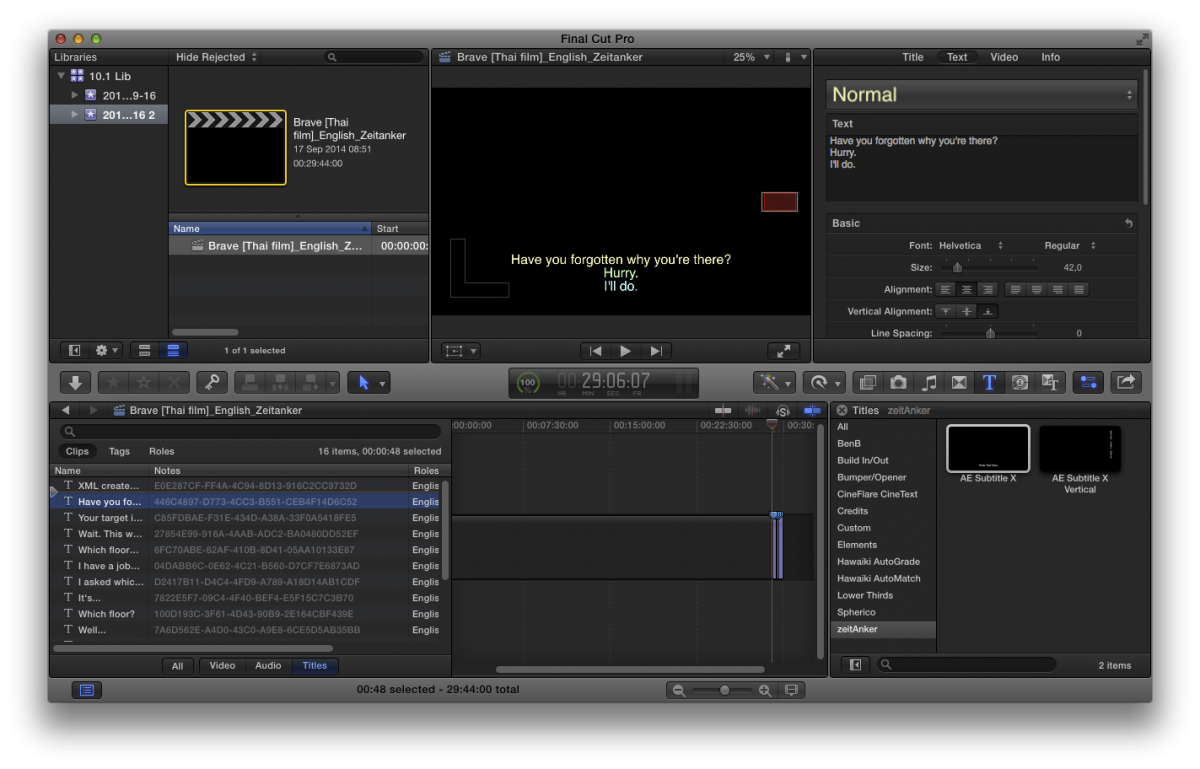
To test there are the source files I used.
The zeitAnker templates are installed at "/Library/Application Support/Final Cut Pro/Templates.localized/Titles.localized/zeitAnker"
- Andreas
I can't be of real help here since I don't have a full version of Annotation Edit at my office machines - no need for me here.
The way I described above should work though. I have no idea why it doesn't.
Anyway you got the problem solved.
Below an example "package" of the result I got using a standard .vtt file, the zeitAnker FCP X template and my app – should be more or less the same with Annotation Edit
First setup the template.
Save as XML.
Then use that template for the conversion.
To test there are the source files I used.
The zeitAnker templates are installed at "/Library/Application Support/Final Cut Pro/Templates.localized/Titles.localized/zeitAnker"
- Andreas
Last edit: 17 Sep 2014 07:24 by Andreas Kiel.
Please Log in to join the conversation.
17 Sep 2014 07:18 #52809
by schloerg
Replied by schloerg on topic all titles are gone in 10.1.3
Hi Andreas
I will try it. thank you so much for taking care of my subtitles. I will let you know.
Lutz
I will try it. thank you so much for taking care of my subtitles. I will let you know.
Lutz
Please Log in to join the conversation.

17 Nov 2014 09:17 #56121
by wdevn
LLAP,
James
Taipei, Taiwan
Replied by wdevn on topic Is spherico.com down?
LLAP,
James
Taipei, Taiwan
Please Log in to join the conversation.
- Andreas Kiel
-
- Offline
- Platinum Member
-
Less
More
- Posts: 1077
- Thank you received: 189
17 Nov 2014 11:09 #56122
by Andreas Kiel
Replied by Andreas Kiel on topic Is spherico.com down?
Please Log in to join the conversation.
