


- Posts: 22
- Thank you received: 0
3 Post Moderation Rule for New Boarders (25 Jan 2021)
New boarders will have their posts moderated - Don't worry if you cannot see your post immediately.
Safe Zones/Exporting Problem
- AndreaO1984
-
 Topic Author
- Offline
- Junior Member
-

Less
More
12 Sep 2014 14:18 #52611
by AndreaO1984
Safe Zones/Exporting Problem was created by AndreaO1984
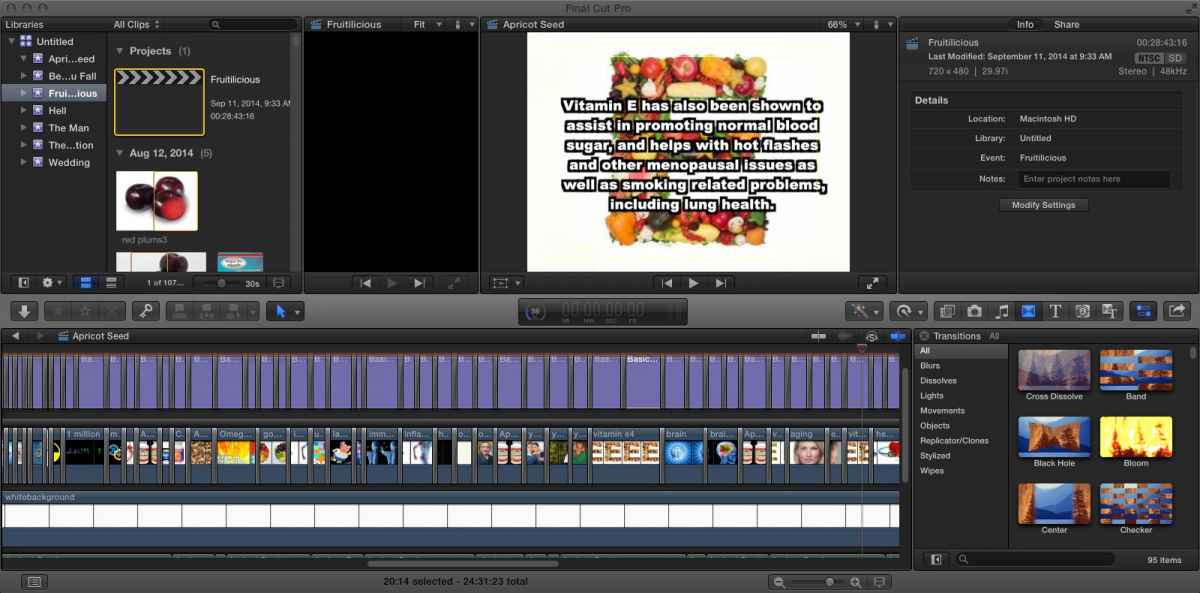
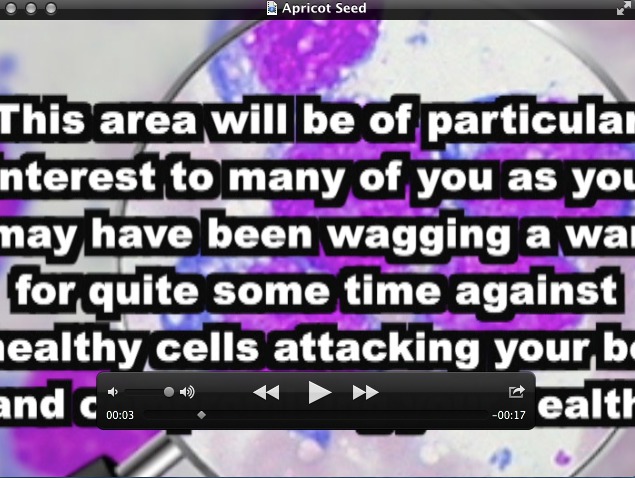
Safe Zones: I have finished a project using 720x480 29.97 and my text is within the safe zones and looks fine in Final Cut. But...when I export it all of the text almost blows up and is cut off of the screen. Please help!!
Please Log in to join the conversation.
- Tom Wolsky
-

- Offline
- Moderator
-

12 Sep 2014 14:21 #52612
by Tom Wolsky
Replied by Tom Wolsky on topic Safe Zones/Exporting Problem
Would love to see screen shots of this.
Please Log in to join the conversation.
- AndreaO1984
-
Topic Author
- Offline
- Junior Member
-
Less
More
- Posts: 22
- Thank you received: 0
12 Sep 2014 14:26 #52613
by AndreaO1984
Replied by AndreaO1984 on topic Safe Zones/Exporting Problem
First one- in Final Cut Pro
Second one- After being exported
They are the same project, just different parts of the project.
Second one- After being exported
They are the same project, just different parts of the project.
Please Log in to join the conversation.
- AndreaO1984
-
Topic Author
- Offline
- Junior Member
-
Less
More
- Posts: 22
- Thank you received: 0
12 Sep 2014 14:37 #52615
by AndreaO1984
Replied by AndreaO1984 on topic Safe Zones/Exporting Problem
They didn't upload last time - here they are..hopefully!

Please Log in to join the conversation.
- Tom Wolsky
-
- Offline
- Moderator
-
12 Sep 2014 14:56 #52616
by Tom Wolsky
Replied by Tom Wolsky on topic Safe Zones/Exporting Problem
Try setting the QT display to half size and see if it still looks like that. If it does I have no idea.
Please Log in to join the conversation.
- AndreaO1984
-
Topic Author
- Offline
- Junior Member
-
Less
More
- Posts: 22
- Thank you received: 0
12 Sep 2014 14:59 #52617
by AndreaO1984
Replied by AndreaO1984 on topic Safe Zones/Exporting Problem
Yes, no matter what view I set it to it stays the same. 
Please Log in to join the conversation.
- ronny courtens
-

- Offline
- Moderator
-
Less
More
- Posts: 4455
- Thank you received: 962
12 Sep 2014 15:10 #52618
by ronny courtens
Replied by ronny courtens on topic Safe Zones/Exporting Problem
Turn Background Rendering OFF.
Then Select your Project in the Browser and choose File > Delete Generated Project Files.
Finally export a small part of your timeline (you can set a Range in the timeline) to see if the titles are now correctly placed.
- Ronny
Then Select your Project in the Browser and choose File > Delete Generated Project Files.
Finally export a small part of your timeline (you can set a Range in the timeline) to see if the titles are now correctly placed.
- Ronny
Please Log in to join the conversation.
- AndreaO1984
-
Topic Author
- Offline
- Junior Member
-
Less
More
- Posts: 22
- Thank you received: 0
12 Sep 2014 15:35 #52619
by AndreaO1984
Replied by AndreaO1984 on topic Safe Zones/Exporting Problem
That didn't work either.
Please Log in to join the conversation.
- AndreaO1984
-
Topic Author
- Offline
- Junior Member
-
Less
More
- Posts: 22
- Thank you received: 0
12 Sep 2014 15:40 #52620
by AndreaO1984
Replied by AndreaO1984 on topic Safe Zones/Exporting Problem
The text even gets blurry after about 10 seconds of playing it. I just don't it. It looks great in Final Cut.
Please Log in to join the conversation.
- ronny courtens
-
- Offline
- Moderator
-
Less
More
- Posts: 4455
- Thank you received: 962
12 Sep 2014 15:44 #52621
by ronny courtens
Replied by ronny courtens on topic Safe Zones/Exporting Problem
I think I know what's going on. I'm running a test right now, will come back to you in 10 minutes.
- Ronny
- Ronny
Please Log in to join the conversation.
- AndreaO1984
-
Topic Author
- Offline
- Junior Member
-
Less
More
- Posts: 22
- Thank you received: 0
12 Sep 2014 15:45 #52622
by AndreaO1984
Replied by AndreaO1984 on topic Safe Zones/Exporting Problem
That would be great! Thank you so very much! :lol:
Please Log in to join the conversation.
- ronny courtens
-
- Offline
- Moderator
-
Less
More
- Posts: 4455
- Thank you received: 962
12 Sep 2014 16:10 #52623
by ronny courtens
Replied by ronny courtens on topic Safe Zones/Exporting Problem
Unfortunately the test failed.
For a moment I thought it was because the Basic Title template has no published format preset for 4:3 NTSC SD (it only has 16:9, 720 and 1080 presets). So I did a test with the same Project settings, the same background and the same Basic Title template, but I was able to export the timeline without any issues.
Which brings us back to the start.
Let's start with basic troubleshooting:
Quit FCP X, then re-launch it while holding both the ALT+CMD keys pressed down. You will get a message asking if you want to delete your FCP X preferences. Confirm and let the app launch. Then try exporting a small part of your timeline again.
- Ronny
For a moment I thought it was because the Basic Title template has no published format preset for 4:3 NTSC SD (it only has 16:9, 720 and 1080 presets). So I did a test with the same Project settings, the same background and the same Basic Title template, but I was able to export the timeline without any issues.
Which brings us back to the start.
Let's start with basic troubleshooting:
Quit FCP X, then re-launch it while holding both the ALT+CMD keys pressed down. You will get a message asking if you want to delete your FCP X preferences. Confirm and let the app launch. Then try exporting a small part of your timeline again.
- Ronny
Please Log in to join the conversation.
- Tom Wolsky
-
- Offline
- Moderator
-
12 Sep 2014 16:35 #52624
by Tom Wolsky
Replied by Tom Wolsky on topic Safe Zones/Exporting Problem
Could you give the project properties you're using and also exactly how you're exporting? See if we can reproduce the problem and find a solution or workaround.
Please Log in to join the conversation.
- AndreaO1984
-
Topic Author
- Offline
- Junior Member
-
Less
More
- Posts: 22
- Thank you received: 0
12 Sep 2014 16:42 #52625
by AndreaO1984
Replied by AndreaO1984 on topic Safe Zones/Exporting Problem
Ronny - I tried closing and reopening the program three times with holding down the cmnd and opt key but no message pops up at all.
Please Log in to join the conversation.
- ronny courtens
-
- Offline
- Moderator
-
Less
More
- Posts: 4455
- Thank you received: 962
12 Sep 2014 16:48 #52626
by ronny courtens
Replied by ronny courtens on topic Safe Zones/Exporting Problem
Okay, what version of FCP X are you using?
I agree with Tom it would be great if you could provide the project properties you're using.
Select the Project and in the Inspector > Into tab press the Modify Settings button. This will open the Project settings window, make a screenshot of that window.
Also tell us exactly how you're exporting, this will help detect any anomalies.
- Ronny
I agree with Tom it would be great if you could provide the project properties you're using.
Select the Project and in the Inspector > Into tab press the Modify Settings button. This will open the Project settings window, make a screenshot of that window.
Also tell us exactly how you're exporting, this will help detect any anomalies.
- Ronny
Please Log in to join the conversation.
- AndreaO1984
-
Topic Author
- Offline
- Junior Member
-
Less
More
- Posts: 22
- Thank you received: 0
12 Sep 2014 16:51 #52627
by AndreaO1984
Replied by AndreaO1984 on topic Safe Zones/Exporting Problem
This is what happens...
Please Log in to join the conversation.
- Tom Wolsky
-
- Offline
- Moderator
-
12 Sep 2014 16:55 #52628
by Tom Wolsky
Replied by Tom Wolsky on topic Safe Zones/Exporting Problem
Hold Cmd-Opt when you launch the application. Works for 10.1.2 or later.
Please Log in to join the conversation.
- ronny courtens
-
- Offline
- Moderator
-
Less
More
- Posts: 4455
- Thank you received: 962
12 Sep 2014 16:56 #52629
by ronny courtens
Replied by ronny courtens on topic Safe Zones/Exporting Problem
Thank you, but you have posted that screenshot already. What we need to know:
- What version of FCP X are you using, and what OS are you running?
- What are your Project settings? (see my post above on how to make a screenshot of the settings)
- How are you exporting? As a Master File? Do you change anything int he share settings?
- Ronny
- What version of FCP X are you using, and what OS are you running?
- What are your Project settings? (see my post above on how to make a screenshot of the settings)
- How are you exporting? As a Master File? Do you change anything int he share settings?
- Ronny
Please Log in to join the conversation.
- AndreaO1984
-
Topic Author
- Offline
- Junior Member
-
Less
More
- Posts: 22
- Thank you received: 0
12 Sep 2014 16:58 #52630
by AndreaO1984
Replied by AndreaO1984 on topic Safe Zones/Exporting Problem
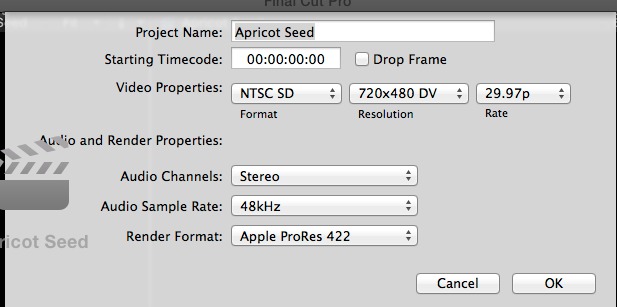
Thank you both so much for taking the time to look at this. Here is a screen shot of my settings. I am using the share button on the right side of Final Cut, choosing master file and then next. It exports and you have seen the finished product.
Please Log in to join the conversation.
- AndreaO1984
-
Topic Author
- Offline
- Junior Member
-
Less
More
- Posts: 22
- Thank you received: 0
12 Sep 2014 16:59 #52631
by AndreaO1984
Replied by AndreaO1984 on topic Safe Zones/Exporting Problem
I'm using Final Cut version 10.1.1, and Mavericks OSX 10.9
Please Log in to join the conversation.
