


- Posts: 5
- Thank you received: 2
3 Post Moderation Rule for New Boarders (25 Jan 2021)
New boarders will have their posts moderated - Don't worry if you cannot see your post immediately.
FCP 10.1.3 crashes when opening FX browser
11 Sep 2014 19:42 #52579
by Alison
FCP 10.1.3 crashes when opening FX browser was created by Alison
Hello!
I'm a musician and producer so I use occasionally FCP 10.1.3, macbook pro running 10.9.4
At the moment I cannot use FCP it crashes every time I try to open the FX pane and then when I restart FCP it gets blocked on the restoring windows. So the only way to restart FCP is to trash the preferences and after I do this a few times I have to reinstall the whole program.
See issue with this video:
The problem seems to come from managing incompatible AU and VST which I have in abundance. Waves, iZotope, McDSP, NI, East West, etc.
I tried to install both the Event Manager X and Audio Unit manager which both or crash or an error window pops up when managing my plugins.
Could anyone help me with this issue?
Thank you
I'm a musician and producer so I use occasionally FCP 10.1.3, macbook pro running 10.9.4
At the moment I cannot use FCP it crashes every time I try to open the FX pane and then when I restart FCP it gets blocked on the restoring windows. So the only way to restart FCP is to trash the preferences and after I do this a few times I have to reinstall the whole program.
See issue with this video:
The problem seems to come from managing incompatible AU and VST which I have in abundance. Waves, iZotope, McDSP, NI, East West, etc.
I tried to install both the Event Manager X and Audio Unit manager which both or crash or an error window pops up when managing my plugins.
Could anyone help me with this issue?
Thank you
Please Log in to join the conversation.
12 Sep 2014 06:51 #52590
by Dr Rock
Replied by Dr Rock on topic FCP 10.1.3 crashes when opening FX browser
I think it's the plugin: Rob Papen "Predator" that causes this. To be more specific, it is the PredatorFX plugin.
Delete that from your AU plugins, and all should work again. You can leave the main Predator plugin there - it works just fine. It's just the FX one that crashes the Effects Browser.
Hope that helps
Now you're going to tell me that you don't have the Rob Papen Predator plugin, aren't you?.....
Delete that from your AU plugins, and all should work again. You can leave the main Predator plugin there - it works just fine. It's just the FX one that crashes the Effects Browser.
Hope that helps
Now you're going to tell me that you don't have the Rob Papen Predator plugin, aren't you?.....
Please Log in to join the conversation.
- ronny courtens
-

- Offline
- Moderator
-

Less
More
- Posts: 4455
- Thank you received: 962
12 Sep 2014 06:54 #52591
by ronny courtens
Replied by ronny courtens on topic FCP 10.1.3 crashes when opening FX browser
Hello Alison,
Waves plugins automatically install for any application, and they are notorious for crashing editing systems. This has been the case for many years and it is mostly due to outdated or conflicting plugins.
First make sure ALL your Waves plugins are up-to-date!!
Then, with FCP X quit:
1. Go to Home > Applications > Waves > Waveshells and run “Waves AU Reg Utility 9.2”
2. Go To User Library > Preferences and move the com.apple.audio.infoHelper.plist to the trash
3. Restart the computer and re-launch FCP X.
When FCP X launches it may take a few minutes to load because every Waves plugin you have will pass through validation first (grey icons jumping up and down in your Dock). Once validation is done you should be able to work with FCP X without any problems.
Finally also test if your music applications run as expected. If all is well, empty the trash.
- Ronny
Waves plugins automatically install for any application, and they are notorious for crashing editing systems. This has been the case for many years and it is mostly due to outdated or conflicting plugins.
First make sure ALL your Waves plugins are up-to-date!!
Then, with FCP X quit:
1. Go to Home > Applications > Waves > Waveshells and run “Waves AU Reg Utility 9.2”
2. Go To User Library > Preferences and move the com.apple.audio.infoHelper.plist to the trash
3. Restart the computer and re-launch FCP X.
When FCP X launches it may take a few minutes to load because every Waves plugin you have will pass through validation first (grey icons jumping up and down in your Dock). Once validation is done you should be able to work with FCP X without any problems.
Finally also test if your music applications run as expected. If all is well, empty the trash.
- Ronny
Please Log in to join the conversation.
12 Sep 2014 17:06 #52633
by Alison
Replied by Alison on topic FCP 10.1.3 crashes when opening FX browser
Nice try!! But I don't have the Predator plugin…
Please Log in to join the conversation.
12 Sep 2014 17:39 #52636
by Alison
Replied by Alison on topic FCP 10.1.3 crashes when opening FX browser
Hi Ronny!
Thanks for the help. I'm afraid it didn't work.
I did get this window while launching FCP:
auvaltool quit unexpectedly while using the WavesLib plugin-in
Any other ideas I could try before I phone up and pay an apple/FCP expert…
I really think FCP needs an AU manager…
Best regards!
Thanks for the help. I'm afraid it didn't work.
I did get this window while launching FCP:
auvaltool quit unexpectedly while using the WavesLib plugin-in
Any other ideas I could try before I phone up and pay an apple/FCP expert…
I really think FCP needs an AU manager…
Best regards!
Please Log in to join the conversation.
- ronny courtens
-
- Offline
- Moderator
-
Less
More
- Posts: 4455
- Thank you received: 962
12 Sep 2014 17:56 #52640
by ronny courtens
Replied by ronny courtens on topic FCP 10.1.3 crashes when opening FX browser
Hi Alison,
Yes, FCP X dearly needs a dedicated AU manager!!
WavesLib is the framework for your Waves plugins. If AU validation fails due to WavesLib there must be something wrong with you Waves installation. You could contact Waves or Apple Support, I really have no clue what's going on. I have 412 Waves plugins installed on this system and all of them work perfectly in FCP X:
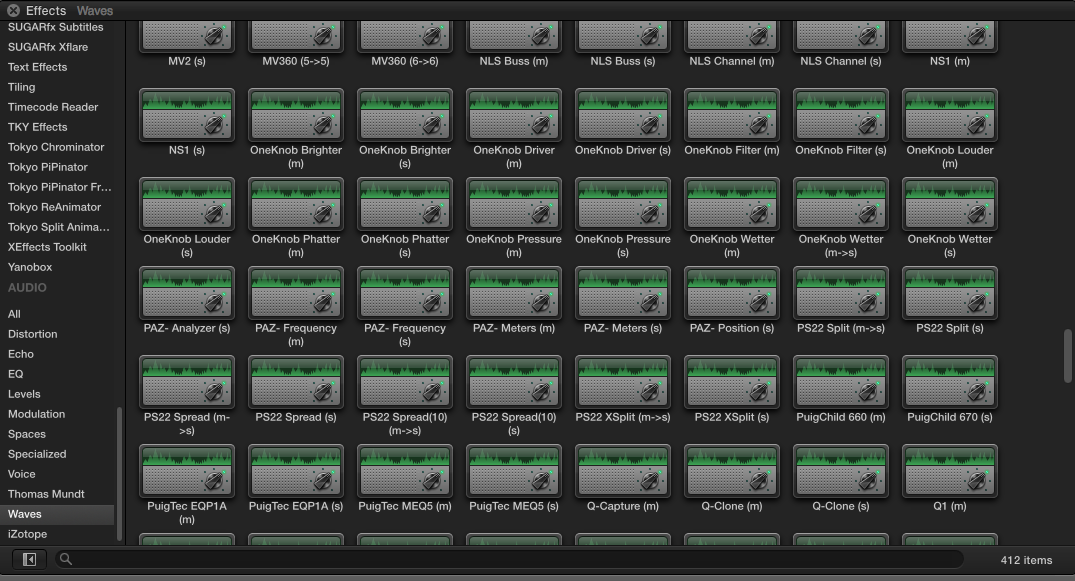
- Ronny
Yes, FCP X dearly needs a dedicated AU manager!!
WavesLib is the framework for your Waves plugins. If AU validation fails due to WavesLib there must be something wrong with you Waves installation. You could contact Waves or Apple Support, I really have no clue what's going on. I have 412 Waves plugins installed on this system and all of them work perfectly in FCP X:
- Ronny
Please Log in to join the conversation.
12 Sep 2014 19:08 #52645
by Alison
Replied by Alison on topic FCP 10.1.3 crashes when opening FX browser
Hi Ronny!
Good to know! I have about that much of Waves plugins. Do you have any from Native Instruments?
I seem to recall that auvaltool quit when launching Logic, Garage Band and Studio One and they are all OK.
Maybe the problem is elsewhere…?
Any suggestions for getting expert payed help?
Thank a lot!
Good to know! I have about that much of Waves plugins. Do you have any from Native Instruments?
I seem to recall that auvaltool quit when launching Logic, Garage Band and Studio One and they are all OK.
Maybe the problem is elsewhere…?
Any suggestions for getting expert payed help?
Thank a lot!
Please Log in to join the conversation.

12 Sep 2014 19:13 #52646
by BenB
Replied by BenB on topic FCP 10.1.3 crashes when opening FX browser
I use FCPX, LPX, GaragBand, and I have TONS of NI plugins. Never been a problem.
Please Log in to join the conversation.
- Samuel Nthoroane
-

- Offline
- New Member
-

Less
More
- Posts: 1
- Thank you received: 1
21 Sep 2014 09:28 #52983
by Samuel Nthoroane
Replied by Samuel Nthoroane on topic FCP 10.1.3 crashes when opening FX browser
Removing "PredatorFx" worked for me 
Please Log in to join the conversation.
26 Sep 2014 15:09 - 26 Sep 2014 15:35 #53258
by Alison
Replied by Alison on topic FCP 10.1.3 crashes when opening FX browser
Hey guys!!
Thanks for your help!
I actually phoned up an Apple specialist -we found the problem!!
One of my plugins: SicknDstroy.component was creating the havoc with the FX browser.
This is how you proceed to eliminate the problem:
1.) Create a new folder on your desktop
2.) Go into Macintosh HD/Library/Audio/Plugins/Components/ move all your plugins from that folder into the the new folder on your desktop
3.) Open FC and FX browser to test
4.) Then if the test in successful drag back in your plugins one by one or by manufacture quitting and reopening FC
For me Waves, iZotope, Mc DSP, Eventide, Flux, TAL were all fine
I hope this is useful!
Thanks for your help!
I actually phoned up an Apple specialist -we found the problem!!
One of my plugins: SicknDstroy.component was creating the havoc with the FX browser.
This is how you proceed to eliminate the problem:
1.) Create a new folder on your desktop
2.) Go into Macintosh HD/Library/Audio/Plugins/Components/ move all your plugins from that folder into the the new folder on your desktop
3.) Open FC and FX browser to test
4.) Then if the test in successful drag back in your plugins one by one or by manufacture quitting and reopening FC
For me Waves, iZotope, Mc DSP, Eventide, Flux, TAL were all fine
I hope this is useful!
Last edit: 26 Sep 2014 15:35 by Alison.
Please Log in to join the conversation.
- ronny courtens
-
- Offline
- Moderator
-
Less
More
- Posts: 4455
- Thank you received: 962
26 Sep 2014 15:12 #53259
by ronny courtens
Replied by ronny courtens on topic FCP 10.1.3 crashes when opening FX browser
Hey Alison,
That's great news. And thank you for posting the solution. Very useful indeed.
- Ronny
That's great news. And thank you for posting the solution. Very useful indeed.
- Ronny
Please Log in to join the conversation.
