


3 Post Moderation Rule for New Boarders (25 Jan 2021)
New boarders will have their posts moderated - Don't worry if you cannot see your post immediately.
How to spot the projects with a missing media


11 Sep 2014 14:17 #52553
by Emmanuel
How to spot the projects with a missing media was created by Emmanuel
Hi guys
I'm getting a little crazy with a large library that is showing me a yellow warning claiming that it misses a clip I deleted some time ago.
I would like to get rid of the warning.
In the Browser, there is no reference to this clip anymore. So I suppose one project is using it, but I have opened them all and can't find it.
Is there a way to spot which project/multiclip/compound clip is using this missing media ?
Thanks a lot!!!
Manu
I'm getting a little crazy with a large library that is showing me a yellow warning claiming that it misses a clip I deleted some time ago.
I would like to get rid of the warning.
In the Browser, there is no reference to this clip anymore. So I suppose one project is using it, but I have opened them all and can't find it.
Is there a way to spot which project/multiclip/compound clip is using this missing media ?
Thanks a lot!!!
Manu
Please Log in to join the conversation.
- ronny courtens
-

- Offline
- Moderator
-

Less
More
- Posts: 4455
- Thank you received: 962
11 Sep 2014 18:19 - 11 Sep 2014 18:20 #52568
by ronny courtens
Replied by ronny courtens on topic How to spot the projects with a missing media
Yes, that yellow triangle can be aggravating 
In a Project timeline you may have 1 frame left of a clip that you have deleted, or you may have some audio file that has gone corrupt (look for audio clips with black diagonal lines in them and no waveform). All such things can lead to your Library presenting a warning icon.
If you have a corrupt or missing clip in a Project the Project will show a similar yellow triangle in List view. When you open the Project and you open the Timeline Index you will see a triangle on the clip that is corrupt or missing. Next to the clip you will see the exact timecode of that clip on the Project timeline.
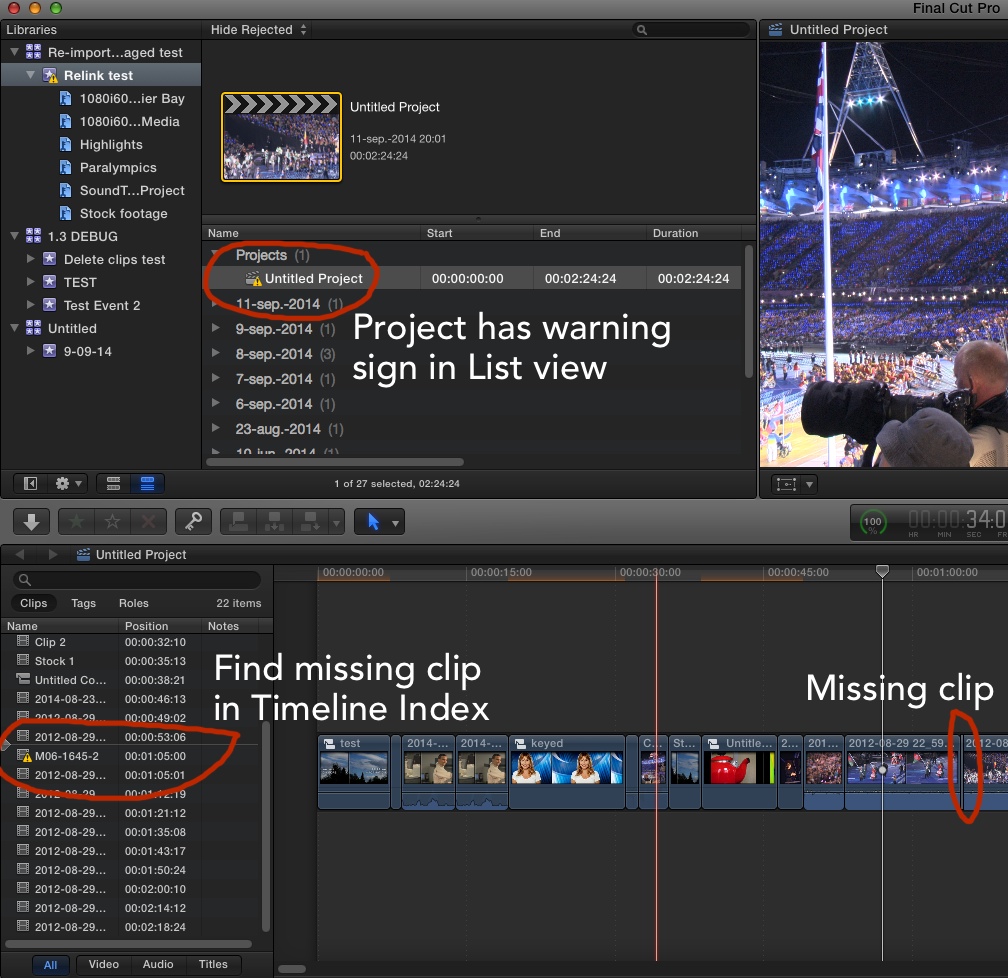
- Ronny
In a Project timeline you may have 1 frame left of a clip that you have deleted, or you may have some audio file that has gone corrupt (look for audio clips with black diagonal lines in them and no waveform). All such things can lead to your Library presenting a warning icon.
If you have a corrupt or missing clip in a Project the Project will show a similar yellow triangle in List view. When you open the Project and you open the Timeline Index you will see a triangle on the clip that is corrupt or missing. Next to the clip you will see the exact timecode of that clip on the Project timeline.
- Ronny
Last edit: 11 Sep 2014 18:20 by ronny courtens.
Please Log in to join the conversation.
12 Sep 2014 13:14 #52603
by Emmanuel
Replied by Emmanuel on topic How to spot the projects with a missing media
Thank you so much Ronny for your detailed answer (Merci / Dank je)
The strange thing is... no project shows the warning, nor any compound clip (also in Rejected). To be sure I've checked them exactly as you said, but the yellow warning only appears on the Event itself.
Bug ? Corrupted library ? I've also run Project Repair on it, no luck.
The strange thing is... no project shows the warning, nor any compound clip (also in Rejected). To be sure I've checked them exactly as you said, but the yellow warning only appears on the Event itself.
Bug ? Corrupted library ? I've also run Project Repair on it, no luck.
Please Log in to join the conversation.
- ronny courtens
-
- Offline
- Moderator
-
Less
More
- Posts: 4455
- Thank you received: 962
12 Sep 2014 13:28 #52604
by ronny courtens
Replied by ronny courtens on topic How to spot the projects with a missing media
Hey manoucho,
So you are from Amsterdam? My favorite hangout whenever I cross the border
Yep, these triangle things can be weird.
Try this: Select the Library in the FCP X Library Browser, then choose File > Relink Files.
Do you see any files listed under "Missing" in the Relink window?
- Ronny
So you are from Amsterdam? My favorite hangout whenever I cross the border
Yep, these triangle things can be weird.
Try this: Select the Library in the FCP X Library Browser, then choose File > Relink Files.
Do you see any files listed under "Missing" in the Relink window?
- Ronny
Please Log in to join the conversation.
12 Sep 2014 13:39 #52605
by Emmanuel
Replied by Emmanuel on topic How to spot the projects with a missing media
Hi Ronny
I'm French, living in Amsterdam
Yes when I do this FCPX asks for this file, that I have deleted long ago...
I'm French, living in Amsterdam
Yes when I do this FCPX asks for this file, that I have deleted long ago...
Please Log in to join the conversation.
- ronny courtens
-
- Offline
- Moderator
-
Less
More
- Posts: 4455
- Thank you received: 962
12 Sep 2014 13:42 #52606
by ronny courtens
Replied by ronny courtens on topic How to spot the projects with a missing media
Was this a still or graphics file?
- Ronny
- Ronny
Please Log in to join the conversation.
12 Sep 2014 13:50 #52607
by Emmanuel
Replied by Emmanuel on topic How to spot the projects with a missing media
Nope, a RED video file.
Please Log in to join the conversation.
- ronny courtens
-
- Offline
- Moderator
-
Less
More
- Posts: 4455
- Thank you received: 962
12 Sep 2014 13:55 #52608
by ronny courtens
Replied by ronny courtens on topic How to spot the projects with a missing media
Bummer. For stills there's a trick: create any still, put it on your desktop and in the FCP X Relink window relink the "deleted" file to the still on the desktop. Stills relink easily because they have no audio or TC. Once the still has been relinked, delete it from FCP X and this will make the yellow triangle go away.
But unfortunately this is not the case here, so...
When you select your Library and you enter the name of the deleted RED clip in the Search field, does that bring up any files?
- Ronny
But unfortunately this is not the case here, so...
When you select your Library and you enter the name of the deleted RED clip in the Search field, does that bring up any files?
- Ronny
Please Log in to join the conversation.
