


- Posts: 51
- Thank you received: 0
3 Post Moderation Rule for New Boarders (25 Jan 2021)
New boarders will have their posts moderated - Don't worry if you cannot see your post immediately.
Video frames were dropped during playback
- cockneyjay
-
 Topic Author
- Offline
- Senior Member
-

Less
More
09 Sep 2014 23:52 #52473
by cockneyjay
Video frames were dropped during playback was created by cockneyjay
Hey,
This is a problem I've had before. When I'm editing my project the play back is jumpy and I get the message that video frames were dropped. I once asked about this on here before and was told to delete render files which completely solved the problem. HOWEVER!! That option is no longer available on my Final Cut pro X.
I'm not sure what's happened. A few things have changed. It's obviously updated itself.
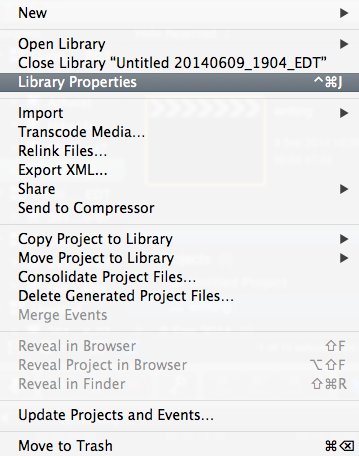
Now when I click on file all I get it the options I've included here. Even when I search for it, the option just isn't there.
What is the new solution? And where did my capability to delete render files go?
Thanks
Jay
This is a problem I've had before. When I'm editing my project the play back is jumpy and I get the message that video frames were dropped. I once asked about this on here before and was told to delete render files which completely solved the problem. HOWEVER!! That option is no longer available on my Final Cut pro X.
I'm not sure what's happened. A few things have changed. It's obviously updated itself.
Now when I click on file all I get it the options I've included here. Even when I search for it, the option just isn't there.
What is the new solution? And where did my capability to delete render files go?
Thanks
Jay
Please Log in to join the conversation.
- ronny courtens
-

- Offline
- Moderator
-

Less
More
- Posts: 4455
- Thank you received: 962
10 Sep 2014 05:49 - 10 Sep 2014 05:51 #52476
by ronny courtens
Replied by ronny courtens on topic Video frames were dropped during playback
Select your Project and choose File > Delete Generated Project Files.
Make sure Background Rendering is always turned OFF and only render when needed.
- Ronny
Make sure Background Rendering is always turned OFF and only render when needed.
- Ronny
Last edit: 10 Sep 2014 05:51 by ronny courtens.
Please Log in to join the conversation.
