


- Posts: 377
- Thank you received: 32
3 Post Moderation Rule for New Boarders (25 Jan 2021)
New boarders will have their posts moderated - Don't worry if you cannot see your post immediately.
LUT drop down window in inspector comes and goes as it pleases
09 Sep 2014 03:28 #52421
by Julian
I just got the Pocket camera when it was on sale for $495 so I started playing with RAW footage and when I go to the inspector to try out the LUT settings the LUT options are there sometimes and then they just go away and never come back.
Is this a bug or am I missing something? Seems like a bug to me.
Is this a bug or am I missing something? Seems like a bug to me.
Please Log in to join the conversation.
- ronny courtens
-

- Offline
- Moderator
-

Less
More
- Posts: 4455
- Thank you received: 962
09 Sep 2014 15:35 #52454
by ronny courtens
Replied by ronny courtens on topic LUT drop down window in inspector comes and goes as it pleases
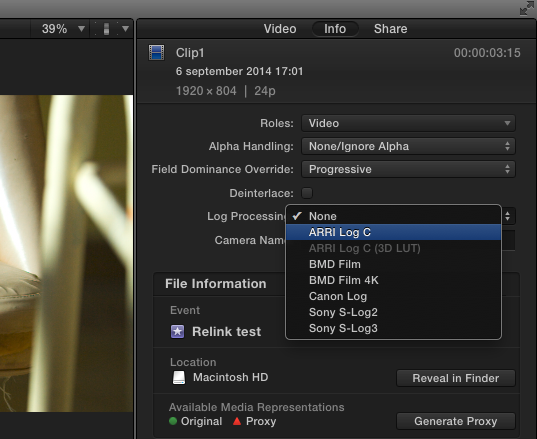
Do you mean you don't get the list of standard LUTs when you click on Log Processing?
Works fine here, on different raw clips.
- Ronny
Works fine here, on different raw clips.
- Ronny
Please Log in to join the conversation.
11 Sep 2014 00:33 #52536
by Julian
I mean that whole pull down window just doesn't even show up. It's there one second and then gone the next.
Replied by Julian on topic LUT drop down window in inspector comes and goes as it pleases
ronny courtens wrote: Do you mean you don't get the list of standard LUTs when you click on Log Processing?
Works fine here, on different raw clips.
- Ronny
I mean that whole pull down window just doesn't even show up. It's there one second and then gone the next.
Please Log in to join the conversation.
- ronny courtens
-
- Offline
- Moderator
-
Less
More
- Posts: 4455
- Thank you received: 962
11 Sep 2014 08:24 #52544
by ronny courtens
Replied by ronny courtens on topic LUT drop down window in inspector comes and goes as it pleases
I haven't found any other posts mentioning such an issue, so I think it could be related to your setup.
Try Window > Revert to Original Layout.
If this doesn't help try deleting your FCP X preferences.
- Ronny
Try Window > Revert to Original Layout.
If this doesn't help try deleting your FCP X preferences.
- Ronny
Please Log in to join the conversation.


05 Jun 2023 16:50 #125783
by burnsnd
Replied by burnsnd on topic LUT drop down window in inspector comes and goes as it pleases
I am experiencing this issue after the autoupdate 10.6.6
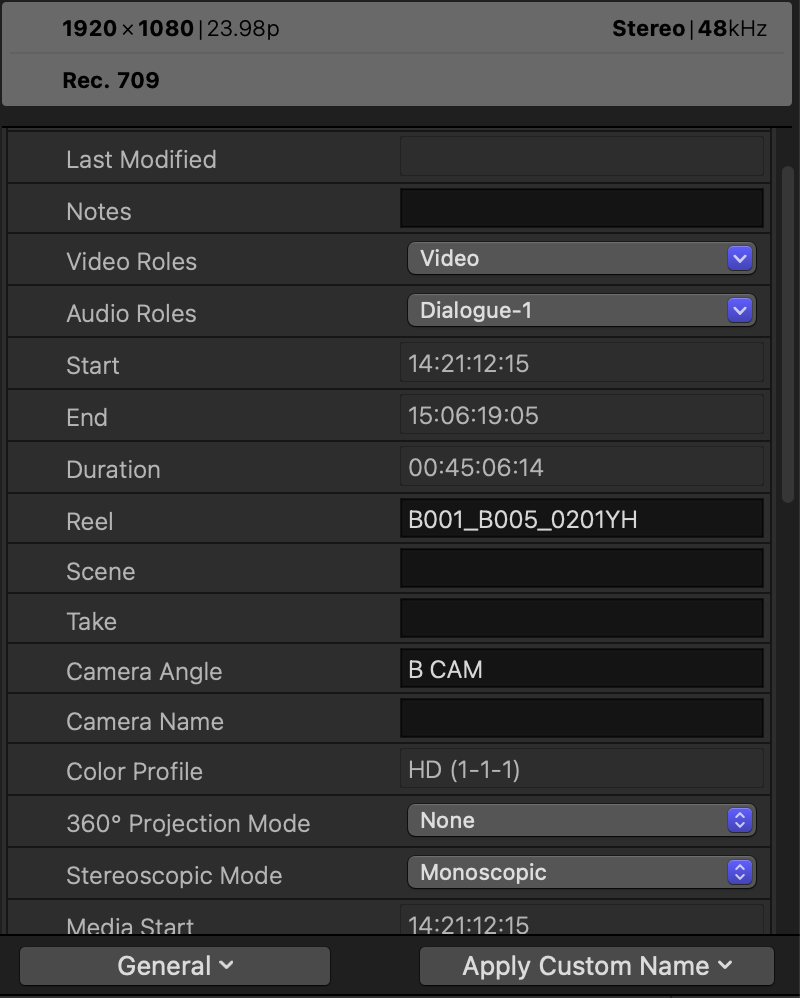
I had a preexisting project with a ton of ProRes 422 LT files already imported and a custom LUT was applied to all clips via the Inspector>Custom LUT dropdown menu (because you can do that with a batch of clips as opposed to applying the Custom LUT effect).
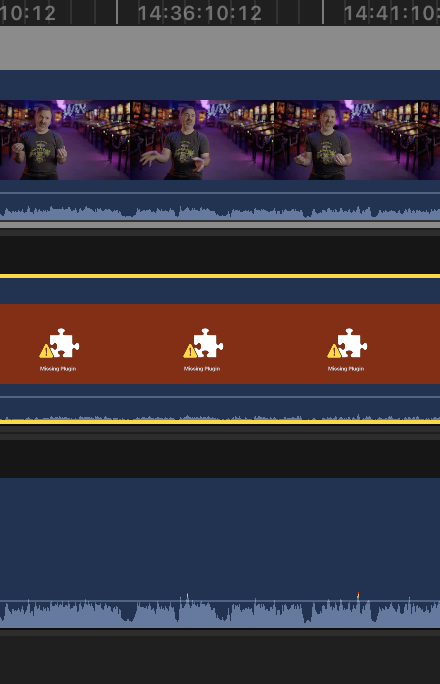
Now the vast majority of my clips show up with the red puzzle piece "Missing Plugin" and there is no way to remove the custom LUT because the dropdown menu is no longer in the Inspector.
Any ideas?
Thank you!
I had a preexisting project with a ton of ProRes 422 LT files already imported and a custom LUT was applied to all clips via the Inspector>Custom LUT dropdown menu (because you can do that with a batch of clips as opposed to applying the Custom LUT effect).
Now the vast majority of my clips show up with the red puzzle piece "Missing Plugin" and there is no way to remove the custom LUT because the dropdown menu is no longer in the Inspector.
Any ideas?
Thank you!
Please Log in to join the conversation.
07 Jun 2023 15:25 #125806
by dmetz
Replied by dmetz on topic LUT drop down window in inspector comes and goes as it pleases
Looking at the Inspector, in the lower left corner, you're set to General - try the Settings panel there and see if it shows up (it should).
Please Log in to join the conversation.
