


- Posts: 9
- Thank you received: 0
3 Post Moderation Rule for New Boarders (25 Jan 2021)
New boarders will have their posts moderated - Don't worry if you cannot see your post immediately.
Question re audio transcoding
09 Sep 2014 01:27 - 09 Sep 2014 01:27 #52409
by Dr Rock
Question re audio transcoding was created by Dr Rock
Hi from a new user, and a beginner. I have multiple video clips shot on a Sony HDR-PJ820 cam, where the audio is in AAC format. They load just fine into FCPX, but I have a problem. I have to do automatic dialog replacement on all of them (ADR) and I have Revoice Pro to do it. But RVP will only read either WAV or AIFF audio formats.
Now I can export using FCPXML then import to Logic Pro X, and surprise, surprise - the audio has been transcoded into AIFF, so Revoice Pro will work on that audio - but it's a real pain then to try and spot that processed audio back into FCPX and keep it in sync.
If I could get RVP to work as a direct plugin WITHIN FCPX (like all the other Logic plugins do), and if I could do the ADR "in place" using the Voiceover track in FCPX, life would be very much simpler.
But to do that, I'd need to be able to transcode the audio to AIFF or WAV while it is still inside FCPX - in other words - in place.
Can anyone tell me if this is possible, either in FCPX natively, or via a separate plugin or utility? Given that the export to FCPXML transcodes into AIFF anyway, I was thinking that there could be a way to do it WITHOUT leaving FCPX.
Any help much appreciated. If I could just get the talent to do the new voiceover on the FCPX Voiceover track, then use Revoice Pro to sync it back to the original location voiceover (done in a noisy lab environment) then all would be hunky dory...!
Now I can export using FCPXML then import to Logic Pro X, and surprise, surprise - the audio has been transcoded into AIFF, so Revoice Pro will work on that audio - but it's a real pain then to try and spot that processed audio back into FCPX and keep it in sync.
If I could get RVP to work as a direct plugin WITHIN FCPX (like all the other Logic plugins do), and if I could do the ADR "in place" using the Voiceover track in FCPX, life would be very much simpler.
But to do that, I'd need to be able to transcode the audio to AIFF or WAV while it is still inside FCPX - in other words - in place.
Can anyone tell me if this is possible, either in FCPX natively, or via a separate plugin or utility? Given that the export to FCPXML transcodes into AIFF anyway, I was thinking that there could be a way to do it WITHOUT leaving FCPX.
Any help much appreciated. If I could just get the talent to do the new voiceover on the FCPX Voiceover track, then use Revoice Pro to sync it back to the original location voiceover (done in a noisy lab environment) then all would be hunky dory...!
Last edit: 09 Sep 2014 01:27 by Dr Rock.
Please Log in to join the conversation.

09 Sep 2014 03:24 #52417
by BenB
Replied by BenB on topic Question re audio transcoding
Why not do the ADR work inside of FCPX to start with?
I assume you're not optimizing this stuff during import.
You could create a custom export preset in Compressor to use in FCPX.
I assume you're not optimizing this stuff during import.
You could create a custom export preset in Compressor to use in FCPX.
Please Log in to join the conversation.
09 Sep 2014 03:40 #52422
by Dr Rock
Replied by Dr Rock on topic Question re audio transcoding
Hi Ben - thanks for the reply. Much appreciated 
I probably didn't explain very well, but doing the ADR within FCPX is exactly what i AM trying to do. But I need to be able to use Revoice Pro to do it - the location audio consists of the person doing the demonstrations talking while he is doing them. The sound quality is awful. But if I can do a proper voiceover using professional talent, on the FCPX Voiceover track, the problem then is lip-syncing it back to the original. Revoice Pro does this superbly well - but it won't read the AAC audio I've got from the original shoot - it only reads AIFF or WAV.
I do have Compressor (very recent purchase) but have no experience of creating custom presets etc. If I could batch process all the video clips BEFORE importing into FCPX, so that the video remains untouched but the audio is transcoded to AIFF or WAV, then that should solve the problem. If you have any quick hints on how to set that up in Compressor, or somewhere you could point me that may help, that would be very much appreciated.
I have all the original clips from the SDHC card stored on the iMac, and I would make copies of them all before playing with them in Compressor - just in case.
Thanks again for the help
I probably didn't explain very well, but doing the ADR within FCPX is exactly what i AM trying to do. But I need to be able to use Revoice Pro to do it - the location audio consists of the person doing the demonstrations talking while he is doing them. The sound quality is awful. But if I can do a proper voiceover using professional talent, on the FCPX Voiceover track, the problem then is lip-syncing it back to the original. Revoice Pro does this superbly well - but it won't read the AAC audio I've got from the original shoot - it only reads AIFF or WAV.
I do have Compressor (very recent purchase) but have no experience of creating custom presets etc. If I could batch process all the video clips BEFORE importing into FCPX, so that the video remains untouched but the audio is transcoded to AIFF or WAV, then that should solve the problem. If you have any quick hints on how to set that up in Compressor, or somewhere you could point me that may help, that would be very much appreciated.
I have all the original clips from the SDHC card stored on the iMac, and I would make copies of them all before playing with them in Compressor - just in case.
Thanks again for the help
Please Log in to join the conversation.
09 Sep 2014 21:44 #52464
by Dr Rock
Replied by Dr Rock on topic Question re audio transcoding
Anybody? Helllpppp? Any clues on either transcoding audio in place within FCPX, or setting up a custom preset in Compressor that I could use to batch-process all my clips before importing into FCPX? I need the audio to be converted from AAC to AIFF or WAV, without changing the video.....
Any help would be much appreciated - I'm stuck with the original clips in AAC audio (they can't be re-done) and I need to do ADR and lipsync, using Revoice Pro - see my posts above.
Any help would be much appreciated - I'm stuck with the original clips in AAC audio (they can't be re-done) and I need to do ADR and lipsync, using Revoice Pro - see my posts above.
Please Log in to join the conversation.
10 Sep 2014 06:57 - 10 Sep 2014 07:01 #52480
by BenB
Replied by BenB on topic Question re audio transcoding
Sorry, I'm teaching back-to-back FCPX and Logic Pro X classes the past three weeks, not had much time for then forum lately.
- Go in to Compressor, select the ProRes 422 preset (ProRes category in the Settings pane).
- Select it, right-click it, from the pop-up menu choose Duplicate.
- Rename the new Custom (inside the Custom section) preset to "ProRes with PCM Audio".
- With it selected, go to the Inspector, Audio section, uncheck "Copy Audio Tracks From Source".
- Click the "Change" button for QuickTime Settings, make sure it is set to "PCM", 48kHz, Quality at "Best", and Sample Size is "16".
- Quit out of Compressor.
- Back in FCPX, Command-Comma for the Preferences window, go to the Destinations section.
- Double-click the "Compressor Settings" icon.
- In the resulting window, select your new preset, click "OK".
- In the left column, you'll see your new preset, drag it up towards the middle. This will make it faster to access when you click the Share button in the Tool Bar. Or drag it to the top, or where ever works for you. Close the window.
- Done.
BTW, "PCM" is the same as "AIFF", so don't worry about that, you're VO app should work with it just fine.
- Go in to Compressor, select the ProRes 422 preset (ProRes category in the Settings pane).
- Select it, right-click it, from the pop-up menu choose Duplicate.
- Rename the new Custom (inside the Custom section) preset to "ProRes with PCM Audio".
- With it selected, go to the Inspector, Audio section, uncheck "Copy Audio Tracks From Source".
- Click the "Change" button for QuickTime Settings, make sure it is set to "PCM", 48kHz, Quality at "Best", and Sample Size is "16".
- Quit out of Compressor.
- Back in FCPX, Command-Comma for the Preferences window, go to the Destinations section.
- Double-click the "Compressor Settings" icon.
- In the resulting window, select your new preset, click "OK".
- In the left column, you'll see your new preset, drag it up towards the middle. This will make it faster to access when you click the Share button in the Tool Bar. Or drag it to the top, or where ever works for you. Close the window.
- Done.
BTW, "PCM" is the same as "AIFF", so don't worry about that, you're VO app should work with it just fine.
Last edit: 10 Sep 2014 07:01 by BenB.
Please Log in to join the conversation.
10 Sep 2014 07:15 #52482
by Dr Rock
Replied by Dr Rock on topic Question re audio transcoding
Thank you Ben - sorry if I seemed to be hassling 
Put it down to my anxiety, as I have to get this all done in the next 2-3 weeks.
The videos I have are all of a visiting overseas professor doing demonstrations in Anatomy - and apart from his accent (his English was actually good - just accented) there is a lot of echo and general lab noise that makes it very hard to hear at times. Hence the need for the ADR - I have the talent lined up and ready.
I'll do as you suggest, and hopefully post back here with a successful outcome.
Thanks again - your help very much appreciated.
Put it down to my anxiety, as I have to get this all done in the next 2-3 weeks.
The videos I have are all of a visiting overseas professor doing demonstrations in Anatomy - and apart from his accent (his English was actually good - just accented) there is a lot of echo and general lab noise that makes it very hard to hear at times. Hence the need for the ADR - I have the talent lined up and ready.
I'll do as you suggest, and hopefully post back here with a successful outcome.
Thanks again - your help very much appreciated.
Please Log in to join the conversation.
10 Sep 2014 07:24 #52486
by BenB
Replied by BenB on topic Question re audio transcoding
A lav mic would make the ADR unnecessary.
Please Log in to join the conversation.
10 Sep 2014 07:38 - 10 Sep 2014 07:38 #52488
by Dr Rock
Replied by Dr Rock on topic Question re audio transcoding
Heheh - you have no idea just how noisy an anatomy lab is... It had about 100 Med students in there at the time. And it is the ultimate in acoustic badness - every surface is echoey.
A lav or headboom mike may have helped a bit, but it would still have been recorded straight into the Sony cam. It was shot by somebody else, and they just used the department's only camera. The video is actually quite good and should trim up nicely. They don't have the gear to record audio separately and put timecode onto it etc.
I just created the preset that you kindly posted - very clear indeed, thank you.
But I'm a bit puzzled - that gives me the capability to OUTPUT from FCPX via Compressor using the Share button. But I was thinking more of getting Compressor to process the clips BEFORE importing them into FCPX. But Compressor (and I hasten to add I'm a complete newbie with Compressor) didn't want to know about the AVCHD clips. I even tried drilling down via "Show package contents" all the way to the raw .mts files in the Stream folder - but Compressor still didn't want to know about them. Yet FCPX imports the AVCHD clips just fine - am I missing something? FCPX understands an AVCHD file, but Compressor doesn't?
Sorry if I'm being dumb - but I'm Australian...! :lol:
A lav or headboom mike may have helped a bit, but it would still have been recorded straight into the Sony cam. It was shot by somebody else, and they just used the department's only camera. The video is actually quite good and should trim up nicely. They don't have the gear to record audio separately and put timecode onto it etc.
I just created the preset that you kindly posted - very clear indeed, thank you.
But I'm a bit puzzled - that gives me the capability to OUTPUT from FCPX via Compressor using the Share button. But I was thinking more of getting Compressor to process the clips BEFORE importing them into FCPX. But Compressor (and I hasten to add I'm a complete newbie with Compressor) didn't want to know about the AVCHD clips. I even tried drilling down via "Show package contents" all the way to the raw .mts files in the Stream folder - but Compressor still didn't want to know about them. Yet FCPX imports the AVCHD clips just fine - am I missing something? FCPX understands an AVCHD file, but Compressor doesn't?
Sorry if I'm being dumb - but I'm Australian...! :lol:
Last edit: 10 Sep 2014 07:38 by Dr Rock.
Please Log in to join the conversation.
11 Sep 2014 13:40 #52548
by BenB
Replied by BenB on topic Question re audio transcoding
I've recorded in many very loud environments, and a well place lab mic takes care of 90% of the background noise issues.
What camera does this AVC come from? Each camera manufacturer has their own flavor of it. It is not a single, universal setting.
What camera does this AVC come from? Each camera manufacturer has their own flavor of it. It is not a single, universal setting.
Please Log in to join the conversation.
11 Sep 2014 13:47 - 11 Sep 2014 13:48 #52550
by Dr Rock
Replied by Dr Rock on topic Question re audio transcoding
Hi again Ben
It was from a Sony HDR-PJ820. That's the camera that belongs to the department, and I'm stuck with it. Also, the visiting prof. Who did the demonstrations on the videos has gone back overseas, so it can't be redone.
The more I look into it, the more I think I'm going to have to do the round trip thing. Export FCPXML from FCPX, then import that into Logic Pro X. The Revoice Pro plugin works just fine in Logic - the audio gets transcoded to AIFF via that export to FCPXML. The only problem is that according to Apple, there is no way to automatically spot timecoded audio back into place within FCPX, so it will be a case of bring the new audio tracks into FCPX once I've done the ADR, then manually lining them all up to lipsync as best as I can.
The makers of the Revoice Pro app contacted Apple on my behalf - and they were told that there is no way to do that automatic spotting back into FCPX. Bummer!
I wonder if Apple may add that function, especially now that FCPX is being rolled out through the BBC?
Did you see my query about using Compressor to transcode the audio from AAC to AIFF, while passing the video through unchanged, but on the raw AVCHD clips BEFORE importing them into FCPX? Any help there would be much appreciated.
It was from a Sony HDR-PJ820. That's the camera that belongs to the department, and I'm stuck with it. Also, the visiting prof. Who did the demonstrations on the videos has gone back overseas, so it can't be redone.
The more I look into it, the more I think I'm going to have to do the round trip thing. Export FCPXML from FCPX, then import that into Logic Pro X. The Revoice Pro plugin works just fine in Logic - the audio gets transcoded to AIFF via that export to FCPXML. The only problem is that according to Apple, there is no way to automatically spot timecoded audio back into place within FCPX, so it will be a case of bring the new audio tracks into FCPX once I've done the ADR, then manually lining them all up to lipsync as best as I can.
The makers of the Revoice Pro app contacted Apple on my behalf - and they were told that there is no way to do that automatic spotting back into FCPX. Bummer!
I wonder if Apple may add that function, especially now that FCPX is being rolled out through the BBC?
Did you see my query about using Compressor to transcode the audio from AAC to AIFF, while passing the video through unchanged, but on the raw AVCHD clips BEFORE importing them into FCPX? Any help there would be much appreciated.
Last edit: 11 Sep 2014 13:48 by Dr Rock.
Please Log in to join the conversation.
- ronny courtens
-

- Offline
- Moderator
-

Less
More
- Posts: 4455
- Thank you received: 962
11 Sep 2014 15:48 #52559
by ronny courtens
Replied by ronny courtens on topic Question re audio transcoding
Hey Pete,
Why don't you just optimize your clips in FCP X?
When you optimize any clip from the Browser FCP X creates a ProRes 422 video with AIFF audio version of the clip, and this version is used for editing.
Here I have imported an H.264 clip with AAC audio, it's in the Original Media folder of my Library:
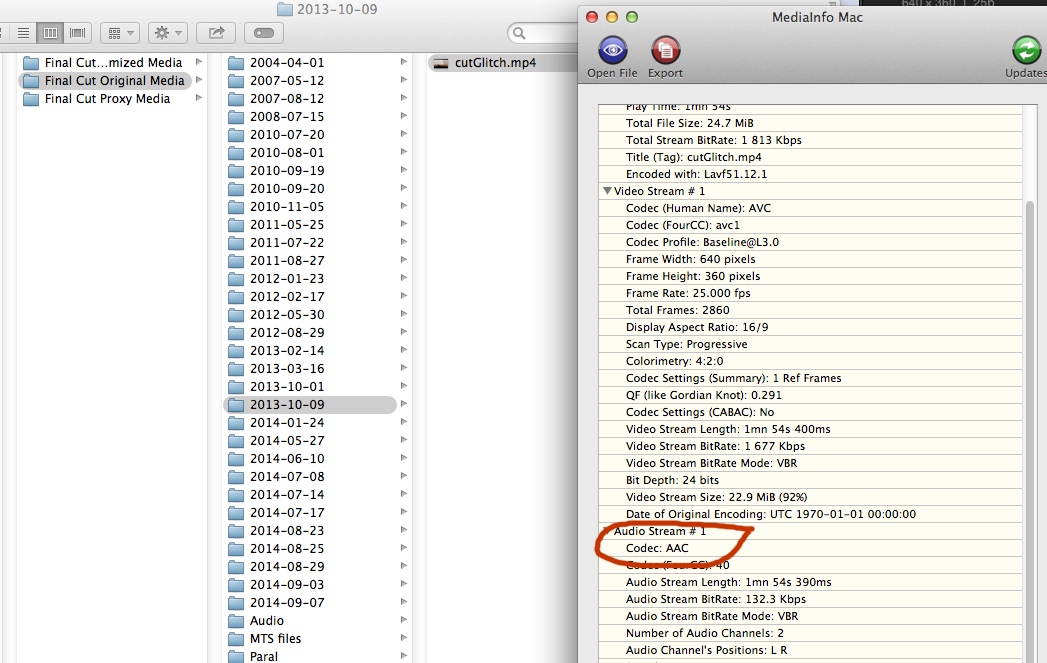
Then I have selected the imported clip in the FCP X Browser and I have optimized the clip (R-click the clip, choose "Transcode Media" and select Create optimized media. Optimizing the clip has made the video format of the clip ProRes 422 and the audio format Linear PCM (AIFF):
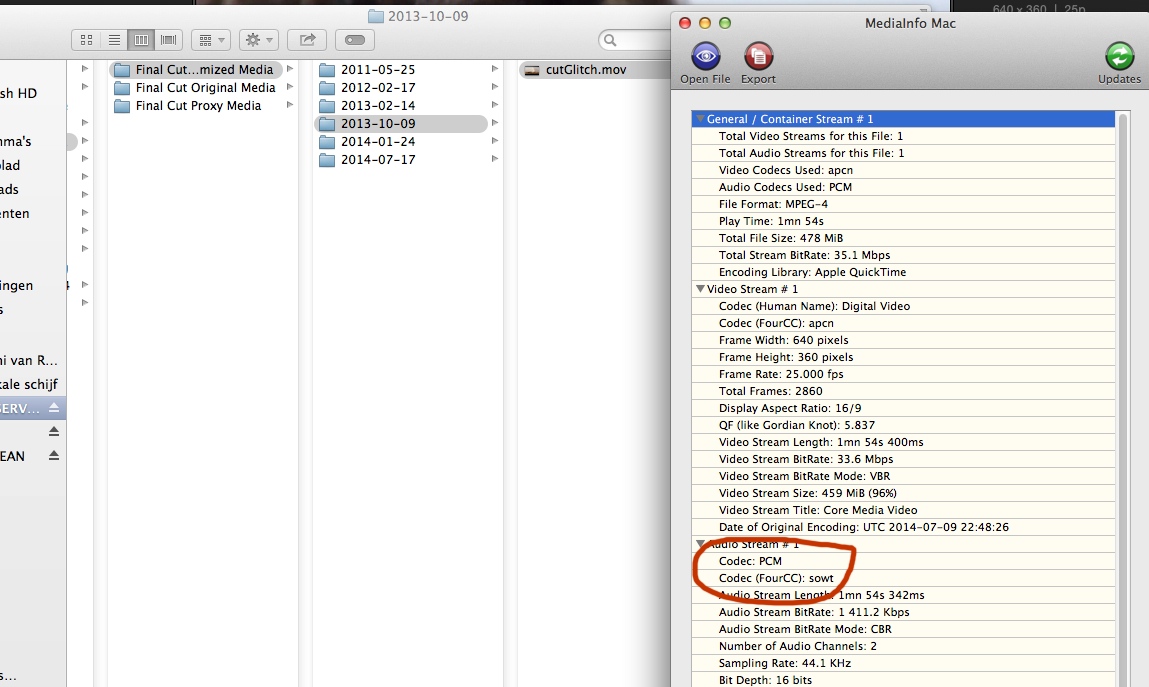
When you optimize a clip FCP X will use the optimized version, which is AIFF. This should enable you to use the Revoice App with your FCP X media.
- Ronny
Why don't you just optimize your clips in FCP X?
When you optimize any clip from the Browser FCP X creates a ProRes 422 video with AIFF audio version of the clip, and this version is used for editing.
Here I have imported an H.264 clip with AAC audio, it's in the Original Media folder of my Library:
Then I have selected the imported clip in the FCP X Browser and I have optimized the clip (R-click the clip, choose "Transcode Media" and select Create optimized media. Optimizing the clip has made the video format of the clip ProRes 422 and the audio format Linear PCM (AIFF):
When you optimize a clip FCP X will use the optimized version, which is AIFF. This should enable you to use the Revoice App with your FCP X media.
- Ronny
Please Log in to join the conversation.
11 Sep 2014 21:47 #52584
by Dr Rock
Replied by Dr Rock on topic Question re audio transcoding
Ronny - thank you so much for taking the time and trouble to post that. I didn't know that optimising the clip created AIFF audio. I actually did have FCPX set to optimise clips on import, but I'll give your method a try by the right-click/optimise media technique when the clips are in the media browser of FCPX.
I hope to give that a try later today, and will post back the outcome. The problem still remains (nothing to do with audio format) that FCPX will NOT spot audio back into sync automatically, according to Apple. ProTools does, and Logic Pro X will do it using the "Move Region to Original Recorded Position". But FCPX will not do automatic spotting back into sync, even with timecode on the audio. Now THAT'S a bummer! So it's a case of manually lining up the audio - a fiddle, but do-able.
Methinks Apple need to introduce that function quick-smart. How does FCPX handle audio that has been recorded separately and with timecode on it, when imported along with the silent video? I haven't done that yet, so perhaps that is something I have yet to discover...
Thanks again for your help
I hope to give that a try later today, and will post back the outcome. The problem still remains (nothing to do with audio format) that FCPX will NOT spot audio back into sync automatically, according to Apple. ProTools does, and Logic Pro X will do it using the "Move Region to Original Recorded Position". But FCPX will not do automatic spotting back into sync, even with timecode on the audio. Now THAT'S a bummer! So it's a case of manually lining up the audio - a fiddle, but do-able.
Methinks Apple need to introduce that function quick-smart. How does FCPX handle audio that has been recorded separately and with timecode on it, when imported along with the silent video? I haven't done that yet, so perhaps that is something I have yet to discover...
Thanks again for your help
Please Log in to join the conversation.
- ronny courtens
-
- Offline
- Moderator
-
Less
More
- Posts: 4455
- Thank you received: 962
12 Sep 2014 07:47 - 12 Sep 2014 07:50 #52595
by ronny courtens
Replied by ronny courtens on topic Question re audio transcoding
FCP X handles external audio extremely well:
Select the video clip and the corresponding external audio clip and choose "Synchronize Clips" (ALT+CMD+G)
A window will pop up where you can choose on what basis FCP X should synchronize the two clips. You can choose to synchronize based on the Audio waveforms of both clips if the video has been recorded with on-cam audio. Or you can choose to synchronize based on time code (for jam-synched video and audio recorders), based on content created (date-time stamp), based on start of first clip or based on markers you have put on the clips:
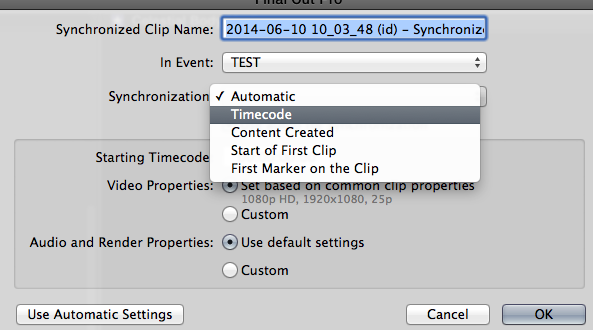
In your specific case you could synchronize the existing video clips that have badly recorded audio with the good recorded talent audio clips, based on the audio waveforms of the clips. But if the original audio is so bad I'm afraid that may not work as expected. Still worth a try
- Ronny
Select the video clip and the corresponding external audio clip and choose "Synchronize Clips" (ALT+CMD+G)
A window will pop up where you can choose on what basis FCP X should synchronize the two clips. You can choose to synchronize based on the Audio waveforms of both clips if the video has been recorded with on-cam audio. Or you can choose to synchronize based on time code (for jam-synched video and audio recorders), based on content created (date-time stamp), based on start of first clip or based on markers you have put on the clips:
In your specific case you could synchronize the existing video clips that have badly recorded audio with the good recorded talent audio clips, based on the audio waveforms of the clips. But if the original audio is so bad I'm afraid that may not work as expected. Still worth a try
- Ronny
Last edit: 12 Sep 2014 07:50 by ronny courtens.
Please Log in to join the conversation.
12 Sep 2014 11:00 #52599
by Dr Rock
Replied by Dr Rock on topic Question re audio transcoding
Wow - thanks Ronny. That looks like I CAN sync audio tracks back using timecode. Despite Apple specifically telling SynchroArts (makers of Revoice Pro) that it wouldn't do it.
I'm tied up doing other things for the next little while (sudden rush job) so won't be able to try this out as quickly as I would have liked, but I really appreciate the help that you and Ben have been on this matter.
In the meantime, I'll pass this tip on to SynchroArts to see if they can get it to work with a lipsynced ADR track.
Thank you again
I'm tied up doing other things for the next little while (sudden rush job) so won't be able to try this out as quickly as I would have liked, but I really appreciate the help that you and Ben have been on this matter.
In the meantime, I'll pass this tip on to SynchroArts to see if they can get it to work with a lipsynced ADR track.
Thank you again
Please Log in to join the conversation.
