


- Posts: 109
- Thank you received: 5
3 Post Moderation Rule for New Boarders (25 Jan 2021)
New boarders will have their posts moderated - Don't worry if you cannot see your post immediately.
Assigning Audio Roles
- DSvoboda356
-
 Topic Author
- Offline
- Premium Member
-

Less
More
08 Sep 2014 03:27 #52347
by DSvoboda356
Assigning Audio Roles was created by DSvoboda356
So I noticed something goofy. I am swapping out some shots in an existing 15. The spot was mastered for broadcast in 5.1. It was delivered to me as a ProRes 4444 file with L,R,C,LFE,LS,RS,ST mapping for the audio. I drop it down into the timeline and break apart the clip items to edit video separately from the audio. However when I try to map the surround setting properly in the inspector, it says Audio Channels Config is unavailable for the selected clips. Its seems that if I use the detach audio command it will keep the original mapping but i found it odd that the config could be adjusted from the mono clips made from the break apart clips command. Has anyone else run into this?
Please Log in to join the conversation.

08 Sep 2014 03:48 #52348
by plysat
Can't sleep? Try this: fcpxpert.net ;-)
Replied by plysat on topic Assigning Audio Roles
Seems like you're confusing Roles (organizational labels) with the actual audio channel configuration. When you use detach audio, it keeps the surround components, with whatever the original mapping was, in a single clip. Now, you can open the clip in it's own timeline and assign Roles to the components so you know whats what, and can mute/solo things in the index. The Role doesn't change anything about the component as far as panning etc. But once you break apart the components they all become straight up mono. The only way to adjust them would be to use the panning settings on each clip. Channel config won't do anything because you've only got one mono channel for each clip. If you want to preserve the surround clip settings, just detach it, don't break the components apart... 
Can't sleep? Try this: fcpxpert.net ;-)
Please Log in to join the conversation.
- DSvoboda356
-
Topic Author
- Offline
- Premium Member
-
Less
More
- Posts: 109
- Thank you received: 5
08 Sep 2014 03:54 #52349
by DSvoboda356
Replied by DSvoboda356 on topic Assigning Audio Roles
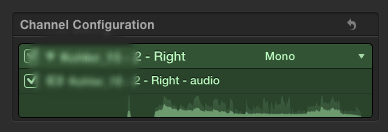
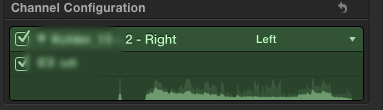
Yea I might have misspoke. I use Roles to export the final spot with the surround audio. However when you bring in mono audio you can map it to either L,R,C,LFE,LS,RS in the audio config inspector. I expected it to behave the same after breaking apart the clip.
Please Log in to join the conversation.
08 Sep 2014 04:27 #52350
by plysat
Gotcha... The screenshots are the clips after being broken apart? You're right, seems like you should be able to remap them... I wonder if there's something in the clips settings that "lock" it?
Can't sleep? Try this: fcpxpert.net ;-)
Replied by plysat on topic Assigning Audio Roles
DSvoboda356 wrote: Yea I might have misspoke. I use Roles to export the final spot with the surround audio. However when you bring in mono audio you can map it to either L,R,C,LFE,LS,RS in the audio config inspector. I expected it to behave the same after breaking apart the clip.
Gotcha... The screenshots are the clips after being broken apart? You're right, seems like you should be able to remap them... I wonder if there's something in the clips settings that "lock" it?
Can't sleep? Try this: fcpxpert.net ;-)
Please Log in to join the conversation.
- DSvoboda356
-
Topic Author
- Offline
- Premium Member
-
Less
More
- Posts: 109
- Thank you received: 5
08 Sep 2014 04:30 #52351
by DSvoboda356
Replied by DSvoboda356 on topic Assigning Audio Roles
Those grabs are from another spot. In that scenario I received the splits from a mixer as 8 mono channels. I was able to drop them all in and assign the mapping in the audio config inspector. I wonder if this is a bug?
Please Log in to join the conversation.
08 Sep 2014 04:37 #52352
by plysat
I dunno, I'll track down a surround clip and see if it does the same here...
Can't sleep? Try this: fcpxpert.net ;-)
Replied by plysat on topic Assigning Audio Roles
DSvoboda356 wrote: Those grabs are from another spot. In that scenario I received the splits from a mixer as 8 mono channels. I was able to drop them all in and assign the mapping in the audio config inspector. I wonder if this is a bug?
I dunno, I'll track down a surround clip and see if it does the same here...
Can't sleep? Try this: fcpxpert.net ;-)
Please Log in to join the conversation.
08 Sep 2014 05:03 - 08 Sep 2014 05:05 #52353
by plysat
Can't sleep? Try this: fcpxpert.net ;-)
Replied by plysat on topic Assigning Audio Roles
Looks like, if the clip is contains surround components, even if you break it apart you can't use the configuration to assign it. You can change the panning though, by setting each clip to basic surround and then adjusting it using the surround panner. As I'm sure you found, even if you copy the mono channels from within the clip and paste them into a project they still behave this way. And a normal mono channel does let you use the configuration tab.
In the settings, a surround component has "mono" as it's config, and a regular mono file has "1mono" as it's config. No idea if that has anything to do with it, but my guess is that since the component from a single 6ch surround audio clip doesn't really exist on it's own except in the X UI, it's configuration is sort of locked. You can change the panning, but not the actual info about what the clip is, since the mono source file is part of a multichannel clip. Don't think it's a bug, just the way X has to deal with broken apart audio.
If you took the 6 ch surround clip, opened it in it's timeline (panned everything center?, dunno if you'd need to do this...), assigned roles, exported the Roles as a multichannel QT movie, and reimported it, I bet you'd be able to use the Audio config on the components. Anyhoo, without doing that you can use the panner on the broken out components...
In the settings, a surround component has "mono" as it's config, and a regular mono file has "1mono" as it's config. No idea if that has anything to do with it, but my guess is that since the component from a single 6ch surround audio clip doesn't really exist on it's own except in the X UI, it's configuration is sort of locked. You can change the panning, but not the actual info about what the clip is, since the mono source file is part of a multichannel clip. Don't think it's a bug, just the way X has to deal with broken apart audio.
If you took the 6 ch surround clip, opened it in it's timeline (panned everything center?, dunno if you'd need to do this...), assigned roles, exported the Roles as a multichannel QT movie, and reimported it, I bet you'd be able to use the Audio config on the components. Anyhoo, without doing that you can use the panner on the broken out components...
Can't sleep? Try this: fcpxpert.net ;-)
Last edit: 08 Sep 2014 05:05 by plysat.
Please Log in to join the conversation.
- DSvoboda356
-
Topic Author
- Offline
- Premium Member
-
Less
More
- Posts: 109
- Thank you received: 5
08 Sep 2014 05:12 #52354
by DSvoboda356
Replied by DSvoboda356 on topic Assigning Audio Roles
Yea thats pretty much what I had gone through. I did see that I was able to pan the audio using the panning interface. I am hesitant to do that just don't want any funny business with a distributer like Extreme Reach. I have had goofy hiccups with audio before. I may just use the export roles workflow you had mentioned, i tried that earlier and seems to work more like how I am familiar. Thanks for your help though!
Please Log in to join the conversation.

08 Sep 2014 12:42 #52387
by BenB
Replied by BenB on topic Assigning Audio Roles
No need to break them apart. Place the clip in your timeline, Right-Click and select Expand Audio Components. Then selecting the video part, you can configure the channels. Selecting each channel in the Timeline, you can gain/pan each individually. Just be sure the Project is set as 5.1 audio.
If this isn't doing the trick, then I'm not understanding the issue.
If this isn't doing the trick, then I'm not understanding the issue.
Please Log in to join the conversation.
- DSvoboda356
-
Topic Author
- Offline
- Premium Member
-
Less
More
- Posts: 109
- Thank you received: 5
08 Sep 2014 13:10 #52388
by DSvoboda356
Replied by DSvoboda356 on topic Assigning Audio Roles
I need to either break the clip apart or detach the audio because I need to cut out sections of the video without effecting the audio.
Please Log in to join the conversation.
