


- Posts: 59
- Thank you received: 0
3 Post Moderation Rule for New Boarders (25 Jan 2021)
New boarders will have their posts moderated - Don't worry if you cannot see your post immediately.
How do you remove files from FcpX
07 Sep 2014 14:03 #52318
by chk70
How do you remove files from FcpX was created by chk70
Nightworkers,
How in the h**l do you remove files from FcpX?. My HD i full so I can´t really work. I´m trying to move raw footage from a previous project but the only place I can find the footage is under import media and from there I can't move anything. Logic tell´s me to move the footage from another folder under Finder but I can´t find the files anywhere else?? When looking on youtube most tutorials point to a two buttons bottom left on FcpX I do not have these button´s. I do have an "show or hide timeline index" I think the button that I can´t find are referred to as project library and something else. They look like a reel and new map thingy. this seem´s like it should be the easiest thing in da world to do but I can´t make it happen. Help is needed and yesterday.
/H
How in the h**l do you remove files from FcpX?. My HD i full so I can´t really work. I´m trying to move raw footage from a previous project but the only place I can find the footage is under import media and from there I can't move anything. Logic tell´s me to move the footage from another folder under Finder but I can´t find the files anywhere else?? When looking on youtube most tutorials point to a two buttons bottom left on FcpX I do not have these button´s. I do have an "show or hide timeline index" I think the button that I can´t find are referred to as project library and something else. They look like a reel and new map thingy. this seem´s like it should be the easiest thing in da world to do but I can´t make it happen. Help is needed and yesterday.
/H
Please Log in to join the conversation.

07 Sep 2014 14:58 #52321
by VidGreg
Replied by VidGreg on topic How do you remove files from FcpX
What version of FCPX?
Do you want to keep the files?
Archive the files?
Totally delete the files, never to be used again?
Is the project in it's own separate "Library" or is the project in a Library with other events/projects.
If using 10.1.2(3) you can right click in FCP on Library/event/project in Browser pane and choose "Reveal in Finder"
This will show you where it is in the Finder.
You can copy the media files via Modify Settings/choose/then consolidate media/cache in the Library Preferences Pane. This copies files to a different drive, but you will need to delete the files.
MacBreak Studios has a good 3 part tutorial on Media Management and Guidelines here is the part that includes moving coping files…
If using earlier versions of FCPX, the Library/Media is different, but Reveal In Finder should work.
Hope this helps, Greg
Do you want to keep the files?
Archive the files?
Totally delete the files, never to be used again?
Is the project in it's own separate "Library" or is the project in a Library with other events/projects.
If using 10.1.2(3) you can right click in FCP on Library/event/project in Browser pane and choose "Reveal in Finder"
This will show you where it is in the Finder.
You can copy the media files via Modify Settings/choose/then consolidate media/cache in the Library Preferences Pane. This copies files to a different drive, but you will need to delete the files.
MacBreak Studios has a good 3 part tutorial on Media Management and Guidelines here is the part that includes moving coping files…
If using earlier versions of FCPX, the Library/Media is different, but Reveal In Finder should work.
Hope this helps, Greg
Please Log in to join the conversation.

08 Sep 2014 02:57 #52345
by BenB
Replied by BenB on topic How do you remove files from FcpX
1- There is no Project Library any longer. That's been done away with several versions back.
2- Right-click your files in the Browser, select "Move To Trash". You can do this with a Project, also. Or create a Library called "Junk To Trash". Then "move" all of your unwanted projects and media into it (select in Browser, File menu, "Move x To Library..."). Then in the Finder, trash that Library.
2- Right-click your files in the Browser, select "Move To Trash". You can do this with a Project, also. Or create a Library called "Junk To Trash". Then "move" all of your unwanted projects and media into it (select in Browser, File menu, "Move x To Library..."). Then in the Finder, trash that Library.
Please Log in to join the conversation.
08 Sep 2014 06:13 - 08 Sep 2014 06:33 #52358
by chk70
Replied by chk70 on topic How do you remove files from FcpX
Greg,
I want to move the files to an external drive.
The project is in a library with other events.
When I right click I do get the option reveal in finder but it is not highlighted so I can´t use it.
Is all the raw footage attached to the project so if I move the project all of those hundreds of short takes move with it?
Many thanks
/H
I want to move the files to an external drive.
The project is in a library with other events.
When I right click I do get the option reveal in finder but it is not highlighted so I can´t use it.
Is all the raw footage attached to the project so if I move the project all of those hundreds of short takes move with it?
Many thanks
/H
Last edit: 08 Sep 2014 06:33 by chk70.
Please Log in to join the conversation.
08 Sep 2014 15:05 #52392
by VidGreg
Replied by VidGreg on topic How do you remove files from FcpX
/H
Would be really helpful if we knew which version of FCPX you are using. (??)
Things have been changing a lot lately. Knowing the version helps to give exact help.
First I hope you have back-ups of all drives. 2 back-up copies is not excessive!
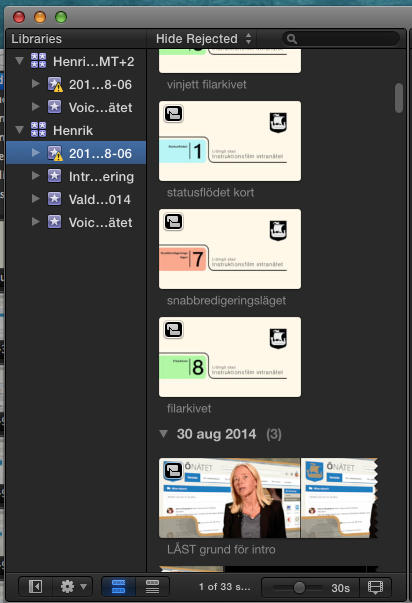
Could you take a screen shot of the Libraries pane? Would help to know hierarchy.
Do you use your boot drive to store the media?
Are you using a MP/MBP and how many internal drives do you have? External drives set-up?
If your Event is not in separate Library, splitting out and copying to other drives involves extra steps if you want to still have the current Library in the present location and only want to move an event. You can create separate Libraries for different Events if you want, and you can transfer Events to different Libraries.
Sorry Henrik, me bad as only the entire fcpbundle is revealed using "Reveal In Finder" and requires that the Library in question is selected or it will show the current timeline Library in Reveal. I thought "Reveal" worked at Event level. Holding mouse cursor over library icon will also show path.
If moving a Library to a different physical disk, FCPX10.1.2(3) will always/(only) copy the media to the new location WHEN you use the consolidate button after choosing new location in "Modify Settings". This leaves the media in the old location. If you do not "Consolidate" then only new media imported after you change locations in Modify Settings would appear in new location. In other words, using the Modify Settings button, sets where to store anything imported after that will go to. "Consolidate" will create a bundle with a copy of all the old media as a self contained bundle with the media and if you choose you can copy the cache files as well. Hope this makes sense.
Thought the MacBreak Studio vid would be better at providing all info. That is a 3 part series and the first part explains the new Media structure that may be helpful.
Again, if using earlier versions of FCPX, then the advice would change.
Hope this helps, Greg
Would be really helpful if we knew which version of FCPX you are using. (??)
Things have been changing a lot lately. Knowing the version helps to give exact help.
First I hope you have back-ups of all drives. 2 back-up copies is not excessive!
Could you take a screen shot of the Libraries pane? Would help to know hierarchy.
Do you use your boot drive to store the media?
Are you using a MP/MBP and how many internal drives do you have? External drives set-up?
If your Event is not in separate Library, splitting out and copying to other drives involves extra steps if you want to still have the current Library in the present location and only want to move an event. You can create separate Libraries for different Events if you want, and you can transfer Events to different Libraries.
Sorry Henrik, me bad as only the entire fcpbundle is revealed using "Reveal In Finder" and requires that the Library in question is selected or it will show the current timeline Library in Reveal. I thought "Reveal" worked at Event level. Holding mouse cursor over library icon will also show path.
If moving a Library to a different physical disk, FCPX10.1.2(3) will always/(only) copy the media to the new location WHEN you use the consolidate button after choosing new location in "Modify Settings". This leaves the media in the old location. If you do not "Consolidate" then only new media imported after you change locations in Modify Settings would appear in new location. In other words, using the Modify Settings button, sets where to store anything imported after that will go to. "Consolidate" will create a bundle with a copy of all the old media as a self contained bundle with the media and if you choose you can copy the cache files as well. Hope this makes sense.
Thought the MacBreak Studio vid would be better at providing all info. That is a 3 part series and the first part explains the new Media structure that may be helpful.
Again, if using earlier versions of FCPX, then the advice would change.
Hope this helps, Greg
Please Log in to join the conversation.
09 Sep 2014 14:45 #52452
by chk70
Replied by chk70 on topic How do you remove files from FcpX
Greg,
Version 10.1.3. Latest version MBP retina. No external drives. I think I have one internal drive. Ordered an external drive today, 2TB. Watched the Macbreak studio guys, and it was sort of helpful. What confuses me is event, project, folder, library it seem´s the Hierarki is upside down. This is by far my weakest point regarding editing, organizing anything "outside" normal editing in FcpX and I´m lost. Thank you for all the help.
/H
Version 10.1.3. Latest version MBP retina. No external drives. I think I have one internal drive. Ordered an external drive today, 2TB. Watched the Macbreak studio guys, and it was sort of helpful. What confuses me is event, project, folder, library it seem´s the Hierarki is upside down. This is by far my weakest point regarding editing, organizing anything "outside" normal editing in FcpX and I´m lost. Thank you for all the help.
/H
Please Log in to join the conversation.
10 Sep 2014 07:18 #52484
by BenB
Replied by BenB on topic How do you remove files from FcpX
On a hare drive you create Libraries. A Library is a package, contains everything, is independent of other Libraries. Libraries do not talk to each other.
Inside the Library are Events. An Event is a container of media you want to collect together by some criteria. One Library can contain multiple Events.
Inside the Event, you can have Projects. A Project is simply a specialized type of Timeline. Everything inside of an Event is some type of Timeline. A Clip is simply a Timeline container which holds the original physical file's video and audio components. An Event can contain multiple Project timelines.
An Event can contain multiple media assets: video clips, audio clips, photos, graphic files, etc.
An Event is organized by Collections. There are three types: keyword, smart filter, analysis. An Event can also contain one or more Folders, in which you can put these various Collections to further organize them.
That's it, very simple.
Hard Drive > Library > Events (contains Projects & media assets & collections & folders, etc.)
Inside the Library are Events. An Event is a container of media you want to collect together by some criteria. One Library can contain multiple Events.
Inside the Event, you can have Projects. A Project is simply a specialized type of Timeline. Everything inside of an Event is some type of Timeline. A Clip is simply a Timeline container which holds the original physical file's video and audio components. An Event can contain multiple Project timelines.
An Event can contain multiple media assets: video clips, audio clips, photos, graphic files, etc.
An Event is organized by Collections. There are three types: keyword, smart filter, analysis. An Event can also contain one or more Folders, in which you can put these various Collections to further organize them.
That's it, very simple.
Hard Drive > Library > Events (contains Projects & media assets & collections & folders, etc.)
Please Log in to join the conversation.
