


- Posts: 16
- Thank you received: 1
3 Post Moderation Rule for New Boarders (25 Jan 2021)
New boarders will have their posts moderated - Don't worry if you cannot see your post immediately.
Having issues deleting projects.
06 Sep 2014 05:14 - 06 Sep 2014 05:15 #52250
by freeme
Having issues deleting projects. was created by freeme
So I'm having issues deleting projects after I'm done with them.
Until this point I've been deleting them through FCPX directly, Meaning I delete through Libraries window in FCPX, which I know is not the correct way to go about it. (FCPX quits unexpectedly after I delete projects)
I've tried looking in my "Final Cut Media Archives" folder as well as to delete that way but the folder is empty.
I'm obviously doing something wrong and I've looked online to find an answer but no luck. I may simply be doing something wrong.
ATTACHED IS A VIDEO OF WHAT I SEE THROUGH MY MAC.
Hope someone can shed some light on this issue I have, thanks in advance.
vimeo.com/105413150
Until this point I've been deleting them through FCPX directly, Meaning I delete through Libraries window in FCPX, which I know is not the correct way to go about it. (FCPX quits unexpectedly after I delete projects)
I've tried looking in my "Final Cut Media Archives" folder as well as to delete that way but the folder is empty.
I'm obviously doing something wrong and I've looked online to find an answer but no luck. I may simply be doing something wrong.
ATTACHED IS A VIDEO OF WHAT I SEE THROUGH MY MAC.
Hope someone can shed some light on this issue I have, thanks in advance.
vimeo.com/105413150
Last edit: 06 Sep 2014 05:15 by freeme. Reason: video not showing
Please Log in to join the conversation.
- ronny courtens
-

- Offline
- Moderator
-

Less
More
- Posts: 4455
- Thank you received: 962
06 Sep 2014 10:40 #52252
by ronny courtens
Replied by ronny courtens on topic Having issues deleting projects.
I'm not sure I understand the problem.
If you want to delete a Project ("Sequence") from your Library you select the Project in the Library Browser and you press CMD+Delete (Backspace) to delete the Project. That is the only correct way for doing this, you should not delete a Project folder in Finder.
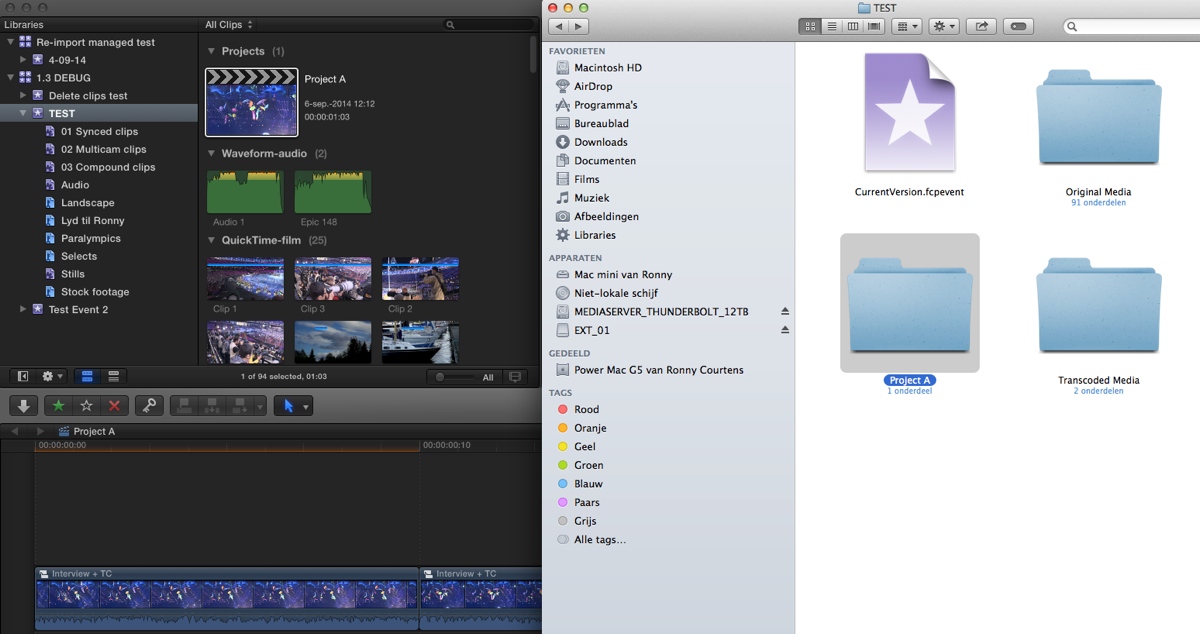
Here's a "Project A" Project in the "TEST" Event in the "1.3 DEBUG" Library in FCO X. In Finder you can see the "Project A" folder inside the TEST Event folder:
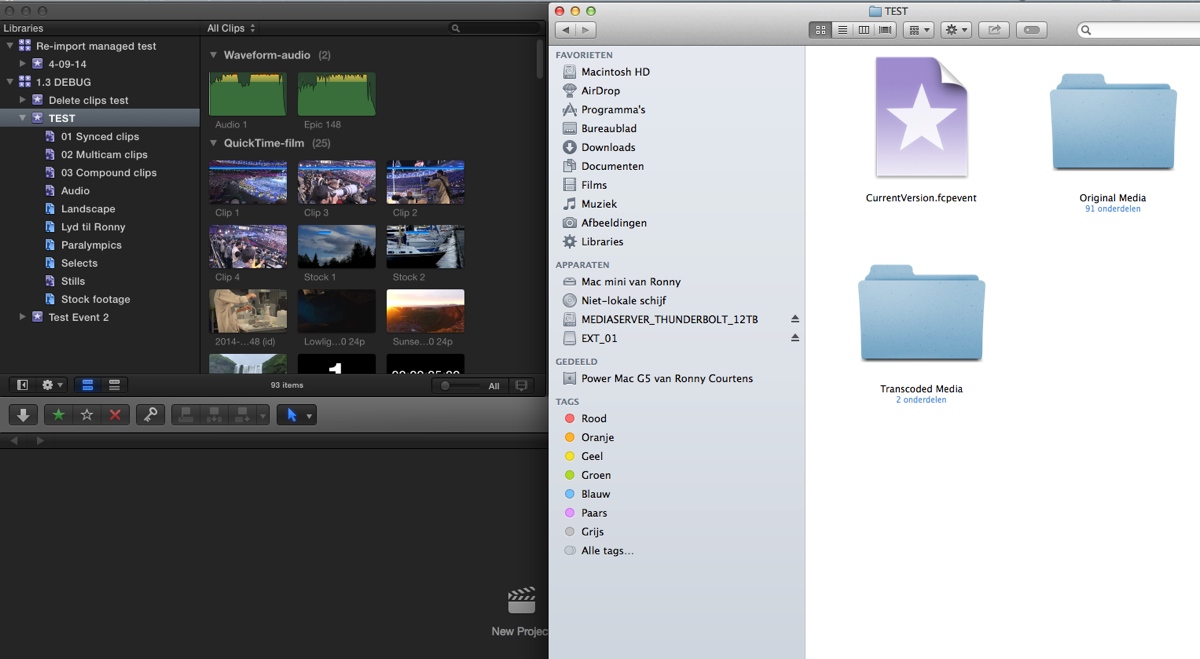
I select the "Project A" Project in the FCP X Browser Library and press CMD+Delete. The Project gets deleted from the Library, and in Finder the "Project A" folder is automatically removed from the "TEST" Event folder:
Is this not working for you?
- Ronny
If you want to delete a Project ("Sequence") from your Library you select the Project in the Library Browser and you press CMD+Delete (Backspace) to delete the Project. That is the only correct way for doing this, you should not delete a Project folder in Finder.
Here's a "Project A" Project in the "TEST" Event in the "1.3 DEBUG" Library in FCO X. In Finder you can see the "Project A" folder inside the TEST Event folder:
I select the "Project A" Project in the FCP X Browser Library and press CMD+Delete. The Project gets deleted from the Library, and in Finder the "Project A" folder is automatically removed from the "TEST" Event folder:
Is this not working for you?
- Ronny
Please Log in to join the conversation.
06 Sep 2014 15:25 #52264
by freeme
Replied by freeme on topic Having issues deleting projects.
Thanks Ronny,
At least now I DO know that deleting projects though FCP is OK.
You see how in your "test" window through finder you have two folders labeled "original media" and "transcoded media" well I cannot locate either of those folders in my finder. Thats what was making my head spin.
Ronny, In the past, I have deleting projects through FCPX but upon doing so the program suddenly quits after deletion has occurred, I doubt this is normal, after such actions I notice that my storage space also stays the same, assuming that no files have been deleted obviously.
So I started deleting projects by right clicking on a clip in the Libraries window in FCP doing the "show in finder" action and deleting through finder
Thanks again for your help I appreciate your time.
At least now I DO know that deleting projects though FCP is OK.
You see how in your "test" window through finder you have two folders labeled "original media" and "transcoded media" well I cannot locate either of those folders in my finder. Thats what was making my head spin.
Ronny, In the past, I have deleting projects through FCPX but upon doing so the program suddenly quits after deletion has occurred, I doubt this is normal, after such actions I notice that my storage space also stays the same, assuming that no files have been deleted obviously.
So I started deleting projects by right clicking on a clip in the Libraries window in FCP doing the "show in finder" action and deleting through finder
Thanks again for your help I appreciate your time.
Please Log in to join the conversation.
- ronny courtens
-
- Offline
- Moderator
-
Less
More
- Posts: 4455
- Thank you received: 962
06 Sep 2014 15:35 #52265
by ronny courtens
Replied by ronny courtens on topic Having issues deleting projects.
The "Original Media" and the "Transcoded Media" folders have nothing to do with the Project, they are part of the Event in which the Project is stored. Deleting a Project = deleting a timeline. This will not delete any media from your Library.
- Ronny
- Ronny
Please Log in to join the conversation.
