


- Posts: 5
- Thank you received: 0
3 Post Moderation Rule for New Boarders (25 Jan 2021)
New boarders will have their posts moderated - Don't worry if you cannot see your post immediately.
Text : "Fill with gradient" on WHOLE word
05 Sep 2014 18:52 #52230
by fryjay
Text : "Fill with gradient" on WHOLE word was created by fryjay
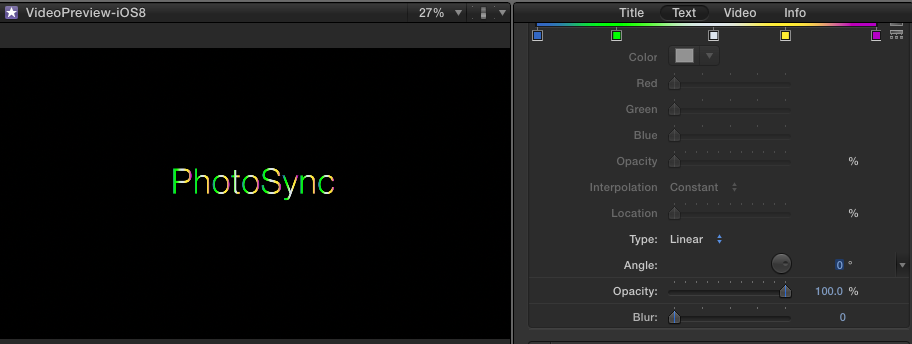
How does one apply a "Fill with gradient" on a WHOLE word of text?
At the moment the gradient is being applied individually to EACH separate letter rather than the whole word.
Thx
At the moment the gradient is being applied individually to EACH separate letter rather than the whole word.
Thx
Please Log in to join the conversation.

05 Sep 2014 19:21 - 05 Sep 2014 21:30 #52233
by NoahK
Replied by NoahK on topic Text : "Fill with gradient" on WHOLE word
Try starting with one of the prebuilt styles and then examine the settings for Face:
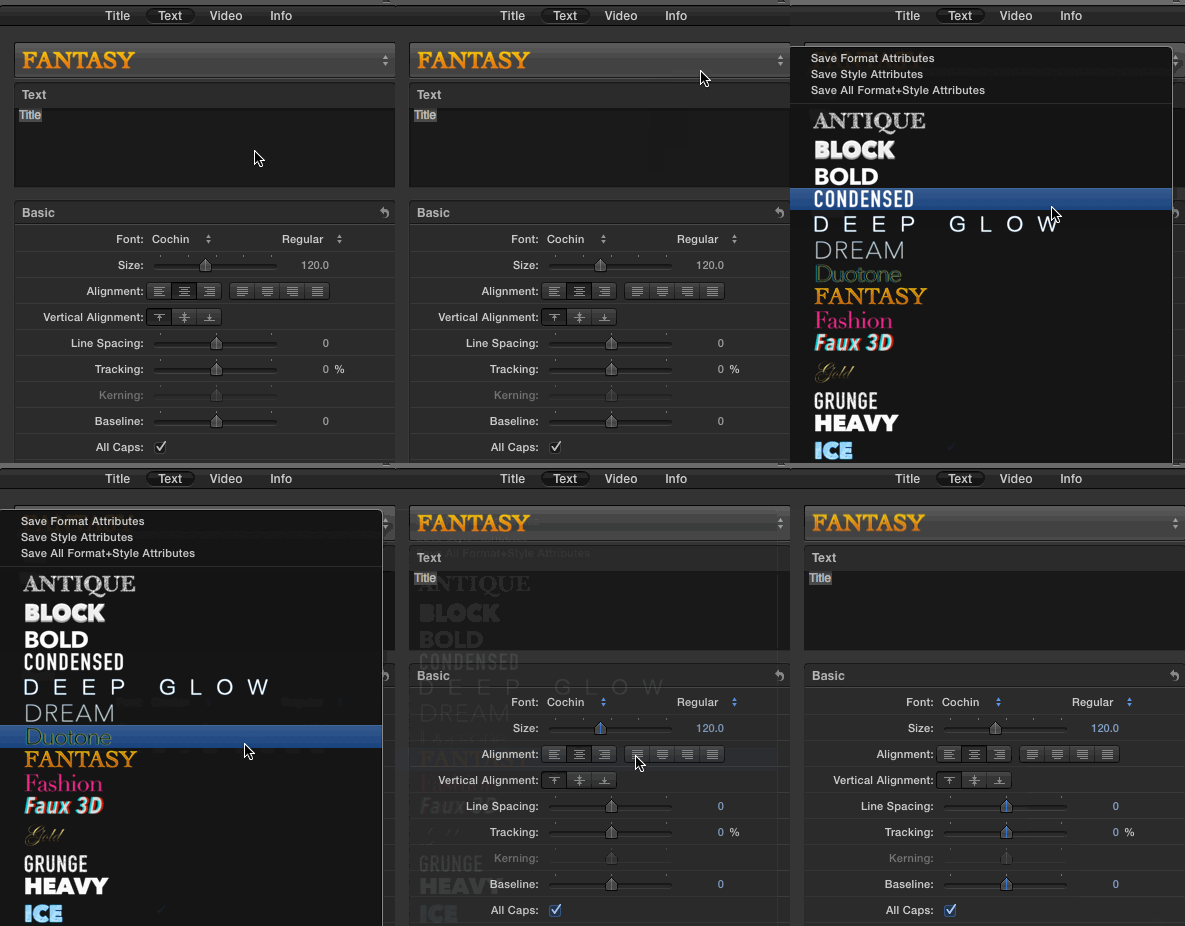
-Noah
_____________________________________

FCPWORKS - Workflow and Integration
-Noah
_____________________________________
FCPWORKS - Workflow and Integration
Last edit: 05 Sep 2014 21:30 by NoahK.
Please Log in to join the conversation.
05 Sep 2014 19:33 #52234
by fryjay
Replied by fryjay on topic Text : "Fill with gradient" on WHOLE word
There are unfortunately no similar fonts i.e., with a horizontal gradient for the WHOLE word.
The attachment illustrates what i am trying to achieve in FCP. As mentioned, I can apply the gradient but its for EACH letter rather than the whole word.
Regards,
fryjay
The attachment illustrates what i am trying to achieve in FCP. As mentioned, I can apply the gradient but its for EACH letter rather than the whole word.
Regards,
fryjay

Please Log in to join the conversation.
05 Sep 2014 21:30 - 05 Sep 2014 21:30 #52238
by NoahK
Replied by NoahK on topic Text : "Fill with gradient" on WHOLE word
In that case you'd need to design the title as a graphic within Photoshop or make your own title in Motion. The built-in titles apply the gradient per character.
-Noah
_____________________________________
FCPWORKS - Workflow and Integration
-Noah
_____________________________________
FCPWORKS - Workflow and Integration
Last edit: 05 Sep 2014 21:30 by NoahK.
Please Log in to join the conversation.

05 Sep 2014 21:37 - 05 Sep 2014 21:37 #52240
by BenB
Replied by BenB on topic Text : "Fill with gradient" on WHOLE word
I'd do this in Motion, or make a custom Motion template for it.
But a quick and dirty way would be create a gradient in some app like Pixelmator or Photoshop, then place it below your Text clip, and set the title clip's Blend Mode to Stencil Alpha.
www.macprovideo.com/hub/final-cut/fcp-x-...side-text-and-shapes
But a quick and dirty way would be create a gradient in some app like Pixelmator or Photoshop, then place it below your Text clip, and set the title clip's Blend Mode to Stencil Alpha.
www.macprovideo.com/hub/final-cut/fcp-x-...side-text-and-shapes
Last edit: 05 Sep 2014 21:37 by BenB.
Please Log in to join the conversation.

07 Sep 2014 00:21 #52282
by rhoydotp
Replied by rhoydotp on topic Text : "Fill with gradient" on WHOLE word
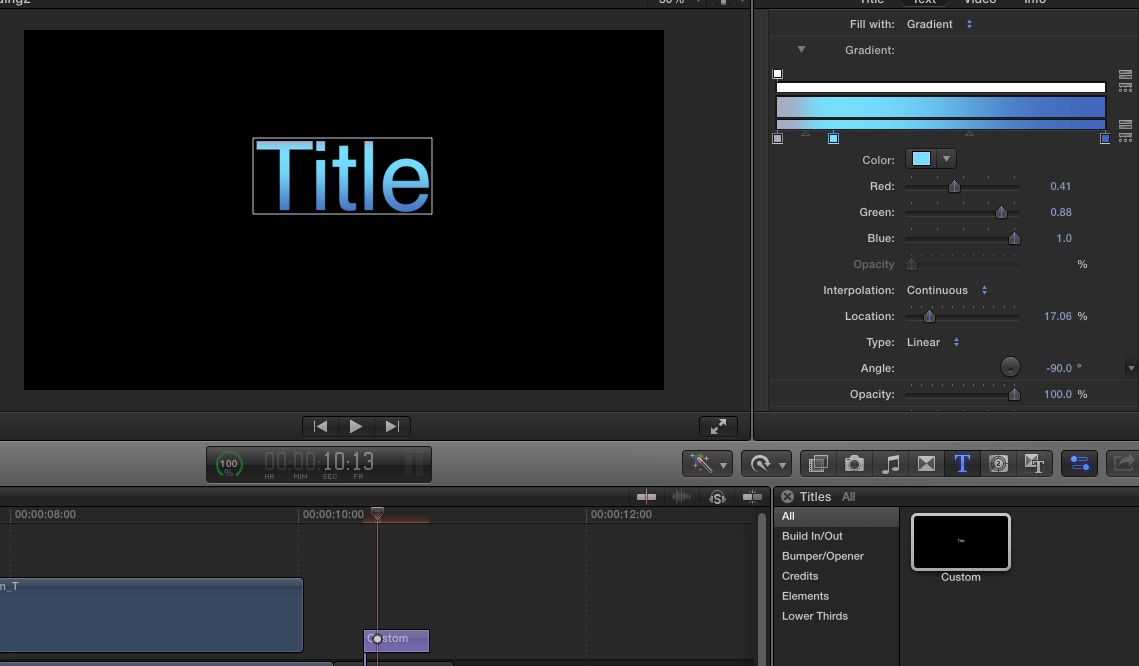
Just tried this something similar and it seems to work with the whole word. I used a Custom title and filled with Gradient ... have you tried the angle at 90 degrees?
Please Log in to join the conversation.
07 Sep 2014 12:34 #52299
by fryjay
Replied by fryjay on topic Text : "Fill with gradient" on WHOLE word
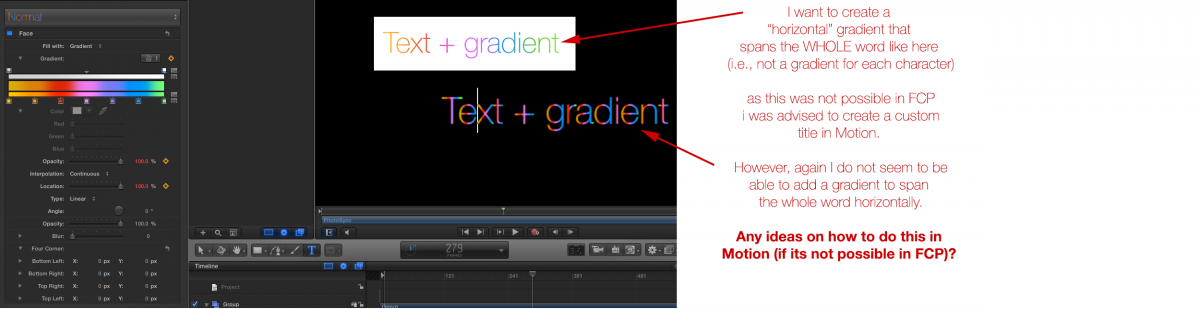
I have as advised tried to create a custom title in Motion but again do not seem to be able to apply a "horizontal" gradient to span the WHOLE word. As with FCP the gradient is applied to each individual character.
Any ideas on how to set the gradient to SPAN THE WHOLE WORD in Motion?
Many thanks.
Any ideas on how to set the gradient to SPAN THE WHOLE WORD in Motion?
Many thanks.
Please Log in to join the conversation.
07 Sep 2014 13:18 - 08 Sep 2014 02:48 #52304
by BenB
Replied by BenB on topic Text : "Fill with gradient" on WHOLE word
OK, to clarify for everyone, I think the OP is looking for a gradient at 0 degrees angle. Custom doesn't do this. If the angle of the gradient is set to 90, it creates the illusion of that (top down), but at 0 degrees, it is per letter (side to side).
One way to do this is create a new Title template in Motion. Create a Rectangle shape layer below the text layer, with Gradient for the fill. Change text layer's Blend Mode to Stencil Luma. Publish the gradient parameters. Put the text and shape layers into their own group, change that group's blend mode to normal. Takes some doing, but can be done.
Click here to download a sample template.
Or do a similar thing directly inside of FCPX, put the title and gradient inside of a Compound Clip.
One way to do this is create a new Title template in Motion. Create a Rectangle shape layer below the text layer, with Gradient for the fill. Change text layer's Blend Mode to Stencil Luma. Publish the gradient parameters. Put the text and shape layers into their own group, change that group's blend mode to normal. Takes some doing, but can be done.
Click here to download a sample template.
Or do a similar thing directly inside of FCPX, put the title and gradient inside of a Compound Clip.
Last edit: 08 Sep 2014 02:48 by BenB. Reason: Changed "Only" to "One"
Please Log in to join the conversation.
07 Sep 2014 13:37 #52309
by fryjay
Replied by fryjay on topic Text : "Fill with gradient" on WHOLE word
Hi Ben,
Thanks for swift reply. Yep, thats what I did directly in FCP using the "stencil alpha".
In your first reply you mentioned that this was the "quick and dirty way".
Does this mean there will be a negative impact on the quality of the font?
Cheers
j
Thanks for swift reply. Yep, thats what I did directly in FCP using the "stencil alpha".
In your first reply you mentioned that this was the "quick and dirty way".
Does this mean there will be a negative impact on the quality of the font?
Cheers
j
Please Log in to join the conversation.
07 Sep 2014 13:54 #52316
by BenB
Replied by BenB on topic Text : "Fill with gradient" on WHOLE word
No quality impact, just that it isn't as fast and elegant as a title template.
Please Log in to join the conversation.
07 Sep 2014 14:07 #52320
by fryjay
Replied by fryjay on topic Text : "Fill with gradient" on WHOLE word
Sorry really last question..
So is this method "Only way to do this is create a new Title template in Motion. Create a Rectangle shape layer below the text layer, with Gradient for the fill. Change text layer's Blend Mode to Stencil Luma. Publish the gradient parameters. Put the text and shape layers into their own group, change that group's blend mode to normal. Takes some doing, but can be done." better than doing it directly in FCP with Stencil Alpha?
When you say "quicker" do you mean the final published movie will play quicker and more smoothly?
cheers,
J.
So is this method "Only way to do this is create a new Title template in Motion. Create a Rectangle shape layer below the text layer, with Gradient for the fill. Change text layer's Blend Mode to Stencil Luma. Publish the gradient parameters. Put the text and shape layers into their own group, change that group's blend mode to normal. Takes some doing, but can be done." better than doing it directly in FCP with Stencil Alpha?
When you say "quicker" do you mean the final published movie will play quicker and more smoothly?
cheers,
J.
Please Log in to join the conversation.
07 Sep 2014 18:42 #52330
by rhoydotp
Replied by rhoydotp on topic Text : "Fill with gradient" on WHOLE word
woops! Sorry to the OP, in my haste to help, I didn't read properly. At least you get this thread moving, so I guess a bump from my unhelpful reply is actually helpful ... or not 
apologies.
apologies.
Please Log in to join the conversation.
08 Sep 2014 02:47 #52343
by BenB
Replied by BenB on topic Text : "Fill with gradient" on WHOLE word
"'Takes some doing, but can be done.' better than doing it directly in FCP with Stencil Alpha?"
Not better, just gives you a template to apply it more easily and more quickly if you want to do this over and over and over again.
"When you say 'quicker' do you mean the final published movie will play quicker and more smoothly?"
No, just faster to get the effect done. No matter what method you use, the playback speed and image quality will be the same. Slower way to put the effect together, or faster more efficient method? That's all I think we're say. Or maybe, "Give peace a chance", something like that.
Not better, just gives you a template to apply it more easily and more quickly if you want to do this over and over and over again.
"When you say 'quicker' do you mean the final published movie will play quicker and more smoothly?"
No, just faster to get the effect done. No matter what method you use, the playback speed and image quality will be the same. Slower way to put the effect together, or faster more efficient method? That's all I think we're say. Or maybe, "Give peace a chance", something like that.
Please Log in to join the conversation.
