


- Posts: 1
- Thank you received: 0
3 Post Moderation Rule for New Boarders (25 Jan 2021)
New boarders will have their posts moderated - Don't worry if you cannot see your post immediately.
Time line change
04 Sep 2014 23:33 #52197
by nbell
Time line change was created by nbell
I think the solution to my question lies with understanding the difference and purpose of Library, Project and Element... which I feel only a little confident....
However, I have a question about the time line.. I own and operate orphanages in rural China. Let's say I work on a eight to ten minute podcast for "Joe" with stills and short video and have a substantial and almost complete timeline...
Then I realize there is some data missing and I won't be able to finish until I get that data... so I start working on a podcast for "Mary".
Here is the question... How do I preserve Joe's timeline, clear the time line and start a new one for Mary and then when the data comes in I'm waiting on for Joe, switch back to Joe's timeline? Of course I don't want to lose either one.
So far, I have completely lost each timeline when I attempted to switch.
A newby that needs help... Please help?
However, I have a question about the time line.. I own and operate orphanages in rural China. Let's say I work on a eight to ten minute podcast for "Joe" with stills and short video and have a substantial and almost complete timeline...
Then I realize there is some data missing and I won't be able to finish until I get that data... so I start working on a podcast for "Mary".
Here is the question... How do I preserve Joe's timeline, clear the time line and start a new one for Mary and then when the data comes in I'm waiting on for Joe, switch back to Joe's timeline? Of course I don't want to lose either one.
So far, I have completely lost each timeline when I attempted to switch.
A newby that needs help... Please help?
Please Log in to join the conversation.

04 Sep 2014 23:56 #52198
by ianstubbs
Replied by ianstubbs on topic Time line change
Hi,
What you are working on in the Timeline is usually a Project. Libraries contain Events and Events contain clips and Projects.
Creating a new Project loads it into the Timeline and that might look as though you have lost what you were editing. However, the original Project should be available in the Browser and double clicking it will load it into the Timeline again.
Projects in the Browser have a clapperboard type header on them. This assumes that you are running FCPX 10.1 or greater. In 10.0.9 and earlier Projects can be found in the Project library which can be accessed by clicking the leftmost of the two icons at the bottom left of the Timeline. (If there is only one icon here then you are running 10.1 or greater and Projects can be found inside Events in the Browser).
Hope that helps...
Ian.
What you are working on in the Timeline is usually a Project. Libraries contain Events and Events contain clips and Projects.
Creating a new Project loads it into the Timeline and that might look as though you have lost what you were editing. However, the original Project should be available in the Browser and double clicking it will load it into the Timeline again.
Projects in the Browser have a clapperboard type header on them. This assumes that you are running FCPX 10.1 or greater. In 10.0.9 and earlier Projects can be found in the Project library which can be accessed by clicking the leftmost of the two icons at the bottom left of the Timeline. (If there is only one icon here then you are running 10.1 or greater and Projects can be found inside Events in the Browser).
Hope that helps...
Ian.
Please Log in to join the conversation.

05 Sep 2014 15:06 #52224
by VidGreg
Replied by VidGreg on topic Time line change
Welcome to the forum nBell,
As Ian says it is helpful if we know what version of FCP you are using and if you need extra technical help any other info about your set-up. This is a great place to get help.
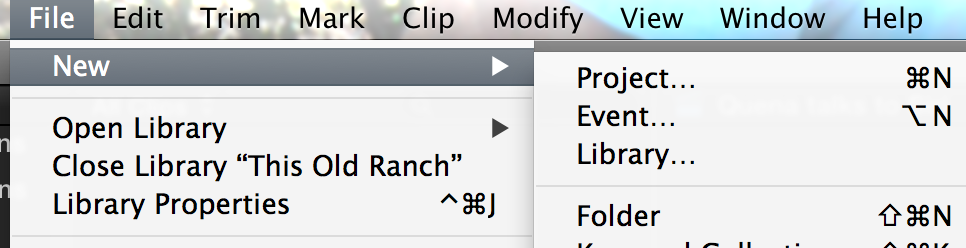
If you are using FCPX10.1.3(x) (latest version) then when you want to start a new project or event, go to the file menu and click on the appropriate place or use the keyboard shortcuts.
Here is a file menu view…
Your events will show up in the "Libraries" pane on the left side of the screen. If you do not see this pane you can show it via the keyboard shortcut of Shift+command+1 or go to the "Window" menu "Show Libraries". There is also a small icon on the left side of the screen between the clips pane and the timeline above the downward pointing arrow icon. Easy to click this accidentally and hide the Library Pane.
Hopefully, you are not deleting all of your clips from the timeline when you are trying to work on a different project. If you do, then you cannot see your previous timeline.
How you manage your media/workflows/naming is long subject and there are many threads here on fcp.co about that. Pick something that works for you.
Switching between projects is very fast, but you can only have 1 open at a time. FCP auto saves every 15 minutes and when you close a project or the program so you should not be losing your work.
Hope this helps, Greg
As Ian says it is helpful if we know what version of FCP you are using and if you need extra technical help any other info about your set-up. This is a great place to get help.
If you are using FCPX10.1.3(x) (latest version) then when you want to start a new project or event, go to the file menu and click on the appropriate place or use the keyboard shortcuts.
Here is a file menu view…
Your events will show up in the "Libraries" pane on the left side of the screen. If you do not see this pane you can show it via the keyboard shortcut of Shift+command+1 or go to the "Window" menu "Show Libraries". There is also a small icon on the left side of the screen between the clips pane and the timeline above the downward pointing arrow icon. Easy to click this accidentally and hide the Library Pane.
Hopefully, you are not deleting all of your clips from the timeline when you are trying to work on a different project. If you do, then you cannot see your previous timeline.
How you manage your media/workflows/naming is long subject and there are many threads here on fcp.co about that. Pick something that works for you.
Switching between projects is very fast, but you can only have 1 open at a time. FCP auto saves every 15 minutes and when you close a project or the program so you should not be losing your work.
Hope this helps, Greg
Please Log in to join the conversation.
