


- Posts: 2
- Thank you received: 0
3 Post Moderation Rule for New Boarders (25 Jan 2021)
New boarders will have their posts moderated - Don't worry if you cannot see your post immediately.
Automatic movement between keyframes
- fb_100001711491636
-
 Topic Author
- Offline
- New Member
-

Less
More
03 Sep 2014 10:01 #52138
by fb_100001711491636
Automatic movement between keyframes was created by fb_100001711491636
Good afternoon,
I have a question about a feature of Final Cut Pro X.
I am working on a movie and wants to move a small block using keyframes.
I placed an keyframe at 1:00:07 and another at 2:29:05.
Both keyframes have the position X: 0, and position Y: -850.0.
But between the two keyframes, the block moves. At 1:54:18, the X:0, and the Y at -822.9. There are no further keyframes between the two i mentioned.
I can put a keyframe at 1:54:18, but than he's going to move on both sides of the middle keyframe. So it does not help anything.
Does anyone know how I can fix this? I might use the wrong keyframes or something?
Thanks!
Sincerely.
I have a question about a feature of Final Cut Pro X.
I am working on a movie and wants to move a small block using keyframes.
I placed an keyframe at 1:00:07 and another at 2:29:05.
Both keyframes have the position X: 0, and position Y: -850.0.
But between the two keyframes, the block moves. At 1:54:18, the X:0, and the Y at -822.9. There are no further keyframes between the two i mentioned.
I can put a keyframe at 1:54:18, but than he's going to move on both sides of the middle keyframe. So it does not help anything.
Does anyone know how I can fix this? I might use the wrong keyframes or something?
Thanks!
Sincerely.
Please Log in to join the conversation.

03 Sep 2014 11:43 - 03 Sep 2014 11:44 #52142
by BenB
Replied by BenB on topic Automatic movement between keyframes
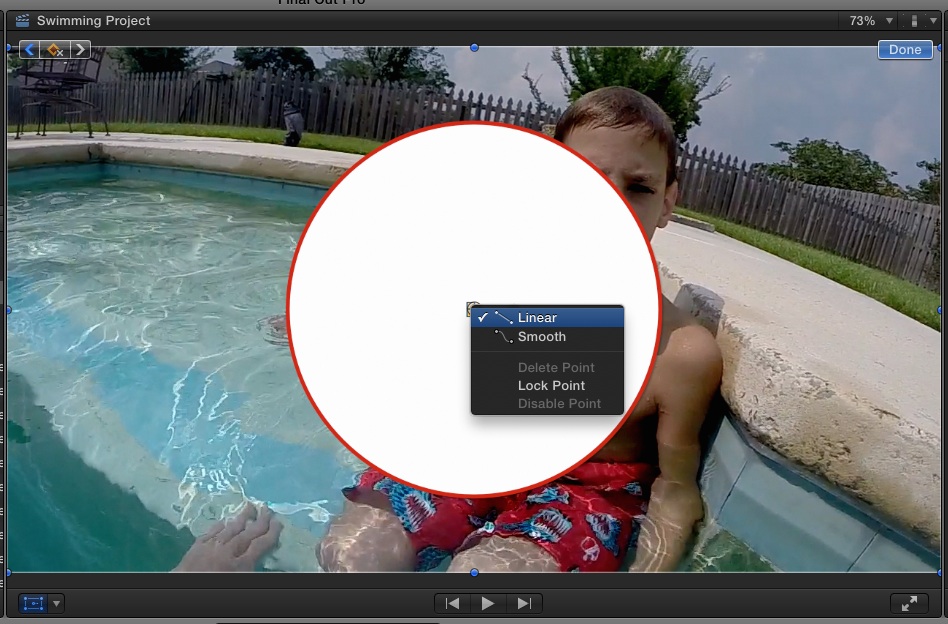
I'll assume you're using a version of FCPX before 10.1.2 (or 3). This would be due to the keyframes being set to Smooth, rather than Liniar. One of the two most recent updates fixed the Smooth drifting oddly.
Last edit: 03 Sep 2014 11:44 by BenB.
Please Log in to join the conversation.
- fb_100001711491636
-
Topic Author
- Offline
- New Member
-
Less
More
- Posts: 2
- Thank you received: 0
03 Sep 2014 11:47 #52143
by fb_100001711491636
Replied by fb_100001711491636 on topic Automatic movement between keyframes
I'm using version 10.1.3.
But your solution solved the problem! Thank you very much!
But your solution solved the problem! Thank you very much!
Please Log in to join the conversation.
