


- Posts: 238
- Thank you received: 20
3 Post Moderation Rule for New Boarders (25 Jan 2021)
New boarders will have their posts moderated - Don't worry if you cannot see your post immediately.
Text question: 'How'd I do that?'
- Squamish ed
-
 Topic Author
- Offline
- Elite Member
-

Less
More
03 Sep 2014 02:33 #52122
by Squamish ed
Ed
Text question: 'How'd I do that?' was created by Squamish ed
I was working with a test project and had found a text effect that gave a reflection. On a black background it was the effect I wanted. Unfortunately FCPX crashed and the test was lost. No backups recorded it either.
My question: how did I or can I create text with a reflection? I've looked through the options I can find and don't see that anywhere. On this computer I only have a few 3rd party plugins from Coremelt and Alex 4D and no non-standard fonts. I'm hoping I'm just having a senior moment. Does anyone have any suggestions?
Thanks.
My question: how did I or can I create text with a reflection? I've looked through the options I can find and don't see that anywhere. On this computer I only have a few 3rd party plugins from Coremelt and Alex 4D and no non-standard fonts. I'm hoping I'm just having a senior moment. Does anyone have any suggestions?
Thanks.
Ed
Please Log in to join the conversation.
- ronny courtens
-

- Offline
- Moderator
-

Less
More
- Posts: 4455
- Thank you received: 962
03 Sep 2014 09:21 - 03 Sep 2014 09:25 #52137
by ronny courtens
Replied by ronny courtens on topic Text question: 'How'd I do that?'
Hey Ed,
There are several third-party effects that will allow you to add a reflection to your text.
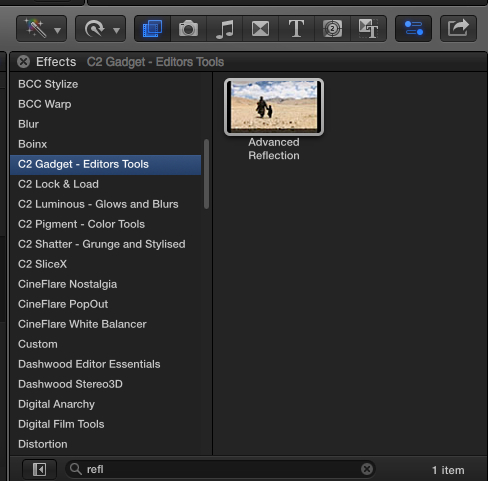
If you have CoreMelt plugins you can drop the Advanced Reflection filter in the C2 Gadget-Editors Tools category onto your title clip.
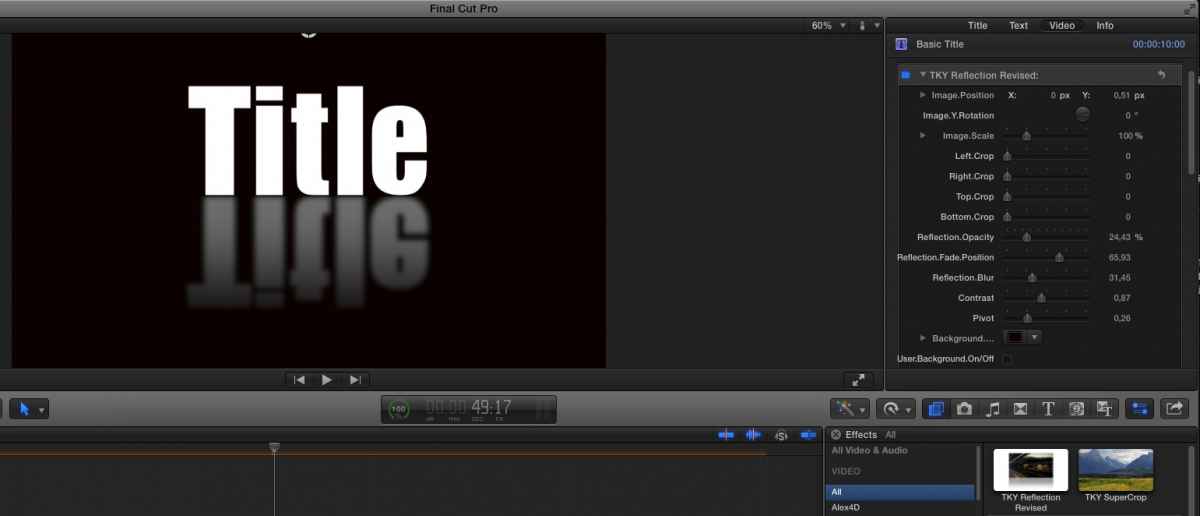
If you don't have this filter you can download a very similar free effect from Simon Ubsdell (called TKYReflection Revised) here:
www.fcp.co/media/kunena/attachments/458/...eflectionRevised.zip
Just drop the downloaded folder in your Movies > Motion Templates > Effects folder.
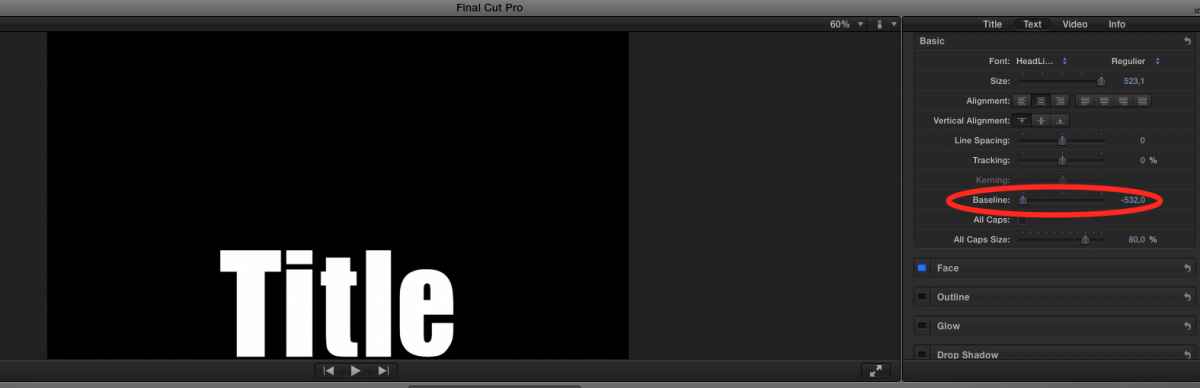
The first thing you need to know is that to add a reflection to text it is best to create your text so it sits at the bottom of your Viewer. You do this by dragging the Baseline slider down in the Text tab of the Title Inspector:
Then you add the reflection effect to your title clip. Here I'm using the C2 Advanced reflection effect:
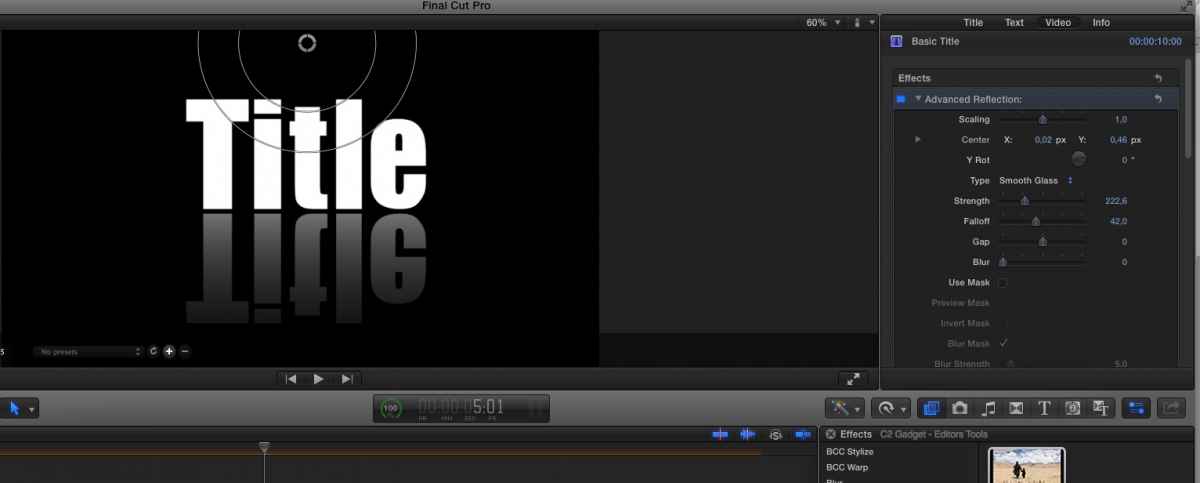
A reflection effect usually will scale your title down to make room for the reflection. I always reset Scaling to 1 (or 100 depending of the kind of effect template), then I manually move the title with its reflection to the position I wish:
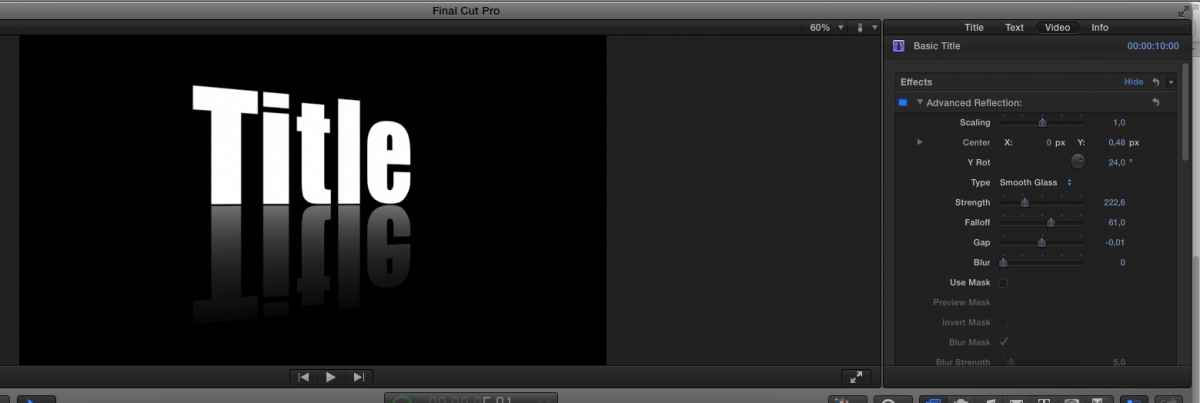
Then you can tweak the effect by rotating the title, adjusting the opacity, falloff or blurriness of the reflection a.s.o.:
The free TKY Reflection effect also offers a lot of control over your reflection parameters. Here I have added some blur to the reflection:
- Ronny
There are several third-party effects that will allow you to add a reflection to your text.
If you have CoreMelt plugins you can drop the Advanced Reflection filter in the C2 Gadget-Editors Tools category onto your title clip.
If you don't have this filter you can download a very similar free effect from Simon Ubsdell (called TKYReflection Revised) here:
www.fcp.co/media/kunena/attachments/458/...eflectionRevised.zip
Just drop the downloaded folder in your Movies > Motion Templates > Effects folder.
The first thing you need to know is that to add a reflection to text it is best to create your text so it sits at the bottom of your Viewer. You do this by dragging the Baseline slider down in the Text tab of the Title Inspector:
Then you add the reflection effect to your title clip. Here I'm using the C2 Advanced reflection effect:
A reflection effect usually will scale your title down to make room for the reflection. I always reset Scaling to 1 (or 100 depending of the kind of effect template), then I manually move the title with its reflection to the position I wish:
Then you can tweak the effect by rotating the title, adjusting the opacity, falloff or blurriness of the reflection a.s.o.:
The free TKY Reflection effect also offers a lot of control over your reflection parameters. Here I have added some blur to the reflection:
- Ronny
Last edit: 03 Sep 2014 09:25 by ronny courtens.
Please Log in to join the conversation.
- Squamish ed
-
Topic Author
- Offline
- Elite Member
-
Less
More
- Posts: 238
- Thank you received: 20
03 Sep 2014 22:03 #52172
by Squamish ed
Ed
Replied by Squamish ed on topic Text question: 'How'd I do that?'
Ronny,
I can't thank you enough for the TKY link and the tutorial! You really are a remarkable resource both for your knowledge and your willingness to take the time to help. Your guidance has allowed me to recreate what I had stumbled onto before.
I'm still puzzled by how I got the effect in the first place as I didn't have the Coremelt plugin or the TKY (which I have now. ) but I don't think I'll expend any more time trying to figure that out.
Thanks again my friend!
I can't thank you enough for the TKY link and the tutorial! You really are a remarkable resource both for your knowledge and your willingness to take the time to help. Your guidance has allowed me to recreate what I had stumbled onto before.
I'm still puzzled by how I got the effect in the first place as I didn't have the Coremelt plugin or the TKY (which I have now.
) but I don't think I'll expend any more time trying to figure that out.Thanks again my friend!
Ed
Please Log in to join the conversation.
