


- Posts: 3790
- Thank you received: 718
3 Post Moderation Rule for New Boarders (25 Jan 2021)
New boarders will have their posts moderated - Don't worry if you cannot see your post immediately.
How's this maneuver called? And can I apply a custom short-cut to it?
- Karsten Schlüter
-
 Topic Author
- Offline
- Moderator
-

Less
More
31 Aug 2014 16:34 - 31 Aug 2014 16:43 #52007
by Karsten Schlüter
How's this maneuver called? And can I apply a custom short-cut to it? was created by Karsten Schlüter
On my never-ending quest for a simple display of the source-timestamp and not the Projects TC, my latest idea asks for this:
To 'double' a clip from the main story-line to a secondary, you can hold the alt-key and simply drag the clip up...
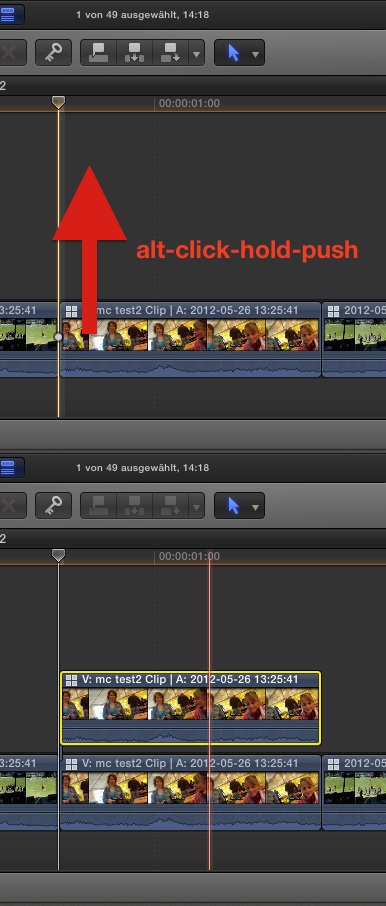
I'll perform this maneuver quiet often - therefor, I'd like to assign a customized short-cut to it - but have no plan, how's it called/what is the search-term for it..?
(background: for editing my little sports-videos, I synch my 6 cams via MultiCam; I then create a 7th track, containing just my customized 'title' (=a Motion made generator, in the looks of my title plus the TC-generator) to display the games time... instead of applying a 'title' or 'generator' I drag the first clip of a sequence up and the switch to track#7 - which instantly gives the correct game-time.... works like charm, but would be much faster with some smart key-combo)
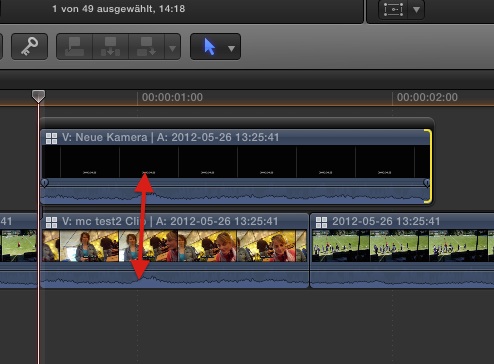
To 'double' a clip from the main story-line to a secondary, you can hold the alt-key and simply drag the clip up...
I'll perform this maneuver quiet often - therefor, I'd like to assign a customized short-cut to it - but have no plan, how's it called/what is the search-term for it..?
(background: for editing my little sports-videos, I synch my 6 cams via MultiCam; I then create a 7th track, containing just my customized 'title' (=a Motion made generator, in the looks of my title plus the TC-generator) to display the games time... instead of applying a 'title' or 'generator' I drag the first clip of a sequence up and the switch to track#7 - which instantly gives the correct game-time.... works like charm, but would be much faster with some smart key-combo)
Last edit: 31 Aug 2014 16:43 by Karsten Schlüter.
Please Log in to join the conversation.
- ronny courtens
-

- Offline
- Moderator
-
Less
More
- Posts: 4455
- Thank you received: 962
31 Aug 2014 17:23 #52014
by ronny courtens
Replied by ronny courtens on topic How's this maneuver called? And can I apply a custom short-cut to it?
Hey Karsten,
ALT-dragging is in fact a combination of two actions: "copy" and "paste as a connected clip".
So in order to do this with only keyboard shortcuts you have to position your playhead at the start of the clip (UP arrow), then press CMD+C followed by ALT+V. I think just ALT-dragging is a bit faster.
- Ronny
ALT-dragging is in fact a combination of two actions: "copy" and "paste as a connected clip".
So in order to do this with only keyboard shortcuts you have to position your playhead at the start of the clip (UP arrow), then press CMD+C followed by ALT+V. I think just ALT-dragging is a bit faster.
- Ronny
Please Log in to join the conversation.

31 Aug 2014 21:22 #52030
by BenB
Replied by BenB on topic How's this maneuver called? And can I apply a custom short-cut to it?
And Option-Drag is an OSX shortcut, not an FCPX shortcut. It works in the Finder and many other apps. Those OS level shortcuts normally aren't able to assign inside of individual apps.
Please Log in to join the conversation.
- Karsten Schlüter
-
Topic Author
- Offline
- Moderator
-
Less
More
- Posts: 3790
- Thank you received: 718
01 Sep 2014 06:01 - 01 Sep 2014 06:03 #52040
by Karsten Schlüter
… didn't know ALT+V :blush: !! and that solves, in my special case, the problem perfectly:
• I'll assign all clips, which need a 'duplication' a role.
• when edit done, I select all clips by role
• alt+v, then 'hopping' via cursor-right to each clip and press '7' = my clock-track
hmmm .... a bit weird, but most probably the 'easiest' method for my needs ...
Why the &?%$§ did Apple axed the API for 'source timeode''???? :sick:
(the skimmer shows the TC!!)
… one of the big, unsolved mysteries of computer-history ........ :lol:
THANKS again, Ronny!
@BenB
option-drag is optional in Finder? Haven't tried that in 30y using Macs! :woohoo:
Replied by Karsten Schlüter on topic How's this maneuver called? And can I apply a custom short-cut to it?
ronny courtens wrote: … followed by ALT+V. I think just ALT-dragging is a bit faster...
… didn't know ALT+V :blush: !! and that solves, in my special case, the problem perfectly:
• I'll assign all clips, which need a 'duplication' a role.
• when edit done, I select all clips by role
• alt+v, then 'hopping' via cursor-right to each clip and press '7' = my clock-track
hmmm .... a bit weird, but most probably the 'easiest' method for my needs ...
Why the &?%$§ did Apple axed the API for 'source timeode''???? :sick:
(the skimmer shows the TC!!)
… one of the big, unsolved mysteries of computer-history ........ :lol:
THANKS again, Ronny!
@BenB
option-drag is optional in Finder? Haven't tried that in 30y using Macs! :woohoo:
Last edit: 01 Sep 2014 06:03 by Karsten Schlüter.
Please Log in to join the conversation.
- Andreas Kiel
-

- Offline
- Platinum Member
-

Less
More
- Posts: 1077
- Thank you received: 189
01 Sep 2014 10:45 #52047
by Andreas Kiel
Replied by Andreas Kiel on topic How's this maneuver called? And can I apply a custom short-cut to it?
Karsten,
Have you tried one of thr utilities for daisy chaining keyboard short cuts etc?
I did some things with UI scripts, which is finally the same these apps are doing.
- Andreas
Have you tried one of thr utilities for daisy chaining keyboard short cuts etc?
I did some things with UI scripts, which is finally the same these apps are doing.
- Andreas
Please Log in to join the conversation.
- Karsten Schlüter
-
Topic Author
- Offline
- Moderator
-
Less
More
- Posts: 3790
- Thank you received: 718
01 Sep 2014 11:14 - 01 Sep 2014 11:25 #52049
by Karsten Schlüter
like Automator?
No. I don't dare to 'automize' my editing :woohoo:
(me hobbyist = 'chaotic' workflow )
And I must admit, Ronny's hint with alt+v, plus [strike]my super-smart-genius-epic-... [/strike] <cough> Bobby's idea about compounds (which keep the source' TC!)... to double my Multicams by using roles, and containing a track just for the clock, does it for the moment.
In the next days, I'll post here some screen-shots of my work-flow - it is VERY customized for my needs, I admit, no 'universal' solution for working with source-TCs ... And it probably makes clear, why I'm actually happy with it. Or, makes it easier for you to understand, if there's any 'room for improvement'. At last, it will some people inspire ...
And all these pull-ups would be obsolete, if Apple would allow using the sources TC!!! <grrrrr>
next stop: a time-code-display in Motion, which allows to display "01:06:22" as "66:22".
If I remember correctly, Motion-Master-Mind BenB helped me last year with this riddle... where did I bookmark that again?? LOL!
==edit==
a 'script' which automatically 1) select all clips of a specific role, b) alt-v all of them c) selects in all these clips track #7 - .. would be smart-***
But I assume, I therefor would have to enter the Twilight Zone of XML... which is your domain, not mine. Me happy to do my plug-ins creating a single yellow lin e .... :silly:
Replied by Karsten Schlüter on topic How's this maneuver called? And can I apply a custom short-cut to it?
Andreas Kiel wrote: ... Have you tried one of thr utilities for daisy chaining keyboard short cuts etc?...
like Automator?
No. I don't dare to 'automize' my editing :woohoo:
(me hobbyist = 'chaotic' workflow )
And I must admit, Ronny's hint with alt+v, plus [strike]my super-smart-genius-epic-... [/strike] <cough> Bobby's idea about compounds (which keep the source' TC!)... to double my Multicams by using roles, and containing a track just for the clock, does it for the moment.
In the next days, I'll post here some screen-shots of my work-flow - it is VERY customized for my needs, I admit, no 'universal' solution for working with source-TCs ... And it probably makes clear, why I'm actually happy with it. Or, makes it easier for you to understand, if there's any 'room for improvement'. At last, it will some people inspire ...
And all these pull-ups would be obsolete, if Apple would allow using the sources TC!!! <grrrrr>
next stop: a time-code-display in Motion, which allows to display "01:06:22" as "66:22".
If I remember correctly, Motion-Master-Mind BenB helped me last year with this riddle... where did I bookmark that again?? LOL!
==edit==
a 'script' which automatically 1) select all clips of a specific role, b) alt-v all of them c) selects in all these clips track #7 - .. would be smart-***
But I assume, I therefor would have to enter the Twilight Zone of XML... which is your domain, not mine. Me happy to do my plug-ins creating a single yellow lin e .... :silly:
Last edit: 01 Sep 2014 11:25 by Karsten Schlüter.
Please Log in to join the conversation.
01 Sep 2014 12:00 - 01 Sep 2014 12:01 #52050
by BenB
Replied by BenB on topic How's this maneuver called? And can I apply a custom short-cut to it?
"option-drag is optional in Finder? Haven't tried that in 30y using Macs!"
Yes, it is a Finder keyboard shortcut. Has been for a very long time now. And works in most any other application (that is coded properly). Just like Command-D is "duplicate object" at the Finder level, and not an application specific command.

Yes, it is a Finder keyboard shortcut. Has been for a very long time now. And works in most any other application (that is coded properly). Just like Command-D is "duplicate object" at the Finder level, and not an application specific command.
Last edit: 01 Sep 2014 12:01 by BenB.
Please Log in to join the conversation.
- Andreas Kiel
-
- Offline
- Platinum Member
-
Less
More
- Posts: 1077
- Thank you received: 189
01 Sep 2014 14:16 #52052
by Andreas Kiel
Replied by Andreas Kiel on topic How's this maneuver called? And can I apply a custom short-cut to it?
hi karsten,
maybe you misunderstood.
i meant tools like startly.com/products/quickeys/mac/4/
it is pretty easy to use and help help to solve your issue quite easily.
i totally aggree that it sucks that apple has dropped support for a tcr reader.
for me it sucks that i can't copy paste tc since version 1 of 10. i always get long lists with tc and comments. i had to keep both to text document open beside fcp x and type the tc into the tc field (and this sucks as well cause of the auto conversion) till i decided to write a little ui script which i can use to copy tc from anywhere and paste it into fcp x.
as an addition to ben's finder options: holding down the cmd key when moving finder items to another volume will prevent finder from copying the item to the other volume. it will move it.
- andreas
p.s.
sorry for all lowercase. i just have a few minutes of internet connection.
maybe you misunderstood.
i meant tools like startly.com/products/quickeys/mac/4/
it is pretty easy to use and help help to solve your issue quite easily.
i totally aggree that it sucks that apple has dropped support for a tcr reader.
for me it sucks that i can't copy paste tc since version 1 of 10. i always get long lists with tc and comments. i had to keep both to text document open beside fcp x and type the tc into the tc field (and this sucks as well cause of the auto conversion) till i decided to write a little ui script which i can use to copy tc from anywhere and paste it into fcp x.
as an addition to ben's finder options: holding down the cmd key when moving finder items to another volume will prevent finder from copying the item to the other volume. it will move it.
- andreas
p.s.
sorry for all lowercase. i just have a few minutes of internet connection.
Please Log in to join the conversation.
- Karsten Schlüter
-
Topic Author
- Offline
- Moderator
-
Less
More
- Posts: 3790
- Thank you received: 718
01 Sep 2014 14:51 #52054
by Karsten Schlüter
ahhh, Quickeys... while ago, I heard of that, … still exists?
System-wide shortcuts, I remember that...
… season starts in about 2 weeks, 'til then, I try a few things first, and design is still in the making, the layout is done, lots of animation (this year, everything should 'pop-in') missing:
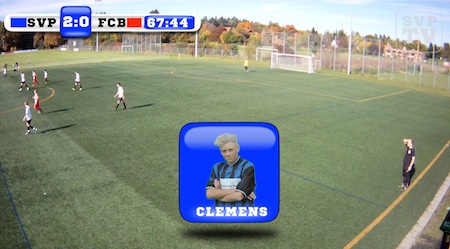
I guess, I should keep things simple - imagine the faces of other parents, when I'm entering the green with my 'TV Truck', alone my meanwhile three 'towers', tripods of five meters length for my 4 'overview'-cams... :silly:
... it all started with photos, a single cam and then iMovie ........................ :lol: :lol: :lol:
Replied by Karsten Schlüter on topic How's this maneuver called? And can I apply a custom short-cut to it?
Andreas Kiel wrote: ... i meant tools like quickeys ..
ahhh, Quickeys... while ago, I heard of that, … still exists?
System-wide shortcuts, I remember that...
… season starts in about 2 weeks, 'til then, I try a few things first, and design is still in the making, the layout is done, lots of animation (this year, everything should 'pop-in') missing:
I guess, I should keep things simple - imagine the faces of other parents, when I'm entering the green with my 'TV Truck', alone my meanwhile three 'towers', tripods of five meters length for my 4 'overview'-cams... :silly:
... it all started with photos, a single cam and then iMovie ........................ :lol: :lol: :lol:
Please Log in to join the conversation.
