


- Posts: 69
- Thank you received: 1
3 Post Moderation Rule for New Boarders (25 Jan 2021)
New boarders will have their posts moderated - Don't worry if you cannot see your post immediately.
Sudden and brutal general unlink issue...
31 Aug 2014 14:49 #51994
by ivannoel
Sudden and brutal general unlink issue... was created by ivannoel
Hi guys,
I’ll skip the drama and gnashing of teeth… though teeth gnashing there is.
I wonder if anyone can make sense of it.
For no apparent reason, from one day to the next, when I opened my feature film project now, every single single file has been unlinked (all red clips). And attempts to link them up again takes about an hour, and ends in an error message saying fcpx found the files, but they are not compatible (the same files they had been linked to for the past 3 months)…
Here a some of the usual suspects dealt with:
- this was not mid-update (I had updated to 10.1.3 before, and it worked fine)
- files, projects, library are all on the same external HD from the start, no changes of any kind.
- All backup project files have the same problem – even ones I backed up one month ago on another HD.
- I tried reinstalling fcpx, digital rebellion trashing, NVram reset, safe mode, I tried moving all content to a new library I created, I tried re-opening the previous working version of fcpx with a backup from that time and same problem, I even hung a horseshoe above my door.
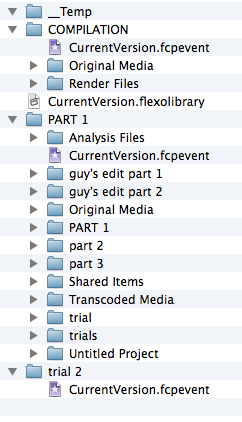
There is nothing I am aware I have done since the problem started, except that I ran a verify/repair permission in my mac, around that time, bit not sure. For what it is worth I attach a look at the inside of the library-that-won't-relink.
I would be very grateful to anyone who could suggest a way that FCPX would recognise its own children, as I’m 20 days away from the premiere.
Gnash, gnash.
Thanks guys, Ivan
I’ll skip the drama and gnashing of teeth… though teeth gnashing there is.
I wonder if anyone can make sense of it.
For no apparent reason, from one day to the next, when I opened my feature film project now, every single single file has been unlinked (all red clips). And attempts to link them up again takes about an hour, and ends in an error message saying fcpx found the files, but they are not compatible (the same files they had been linked to for the past 3 months)…
Here a some of the usual suspects dealt with:
- this was not mid-update (I had updated to 10.1.3 before, and it worked fine)
- files, projects, library are all on the same external HD from the start, no changes of any kind.
- All backup project files have the same problem – even ones I backed up one month ago on another HD.
- I tried reinstalling fcpx, digital rebellion trashing, NVram reset, safe mode, I tried moving all content to a new library I created, I tried re-opening the previous working version of fcpx with a backup from that time and same problem, I even hung a horseshoe above my door.
There is nothing I am aware I have done since the problem started, except that I ran a verify/repair permission in my mac, around that time, bit not sure. For what it is worth I attach a look at the inside of the library-that-won't-relink.
I would be very grateful to anyone who could suggest a way that FCPX would recognise its own children, as I’m 20 days away from the premiere.
Gnash, gnash.
Thanks guys, Ivan
Please Log in to join the conversation.
- ronny courtens
-

- Offline
- Moderator
-

Less
More
- Posts: 4455
- Thank you received: 962
31 Aug 2014 15:02 #51995
by ronny courtens
Replied by ronny courtens on topic Sudden and brutal general unlink issue...
Hey Ivan,
Wow, that's scary. Let's try to find out what's going on. I would like to see two screenshots:
A screenshot of your Library and Browser in thumbnail view, including the Viewer window, with a clip selected.
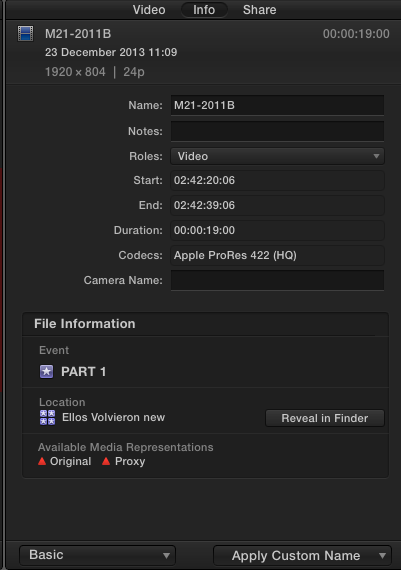
A screenshot of the Basic clip info window in the Info panel of one of your missing clips, including the File Information.
- Ronny
Wow, that's scary. Let's try to find out what's going on. I would like to see two screenshots:
A screenshot of your Library and Browser in thumbnail view, including the Viewer window, with a clip selected.
A screenshot of the Basic clip info window in the Info panel of one of your missing clips, including the File Information.
- Ronny
Please Log in to join the conversation.
31 Aug 2014 15:13 #51996
by ivannoel
Replied by ivannoel on topic Sudden and brutal general unlink issue...
Hi Ronny, and thanks for such prompt response.
It isn't always easy to make screenshots, since many times fcpx won't ever open the project (just blocks)
I hope these screenshots are the right ones you need.
btw, just so you know: it isn't just that library/project, it is all of them.
EXCEPT one I created for a small edit two days ago (but it impossibly slow to edit)
It isn't always easy to make screenshots, since many times fcpx won't ever open the project (just blocks)
I hope these screenshots are the right ones you need.
btw, just so you know: it isn't just that library/project, it is all of them.
EXCEPT one I created for a small edit two days ago (but it impossibly slow to edit)


Please Log in to join the conversation.
- ronny courtens
-
- Offline
- Moderator
-
Less
More
- Posts: 4455
- Thank you received: 962
31 Aug 2014 15:20 #51997
by ronny courtens
Replied by ronny courtens on topic Sudden and brutal general unlink issue...
Thank you for the screenshots.
What worries me is that you say you have a Library with a small edit that works, but it's very slow.
- Is that project also located on the same external drive? What kind of drive is this?
- Do you have a backup of your external drive?
- Ronny
What worries me is that you say you have a Library with a small edit that works, but it's very slow.
- Is that project also located on the same external drive? What kind of drive is this?
- Do you have a backup of your external drive?
- Ronny
Please Log in to join the conversation.
31 Aug 2014 15:27 #51999
by ivannoel
Replied by ivannoel on topic Sudden and brutal general unlink issue...
slow edit is the least of the strange things fcpx has started doing... 
Mmmm to answer your question: the original new small edit was on my home drive.
Then the, i moved it to the drive I use for the full project. There it opens, but don't expect fcpx to respond to any commands without a 10 second delay.
My external drive has the only video files (no backup).
I do though, have the backup of these files in RAW form.
IT sound like you are saying my external drive is sick?
(keep i n mind that I have to use paragon NTFS software for my mac to read the drive (Too long to explain why). It has done so for months now without problems.
Which is why i mention repairing permissions, maybe that did something...
Mmmm to answer your question: the original new small edit was on my home drive.
Then the, i moved it to the drive I use for the full project. There it opens, but don't expect fcpx to respond to any commands without a 10 second delay.
My external drive has the only video files (no backup).
I do though, have the backup of these files in RAW form.
IT sound like you are saying my external drive is sick?
(keep i n mind that I have to use paragon NTFS software for my mac to read the drive (Too long to explain why). It has done so for months now without problems.
Which is why i mention repairing permissions, maybe that did something...
Please Log in to join the conversation.
- ronny courtens
-
- Offline
- Moderator
-
Less
More
- Posts: 4455
- Thank you received: 962
31 Aug 2014 15:42 #52000
by ronny courtens
Replied by ronny courtens on topic Sudden and brutal general unlink issue...
So your media drive is Windows formatted? That is a recipe for disaster when editing on a Mac. I will need as much information as you can give. To start with the drive:
- How full is that drive?
- How is it connected to your Mac? Please tell me it's not via USB2.
- Do you have a separate media folder or are all the ProRes HQ media stored inside the Library?
- Ronny
- How full is that drive?
- How is it connected to your Mac? Please tell me it's not via USB2.
- Do you have a separate media folder or are all the ProRes HQ media stored inside the Library?
- Ronny
Please Log in to join the conversation.
31 Aug 2014 15:50 #52001
by ivannoel
Replied by ivannoel on topic Sudden and brutal general unlink issue...
The drive was indeed formatted by my technician during a shoot one year ago, and it was too far ahead, all of it, for us to be able to do anything about it (4TB...).
The drive is probably as full as it can be.
It's connected via firewire 800.
All my prores files are stored on this HD, I did not make proxies or transcodes or high quality media inside the library (which was a major disaster for me about 18months ago, on another feature: it couldn't cope).
Having said that: I have used this drive since for quite a few projects, including this big one, for now about 10 months, daily, for 10h/day, and it never showed any signs of problems, slowness, never a hiccup until 3 days ago, when i tried to open my project and all was disconnected.
The drive is probably as full as it can be.
It's connected via firewire 800.
All my prores files are stored on this HD, I did not make proxies or transcodes or high quality media inside the library (which was a major disaster for me about 18months ago, on another feature: it couldn't cope).
Having said that: I have used this drive since for quite a few projects, including this big one, for now about 10 months, daily, for 10h/day, and it never showed any signs of problems, slowness, never a hiccup until 3 days ago, when i tried to open my project and all was disconnected.
Please Log in to join the conversation.
31 Aug 2014 16:01 #52004
by ivannoel
Replied by ivannoel on topic Sudden and brutal general unlink issue...
just a little bit of extra info:
just now, to see if it solely a problem tied to my external HD, I created a new library and project with a few files that are only on my home drive. It took about 10mins for fcpx to accept them on the timeline (prores files), and then it ...blocked. I had to close it down.
just now, to see if it solely a problem tied to my external HD, I created a new library and project with a few files that are only on my home drive. It took about 10mins for fcpx to accept them on the timeline (prores files), and then it ...blocked. I had to close it down.
Please Log in to join the conversation.
- ronny courtens
-
- Offline
- Moderator
-
Less
More
- Posts: 4455
- Thank you received: 962
31 Aug 2014 16:32 #52005
by ronny courtens
Replied by ronny courtens on topic Sudden and brutal general unlink issue...
That's interesting.
How full is your system drive?
- Ronny
How full is your system drive?
- Ronny
Please Log in to join the conversation.
31 Aug 2014 16:34 #52008
by ivannoel
Replied by ivannoel on topic Sudden and brutal general unlink issue...
on the drive i run fcpx and keep everything except the video files, I have 200gb free
Please Log in to join the conversation.
- ronny courtens
-
- Offline
- Moderator
-
Less
More
- Posts: 4455
- Thank you received: 962
31 Aug 2014 16:39 #52009
by ronny courtens
Replied by ronny courtens on topic Sudden and brutal general unlink issue...
Okay, I think we can start troubleshooting now.
Disconnect the external Windows drive from your system.
Launch FCP X and close all Libraries.
Then create a new Library on your system drive. When the Library appear in FCP X go to Library Properties, press Modify Settings and make sure everything is set to store media and Cache files inside the Library.
Then import some footage in the Library, create a new Project and drop some clips on the timeline.
Does that work as it should?
If not: where does it stop working?
- Ronny
Disconnect the external Windows drive from your system.
Launch FCP X and close all Libraries.
Then create a new Library on your system drive. When the Library appear in FCP X go to Library Properties, press Modify Settings and make sure everything is set to store media and Cache files inside the Library.
Then import some footage in the Library, create a new Project and drop some clips on the timeline.
Does that work as it should?
If not: where does it stop working?
- Ronny
Please Log in to join the conversation.

31 Aug 2014 17:00 #52010
by VidGreg
Replied by VidGreg on topic Sudden and brutal general unlink issue...
Ivan,
You say your media drive is "The drive is probably as full as it can be." Not sure if it relates or not, but I have had FCPX repeatedly crash when my media drive (ssd) was full. Other issues as well.
Agree with Ronny about formatting.
No Back-ups? Yipes!
Get another drive, format in GUID and transfer files.
Just a wooden nickels worth of opinion.
You're in good hands with Ronny helping you.
Good Luck! Looking forward to seeing this resolved, learning opportunity here.
Hope this helps, Greg
You say your media drive is "The drive is probably as full as it can be." Not sure if it relates or not, but I have had FCPX repeatedly crash when my media drive (ssd) was full. Other issues as well.
Agree with Ronny about formatting.
No Back-ups? Yipes!
Get another drive, format in GUID and transfer files.
Just a wooden nickels worth of opinion.
You're in good hands with Ronny helping you.
Good Luck! Looking forward to seeing this resolved, learning opportunity here.
Hope this helps, Greg
Please Log in to join the conversation.
- ronny courtens
-
- Offline
- Moderator
-
Less
More
- Posts: 4455
- Thank you received: 962
31 Aug 2014 17:09 - 31 Aug 2014 17:11 #52011
by ronny courtens
Replied by ronny courtens on topic Sudden and brutal general unlink issue...
Hey Greg,
I agree, and I'm pretty sure the problem is with the full external drive. But the golden rule of troubleshooting is to first rule out any other probable causes because sometimes you can have multiple issues going on at the same time. So first we need to see if everything works as expected with the drive disconnected. If so we can tackle the drive issue, if not we first have to resolve any other problems.
So Ivan, before doing anything else please let me know if FCP X works normally on your system drive with the external drive disconnected.
- Ronny
I agree, and I'm pretty sure the problem is with the full external drive. But the golden rule of troubleshooting is to first rule out any other probable causes because sometimes you can have multiple issues going on at the same time. So first we need to see if everything works as expected with the drive disconnected. If so we can tackle the drive issue, if not we first have to resolve any other problems.
So Ivan, before doing anything else please let me know if FCP X works normally on your system drive with the external drive disconnected.
- Ronny
Last edit: 31 Aug 2014 17:11 by ronny courtens.
Please Log in to join the conversation.
31 Aug 2014 17:16 #52012
by ivannoel
Replied by ivannoel on topic Sudden and brutal general unlink issue...
Hi greg,
thanks for your input.
The thing is: my drive was always full for the past few months, without probs.
I do have backups, but only of the RAW files.
Reason for having only these discs is... money. I have 14TB of Raw files and converted files. In a country (Argentina) where salaries are 4 times lower than the US, and any imports are taxed 300%, buying, say, 2 more 4TB HD's is equivalent of spending about 7000US$...
I am trying out ronny's idea right now...
(after a BBQ beef lunch - the only good left about this country).
thanks for your input.
The thing is: my drive was always full for the past few months, without probs.
I do have backups, but only of the RAW files.
Reason for having only these discs is... money. I have 14TB of Raw files and converted files. In a country (Argentina) where salaries are 4 times lower than the US, and any imports are taxed 300%, buying, say, 2 more 4TB HD's is equivalent of spending about 7000US$...
I am trying out ronny's idea right now...
(after a BBQ beef lunch - the only good left about this country).
Please Log in to join the conversation.
- ronny courtens
-
- Offline
- Moderator
-
Less
More
- Posts: 4455
- Thank you received: 962
31 Aug 2014 17:19 #52013
by ronny courtens
Replied by ronny courtens on topic Sudden and brutal general unlink issue...
Ivan,
I fully understand why you need to work like this.
Enjoy your BBQ and post back when you have done the test. Then we can proceed step by step.
- Ronny
I fully understand why you need to work like this.
Enjoy your BBQ and post back when you have done the test. Then we can proceed step by step.
- Ronny
Please Log in to join the conversation.
31 Aug 2014 18:29 - 31 Aug 2014 18:39 #52018
by ivannoel
Replied by ivannoel on topic Sudden and brutal general unlink issue...
ok, well, so here are my results of the tests:
I did what you said, and created a new library on home drive and opened it, and things seem to be running relatively smoothly (I say relatively because there still seems to be some lag compared to what it was like before, but at least its running).
I 'freed' up some space on my external HD, leaving now about 15gb of space.
I then moved all video files (from this NEW library) onto the external hard disc, and deleted the ones on my desktop (thus they became disconnected). I then tried to relink' the files. The result was that when i tried to batch relink, it came back with an error saying it found the files, but they are incompatible...
This somewhat suggests that it is down to my external HD... something changed when i was not aware of it.
And I guess the question is: how/why can it read the disc, work normally, yet interpret the exact same files as incompatible...
Many thanks of course for your help and time over this, I hope you've had your lunch!
Meanwhile, i will run tests on said disc.
I did what you said, and created a new library on home drive and opened it, and things seem to be running relatively smoothly (I say relatively because there still seems to be some lag compared to what it was like before, but at least its running).
I 'freed' up some space on my external HD, leaving now about 15gb of space.
I then moved all video files (from this NEW library) onto the external hard disc, and deleted the ones on my desktop (thus they became disconnected). I then tried to relink' the files. The result was that when i tried to batch relink, it came back with an error saying it found the files, but they are incompatible...
This somewhat suggests that it is down to my external HD... something changed when i was not aware of it.
And I guess the question is: how/why can it read the disc, work normally, yet interpret the exact same files as incompatible...
Many thanks of course for your help and time over this, I hope you've had your lunch!
Meanwhile, i will run tests on said disc.
Last edit: 31 Aug 2014 18:39 by ivannoel.
Please Log in to join the conversation.
- ronny courtens
-
- Offline
- Moderator
-
Less
More
- Posts: 4455
- Thank you received: 962
31 Aug 2014 19:47 #52020
by ronny courtens
Replied by ronny courtens on topic Sudden and brutal general unlink issue...
Thank you for the test. This shows that there's nothing wrong with your system nor with FCP X. Now we can concentrate on the external drive.
I admit we may be facing a serious issue here.
You can work on a near-full drive for weeks or even months without problems, but one day it will start acting strangely and then you can even lose everything on it. This is not trying to scare you, this is a fact that many people have experienced before. Sectors can become corrupted over time and files on the drive can become corrupted as well. Even when you have freed up space your file system still can be corrupted, which would explain the sudden un-linking of the media.
An additional problem is that your media are stored inside the Library on that drive. FCP X constantly writes to the Library database, so it is possible that when trying to write to the full drive your Library database has become corrupted over time as well.
First let's try to see what's really wrong.
Select the Elios Library file on your external drive and choose "Show Package Contents".
Open the Original Media folder in Finder and check the following things:
1. Double-click a number of clips: do they open in QT player and do they play correctly?
2. Do your clips have the correct file names and .mov extension?
Let's start with this, then we can move on.
- Ronny
I admit we may be facing a serious issue here.
You can work on a near-full drive for weeks or even months without problems, but one day it will start acting strangely and then you can even lose everything on it. This is not trying to scare you, this is a fact that many people have experienced before. Sectors can become corrupted over time and files on the drive can become corrupted as well. Even when you have freed up space your file system still can be corrupted, which would explain the sudden un-linking of the media.
An additional problem is that your media are stored inside the Library on that drive. FCP X constantly writes to the Library database, so it is possible that when trying to write to the full drive your Library database has become corrupted over time as well.
First let's try to see what's really wrong.
Select the Elios Library file on your external drive and choose "Show Package Contents".
Open the Original Media folder in Finder and check the following things:
1. Double-click a number of clips: do they open in QT player and do they play correctly?
2. Do your clips have the correct file names and .mov extension?
Let's start with this, then we can move on.
- Ronny
Please Log in to join the conversation.
31 Aug 2014 19:52 - 31 Aug 2014 19:53 #52021
by ivannoel
Replied by ivannoel on topic Sudden and brutal general unlink issue...
ok, thanks for this:
just a quick rectification though:
on my external hard disc I have nothing else but the video files, no libraries or projects (they are all in the 'movies' section on my Mac). Also in the libraries, there are no playable video files (since I didn't transcode any), just the aliases.
With this is mind, what do you suggest as a next step?
just a quick rectification though:
on my external hard disc I have nothing else but the video files, no libraries or projects (they are all in the 'movies' section on my Mac). Also in the libraries, there are no playable video files (since I didn't transcode any), just the aliases.
With this is mind, what do you suggest as a next step?
Last edit: 31 Aug 2014 19:53 by ivannoel.
Please Log in to join the conversation.
- ronny courtens
-
- Offline
- Moderator
-
Less
More
- Posts: 4455
- Thank you received: 962
31 Aug 2014 20:00 - 31 Aug 2014 20:00 #52022
by ronny courtens
Replied by ronny courtens on topic Sudden and brutal general unlink issue...
Okay, that's good news. It will make the next steps much easier, and it makes the possibility that your Library database is corrupted less obvious.
On the external drive first check if your media is intact. Open some files and see if they play correctly in QT player, also check if the file names and the extensions are correct.
Next, maybe a difficult question: but is there any way you can make more space available on that drive? Any drive needs to have AT LEAST 10% available of its total capacity. In your case this means you should have at least 400 GB free space to avoid problems. Can you do that?
- Ronny
On the external drive first check if your media is intact. Open some files and see if they play correctly in QT player, also check if the file names and the extensions are correct.
Next, maybe a difficult question: but is there any way you can make more space available on that drive? Any drive needs to have AT LEAST 10% available of its total capacity. In your case this means you should have at least 400 GB free space to avoid problems. Can you do that?
- Ronny
Last edit: 31 Aug 2014 20:00 by ronny courtens.
Please Log in to join the conversation.
31 Aug 2014 20:34 - 31 Aug 2014 20:35 #52027
by ivannoel
Replied by ivannoel on topic Sudden and brutal general unlink issue...
files read fine from the HD, and have the rights extensions. doesn't seem to be anything unusual.
I ran a 'verify disc' on that HD, and it came out with a clean bill of health.
I have freed up space by transferring many of the files elsewhere, but openign fcpx results in the same 100% unlinked files thing.
One strange thing though, and which might throw a spanner in the wheels of the externalHD-at-fault idea...
As I was transferring files right now from the HD onto my desktop, it stopped in mid transfer, and gave an error message (attached). Now the odd thing about that is that it is the exact same error that QT7 has been giving me when things started going wrong, when I try to import an image sequence (that is stored on my Mac) into it. It won't open either one image or a sequence, giving the same error number...
I can find no reference anywhere on the Net regarding this specific error number.
I don't know if this suggests anything new/different, but just wondering if it might have something to do with a mavericks thing, and the fact that I trashed all previous preferences, and repaired a long series of 'permissions'. Maybe some strange quicktime thing?
I am now freeing some space on my external, and will try again
I ran a 'verify disc' on that HD, and it came out with a clean bill of health.
I have freed up space by transferring many of the files elsewhere, but openign fcpx results in the same 100% unlinked files thing.
One strange thing though, and which might throw a spanner in the wheels of the externalHD-at-fault idea...
As I was transferring files right now from the HD onto my desktop, it stopped in mid transfer, and gave an error message (attached). Now the odd thing about that is that it is the exact same error that QT7 has been giving me when things started going wrong, when I try to import an image sequence (that is stored on my Mac) into it. It won't open either one image or a sequence, giving the same error number...
I can find no reference anywhere on the Net regarding this specific error number.
I don't know if this suggests anything new/different, but just wondering if it might have something to do with a mavericks thing, and the fact that I trashed all previous preferences, and repaired a long series of 'permissions'. Maybe some strange quicktime thing?
I am now freeing some space on my external, and will try again

Last edit: 31 Aug 2014 20:35 by ivannoel.
Please Log in to join the conversation.
