


- Posts: 786
- Thank you received: 21
3 Post Moderation Rule for New Boarders (25 Jan 2021)
New boarders will have their posts moderated - Don't worry if you cannot see your post immediately.
Best way to organize Compound and Synchronized clips???
- Jonathan Levin
-
 Topic Author
- Offline
- Platinum Member
-

Less
More
29 Aug 2014 16:36 #51946
by Jonathan Levin
Hello everyone.
How do you organize your compound and audio synced clips?
Let's say you've created several compound clips, do you keep the individual clips that reside in some event? Can you delete those or do the compounds sym-link to those and not the original media?
Same with Synchronized Audio clips. Once audio and video are synced, you end up with a single clip. is it necessary to keep that separate audio and video clip in the event or can those be deleted from event/browser.
As of now my Library is a single film, video, assignment, whatever. In that Library I have separate events for Video, Audio and Music, Project(s), Photos, Graphics, and so on.
So the question is how do you keep everything straight?
Thanks and have a great weekend.
Jonathan
How do you organize your compound and audio synced clips?
Let's say you've created several compound clips, do you keep the individual clips that reside in some event? Can you delete those or do the compounds sym-link to those and not the original media?
Same with Synchronized Audio clips. Once audio and video are synced, you end up with a single clip. is it necessary to keep that separate audio and video clip in the event or can those be deleted from event/browser.
As of now my Library is a single film, video, assignment, whatever. In that Library I have separate events for Video, Audio and Music, Project(s), Photos, Graphics, and so on.
So the question is how do you keep everything straight?
Thanks and have a great weekend.
Jonathan
Please Log in to join the conversation.
- ronny courtens
-

- Offline
- Moderator
-

Less
More
- Posts: 4455
- Thank you received: 962
29 Aug 2014 18:29 #51948
by ronny courtens
Replied by ronny courtens on topic Best way to organize Compound and Synchronized clips???
Hey Jonathan,
Although you can safely delete clips from the Browser once you have turned them into CCs, multiclips or synchronized clips, I usually keep everything in the Event. Clips in the Browser are just pointers after all and they don't take up any drive space.
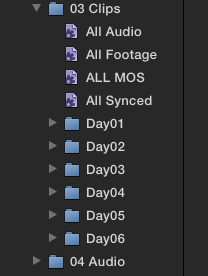
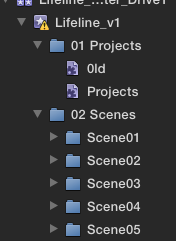
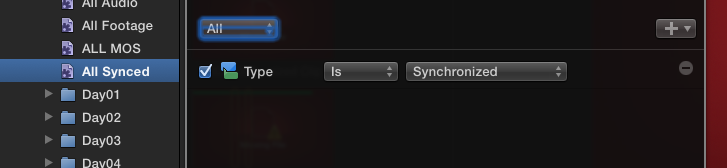
But I do have a strict organization in the Browser. I create Smart Collections for compound clips, multiclips and synchronized clips. This way whenever I create one of these they automatically go into their corresponding Smart Collection and I can easily find them there.
Instead of having several Events, which is OK, you easily could use Smart Collections to separate your audio, stills, PSD, CC etc... files.
- Ronny
Although you can safely delete clips from the Browser once you have turned them into CCs, multiclips or synchronized clips, I usually keep everything in the Event. Clips in the Browser are just pointers after all and they don't take up any drive space.
But I do have a strict organization in the Browser. I create Smart Collections for compound clips, multiclips and synchronized clips. This way whenever I create one of these they automatically go into their corresponding Smart Collection and I can easily find them there.
Instead of having several Events, which is OK, you easily could use Smart Collections to separate your audio, stills, PSD, CC etc... files.
- Ronny
Please Log in to join the conversation.


29 Aug 2014 18:29 #51949
by moviestim
Replied by moviestim on topic Best way to organize Compound and Synchronized clips???
I just edited a short film where the audio and video were recorded separately. As far as I know, YES, you do have to keep the other files, however you can organize your media browser so that you are only seeing what you want to see using "smart collections." You can also use keywords or the rating system to hide the clips that make up your synced clips. I like using "smart collections" cause once you set the parameters any new synced or compound clips will just appear in the collection. Hope this helps a little. There are many ways of organizing in the media browser so that you are seeing only what you want. Ripple training has tutorials on media management that you can find on this site. If you are syncing clips a lot you may want to look into third party software like plural eyes. They sync footage and create a new event in your library that is "synced."
Please Log in to join the conversation.
- Jonathan Levin
-
Topic Author
- Offline
- Platinum Member
-
Less
More
- Posts: 786
- Thank you received: 21
03 Sep 2014 03:14 #52124
by Jonathan Levin
Replied by Jonathan Levin on topic Best way to organize Compound and Synchronized clips???
Thanks guys. I really need to learn more about smart collections.
Jonathan
Jonathan
Please Log in to join the conversation.
- ronny courtens
-
- Offline
- Moderator
-
Less
More
- Posts: 4455
- Thank you received: 962
03 Sep 2014 08:01 #52130
by ronny courtens
Replied by ronny courtens on topic Best way to organize Compound and Synchronized clips???
moviestim wrote: As far as I know, YES, you do have to keep the other files, ...
That is not correct. Although I personally prefer not to do this, you can safely delete any clips from the Library when your have created synchronized clips, multi clips or CCs with them. Here's an example.
This is a Library with a mixture of managed and external media. I have created a Synchronized Clip, a Multicam Clip and a Compound Clip with the imported media:
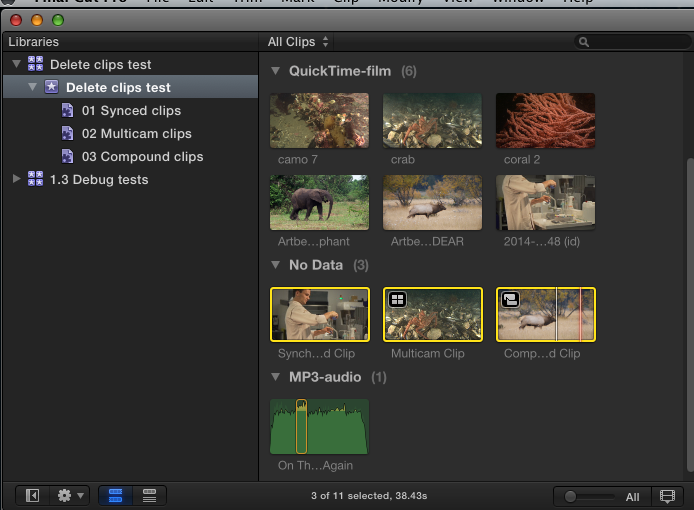
When I delete all the individual clips from the Library the Synchronized Clip, the Multicam Clip and the Compound Clip are not affected. They are still linked to the media inside the Original Media folder of the Library (for managed media) or to the media in the external media folder (for external media):
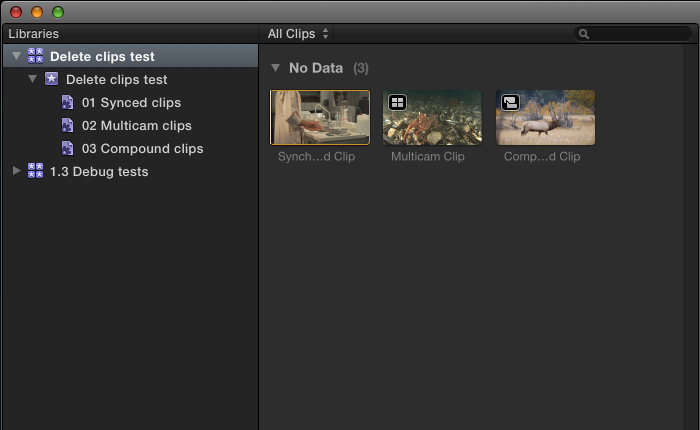
Clips in a Library/Event are just references pointing to the original media on your system; just like Synchronized, Multicam and Compound Clips are just references pointing to the same media.
- Ronny
That is not correct. Although I personally prefer not to do this, you can safely delete any clips from the Library when your have created synchronized clips, multi clips or CCs with them. Here's an example.
This is a Library with a mixture of managed and external media. I have created a Synchronized Clip, a Multicam Clip and a Compound Clip with the imported media:
When I delete all the individual clips from the Library the Synchronized Clip, the Multicam Clip and the Compound Clip are not affected. They are still linked to the media inside the Original Media folder of the Library (for managed media) or to the media in the external media folder (for external media):
Clips in a Library/Event are just references pointing to the original media on your system; just like Synchronized, Multicam and Compound Clips are just references pointing to the same media.
- Ronny
Please Log in to join the conversation.
