


- Posts: 9
- Thank you received: 0
3 Post Moderation Rule for New Boarders (25 Jan 2021)
New boarders will have their posts moderated - Don't worry if you cannot see your post immediately.
Choppy playback in browser
29 Aug 2014 12:33 #51934
by Hemingway
Choppy playback in browser was created by Hemingway
When I import in original (H.264), optimised and/or Proxy media into FCPX 10.1.3. the playback is often choppy. I have a 2010 McBookPro, 10.9.4, 8GB of memory and have even turned all other apps etc off. Can anyone help? Also I can't tell whether I am playing in optimised or proxy media from the Inspector or anywhere else... Help appreciated!
Hemingway
Hemingway
Please Log in to join the conversation.
- ronny courtens
-

- Offline
- Moderator
-

Less
More
- Posts: 4455
- Thank you received: 962
29 Aug 2014 13:23 #51936
by ronny courtens
Replied by ronny courtens on topic Choppy playback in browser
Hi Hamish, welcome to the forum.
I'm afraid the 2010 MBP is notorious for not working very well with FCP X. But there are some things you can do to improve performance.
1. When you have optimized your media, or when you have created proxy media, you can see this in the Inspector > Info tab. Green bullets mean you have optimized and/or proxy media available:
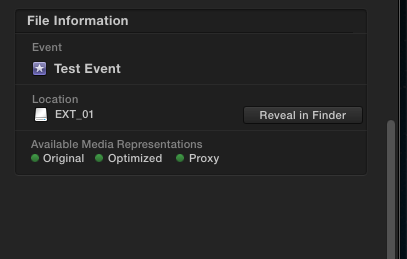
When you have optimized media FCP X will always play back the optimized files and never the original H.264.
When you have proxy media FCP X will play back the proxy media if you select Proxy media playback in the Viewer:
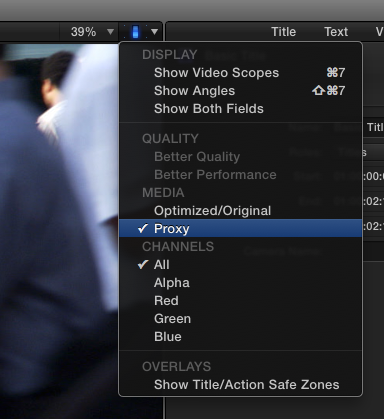
Just remember to always switch back from Proxy media playback to Original/Optimized media whenever you share your Project.
2. Your 2010 MBP should be able to play back optimized and proxy media without any troubles. Just make sure that:
- Background rendering is always turned OFF. You can render manually whenever you wish.
- Your original media and your optimized/proxy media are NOT stored on your system drive. This can considerably slow down your system. You should keep any media on a fast external drive (NO USB2!!). You can set the location to store your media in the Library settings.
- Turn audio waveforms off if you don't need them.
- Only open FCP X windows you need. If you don't need the Inspector or the Library window, switch it off.
If you still have playback issues after this, post back.
- Ronny
I'm afraid the 2010 MBP is notorious for not working very well with FCP X. But there are some things you can do to improve performance.
1. When you have optimized your media, or when you have created proxy media, you can see this in the Inspector > Info tab. Green bullets mean you have optimized and/or proxy media available:
When you have optimized media FCP X will always play back the optimized files and never the original H.264.
When you have proxy media FCP X will play back the proxy media if you select Proxy media playback in the Viewer:
Just remember to always switch back from Proxy media playback to Original/Optimized media whenever you share your Project.
2. Your 2010 MBP should be able to play back optimized and proxy media without any troubles. Just make sure that:
- Background rendering is always turned OFF. You can render manually whenever you wish.
- Your original media and your optimized/proxy media are NOT stored on your system drive. This can considerably slow down your system. You should keep any media on a fast external drive (NO USB2!!). You can set the location to store your media in the Library settings.
- Turn audio waveforms off if you don't need them.
- Only open FCP X windows you need. If you don't need the Inspector or the Library window, switch it off.
If you still have playback issues after this, post back.
- Ronny
Please Log in to join the conversation.
31 Aug 2014 12:25 #51985
by Hemingway
Replied by Hemingway on topic Choppy playback in browser
Hi Ronny - many thanks for your reply. You have enabled me to understand how to playback proxy media in the ideated version of FCPX and the video is now running fine! As I can export in a better format, this is fine for the time being. In the medium-term I need to update my MBP and external hard rive (USB 2.0, unfortunately) but was baulking at the cost right at this moment... Many thanks for saving me lots of money!
Hemingway
Hemingway
Please Log in to join the conversation.
- ronny courtens
-
- Offline
- Moderator
-
Less
More
- Posts: 4455
- Thank you received: 962
31 Aug 2014 13:04 #51986
by ronny courtens
Replied by ronny courtens on topic Choppy playback in browser
Hi Hemingway,
Glad it works better now. Your MBP will do fine if you edit in proxy mode. Whenever you want to invest in a better workflow you can start with a faster external drive.
- Ronny
Glad it works better now. Your MBP will do fine if you edit in proxy mode. Whenever you want to invest in a better workflow you can start with a faster external drive.
- Ronny
Please Log in to join the conversation.
