


- Posts: 5
- Thank you received: 0
3 Post Moderation Rule for New Boarders (25 Jan 2021)
New boarders will have their posts moderated - Don't worry if you cannot see your post immediately.
Multicam angles became splice/cuts !! Help !
- Aliendjent
-
 Topic Author
- Offline
- New Member
-

Less
More
29 Aug 2014 04:05 #51917
by Aliendjent
Multicam angles became splice/cuts !! Help ! was created by Aliendjent
I am running FCPX 10.0.8, and after working many hours in multicam mode switching between 3 angles and an audio track for a 1:15:00 video project, I have opened the project and suddenly, all my switch angle edits appear as cuts (splices?), meaning if I drag the end of one over the other, the second clip goes up while the dragged one overlaps under the other. I know that it is possible to edit this way, but switching between angles is way easier and more practical.
I have no idea how this happened, the project was nearly finished but I did want to make more edits. The only things I did since I last closed the project (when the switch angle edits where still there) was to try exporting (share: master file (default) selecting "computer" ), which I did cancel as soon as it started. I also noticed the background tasks saying it was "rendering", which I waited to finish at 100%). Could that be the reason my switch angle edits became cuts? It is a big bummer, my backup for the project also has those new weird cuts.
Any idea as to how I can fix this and get the old angle switches back to work with? I tried googling this issue but could not find anybody with a similar problem.
I have no idea how this happened, the project was nearly finished but I did want to make more edits. The only things I did since I last closed the project (when the switch angle edits where still there) was to try exporting (share: master file (default) selecting "computer" ), which I did cancel as soon as it started. I also noticed the background tasks saying it was "rendering", which I waited to finish at 100%). Could that be the reason my switch angle edits became cuts? It is a big bummer, my backup for the project also has those new weird cuts.
Any idea as to how I can fix this and get the old angle switches back to work with? I tried googling this issue but could not find anybody with a similar problem.
Please Log in to join the conversation.
- ronny courtens
-

- Offline
- Moderator
-

Less
More
- Posts: 4455
- Thank you received: 962
29 Aug 2014 07:26 #51922
by ronny courtens
Replied by ronny courtens on topic Multicam angles became splice/cuts !! Help !
Hi David, welcome to the forum.
This is strange behavior. What happens when you delete all render files for the multicam project?
And you really should update to the latest version if you can, multicam has much improved.
- Ronny
This is strange behavior. What happens when you delete all render files for the multicam project?
And you really should update to the latest version if you can, multicam has much improved.
- Ronny
Please Log in to join the conversation.
- Aliendjent
-
Topic Author
- Offline
- New Member
-
Less
More
- Posts: 5
- Thank you received: 0
29 Aug 2014 08:24 #51923
by Aliendjent
Replied by Aliendjent on topic Multicam angles became splice/cuts !! Help !
Hi Ronny and first of all thanks for the reply, I appreciate the warm welcome.
I did not delete the render files, but I did try moving the render folder to a different location (not sure if that is the same thing..) and re-starting Final Cut, but it did not seem to make a difference.
I can try deleting the render files, but would like to make sure that it will do no further harm before doing so. Is it absolutely safe to do delete, or even worth it, since I already tried moving the render files out of the folder? Forgive me if I'm not completely familiar with how all this works.
I did not delete the render files, but I did try moving the render folder to a different location (not sure if that is the same thing..) and re-starting Final Cut, but it did not seem to make a difference.
I can try deleting the render files, but would like to make sure that it will do no further harm before doing so. Is it absolutely safe to do delete, or even worth it, since I already tried moving the render files out of the folder? Forgive me if I'm not completely familiar with how all this works.
Please Log in to join the conversation.
- ronny courtens
-
- Offline
- Moderator
-
Less
More
- Posts: 4455
- Thank you received: 962
29 Aug 2014 08:38 - 29 Aug 2014 08:39 #51924
by ronny courtens
Replied by ronny courtens on topic Multicam angles became splice/cuts !! Help !
Hi David,
It's better not to touch any FCP X folder in Finder, so I would suggest you move the Render folder back to its original place first.
Deleting Project render files cannot harm your project at all, it just deletes the render files. I really don't know if it will be worth it as I have never heard of such a thing happening with multicam before. But because you said the problem appeared after you had stopped a share operation and you had let FCP X render I thought it might have to do something with it. Not sure if it will work, though. So we might try something else first.
Put the render folder back and try to delete your FCP X preferences. For 10.0.8 the best way to delete your FCP X preferences is to download Preference Manager X (free): www.digitalrebellion.com/prefman/
Quit FCP X, install and launch Preference Manager X and select FCP X in the utility window to delete your FCP X preferences. Then launch FCP X again and see if the problem is solved.
If this does not solve the issue, can you post a screenshot of your multiclip on the timeline so we can see what's happening?
- Ronny
It's better not to touch any FCP X folder in Finder, so I would suggest you move the Render folder back to its original place first.
Deleting Project render files cannot harm your project at all, it just deletes the render files. I really don't know if it will be worth it as I have never heard of such a thing happening with multicam before. But because you said the problem appeared after you had stopped a share operation and you had let FCP X render I thought it might have to do something with it. Not sure if it will work, though. So we might try something else first.
Put the render folder back and try to delete your FCP X preferences. For 10.0.8 the best way to delete your FCP X preferences is to download Preference Manager X (free): www.digitalrebellion.com/prefman/
Quit FCP X, install and launch Preference Manager X and select FCP X in the utility window to delete your FCP X preferences. Then launch FCP X again and see if the problem is solved.
If this does not solve the issue, can you post a screenshot of your multiclip on the timeline so we can see what's happening?
- Ronny
Last edit: 29 Aug 2014 08:39 by ronny courtens.
Please Log in to join the conversation.
- ronny courtens
-
- Offline
- Moderator
-
Less
More
- Posts: 4455
- Thank you received: 962
29 Aug 2014 08:43 #51925
by ronny courtens
Replied by ronny courtens on topic Multicam angles became splice/cuts !! Help !
ALSO:
If deleting the preferences does not help: make a new Project and copy/paste the contents of the problematic Project onto the new timeline. This sometimes fixes Project issues.
- Ronny
If deleting the preferences does not help: make a new Project and copy/paste the contents of the problematic Project onto the new timeline. This sometimes fixes Project issues.
- Ronny
Please Log in to join the conversation.
- Aliendjent
-
Topic Author
- Offline
- New Member
-
Less
More
- Posts: 5
- Thank you received: 0
29 Aug 2014 09:41 - 29 Aug 2014 09:49 #51926
by Aliendjent
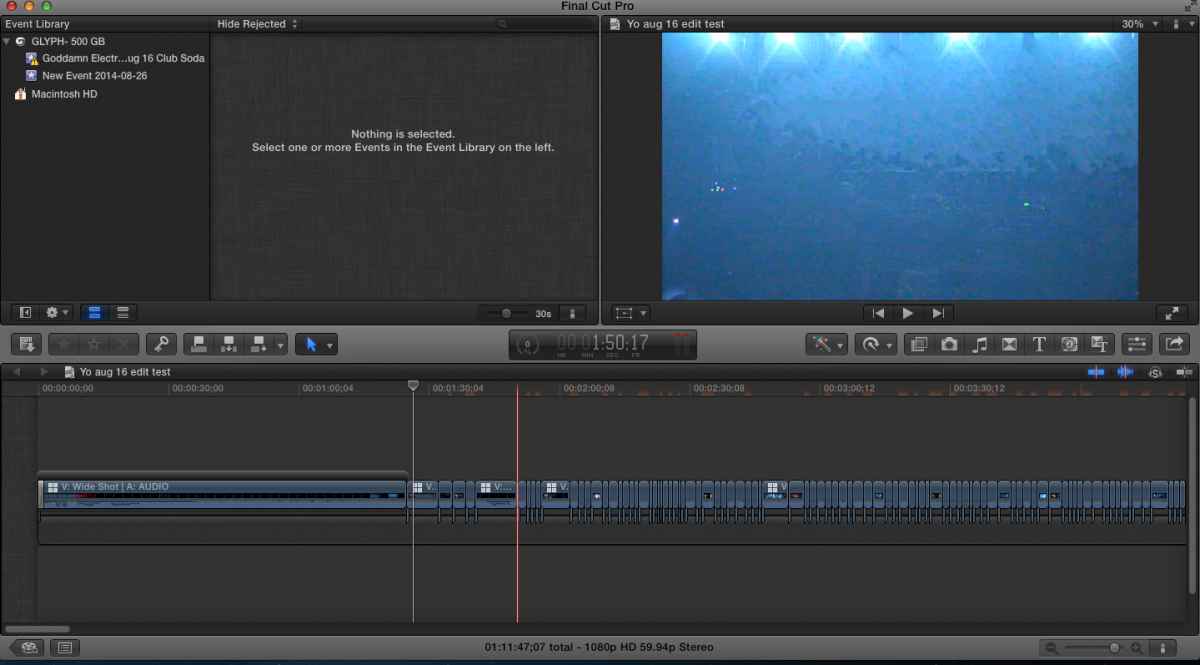
I trashed the preferences, and also tried the copy onto a new project. Unfortunately, the issue remains.. :S
As I was thinking, trying to remember what could've triggered it, I remember one of the last changes I made was to trim out the beginning minute or so of the footage. I remember using the blade tool for that. I also added a short fade to color transition for the beginning afterwards.
Could that have triggered the remaining angle clips to suddenly have the separation acts as cuts instead of angle switch? It seems to me something of that sort could make more sense than the rendering.
I attached a screenshot of my display here, to maybe decipher what is going on. Thanks again.
Replied by Aliendjent on topic Multicam angles became splice/cuts !! Help !
I trashed the preferences, and also tried the copy onto a new project. Unfortunately, the issue remains.. :S
As I was thinking, trying to remember what could've triggered it, I remember one of the last changes I made was to trim out the beginning minute or so of the footage. I remember using the blade tool for that. I also added a short fade to color transition for the beginning afterwards.
Could that have triggered the remaining angle clips to suddenly have the separation acts as cuts instead of angle switch? It seems to me something of that sort could make more sense than the rendering.
I attached a screenshot of my display here, to maybe decipher what is going on. Thanks again.
Last edit: 29 Aug 2014 09:49 by Aliendjent. Reason: screenshot did not seem to upload
Please Log in to join the conversation.
- ronny courtens
-
- Offline
- Moderator
-
Less
More
- Posts: 4455
- Thank you received: 962
29 Aug 2014 10:11 #51927
by ronny courtens
Replied by ronny courtens on topic Multicam angles became splice/cuts !! Help !
Okay, delete the transition at the start of the first clip.
Then select that first clip and press ALT+CMD+Arrow UP to lift the clip out of the secondary storyline you have created by adding the transition. Finally delete the empty secondary storyline (the black empty container).
Does that restore the multicam cuts? If not:
Press CMD+A to select all the clips on your timeline, then press ALT+CMD+Arrow DOWN to put all the clips in the primary storyline, hoping this will finally restore the multicam cuts.
- Ronny
Then select that first clip and press ALT+CMD+Arrow UP to lift the clip out of the secondary storyline you have created by adding the transition. Finally delete the empty secondary storyline (the black empty container).
Does that restore the multicam cuts? If not:
Press CMD+A to select all the clips on your timeline, then press ALT+CMD+Arrow DOWN to put all the clips in the primary storyline, hoping this will finally restore the multicam cuts.
- Ronny
Please Log in to join the conversation.
- Aliendjent
-
Topic Author
- Offline
- New Member
-
Less
More
- Posts: 5
- Thank you received: 0
29 Aug 2014 10:45 #51928
by Aliendjent
Replied by Aliendjent on topic Multicam angles became splice/cuts !! Help !
It worked ! Ronny, you're the best ! Thank you ! It was all in that extra storyline - relief now and back to editing - Will duplicate project just in case 
:woohoo:
:woohoo:
Please Log in to join the conversation.
- ronny courtens
-
- Offline
- Moderator
-
Less
More
- Posts: 4455
- Thank you received: 962
29 Aug 2014 10:51 #51929
by ronny courtens
Replied by ronny courtens on topic Multicam angles became splice/cuts !! Help !
Good news, I love good news. 
Happy editing!
- Ronny
Happy editing!
- Ronny
Please Log in to join the conversation.
- ronny courtens
-
- Offline
- Moderator
-
Less
More
- Posts: 4455
- Thank you received: 962
29 Aug 2014 10:52 #51930
by ronny courtens
Replied by ronny courtens on topic Multicam angles became splice/cuts !! Help !
Oh yes, I forgot. Once your clips are all back in the primary storyline you can safely add the transition again.
- Ronny
- Ronny
Please Log in to join the conversation.
- Aliendjent
-
Topic Author
- Offline
- New Member
-
Less
More
- Posts: 5
- Thank you received: 0
29 Aug 2014 10:54 #51931
by Aliendjent
Replied by Aliendjent on topic Multicam angles became splice/cuts !! Help !
Perfect
Please Log in to join the conversation.
