


- Posts: 19
- Thank you received: 0
3 Post Moderation Rule for New Boarders (25 Jan 2021)
New boarders will have their posts moderated - Don't worry if you cannot see your post immediately.
Exporting to desktop gone? Please help. 10.1.3
- delirium trigger
-
 Topic Author
- Offline
- New Member
-

Less
More
25 Aug 2014 14:39 #51757
by delirium trigger
Exporting to desktop gone? Please help. 10.1.3 was created by delirium trigger
Hello,
I have two Macbook pro's. One, when I export, even at Youtube settings by sharing it lets me choose a location to export to. Which I can choose desktop or an external drive.
The new Macbook Retina, doesn't give me an option. One I click share it just automatically saved it in a folder that is within the movies folder and I have to open package contents to get to it. AND if I close Final Cut Pro X, it deletes the shared movie so I have to drag it out every time before closing.
How do I get it to do what my other macbook does? I've looked everywhere. I want to share on desktop and external drive. Not that folder.
I have two Macbook pro's. One, when I export, even at Youtube settings by sharing it lets me choose a location to export to. Which I can choose desktop or an external drive.
The new Macbook Retina, doesn't give me an option. One I click share it just automatically saved it in a folder that is within the movies folder and I have to open package contents to get to it. AND if I close Final Cut Pro X, it deletes the shared movie so I have to drag it out every time before closing.
How do I get it to do what my other macbook does? I've looked everywhere. I want to share on desktop and external drive. Not that folder.
Please Log in to join the conversation.
- Tom Wolsky
-

- Offline
- Moderator
-

25 Aug 2014 15:04 #51758
by Tom Wolsky
Replied by Tom Wolsky on topic Exporting to desktop gone? Please help. 10.1.3
Export a master file. If you go to YouTube or Vimeo you get the behavior you describe.
Please Log in to join the conversation.

25 Aug 2014 15:16 #51759
by tpayton
Replied by tpayton on topic Exporting to desktop gone? Please help. 10.1.3
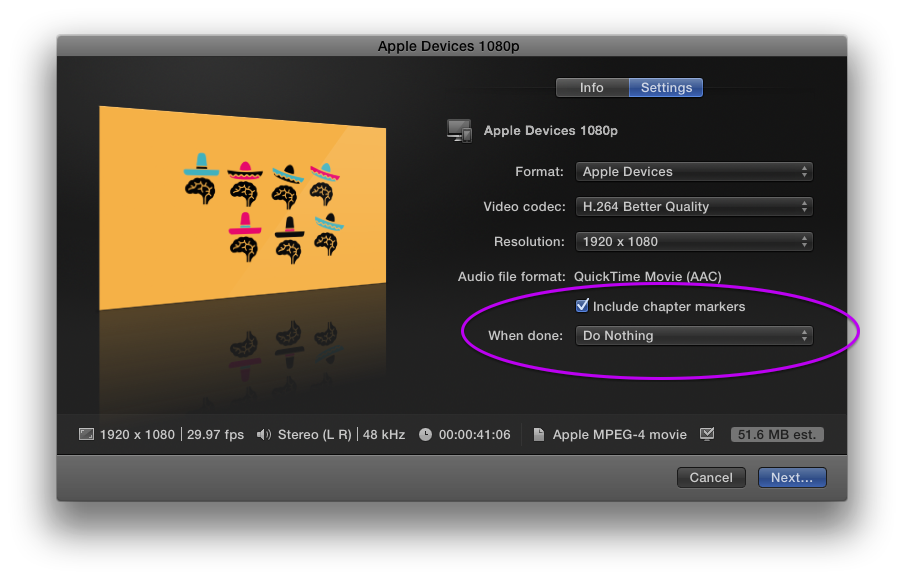
Make sure this to check the "When Done" area in the export dialog. Also although you might think that sharing to YouTube prompted you for a location, it actually never did. I think however the "When Done" is the issue:
Please Log in to join the conversation.
- delirium trigger
-
Topic Author
- Offline
- New Member
-
Less
More
- Posts: 19
- Thank you received: 0
25 Aug 2014 16:07 #51760
by delirium trigger
Replied by delirium trigger on topic Exporting to desktop gone? Please help. 10.1.3
No, I have the when done checked. And to the other person, I do get prompted on where to save it on the other macbook. And not not the new one. Settings all the same.
Please Log in to join the conversation.
- Tom Wolsky
-
- Offline
- Moderator
-
25 Aug 2014 16:10 - 25 Aug 2014 16:13 #51761
by Tom Wolsky
Replied by Tom Wolsky on topic Exporting to desktop gone? Please help. 10.1.3
FCP has never prompted for YouTube location. You are using a different export function in the other machine. What versions are on both machines?
YouTube has no When Done function.
YouTube has no When Done function.
Last edit: 25 Aug 2014 16:13 by Tom Wolsky.
Please Log in to join the conversation.
25 Aug 2014 17:17 #51765
by tpayton
Replied by tpayton on topic Exporting to desktop gone? Please help. 10.1.3
Give the manual a read about this topic and then let us know if you have any questions:
help.apple.com/finalcutpro/mac/10.1/#ver9ac16f8f
help.apple.com/finalcutpro/mac/10.1/#ver9ac16f8f
Please Log in to join the conversation.
