


- Posts: 87
- Thank you received: 5
3 Post Moderation Rule for New Boarders (25 Jan 2021)
New boarders will have their posts moderated - Don't worry if you cannot see your post immediately.
FCP X Lagging
25 Aug 2014 09:51 #51750
by odedh
FCP X Lagging was created by odedh
Hi,
A friend of mine have a problem I have not encountered on my system while using FCP X 10.1.3
His system is a 2010 iMac with 3GHz Core 2 Duo, 8GB of Ram and a GPU with 256MB. His media sits on an external Firewire HD.
Because of his old System he edits the current project he's working on in Proxy. Eevrything works totally fine but after a few hours of editing FCP starts to become laggy. What I mean that lets say he's doing something and then he selects a different clip on the timeline, there's a lag of about 2 seconds and then he can continue to work. He does something else again 2 seconds. A reboot does solve the problem but again after a couple of hours the slowdown comes back.
Any advice?
Thanks
Oded
A friend of mine have a problem I have not encountered on my system while using FCP X 10.1.3
His system is a 2010 iMac with 3GHz Core 2 Duo, 8GB of Ram and a GPU with 256MB. His media sits on an external Firewire HD.
Because of his old System he edits the current project he's working on in Proxy. Eevrything works totally fine but after a few hours of editing FCP starts to become laggy. What I mean that lets say he's doing something and then he selects a different clip on the timeline, there's a lag of about 2 seconds and then he can continue to work. He does something else again 2 seconds. A reboot does solve the problem but again after a couple of hours the slowdown comes back.
Any advice?
Thanks
Oded
Please Log in to join the conversation.
- ronny courtens
-

- Offline
- Moderator
-

Less
More
- Posts: 4455
- Thank you received: 962
26 Aug 2014 08:02 #51787
by ronny courtens
Replied by ronny courtens on topic FCP X Lagging
Hey Oded,
As you say: his system is fairly limited. 8 GB RAM and a 256 MBB VRAM GPU are the bare minimum specs for working with FCP X and HD media. Any 2010 MBP or iMac is known to perform slower with FCP X, and the 8 GB RAM is especially problematic when you make lots of changes to your edit during the day, and when you use lots of titles, generators or effects. All these changes and effects are accumulated in RAM and even when this RAM is not in use FCP X will only make it available when you quit the app or reboot the computer. Working with Proxy media only relieves the CPU, it does not help with the RAM issue.
There are arguments for and against this, but I know people who are using a utility called Memory Clean to monitor their RAM usage and to make unused RAM available again, and they say it helps a lot. You can find it here: itunes.apple.com/app/memory-clean/id451444120?mt=12
Of course he also should avoid anything that can slow down a minimum specced system:
- Background Rendering must be turned OFF all the time
- Make sure to let any background activity finish before starting to edit
- Turn waveforms OFF when you don't work on the audio
- Only have windows opened that you actually need
- Ronny
As you say: his system is fairly limited. 8 GB RAM and a 256 MBB VRAM GPU are the bare minimum specs for working with FCP X and HD media. Any 2010 MBP or iMac is known to perform slower with FCP X, and the 8 GB RAM is especially problematic when you make lots of changes to your edit during the day, and when you use lots of titles, generators or effects. All these changes and effects are accumulated in RAM and even when this RAM is not in use FCP X will only make it available when you quit the app or reboot the computer. Working with Proxy media only relieves the CPU, it does not help with the RAM issue.
There are arguments for and against this, but I know people who are using a utility called Memory Clean to monitor their RAM usage and to make unused RAM available again, and they say it helps a lot. You can find it here: itunes.apple.com/app/memory-clean/id451444120?mt=12
Of course he also should avoid anything that can slow down a minimum specced system:
- Background Rendering must be turned OFF all the time
- Make sure to let any background activity finish before starting to edit
- Turn waveforms OFF when you don't work on the audio
- Only have windows opened that you actually need
- Ronny
Please Log in to join the conversation.

26 Aug 2014 11:33 #51795
by BenB
Replied by BenB on topic FCP X Lagging
I second Memory Clean for older/smaller systems.
Please Log in to join the conversation.
01 Sep 2014 16:46 #52055
by odedh
Replied by odedh on topic FCP X Lagging
Thanks guys, I passed the info along to him 
Please Log in to join the conversation.


06 Sep 2014 01:52 #52247
by dgwvideo
Creating history....one edit at a time !
Replied by dgwvideo on topic FCP X Lagging
Is there an advantage to using memory clean as opposed to purging memory with Onyx or Cocktail?
Creating history....one edit at a time !
Please Log in to join the conversation.
- ronny courtens
-
- Offline
- Moderator
-
Less
More
- Posts: 4455
- Thank you received: 962
06 Sep 2014 09:45 #52251
by ronny courtens
Replied by ronny courtens on topic FCP X Lagging
Memory Clean sits on you tool bar and any time you want to free memory you just click "Free Memory". No need for launching any utility or entering an admin password, so Memory Clean is just easier to use.
- Ronny
- Ronny
Please Log in to join the conversation.


08 Sep 2014 05:53 #52356
by Shane M
Replied by Shane M on topic FCP X Lagging
Yeah, I have a new Mac Pro and 32GB of ram and experience the same "Lag Creep" as your friend. I'm still hoping FCPX will be updated to help with this issue somehow...just some way of letting the app "release" RAM if needed...
Until then, either restart FCPX or use one of the memory cleaner apps...sadly.
Until then, either restart FCPX or use one of the memory cleaner apps...sadly.
Please Log in to join the conversation.
- ronny courtens
-
- Offline
- Moderator
-
Less
More
- Posts: 4455
- Thank you received: 962
08 Sep 2014 09:15 #52372
by ronny courtens
Replied by ronny courtens on topic FCP X Lagging
It's not uniquely an FCP X issue, it's related to the OS. We just see this more clearly when using FCP X because this app takes all the memory you can throw at it, especially for caching all the waveforms/thumbnails and the unlimited Undo's. Other RAM-hungry applications such as Motion 5, AE, Photoshop... have a preference in which you can set the maximum amount of total RAM the application can use for its project cache to prevent it from putting your complete system into a crawl:
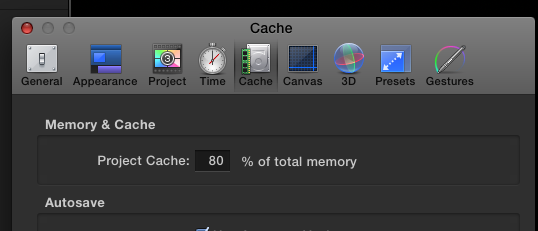
This would be a good addition to FCP X as well, or we will have to see if the official release of Yosemite handles Unused RAM more efficiently.
- Ronny
This would be a good addition to FCP X as well, or we will have to see if the official release of Yosemite handles Unused RAM more efficiently.
- Ronny
Please Log in to join the conversation.
08 Sep 2014 09:27 #52374
by Shane M
Replied by Shane M on topic FCP X Lagging
Yes, that would be sweet. I think its something I could see being added in the future.
Please Log in to join the conversation.
08 Sep 2014 15:34 #52393
by lichinho
Replied by lichinho on topic FCP X Lagging
This cache setting of Motion is not directly available in FCP X, but it still *may* work - at least it appeared to a long time ago - via a terminal 'defaults' command. I did a nonscientific investigation back then that seemed to help. (Absolutely no guarantee that it worked then or that it will work now!)
Mind you, this was two and a half years ago in ML: discussions.apple.com/thread/3772746?start=0&tstart=0
On the other hand, I used to rely on one of those programs that try to free memory, back in Mountain Lion (and boy were they needed!).
I never even tried them on Mavericks - for one, I saw no need, as memory management has proven consistently vastly superior to the older OS; and it does seem that they are now ineffective, and even counterproductive.
Mind you, this was two and a half years ago in ML: discussions.apple.com/thread/3772746?start=0&tstart=0
On the other hand, I used to rely on one of those programs that try to free memory, back in Mountain Lion (and boy were they needed!).
I never even tried them on Mavericks - for one, I saw no need, as memory management has proven consistently vastly superior to the older OS; and it does seem that they are now ineffective, and even counterproductive.
Please Log in to join the conversation.
- ronny courtens
-
- Offline
- Moderator
-
Less
More
- Posts: 4455
- Thank you received: 962
08 Sep 2014 15:57 #52395
by ronny courtens
Replied by ronny courtens on topic FCP X Lagging
Hey Luís,
I had a look at that Terminal command, and yes it still works with Mavericks. Great find!
I agree that RAM management has improved a lot since ML and hopefully it will get even better with the upcoming Yosemite.
I use Memory Clean on systems with less RAM (older MBPs for field editing) and it does help. I never let it clean up the memory automatically, it constantly shows the amount of available RAM in the menu bar and when this gets too low I click the icon to free up RAM. Always works and no need for shutting down anything.
- Ronny
I had a look at that Terminal command, and yes it still works with Mavericks. Great find!
I agree that RAM management has improved a lot since ML and hopefully it will get even better with the upcoming Yosemite.
I use Memory Clean on systems with less RAM (older MBPs for field editing) and it does help. I never let it clean up the memory automatically, it constantly shows the amount of available RAM in the menu bar and when this gets too low I click the icon to free up RAM. Always works and no need for shutting down anything.
- Ronny
Please Log in to join the conversation.
09 Sep 2014 06:42 #52429
by Navigator
Replied by Navigator on topic FCP X Lagging
Memory Clean is a great tool for my late 2009 iMac / 8Gb!
Please Log in to join the conversation.
