


- Posts: 8
- Thank you received: 0
3 Post Moderation Rule for New Boarders (25 Jan 2021)
New boarders will have their posts moderated - Don't worry if you cannot see your post immediately.
FCPX10.1.3 and archiving
23 Aug 2014 20:16 #51685
by eco_bach
FCPX10.1.3 and archiving was created by eco_bach
Ok, trying to do something which should be simple. I assume that the way you archive is slightly different with versions 10.1 and later. I have started by creating a new Library, specifically for archiving.
I then drag and drop within FCPX the Project I wish to archive to this new Library. But it doesn't seem to copy. I notice a yellow exclamation mark on the Project in question, BUT, there are no missing files in my project! What gives?
I then drag and drop within FCPX the Project I wish to archive to this new Library. But it doesn't seem to copy. I notice a yellow exclamation mark on the Project in question, BUT, there are no missing files in my project! What gives?
Please Log in to join the conversation.
- ronny courtens
-

- Offline
- Moderator
-

Less
More
- Posts: 4455
- Thank you received: 962
23 Aug 2014 21:11 #51686
by ronny courtens
Replied by ronny courtens on topic FCPX10.1.3 and archiving
Hi Jim,
To copy a Project from one Library into another: select the Project icon and choose File > Move to Library, OR just drag the Project into the Event of the Library.
You will get a message asking if you also want to copy the Optimized and Proxy media. For archiving purposes you don't really need these.
Don't forget to consolidate your Library before archiving it, so you are sure any external media will be inside the archived Library. Also delete any Render files (select Library and choose File > Delete Generated Library Files).
- Ronny
To copy a Project from one Library into another: select the Project icon and choose File > Move to Library, OR just drag the Project into the Event of the Library.
You will get a message asking if you also want to copy the Optimized and Proxy media. For archiving purposes you don't really need these.
Don't forget to consolidate your Library before archiving it, so you are sure any external media will be inside the archived Library. Also delete any Render files (select Library and choose File > Delete Generated Library Files).
- Ronny
Please Log in to join the conversation.
24 Aug 2014 03:42 #51692
by eco_bach
Replied by eco_bach on topic FCPX10.1.3 and archiving
Thanks but I know all that. The problem is that I cannot copy OR move my projects to the new Library. The projects all have a hello exclamation mark(see attachment) but there are NO missing files. I am pulling my hair out over this as I need to archive everything...
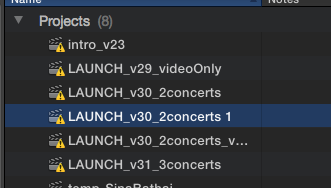
Please Log in to join the conversation.
- ronny courtens
-
- Offline
- Moderator
-
Less
More
- Posts: 4455
- Thank you received: 962
24 Aug 2014 08:26 #51696
by ronny courtens
Replied by ronny courtens on topic FCPX10.1.3 and archiving
Strange that ALL your Projects have these warnings. We will need some more information:
1. Have you been working in Proxy mode? If so make sure to switch to Original/Optimized before moving your Projects.
2. Check the Event that holds the clips for these Projects: do you see any missing files? Does the Event have a warning sign as well?
Let's start with these.
- Ronny
1. Have you been working in Proxy mode? If so make sure to switch to Original/Optimized before moving your Projects.
2. Check the Event that holds the clips for these Projects: do you see any missing files? Does the Event have a warning sign as well?
Let's start with these.
- Ronny
Please Log in to join the conversation.
- Tom Wolsky
-

- Offline
- Moderator
-
24 Aug 2014 08:37 #51697
by Tom Wolsky
Replied by Tom Wolsky on topic FCPX10.1.3 and archiving
Just to add to what Ronny said, open the project in the timeline and check the timeline index to see what's showing with the warning sign. It may be a clip with and effect or plugin applied.
Please Log in to join the conversation.
- ronny courtens
-
- Offline
- Moderator
-
Less
More
- Posts: 4455
- Thank you received: 962
24 Aug 2014 08:43 #51698
by ronny courtens
Replied by ronny courtens on topic FCPX10.1.3 and archiving
Yes, that's a great idea!
- Ronny
- Ronny
Please Log in to join the conversation.
24 Aug 2014 18:09 #51720
by eco_bach
Replied by eco_bach on topic FCPX10.1.3 and archiving
Thanks. Will check timeline index. What worked for me was to create a blank new project then copy paste the entire contents to this new project. No yellow exclamation and I could copy, move to my archive Livrary.
Please Log in to join the conversation.
