


- Posts: 5
- Thank you received: 0
3 Post Moderation Rule for New Boarders (25 Jan 2021)
New boarders will have their posts moderated - Don't worry if you cannot see your post immediately.
Color correction presets
- larrybrannin
-
 Topic Author
- Offline
- New Member
-

Less
More
22 Aug 2014 13:50 #51631
by larrybrannin
Color correction presets was created by larrybrannin
Is there a way to manage/delete color correction presets that have been saved?
I found instructions on locating a file with the .cboard extension in the
Library > Application Support > ProApps > Color Presets folder. Although I
have several saved presets, that folder does not exist on the computer.
(I did use the option key to access hidden files in doing this search.)
I've also searched for any files with .cboard and there are none.
Another site had instructions to find the saved presets in
Movies > Final Cut Events > Color Presets.
That also does not exist on my computer.
I found instructions on locating a file with the .cboard extension in the
Library > Application Support > ProApps > Color Presets folder. Although I
have several saved presets, that folder does not exist on the computer.
(I did use the option key to access hidden files in doing this search.)
I've also searched for any files with .cboard and there are none.
Another site had instructions to find the saved presets in
Movies > Final Cut Events > Color Presets.
That also does not exist on my computer.
Please Log in to join the conversation.
- Lee Patterson
-
- Offline
- Elite Member
-

Less
More
- Posts: 239
- Thank you received: 20
22 Aug 2014 15:43 #51642
by Lee Patterson
Replied by Lee Patterson on topic Color correction presets
Assuming you are on any of the last OSX version... Click on 'Go' menu at the top of your screen when you are looking at the desktop. The when you click on GO hold down the alt key and your Library folder will appear in the dropdown list, select Library and then track the path as you outlined:)
Please Log in to join the conversation.
- larrybrannin
-
Topic Author
- Offline
- New Member
-
Less
More
- Posts: 5
- Thank you received: 0
22 Aug 2014 17:41 #51649
by larrybrannin
Replied by larrybrannin on topic Color correction presets
The problem isn't where to go. I can get to the Library, no problem. The problem is the presets are not there. Cannot find them, nothing shows up with ".cboard" on it. That folder does not exist on the computer even though several presets have been saved!
Please Log in to join the conversation.
22 Aug 2014 17:52 #51650
by sidderke
Replied by sidderke on topic Color correction presets
It used to be in the Events. Now it's in the Library.
Maybe you did an update recently, from an older version of FCPX (like 10.0.9) to 10.0.3, and it deleted them?
Maybe you did an update recently, from an older version of FCPX (like 10.0.9) to 10.0.3, and it deleted them?
Please Log in to join the conversation.
- ronny courtens
-

- Offline
- Moderator
-

Less
More
- Posts: 4455
- Thank you received: 962
22 Aug 2014 20:18 #51655
by ronny courtens
Replied by ronny courtens on topic Color correction presets
The correct path is not Library > Application Support > ProApps > Color Presets folder.
It is USER > Library > Application Support > ProApps > Color Presets folder. To access the User Library you choose Go while holding the ALT key pressed. Then in the list you click Library. Any saved custom Color presets are there.
Here I am in the User Library, you can see the Color Presets folder which is empty as I have no saved custom Color presets:

Now I create a custom Color preset in FCP X and I save it as TEST PRESET:
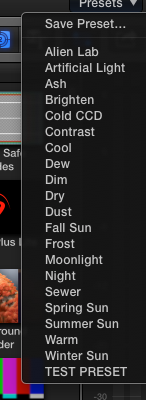
The TEST COLOR preset with .cboard extension appears in the Color Presets folder in the User Library:

This is the only place where custom Color presets get stored.
- Ronny
It is USER > Library > Application Support > ProApps > Color Presets folder. To access the User Library you choose Go while holding the ALT key pressed. Then in the list you click Library. Any saved custom Color presets are there.
Here I am in the User Library, you can see the Color Presets folder which is empty as I have no saved custom Color presets:
Now I create a custom Color preset in FCP X and I save it as TEST PRESET:
The TEST COLOR preset with .cboard extension appears in the Color Presets folder in the User Library:
This is the only place where custom Color presets get stored.
- Ronny
Please Log in to join the conversation.
- larrybrannin
-
Topic Author
- Offline
- New Member
-
Less
More
- Posts: 5
- Thank you received: 0
22 Aug 2014 22:46 #51661
by larrybrannin
Replied by larrybrannin on topic Color correction presets
my guess is that they must have been delete somehow. I assume I can create a new folder...?
Please Log in to join the conversation.
- larrybrannin
-
Topic Author
- Offline
- New Member
-
Less
More
- Posts: 5
- Thank you received: 0
22 Aug 2014 23:09 #51669
by larrybrannin
Replied by larrybrannin on topic Color correction presets
I am good. I must have deleted it somehow. Thanks
Please Log in to join the conversation.
