


- Posts: 2
- Thank you received: 0
3 Post Moderation Rule for New Boarders (25 Jan 2021)
New boarders will have their posts moderated - Don't worry if you cannot see your post immediately.
Problems with AU files check halting FCPX 10.1.3 - stops with dialog every time.
20 Aug 2014 22:12 - 20 Aug 2014 22:13 #51563
by sbarncar
Problems with AU files check halting FCPX 10.1.3 - stops with dialog every time. was created by sbarncar
I'd appreciate if the community could help me with this...
I am having a big problem with AU plugins and FCPX 10.1.3- it hates all of my plugins in the Components folder and takes longer than 5 minutes to load, finally revealing this dialog. (why can't there be some kind of progress indication when this is happening?)
This whole episode started with a COUPLE of Wave plugins kept showing up as not being able to be validated. Subsequent efforts to fix this (including re-installing FCPX ) and I guess this is now the latest version.....
I will list the things that I have tried that have been suggested before in other forums...
Nothing seems to help.
When the Components folder is filled with plugins ( that all actually loaded with no problems before for weeks) the WAIT for the component check is OVER 5 MINUTES. UNACCEPTABLE . The irony is that Audio plugins are still pretty hard to use in FCP and I don't need them. But the startup time is annoying and I can't tell if the App has crashed or it's checking; there is no progress indication (which is against Apples own HUI guidelines....)
Deleted:
~/Library/Cache/com.apple.Components2.LocalCache.AudioComponents
~/Library/Cache/com.apple.Components2.LocalCache.Components
~/Library/Preferences/com.apple.audio.infoHelper.plist (this file is not regenerated when restarting...)
When starting up with all plugins in the Components folder I get this:

if I remove all the plugins from the Components Folder, and restart FCPX then I get this message:

These plugins in the above dialog DO NOT EXIST ANYWHERE on my computer (except the WAVES StudioRack... at least as a file... What is going on...???
But there IS NOTHING IN THE FOLDER.....
I think this must be a bug. I only got a couple of non-existent Waves plugins as an error before the update to 10.1.3. In the process of trying to find the problem, it's gotten worse.
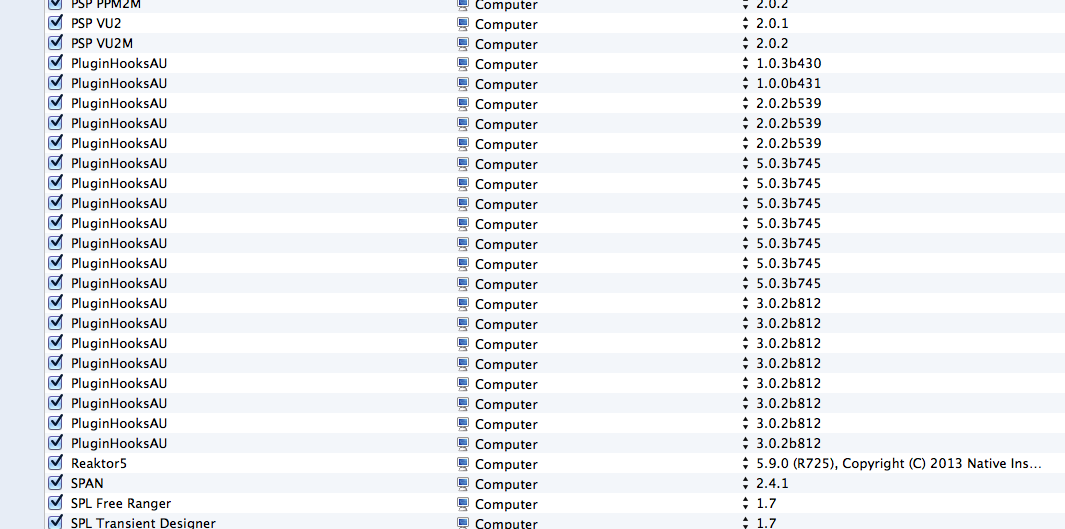
Another Clue: the audio units manager software (that doesn't work that well for its intended purpose) detected more mystery 'files' that don't exist in the folder...... PluginHooksAU - these just showed up today....
WTH????????
I am having a big problem with AU plugins and FCPX 10.1.3- it hates all of my plugins in the Components folder and takes longer than 5 minutes to load, finally revealing this dialog. (why can't there be some kind of progress indication when this is happening?)
This whole episode started with a COUPLE of Wave plugins kept showing up as not being able to be validated. Subsequent efforts to fix this (including re-installing FCPX ) and I guess this is now the latest version.....
I will list the things that I have tried that have been suggested before in other forums...
Nothing seems to help.
When the Components folder is filled with plugins ( that all actually loaded with no problems before for weeks) the WAIT for the component check is OVER 5 MINUTES. UNACCEPTABLE . The irony is that Audio plugins are still pretty hard to use in FCP and I don't need them. But the startup time is annoying and I can't tell if the App has crashed or it's checking; there is no progress indication (which is against Apples own HUI guidelines....)
Deleted:
~/Library/Cache/com.apple.Components2.LocalCache.AudioComponents
~/Library/Cache/com.apple.Components2.LocalCache.Components
~/Library/Preferences/com.apple.audio.infoHelper.plist (this file is not regenerated when restarting...)
When starting up with all plugins in the Components folder I get this:
if I remove all the plugins from the Components Folder, and restart FCPX then I get this message:
These plugins in the above dialog DO NOT EXIST ANYWHERE on my computer (except the WAVES StudioRack... at least as a file... What is going on...???
But there IS NOTHING IN THE FOLDER.....
I think this must be a bug. I only got a couple of non-existent Waves plugins as an error before the update to 10.1.3. In the process of trying to find the problem, it's gotten worse.
Another Clue: the audio units manager software (that doesn't work that well for its intended purpose) detected more mystery 'files' that don't exist in the folder...... PluginHooksAU - these just showed up today....
WTH????????
Last edit: 20 Aug 2014 22:13 by sbarncar.
Please Log in to join the conversation.
- ronny courtens
-

- Offline
- Moderator
-

Less
More
- Posts: 4455
- Thank you received: 962
20 Aug 2014 22:32 #51564
by ronny courtens
Replied by ronny courtens on topic Problems with AU files check halting FCPX 10.1.3 - stops with dialog every time.
Yes, that's a horrible experience.
Waves plugins are notorious for causing AU validation errors, so I think you should get rid of these before anything else. Deleting them from the Components folder isn't enough. To completely remove your Waves plugins:
1. Delete the Waves folder located at Mac HD > Applications.
2. Delete the Waves Preferences folder located at Mac HD > Users > Your User > Library > Preferences.
3. Delete any Waveshells from the following locations:
Mac HD > Library > Application Support > Digidesign > Plug-Ins
Mac HD > Library > Audio > Plug-Ins > Components
Mac HD > Library > Audio > Plug-Ins > MAS
Mac HD > Library > Audio > Plug-Ins > VST
4. Empty Trash.
Then I would try to launch FCP X to see if this has solved the problem. If this still doesn't help I think you will need to re-install FCP X to clean up the mess.
- Ronny
Waves plugins are notorious for causing AU validation errors, so I think you should get rid of these before anything else. Deleting them from the Components folder isn't enough. To completely remove your Waves plugins:
1. Delete the Waves folder located at Mac HD > Applications.
2. Delete the Waves Preferences folder located at Mac HD > Users > Your User > Library > Preferences.
3. Delete any Waveshells from the following locations:
Mac HD > Library > Application Support > Digidesign > Plug-Ins
Mac HD > Library > Audio > Plug-Ins > Components
Mac HD > Library > Audio > Plug-Ins > MAS
Mac HD > Library > Audio > Plug-Ins > VST
4. Empty Trash.
Then I would try to launch FCP X to see if this has solved the problem. If this still doesn't help I think you will need to re-install FCP X to clean up the mess.
- Ronny
Please Log in to join the conversation.
