


- Posts: 2
- Thank you received: 0
3 Post Moderation Rule for New Boarders (25 Jan 2021)
New boarders will have their posts moderated - Don't worry if you cannot see your post immediately.
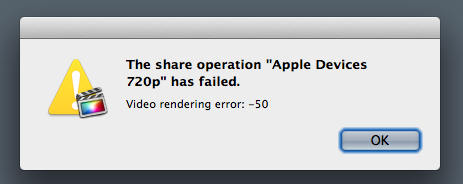
HELP! - What does "Video rendering error: -50" in FCPx mean?
- marianokon
-
 Topic Author
- Offline
- New Member
-

Less
More
19 Aug 2014 15:51 #51479
by marianokon
Hi team, I am trying to render a 30 min clip (very simple video)
I've already tried using Compressor or directly from FCPx. I tried multiple resolutions (540p, 720p, 1080p) and I always see the same error (it happens when the rendering gets to around 75%)
I rendered a video with no issues a few weeks ago.
I am using FCPx 10.1.2
Is there a reference guide on what these errors mean? A Google search does not provide any help for this particular error.
I've added a snapshot of the error just in case.
I am getting really frustrated with the lack of documentation with FCPx...
Thanks, Mariano
I've already tried using Compressor or directly from FCPx. I tried multiple resolutions (540p, 720p, 1080p) and I always see the same error (it happens when the rendering gets to around 75%)
I rendered a video with no issues a few weeks ago.
I am using FCPx 10.1.2
Is there a reference guide on what these errors mean? A Google search does not provide any help for this particular error.
I've added a snapshot of the error just in case.
I am getting really frustrated with the lack of documentation with FCPx...
Thanks, Mariano
Please Log in to join the conversation.
- ronny courtens
-

- Offline
- Moderator
-

Less
More
- Posts: 4455
- Thank you received: 962
19 Aug 2014 16:24 #51484
by ronny courtens
Replied by ronny courtens on topic HELP! - What does "Video rendering error: -50" in FCPx mean?
Hi Mariano,
Export error -50 can mean a lot of things. Let's start with the most obvious:
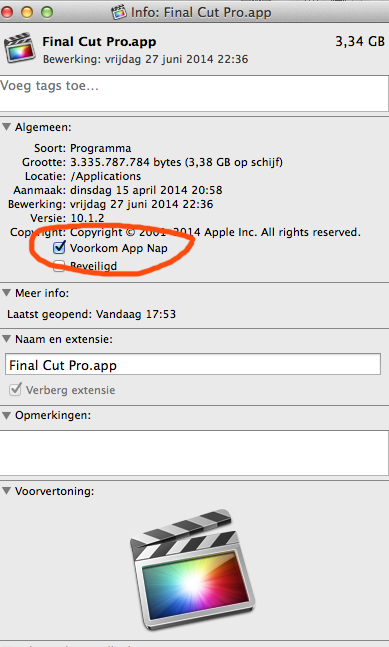
1. Make sure App Nap is disabled for FCP X. How do you do this: R-click the application icon in your Applications folder and select "Show Info". This will open the File Info window. In that window you will see a checkbox that says "Prevent App Nap". Click the checkbox to disable App Nap.
2. Launch FCP X, make sure Background Rendering is turned OFF, then delete all render files for your Project (select the Project in the browser and choose File > Delete Generated Project Files). Then export your Project WITHOUT rendering.
- Ronny
Export error -50 can mean a lot of things. Let's start with the most obvious:
1. Make sure App Nap is disabled for FCP X. How do you do this: R-click the application icon in your Applications folder and select "Show Info". This will open the File Info window. In that window you will see a checkbox that says "Prevent App Nap". Click the checkbox to disable App Nap.
2. Launch FCP X, make sure Background Rendering is turned OFF, then delete all render files for your Project (select the Project in the browser and choose File > Delete Generated Project Files). Then export your Project WITHOUT rendering.
- Ronny
Please Log in to join the conversation.
- marianokon
-
Topic Author
- Offline
- New Member
-
Less
More
- Posts: 2
- Thank you received: 0
19 Aug 2014 16:33 #51485
by marianokon
Replied by marianokon on topic HELP! - What does "Video rendering error: -50" in FCPx mean?
Thanks Ronny.
I already had "App Nap" and "Background Rendering" disabled.
I am deleting the rendered files and try exporting again to see if this fixes it.
Thanks for your suggestions, I will come back with an update in short.
Mariano
I already had "App Nap" and "Background Rendering" disabled.
I am deleting the rendered files and try exporting again to see if this fixes it.
Thanks for your suggestions, I will come back with an update in short.
Mariano
Please Log in to join the conversation.
